Introduction
This manual provides detailed instructions for the installation, operation, and maintenance of your DB Drive WDX200.4 4-Channel Speaker AmpAmplificateur. Veuillez lire attentivement ce manuel avant toute installation ou utilisation de l'amplificateur. amplifier to ensure proper function and safety. The WDX200.4 is a versatile 4-channel amplifier designed to deliver high-quality audio performance for various applications.
Configuration et installation
Une installation correcte est essentielle pour des performances optimales et une longue durée de vie de votre appareil. ampAmplificateur. Il est recommandé que l'installation soit effectuée par un professionnel qualifié.
Montage
Le amplifier features a surface mount design. Ensure the mounting location provides adequate ventilation to prevent overheating. Avoid mounting in direct sunlight or near heat sources.
Connexions électriques
The WDX200.4 operates within a voltage range of 9V to 16V DC. Connect the power and ground cables securely to the robust power and output connectors. Ensure proper gauge wiring is used for power and ground connections to handle the amplifier's current draw.
Connexions d'entrée
Le amplifier supports both RCA (low-level) and high-level inputs. This allows for compatibility with both aftermarket and factory head units without the need for additional adapters.
- Entrée RCA : Use RCA cables to connect your head unit's pre-amp sorties vers le ampentrées RCA du lifier.
- Entrée de haut niveau : If your head unit does not have RCA outputs, use the high-level input. This input typically connects directly to your head unit's speaker outputs.
Connexions des haut-parleurs
The WDX200.4 is a 4-channel amplifier, providing 200 Watts RMS per channel at 2 ohms. It also supports bridging, allowing for 2 channels of 400 Watts RMS at 4 ohms. Connect your speakers to the appropriate output terminals, ensuring correct polarity.

Image : Haut et bas view of the DB Drive WDX200.4 4-Channel Speaker Amplifier, illustrating the various input and output terminals for connection.
Ajustements croisés
Le amplifier features integrated crossovers with High-Pass Filter (HPF), Low-Pass Filter (LPF), and Full-Range adjustments. These allow you to tailor the frequency response for your specific speaker setup (subwoofers, woofers, midranges, tweeters).
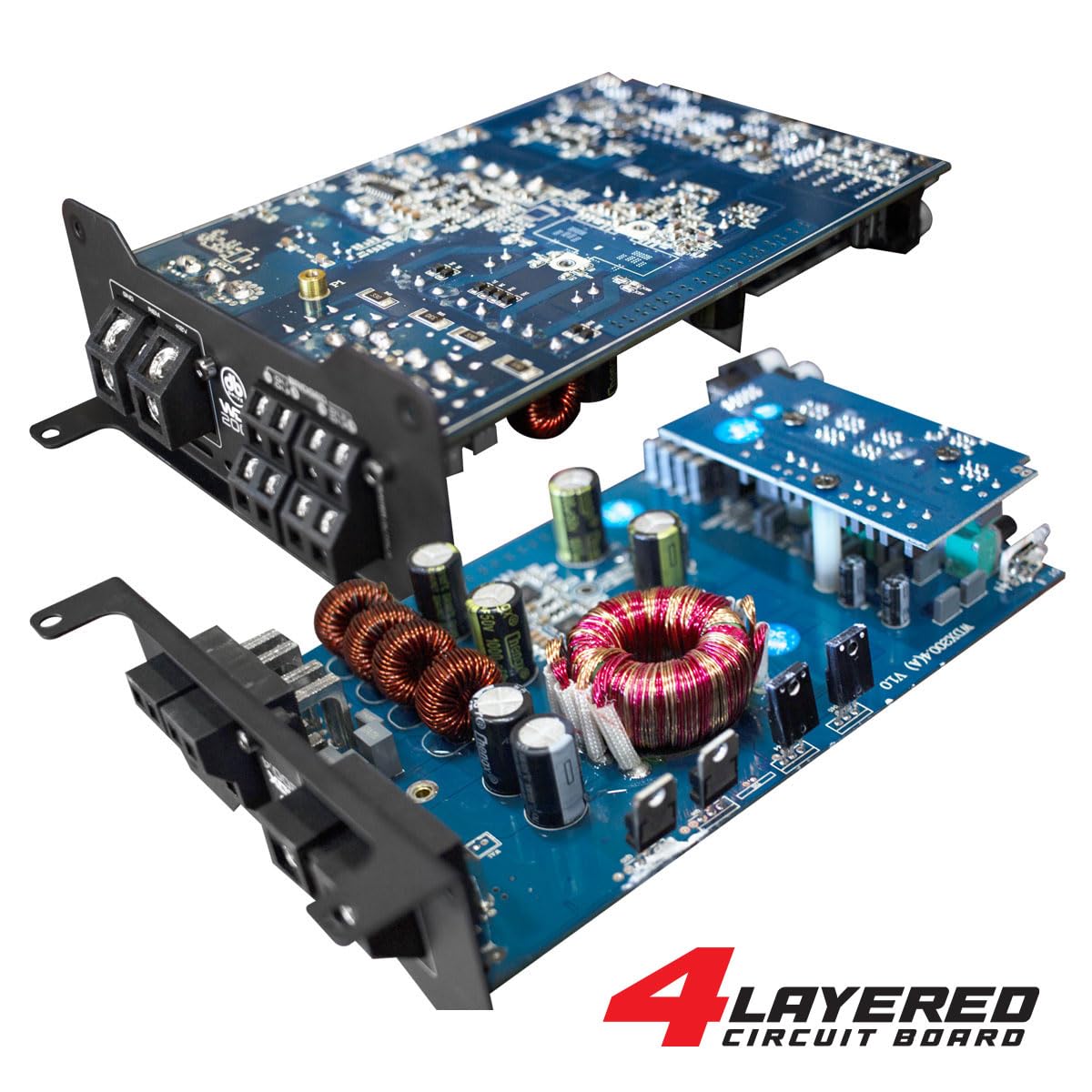
Image : Un interne view of the DB Drive WDX200.4 amplifier, highlighting its 4-layered circuit board design for enhanced performance and durability.
Mode d'emploi
Une fois installé, le amplifier requires minimal user interaction for daily operation. The primary adjustments are for input level and crossover settings.
Réglage du niveau
Adjust the input level controls to match the output voltage of your head unit. Start with the amplifier's level control at minimum and slowly increase it until the desired volume is achieved without distortion.
Paramètres de croisement
- HPF (filtre passe-haut) : Use this setting for speakers that should only reproduce high frequencies (e.g., tweeters, mid-range speakers). This filters out low bass frequencies.
- Filtre passe-bas (LPF) : Use this setting for speakers that should only reproduce low frequencies (e.g., subwoofers). This filters out high frequencies.
- FULL (Full-Range): Use this setting for speakers that should reproduce the entire frequency spectrum.
Adjust these settings according to the specifications of your speakers and your desired audio output.
Entretien
To ensure the longevity and optimal performance of your DB Drive WDX200.4 ampamplificateur, suivez ces consignes d'entretien :
- Nettoyage: Nettoyez périodiquement l'extérieur de la amplifier with a soft, dry cloth. Do not use harsh chemicals or abrasive cleaners. Ensure all ventilation openings are free from dust and debris.
- Relations: Regularly check all power, ground, and speaker connections to ensure they are secure and free from corrosion. Loose connections can lead to poor performance or damage.
- Ventilation: Assurez-vous que amplifier always has adequate airflow around it. Blocked vents can lead to overheating and thermal shutdown.
Dépannage
Si vous rencontrez des problèmes avec votre amplifier, veuillez vous référer aux problèmes et solutions courants suivants :
- Pas d'alimentation : Check the main fuse, power and ground connections, and the remote turn-on wire. Ensure the vehicle's battery has sufficient charge.
- Pas de son : Verify all input and output connections. Check speaker wires for shorts or open circuits. Ensure the head unit is functioning correctly and sending an audio signal. Check crossover settings.
- Son déformé : Reduce the input level (gain) on the amplifier. Check for proper crossover settings. Ensure speakers are not overdriven or damaged.
- AmpSurchauffe de l'amplificateur : Assurer une ventilation adéquate autour du amplifier. Check speaker impedance to ensure it matches the amplifier's capabilities. Reduce the volume or gain settings.
- Mode de protection : Si le amplifier enters protection mode (indicated by a specific LED), it usually signifies an issue such as overheating, a short circuit in the speaker wiring, or an impedance mismatch. Disconnect power, inspect all connections and speaker wiring, and allow the amplifier to cool before reconnecting.
If problems persist after attempting these solutions, consult a qualified car audio technician.
Caractéristiques
| Fonctionnalité | Spécification |
|---|---|
| Numéro de modèle | WDX200.4 |
| Marque | Lecteur DB |
| Nombre de canaux | 4 |
| Puissance de sortie (stéréo) | 200 Watts RMS per channel at 2 Ohms |
| Output Power (Bridged) | 400 Watts RMS per channel at 4 Ohms (2 channels) |
| Voltage | 9 - 16 Volts (DC) |
| Type de montage | Montage en surface |
| Croisement | Integrated HPF, LPF, Full-Range |
| Entrées | RCA (Low-Level), High-Level with Automatic Turn-On |
| Certification | FCC |
Garantie et assistance
For warranty information and technical support, please refer to the documentation included with your purchase or visit the official DB Drive webConsultez le site. Conservez votre preuve d'achat pour toute réclamation au titre de la garantie.


