1. Introduction
Welcome to the user manual for your Hoppstar Expert Digital Camera. This manual provides essential information on how to set up, operate, and maintain your camera, ensuring a fun and creative experience for young photographers. Please read this manual carefully before using the camera and keep it for future reference.
The Hoppstar Expert is designed specifically for children, offering a user-friendly interface, durable construction with interchangeable silicone covers, and a range of exciting features including a selfie camera, video recording, picture frames, photo filters, and face detection.
2. Consignes de sécurité
- This product is intended for children aged 3 years and older. Adult supervision is recommended during use.
- N’exposez pas l’appareil photo à l’eau ou à une humidité excessive.
- Avoid dropping the camera or subjecting it to strong impacts, even with the protective silicone cover.
- Keep small parts, such as memory cards, out of reach of very young children to prevent choking hazards.
- Use only the charging cable provided or a compatible USB charger.
- N’essayez pas de démonter ou de réparer l’appareil photo vous-même. Contactez le service client en cas de problème.
3. Contenu du colis
Veuillez cocher la case correspondant aux éléments suivants :
- Hoppstar Expert Digital Camera
- Manuel d'instructions
- Câble de chargement USB
- Lanière/Sangle
- Adaptateur USB-C vers USB-A
- USB-C to Micro-USB Adapter
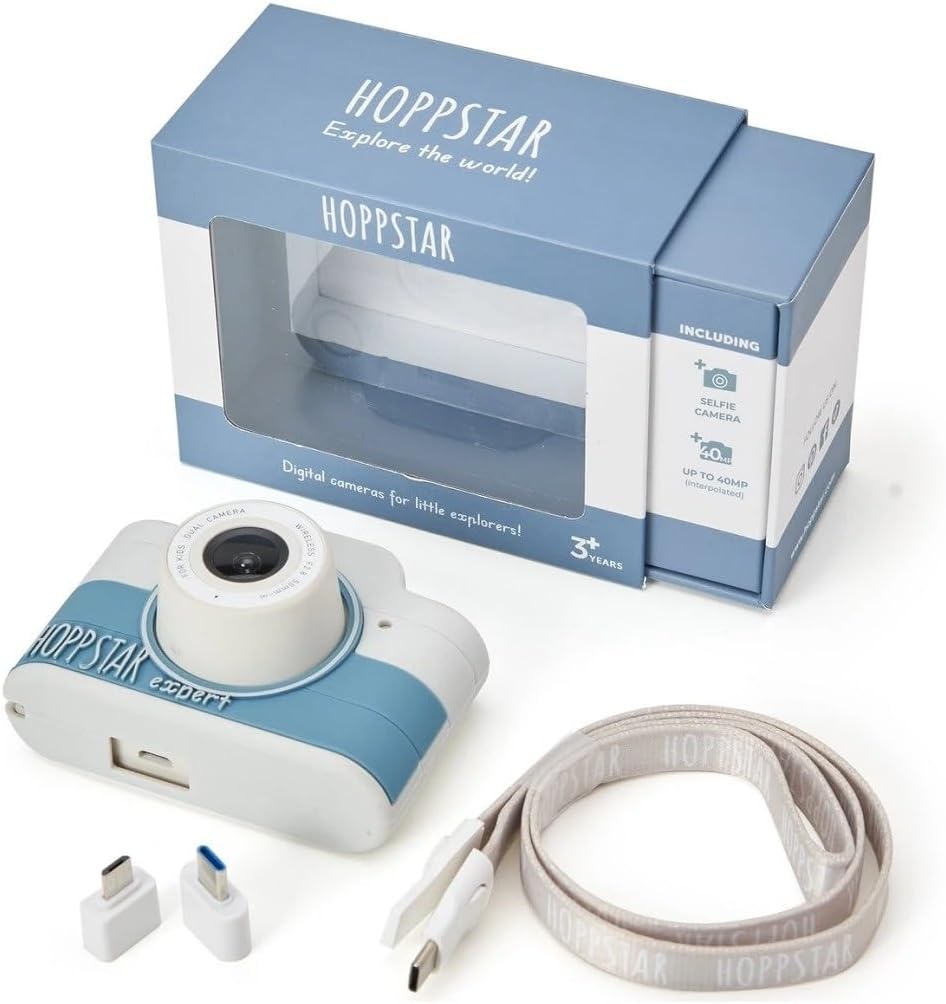
Image: Hoppstar Expert camera shown with its retail packaging, USB charging cable, lanyard, and two USB adapters.
4. Produit terminéview
Devant View

Image: The front of the Hoppstar Expert camera, featuring the main lens, flash, and the 'Hoppstar Expert' branding on the blue and white body.
- Objectif principal : For taking standard photos and videos.
- Flash/Light: Fournit un éclairage dans des conditions de faible luminosité.
- Microphone: Capture l'audio pendant l'enregistrement vidéo.
Arrière View

Image: The back of the Hoppstar Expert camera, displaying the LCD screen and the control buttons on either side.
- Écran LCD : Affiche les menus, en direct viewet la lecture.
- Caméra selfie : Situé au-dessus de l'écran pour les autoportraits.
- Boutons de contrôle : Navigation, OK, Menu, and other function buttons.
5. Installation
5.1 Chargement de l'appareil photo
Before first use, fully charge the camera's internal battery. Connect the provided USB charging cable to the camera's USB port and to a USB power source (e.g., computer, wall adapter). The charging indicator light will show the charging status and turn off when fully charged.
5.2 Insertion d'une carte mémoire
The Hoppstar Expert comes with 16 GB of internal storage. If you wish to expand storage, locate the memory card slot (usually on the side or bottom) and insert a compatible microSD card (not included) until it clicks into place. Ensure the camera is powered off before inserting or removing the card.
5.3 Mise sous/hors tension
Maintenez le bouton Marche/Arrêt (généralement situé sur le dessus ou le côté) enfoncé pendant quelques secondes pour allumer ou éteindre l'appareil photo.
6. Mode d'emploi
6.1 Contrôles de base
- Bouton OK : Confirms selections in menus, takes photos, or starts/stops video recording.
- Boutons de navigation: Used to move through menu options (Up, Down, Left, Right).
- Bouton Menu : Accesses the camera's settings and feature options.
- Bouton Mode : Permet de basculer entre les modes photo, vidéo et lecture.
6.2 Prendre des photos
In photo mode, frame your shot using the LCD screen. Press the OK button to capture a photo. The camera supports both front and selfie cameras. To switch between cameras, navigate to the camera settings in the menu or use a dedicated button if available.
6.3 Enregistrement de vidéos
Switch to video mode. Press the OK button once to start recording and press it again to stop. Videos are saved to the internal memory or inserted memory card.
6.4 Utilisation des fonctionnalités créatives
The Hoppstar Expert includes several creative features:
- Picture Frames: Apply fun borders to your photos. Access this feature through the camera's menu.
- Photo Filters: Change the look and feel of your photos with various color and effect filters.
- Détection facial: The camera can automatically detect faces in the frame, assisting with focus.
Explore these options within the camera's menu settings to enhance your photos and videos.
7. Entretien
- Nettoyage: Use a soft, dry cloth to clean the camera body and screen. For the lens, use a specialized lens cleaning cloth. Do not use liquid cleaners.
- Housse en silicone : The interchangeable silicone cover can be removed and cleaned with mild soap and water if necessary. Ensure it is completely dry before reattaching.
- Entretien de la batterie: Pour prolonger la durée de vie de la batterie, évitez de la décharger complètement et fréquemment. Rechargez l'appareil photo régulièrement, même si vous ne l'utilisez pas pendant une période prolongée.
- Stockage: Rangez l'appareil photo dans un endroit frais et sec, à l'abri de la lumière directe du soleil et des températures extrêmes.
8. Dépannage
L'appareil photo ne s'allume pas
- Vérifiez que la batterie est chargée. Branchez l'appareil photo à une source d'alimentation et réessayez.
- Maintenez le bouton Marche/Arrêt enfoncé pendant une durée plus longue (5 à 10 secondes).
Qualité d'image/vidéo médiocre
- Assurez-vous que la lentille est propre et exempte de traces de doigts ou de poussière.
- Vérifiez les conditions d'éclairage. Les meilleurs résultats sont obtenus dans des environnements bien éclairés.
- Veillez à maintenir la caméra stable pendant la prise de vue.
Camera Freezes/Unresponsive
- Try resetting the camera by pressing the reset button (if available, often a small pinhole) or by holding the Power button until it turns off and then restarting.
Impossible d'enregistrer les photos/vidéos
- Check if the internal memory or inserted memory card is full. Delete unnecessary files ou insérer une nouvelle carte.
- Ensure the memory card is properly inserted and not corrupted.
If you encounter issues not listed here or if troubleshooting steps do not resolve the problem, please contact Hoppstar customer support.
9. Spécifications
| Fonctionnalité | Spécification |
|---|---|
| Nom de marque | Hoppstar |
| Nom du modèle | Hoppstar Expert Yale |
| Numéro de modèle | 76893 |
| Couleur | Université de Yale |
| Dimensions du colis | 14.3 x 8.7 x 5.1 cm |
| Vitesse de prise de vue en continu | 30 images par seconde |
| Composants intégrés | Camera + Instruction Manual |
| Année modèle | 2023 |
| Couleur du film | Couleur |
| Type de contrôle d'exposition | Automatique |
| Type d'obturateur | Électronique |
10. Garantie et assistance
The Hoppstar Expert Digital Camera comes with a standard manufacturer's warranty. Please refer to the warranty information provided with your purchase or visit the official Hoppstar webConsultez le site pour plus de détails concernant les conditions générales de garantie.
For technical support, product inquiries, or warranty claims, please contact Hoppstar customer service through their official website ou les coordonnées fournies dans vos documents d'achat.


