1. Introduction
This manual provides detailed instructions for the CODi A04616 Wireless Headset. Designed for clear audio communication in various environments, this headset features advanced AI-Environmental Noise Cancellation (ENC) technology to suppress ambient noise and enhance voice clarity. Please read this manual thoroughly before using the headset to ensure proper operation and to maximize its performance and lifespan.
Contenu du colis :
- CODi A04616 Wireless Headset
- Headset Charging Dock
- Clé USB-A
- Câble de chargement USB
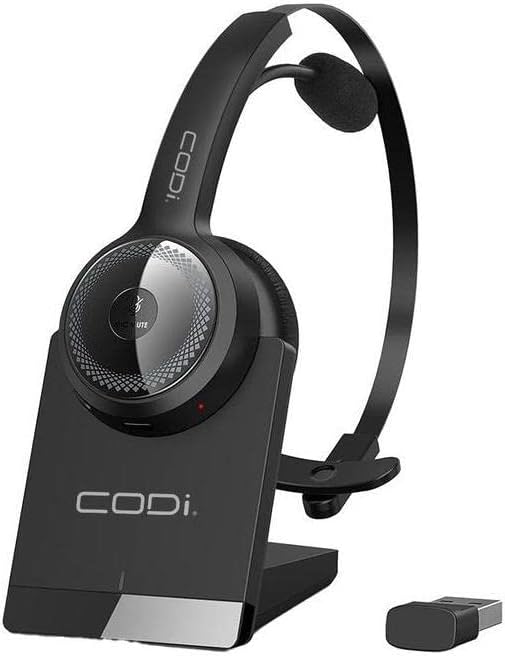
Figure 1.1 : CODi A04616 Wireless Headset with its charging dock and USB-A dongle. The headset is black with a silver accent on the ear cup, resting in its black charging base. The small black USB dongle is visible next to the base.
2. Composants du produit
Familiarize yourself with the various parts of your CODi A04616 Wireless Headset:
- Bandeau réglable : Pour un ajustement confortable et sûr.
- Cushioned Ear Pad: Procure du confort lors d'une utilisation prolongée.
- Microphone: Features AI-ENC technology for clear voice pickup. Rotates 135° for use on either ear.
- Contrôles du volume : Buttons located on the ear cup for adjusting audio levels.
- Bouton multifonction : Pour l'alimentation, le jumelage et la gestion des appels.
- Port de charge : Located on the headset for direct charging or via the dock.
- USB-A Dongle: For wireless connection to PCs and laptops.
- Station de chargement : Provides a convenient charging and storage solution.

Figure 2.1 : The CODi A04616 Wireless Headset, highlighting its adjustable headband and the flexible, rotating microphone arm. The headset is black with a single ear cup and an over-the-head design.
3. Installation
3.1. Charger le casque
- Connect the USB charging cable to the charging dock and then to a power source (e.g., computer USB port or USB wall adapter).
- Place the CODi A04616 Wireless Headset onto the charging dock, ensuring the charging contacts align.
- The headset's indicator light will show charging status. A full charge provides approximately 35 hours of working time.
- Alternatively, connect the USB charging cable directly to the headset's charging port.
3.2. Connexion via Bluetooth
- Assurez-vous que le casque est chargé et éteint.
- Maintenez enfoncé le bouton multifonction du casque jusqu'à ce que le voyant clignote en bleu et rouge, indiquant le mode de couplage.
- Sur votre appareil (smartphone, ordinateur portable, etc.), activez le Bluetooth et recherchez les appareils disponibles.
- Select "CODi A04616" from the list of found devices.
- Once connected, the indicator light on the headset will turn solid blue or flash blue periodically. The Bluetooth operating range is up to 300 feet (91 meters).
3.3. Connecting via USB-A Dongle
- Plug the USB-A dongle into an available USB-A port on your computer or laptop.
- Power on the CODi A04616 Wireless Headset.
- The headset and dongle should automatically pair. The indicator light on the headset will turn solid blue when connected.
- Ensure the CODi A04616 is selected as the audio input and output device in your computer's sound settings. The USB-A dongle operating range is up to 32 feet.
4. Mode d'emploi
4.1. Marche/Arrêt
- Mise sous tension : Maintenez le bouton multifonction enfoncé pendant environ 3 secondes jusqu'à ce que le voyant clignote en bleu.
- Éteindre: Maintenez le bouton multifonction enfoncé pendant environ 5 secondes jusqu'à ce que le voyant clignote en rouge puis s'éteigne.
4.2. Gestion des appels
- Répondre/Terminer l'appel : Appuyez une fois sur le bouton multifonction.
- Rejeter l'appel : Appuyez sur le bouton multifonction et maintenez-le enfoncé pendant 2 secondes.
- Activer/Désactiver le microphone : Press the dedicated mute button (if available, or refer to specific button layout for your model).
4.3. Contrôle du volume
- Augmenter le volume : Appuyez sur le bouton d'augmentation du volume.
- Diminuer le volume : Appuyez sur le bouton de réduction du volume.
4.4. Microphone Adjustment
The microphone arm can rotate 135 degrees, allowing you to wear the headset on either your left or right ear. Position the microphone approximately 1-2 inches from your mouth for optimal voice clarity and AI-ENC performance.
5. Entretien
Proper care and maintenance will extend the life of your CODi A04616 Wireless Headset.
- Nettoyage: Use a soft, dry, lint-free cloth to clean the headset and charging dock. Do not use abrasive cleaners, solvents, or aerosol sprays.
- Stockage: When not in use, store the headset in its charging dock or a cool, dry place away from direct sunlight and extreme temperatures.
- Entretien de la batterie: To preserve battery life, avoid fully discharging the headset frequently. Charge the headset regularly, even if not in constant use.
- Résistance à l'eau : This headset is not water-resistant. Avoid exposure to liquids.
6. Dépannage
Si vous rencontrez des problèmes avec votre casque, consultez les problèmes et solutions courants suivants :
| Problème | Solution |
|---|---|
| Le casque ne s'allume pas. | Ensure the headset is fully charged. Connect it to the charging dock or directly via USB cable. |
| Impossible de se connecter via Bluetooth. |
|
| Aucun son ou mauvaise qualité audio. |
|
| Le microphone ne fonctionne pas. |
|
7. Spécifications
| Nom du modèle | Wireless Headset (A04616) |
| Technologie de connectivité | Sans fil (Bluetooth) |
| Plage de fonctionnement Bluetooth | Jusqu'à 300 pieds (91 mètres) |
| USB-A Dongle Operating Range | Jusqu'à 32 XNUMX pieds |
| Autonomie de la batterie | Approximately 35 hours (working time) |
| Microphone | 135° Rotating, AI-Environmental Noise Cancellation (ENC) |
| Placement des oreilles | Sur l'oreille |
| Facteur de forme | Casque supra-auriculaire / casque tête |
| Appareils compatibles | PCs, Laptops, Smartphones, Desktops, Gaming Consoles, Tablets, Telephones, Smart Speaker, Television, Car Audio Systems |
| Dimensions du produit | 8 x 7.5 x 3.1 pouces |
| Poids de l'article | 13.4 onces |
| Composants inclus | Wireless Headset, Headset Charging Dock |
| Code UPC | 633886015853 |
8. Assistance et garantie
For technical assistance or warranty inquiries, please contact CODi customer support. Refer to the product packaging or the official CODi webConsultez ce site pour obtenir les informations de contact et les détails de garantie les plus récents.
Support en ligne: www.codi.com/support


