1. Introduction
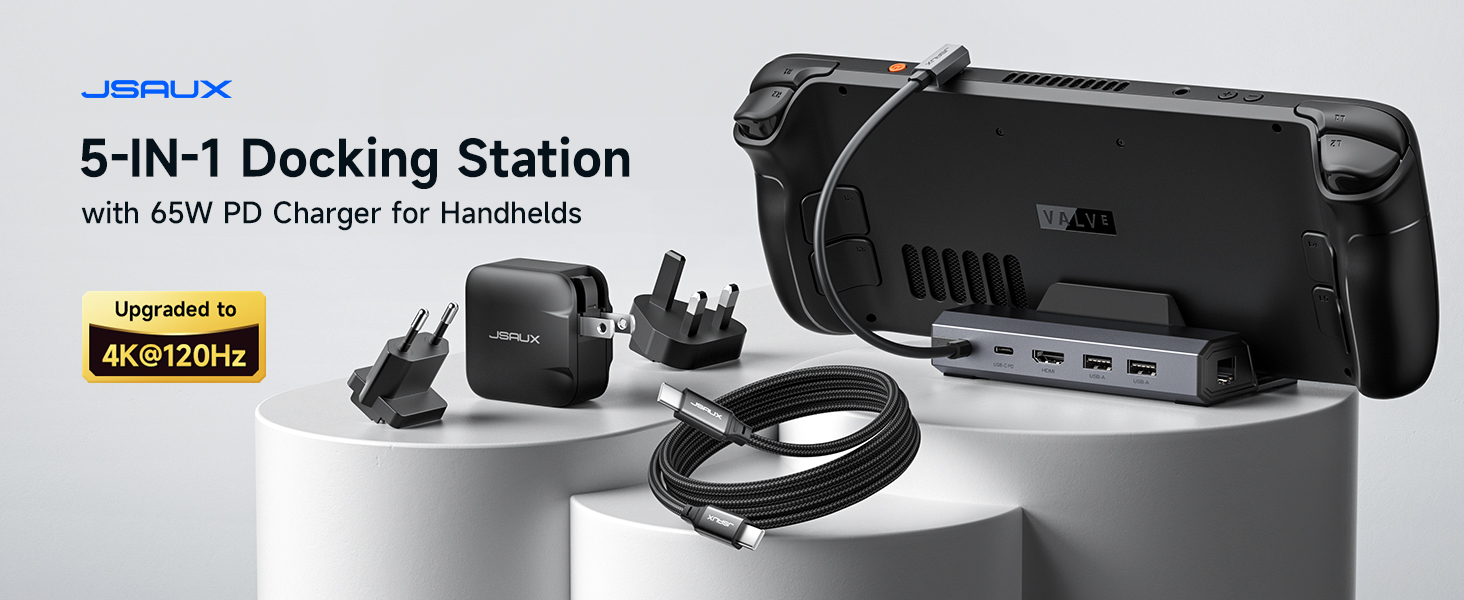
The JSAUX HB0602 5-in-1 Docking Station is designed to enhance your portable gaming experience by providing expanded connectivity and high-performance output. This versatile dock features an HDMI 2.1 port for 4K@120Hz video, 100W Power Delivery charging, a 100Mbps Ethernet port, and dual USB 2.0 ports for peripherals. It is compatible with a wide range of handheld gaming devices, including the Steam Deck LCD/OLED, ROG Ally / Ally X, Legion Go / Go S, and MSI Claw.
2. caractéristiques du produit
- Upgraded 5-in-1 Connectivity: Features HDMI 2.1 4K@120Hz output for ultra-smooth, crystal-clear visuals, plus 100W PD charging, dual USB-A 2.0 ports, and a reliable 100Mbps Ethernet connection.
- Sortie HDMI 4K à 120 Hz : Experience double the refresh rate compared to previous 4K@60Hz versions, ensuring buttery-smooth gameplay and reduced screen tearing on external monitors.
- Charge rapide 100 W : Supports up to 100W Power Delivery (PD) charging, efficiently powering your handheld in Turbo Mode. This ensures uninterrupted gaming sessions. (Note: The ROG Ally's 30W Turbo Mode is fully supported, but a 100W charger is recommended for optimal performance with multiple peripherals.)
- Reliable Wired Ethernet: Enjoy a stable and consistent network connection with the built-in RJ45 port, providing low-latency performance for smooth online gaming and streaming.
- Expanded Device Compatibility: Works with Steam Deck LCD/OLED, ROG Ally / Ally X, Legion Go / Go S, and MSI Claw, serving as an all-in-one docking solution for multiple handhelds.
3. Contenu du colis
The JSAUX HB0602 Docking Station package includes the following items:
- 1X JSAUX 5-in-1 Docking Station (HB0602)
- 1X 65W Steam Deck Charger
- 1X USB-C to USB-C Cable
- 1X European Plug Adapter
- 1X UK Plug Adapter

4. Instructions de configuration
- Unfold the Dock: Gently unfold the adjustable stand of the docking station to your desired angle. The stand features anti-scratch silicone pads and a widened 3cm base for stability and compatibility with various handhelds, even with cases.
- Connecter l'alimentation : Plug the included 65W Steam Deck Charger into the USB-C PD port on the docking station. For optimal performance, especially when using ROG Ally's 30W Turbo Mode with multiple peripherals, a 100W PD charger is recommended.
- Connect to Handheld: Use the included USB-C to USB-C cable to connect your handheld gaming device (e.g., Steam Deck, ROG Ally) to the dedicated USB-C port on the docking station. The 90-degree right-angle design of the cable ensures an easy, hassle-free connection.
- Se connecter à l'écran : Connect an HDMI cable (not included) from the HDMI 2.1 port on the docking station to your external monitor or TV. Ensure your display supports 4K@120Hz for the best visual experience.
- Connectez les périphériques : Utilize the dual USB 2.0 ports to connect accessories such as a mouse, keyboard, or game controller. For a stable internet connection, plug an Ethernet cable (not included) into the 100Mbps RJ45 port.

5. Mode d'emploi
- Sortie vidéo : Once connected, your handheld's display should automatically extend or mirror to the external monitor. Adjust display settings on your handheld for optimal resolution (up to 4K@120Hz) and refresh rate.
- Chargement : The docking station will provide power to your handheld. For devices like the ROG Ally, ensure you are using a sufficiently powerful charger (100W recommended) to maintain 30W Turbo Mode, especially during demanding gaming sessions.
- Utilisation périphérique : Connected USB devices (keyboard, mouse, controllers) will function immediately. The Ethernet connection provides a stable, low-latency network for online activities.


6. Spécifications
| Fonctionnalité | Détail |
|---|---|
| Numéro de modèle | HB0602 |
| Marque | JSAUX |
| Couleur | Gray (with 65W Charger) |
| Sortie HDMI | HDMI 2.1, 4K à 120 Hz |
| Chargement USB-C PD | Jusqu'à 100 W (Power Delivery) |
| Port Ethernet | 100Mbps RJ45 |
| Ports USB-A | 2 x USB 2.0 |
| Appareils compatibles | Steam Deck LCD/OLED, ROG Ally / Ally X, Legion Go / Go S, MSI Claw |
| Poids de l'article | 1.08 livres (0.49 kilogramme) |
| Dimensions du colis | 12.01 x 4.69 x 2.05 pouces |
7. Dépannage
- Aucune sortie vidéo : Ensure all HDMI and USB-C connections are secure. Verify your external monitor is set to the correct input source. Check that your handheld's display settings are configured for external output.
- Problèmes de charge : Confirm the power adapter is correctly plugged into the dock's PD port and a power outlet. Ensure the USB-C cable connecting the dock to your handheld is fully inserted. If using a 65W charger for ROG Ally's 30W Turbo Mode, consider a 100W charger for consistent power, especially with multiple peripherals.
- Périphériques ne fonctionnant pas : Disconnect and reconnect USB peripherals. Try connecting them directly to your handheld to rule out device issues. Ensure the handheld's operating system recognizes the connected devices.
- Unstable Network Connection: Check the Ethernet cable connection to both the dock and your router. Restart your router and handheld.
8. Entretien
- Nettoyage: Use a soft, dry cloth to clean the docking station. Avoid liquid cleaners or abrasive materials that could damage the surface.
- Stockage: Lorsqu'elle n'est pas utilisée, rangez la station d'accueil dans un endroit frais et sec, à l'abri de la lumière directe du soleil et des températures extrêmes.
- Entretien des câbles : Évitez de plier ou de tordre excessivement les câbles afin de prévenir tout dommage.
9. Garantie et assistance
For warranty information, technical support, or any product-related inquiries, please refer to the documentation included in your package or visit the official JSAUX website. Conservez votre reçu d’achat pour les réclamations au titre de la garantie.


