1. Introduction
This manual provides detailed instructions for the setup, operation, and maintenance of your Creative Sound Blaster Katana SE Multi-Channel Gaming Soundbar. Designed for an immersive audio experience, this soundbar features 180W peak power, a bi-amplified 4-driver design, Super X-Fi technology, and customizable RGB lighting. Please read this manual thoroughly before using your device to ensure optimal performance and safety.

Figure 1: Creative Sound Blaster Katana SE Gaming Soundbar
2. Informations importantes sur la sécurité
- Lisez ces instructions.
- Conservez ces instructions.
- Tenez compte de tous les avertissements.
- Suivez toutes les instructions.
- N’utilisez pas cet appareil à proximité de l’eau.
- Nettoyer uniquement avec un chiffon sec.
- Ne pas obstruer les ouvertures de ventilation. Procéder à l'installation conformément aux instructions du fabricant.
- Ne pas installer à proximité de sources de chaleur telles que radiateurs, bouches de chauffage, poêles ou autres appareils (y compris amp(échangeurs thermiques) qui produisent de la chaleur.
- Protégez le cordon d’alimentation pour éviter qu’il ne soit piétiné ou pincé, en particulier au niveau des fiches, des prises de courant et du point de sortie de l’appareil.
- Utilisez uniquement les accessoires spécifiés par le fabricant.
- Débranchez cet appareil en cas d’orage ou lorsqu’il n’est pas utilisé pendant de longues périodes.
3. Contenu du colis
Vérifiez que tous les éléments sont présents dans votre colis :
- Creative Sound Blaster Katana SE Soundbar
- Subwoofer (wired)
- Télécommande
- Adaptateur secteur
- Câble USB-C
- Câble optique
4. Produit terminéview
The Sound Blaster Katana SE is an all-in-one soundbar designed for powerful and immersive audio. It features a sleek design with integrated controls and a front-facing display.
4.1. Soundbar Components
- Commandes du panneau supérieur : Power, Volume Up/Down, Source, Mode, SXFI.
- Écran avant : Shows current source (USB, AUX, OPTICAL, BT, TV), volume level, and selected sound mode.
- Front Headphone Jack: For connecting headphones directly.
- Microphone intégré : Pour la communication vocale.
- RGB Lighting Strip: Customizable lighting effects located at the bottom of the soundbar.
- Conducteurs : Bi-amplified 4-driver design for clear and precise audio.

Figure 2 : Face avant view of the Sound Blaster Katana SE with RGB lighting
4.2. Connexions du panneau arrière
The rear panel provides various ports for connecting to your devices:
- HDMI Out (ARC): Pour la connexion à un téléviseur compatible avec le canal de retour audio (ARC).
- SXFI Out: Dedicated port for Super X-Fi enabled headphones.
- Entrée audio USB : For digital audio connection to PC/Mac.
- Entrée auxiliaire : Entrée audio analogique 3.5 mm.
- Entrée optique : Entrée audio optique numérique.
- Sortie secondaire : For connecting the wired subwoofer.
- Puissance d'entrée : Pour l'adaptateur secteur.

Figure 3: Rear panel with HDMI ARC, SXFI Out, USB Audio In, Aux In, Optical In, Sub Out, and Power Input.
4.3. Caisson de basses
The included wired subwoofer enhances bass response for a more dynamic audio experience.

Figure 4 : Interne view showing the soundbar's bi-amplified drivers and the subwoofer's design.
5. Installation
Follow these steps to set up your Sound Blaster Katana SE:
- Placement: Place the soundbar on a stable surface below your TV or monitor. Position the subwoofer on the floor near the soundbar for optimal bass.
- Connecter le caisson de basses : Connect the wired subwoofer cable to the 'Sub Out' port on the soundbar's rear panel.
- Connecter l'alimentation : Connect the power adapter to the soundbar's power input and then plug it into a wall outlet.
- Connecter la source audio : Choose your preferred audio connection method (HDMI ARC, Optical, USB, Aux, or Bluetooth) and connect the appropriate cable.
Video 1: Official product video demonstrating the Sound Blaster Katana SE's features and connectivity options.
6. Options de connectivité
The Sound Blaster Katana SE offers a wide range of connectivity to suit various devices:
- HDMI Out (ARC): Connectez-vous au port HDMI ARC de votre téléviseur pour bénéficier d'un son de haute qualité et d'un contrôle optimal.
- Entrée audio USB : Ideal for connecting to PCs, Macs, or gaming consoles that support USB audio.
- Entrée auxiliaire : Utilisez un câble audio de 3.5 mm pour vous connecter aux appareils dotés d'une sortie audio analogique.
- Entrée optique : For digital audio connection from TVs, game consoles, or other media players.
- Bluetooth 5.0: Pair wirelessly with your mobile devices, tablets, or computers for convenient audio streaming.
- SXFI Out: Connect Super X-Fi certified headphones for a personalized holographic audio experience.

Figure 5: Soundbar showcasing versatile connectivity with gaming consoles and mobile devices.
7. Mode d'emploi
7.1. Marche/Arrêt
Press the Power button on the soundbar's top panel or the remote control to turn the device on or off.
7.2. Contrôle du volume
Use the Volume Up (+) and Volume Down (-) buttons on the soundbar or remote to adjust the audio level. The current volume will be displayed on the front panel.
7.3. Sélection de la source
Press the 'Source' button on the soundbar or remote to cycle through available input sources (HDMI ARC, USB, Aux, Optical, Bluetooth).
7.4. Modes sonores
The soundbar features optimized sound modes for different content types. Press the 'Mode' button on the soundbar or remote to switch between:
- Musique: Optimisé pour la lecture musicale.
- Films: Optimisé pour un son cinématographique.
- Jeux : Tailored for immersive gaming soundscapes.
- Effects Off: Neutral audio profile.
7.5. Utilisation de la télécommande
The included remote control provides full functionality for the soundbar, including power, volume, source, mode, SXFI, RGB lighting, and custom buttons.
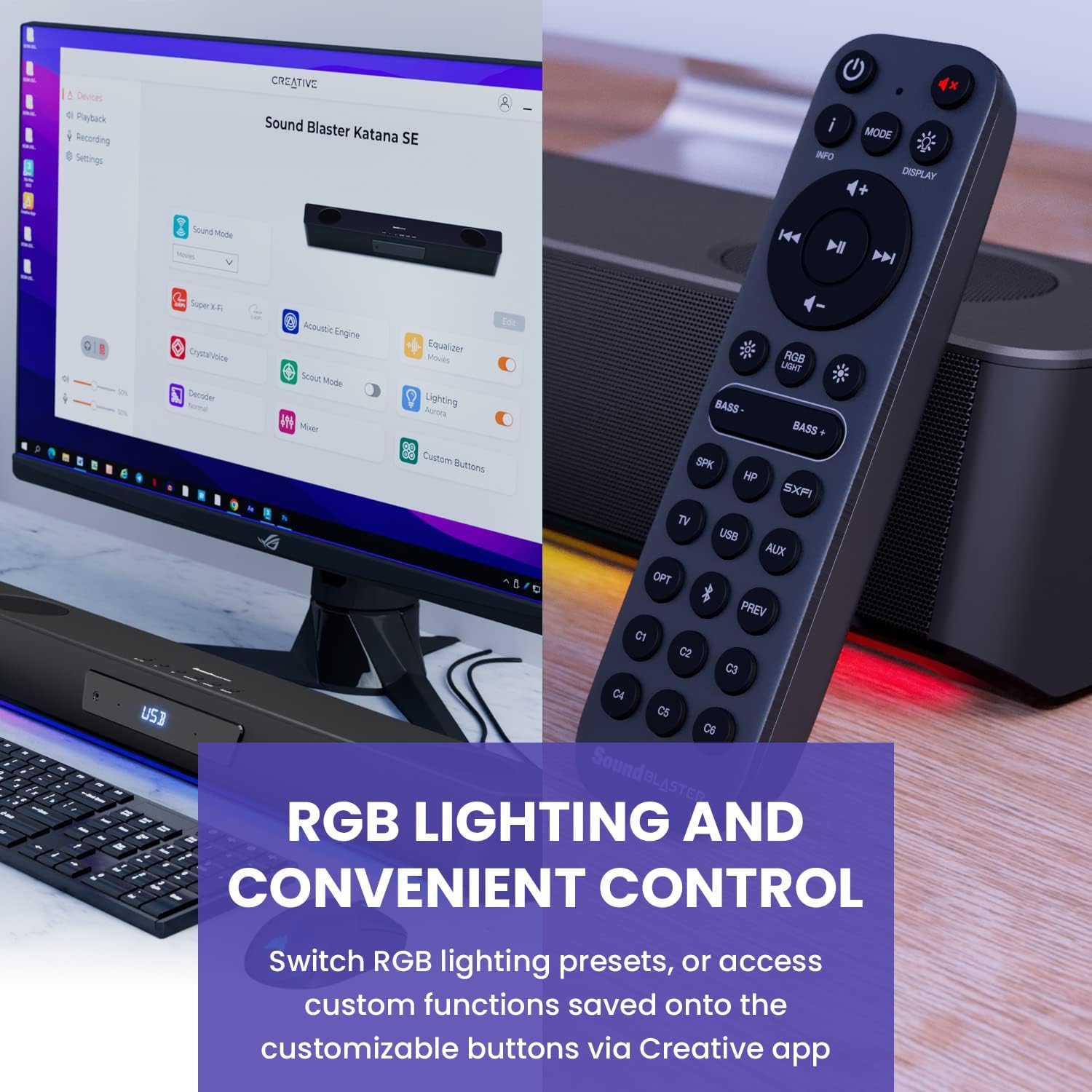
Figure 6: Remote control for the Sound Blaster Katana SE.
7.6. Creative App Customization
For advanced customization, download the Creative app on your PC or Mac. The app allows you to:
- Tune Audio Performance: Adjust EQ settings and activate Sound Blaster processing technologies.
- Personnalisez l'éclairage RVB : Select from various RGB presets or create your own custom lighting effects.
- Map Custom Functions: Assign specific commands to the six customizable buttons on the remote control.

Figure 7: Creative app interface showing sound mode, Super X-Fi, Acoustic Engine, Equalizer, CrystalVoice, Scout Mode, Lighting, Decoder, Mixer, and Custom Buttons.
8. Super X-Fi Technology
Super X-Fi technology personalizes your headphone audio experience for optimized and realistic listening. It recreates the soundstage of a multi-speaker system in your headphones.
- SXFI Battle Mode: Bénéficiez d'un avantage concurrentieltage in FPS games by accurately pinpointing enemy locations through enhanced audio cues.

Figure 8: Super X-Fi and SXFI Battle Mode for enhanced gaming audio.
9. Microphone intégré
The Sound Blaster Katana SE includes a built-in beamforming microphone, allowing you to participate in calls or in-game voice chat directly through the soundbar.
10. Éclairage RVB
The integrated RGB lighting strip can be customized to match your setup or mood. Use the remote control to cycle through presets or the Creative app for advanced color and effect adjustments.
11. Entretien
To ensure the longevity and performance of your Sound Blaster Katana SE:
- Gardez l'appareil propre en l'essuyant avec un chiffon doux et sec.
- Avoid using liquid cleaners or aerosols.
- Assurez-vous que les ouvertures de ventilation ne sont pas obstruées.
- N'exposez pas l'appareil à des températures extrêmes ou à l'humidité.
12. Dépannage
Si vous rencontrez des problèmes avec votre barre de son, consultez les solutions courantes suivantes :
- Pas de son : Check all cable connections (power, audio source, subwoofer). Ensure the correct input source is selected on the soundbar. Verify the volume is not muted or too low.
- Son déformé : Try reducing the volume. Check audio cable integrity. Ensure the audio source is providing a clean signal.
- Problèmes de connectivité Bluetooth : Ensure the soundbar is in Bluetooth pairing mode. Delete the soundbar from your device's Bluetooth list and re-pair. Move closer to the soundbar to reduce interference.
- La télécommande ne fonctionne pas : Check battery levels and replace if necessary. Ensure there are no obstructions between the remote and the soundbar.
- Les lumières RVB ne fonctionnent pas : Check settings in the Creative app. Ensure RGB lighting is enabled via the remote or app.
13. Spécifications
| Fonctionnalité | Spécification |
|---|---|
| Nom du modèle | 51MF8415AA000 27585486 |
| Type de haut-parleur | Barre de son |
| Type de montage | Support de table |
| Dossier spécial | Bass Boost, Built In Microphone, Radio, Stereo Pairing, USB Port |
| Utilisations recommandées pour le produit | For Gaming Consoles, For Computers |
| Appareils compatibles | Ordinateur de bureau, ordinateur portable, lecteur MP3, projecteur, smartphone, tablette, télévision |
| Nombre d'unités | 1.0 Nombre |
| Configuration des canaux de son surround | 5.1 |
| Couleur | 180W Peak Power with Bluetooth 5.0 |
| Composants inclus | Télécommande |
| Dimensions du produit | 25.6"P x 4.3"L x 3.1"H |
| Poids de l'article | 5.9 livres |
| Est étanche | FAUX |
| Type de garantie | Limité |
| Nombre d'articles | 1 |
| Méthode de contrôle | Télécommande |
| Technologie de communication sans fil | Bluetooth |
| Taille du haut-parleur | 1 pouces |
| Source d'énergie | Électrique avec fil |
| Diamètre du tweeter | 1 pouces |
| Niveau de résistance à l'eau | Non résistant à l'eau |
| Type de package client | FFP |
| Type de pilote audio | Pilote dynamique |
| Technologie de connectivité du caisson de basses | Sans fil |
| Nombre de niveaux de puissance | 1 |
| Utilisations spécifiques du produit | Gaming Consoles, Computers |
| Code UPC | 054651195639 |
| Fabricant | Laboratoires créatifs |
| Forme | prisme rectangulaire |
| Poids de l'article | 5.9 livres |
| ASIN | B0C5DFMB93 |
| Numéro de modèle de l'article | MF8415 |
| Date de première disponibilité | 16 mai 2023 |
| Marque | Créatif |
| Puissance de sortie maximale du haut-parleur | 100 watts |
| Réponse en fréquence | 20000 Hz |
| Technologie de connectivité | Bluetooth |
| Mode de sortie audio | Surround, Stéréo |
14. Garantie et assistance
Your Creative Sound Blaster Katana SE comes with a Limited Warranty. For detailed warranty information, product registration, technical support, and customer service, please visit the official Creative website ou reportez-vous à la carte de garantie incluse dans votre colis.


