1. Introduction
This manual provides essential information for the installation, operation, and maintenance of the Cisco Catalyst 9800-L Copper Uplink Wireless LAN Controller (Model C9800-L-C-K9). Please read this manual thoroughly before using the device to ensure proper functionality and safety.
2. Informations importantes sur la sécurité
Respectez les consignes de sécurité suivantes afin d'éviter les blessures et les dommages à l'appareil :
- Veillez à installer l'appareil dans un endroit bien ventilé afin d'éviter toute surchauffe.
- Utilisez uniquement l'alimentation électrique spécifiée pour cet appareil.
- N'exposez pas l'appareil à l'humidité ou à des températures extrêmes.
- Coupez l'alimentation électrique avant toute opération de maintenance ou de nettoyage.
- Confiez toute intervention d'entretien à un personnel qualifié.
3. Contenu du colis
Vérifiez que tous les éléments sont présents dans le colis :
- Cisco Catalyst 9800-L Wireless LAN Controller
- CD (containing documentation or software)
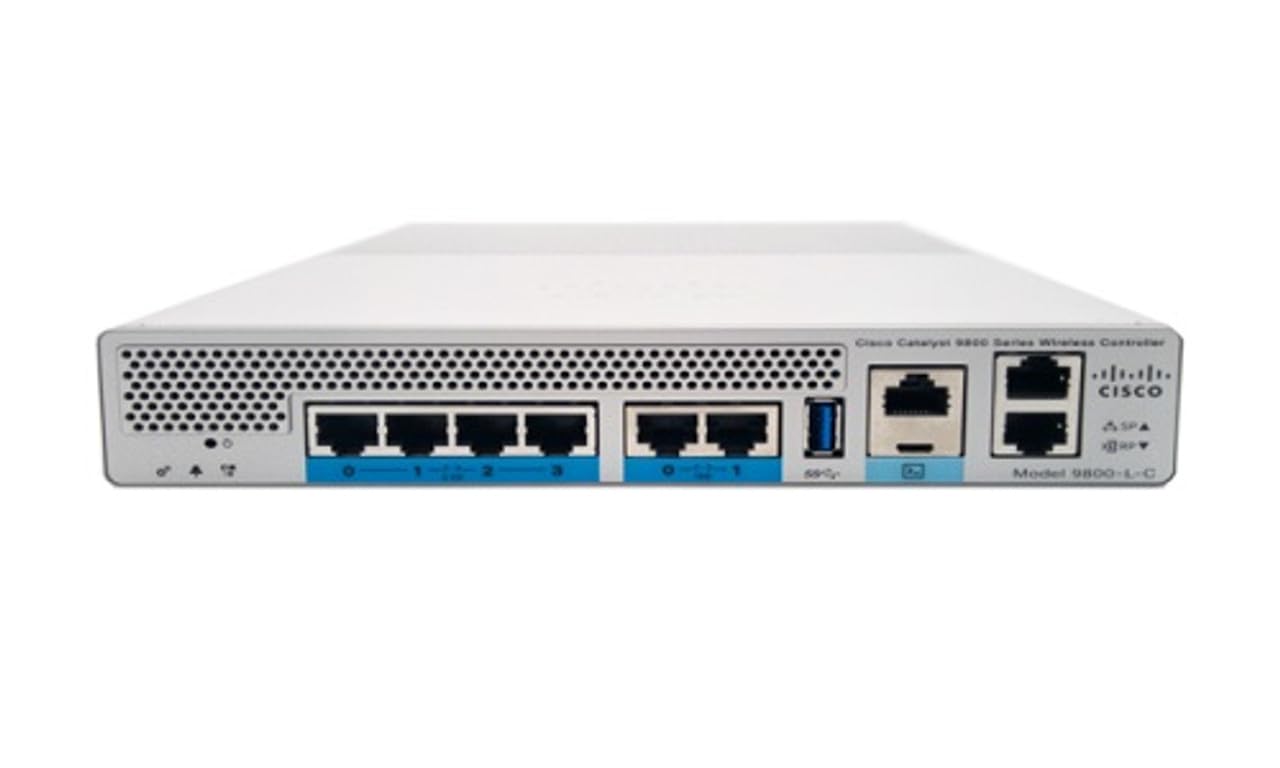
Figure 1 : Face avant view of the Cisco Catalyst 9800-L Wireless LAN Controller. This image shows the compact design and port layout of the device.
4. Produit terminéview
The Cisco Catalyst 9800-L is a compact, fixed-configuration wireless LAN controller designed for small to medium-sized deployments. It provides centralized control for Cisco Aironet access points, offering robust wireless network management capabilities.
Caractéristiques principales :
- Managed, Layer 2.5 (Wireless Controller) functionality
- Copper uplink interfaces
- RJ45 interface type
- 11 ports for connectivity
- Designed for desktop environments
5. Installation
5.1 Déballage et inspection
- Carefully remove the controller from its packaging.
- Inspect the device for any signs of physical damage. If damage is found, contact your supplier immediately.
5.2 Installation physique
- Place the controller on a stable, flat surface, such as a desktop.
- Ensure adequate clearance around the device for proper airflow and ventilation.
5.3 Connexion d'alimentation
- Connect the power cord to the power input on the rear of the controller.
- Plug the other end of the power cord into a grounded electrical outlet (220 Volts).
Connexion réseau 5.4
- Connect Ethernet cables from your network infrastructure to the RJ45 uplink ports on the controller.
- Connect access points to the appropriate downlink ports as required by your network design.
5.5 Accès à la configuration initiale
- Refer to the included CD or Cisco's official documentation for detailed instructions on initial console access and software configuration.
- Typically, this involves connecting a console cable to the device and using a terminal emulator.
6. Utilisation du contrôleur
6.1 Fonctionnement de base
Once powered on and initially configured, the controller will begin managing connected access points. Monitor the status indicators on the device for operational status.
6.2 Access Point Management
The Cisco Catalyst 9800-L automatically discovers and provisions Cisco Aironet access points. Use the controller's management interface (CLI or GUI) to configure wireless networks, security policies, and guest access.
6.3 Configuration du réseau
Detailed network configuration, including VLANs, QoS, and routing, is performed through the controller's operating system. Consult Cisco's official documentation for advanced configuration guides.
7. Directives d'entretien
- Mises à jour du micrologiciel : Regularly check for and apply the latest firmware updates from Cisco to ensure optimal performance and security.
- Nettoyage: Keep the device clean and free of dust. Use a soft, dry cloth for cleaning. Do not use liquid or aerosol cleaners.
- Conditions environnementales : Ensure the operating environment remains within specified temperature and humidity ranges to prevent hardware failure.
- Configuration de sauvegarde : Periodically back up your controller's configuration to prevent data loss.
8. Dépannage
Cette section aborde les problèmes courants que vous pourriez rencontrer :
| Problème | Cause possible | Solution |
|---|---|---|
| Le contrôleur ne s'allume pas | Power cable disconnected; Power outlet failure | Check power cable connections; Test power outlet with another device. |
| Access points not connecting | Incorrect network configuration; APs not discovered | Verify network settings on the controller; Ensure APs are on the same network segment or reachable via IP. |
| Slow wireless performance | Interference; Overloaded channels; Outdated firmware | Perform a site survey to identify interference; Optimize channel selection; Update controller and AP firmware. |
9. Spécifications techniques
| Spécification | Détail |
|---|---|
| Marque | Cisco |
| Numéro de modèle | C9800-L-C-K9 |
| Nombre de ports | 11 |
| Interface | RJ45 |
| Type de commutateur | Managed, Layer 2.5 (Wireless Controller) |
| Plate-forme | Zêta |
| Type de matériau du boîtier | Cuivre |
| Voltage | 220 volts |
| Appareils compatibles | Bureau |
| Couleur | Bleu |
| Poids de l'article | 3.09 kilogrammes |
| Code UPC | 657768416101 |
| ASIN | B0C3FQPCY4 |
10. Informations sur la garantie
This Cisco Catalyst 9800-L Wireless LAN Controller (Renewed) comes with a Garantie limitée de 90 jours. For specific terms and conditions, please refer to the warranty documentation provided with your purchase or contact your reseller.
11. Assistance clientèle
For technical assistance, troubleshooting, or further inquiries regarding your Cisco Catalyst 9800-L Wireless LAN Controller, please visit the official Cisco support website or contact your authorized Cisco reseller. Ensure you have your model number (C9800-L-C-K9) and serial number available when seeking support.