Introduction
Thank you for choosing the Faber 34L Double Glazed 1600W Oven Toaster Grill (OTG). This manual provides essential information for the safe and efficient operation, maintenance, and troubleshooting of your appliance. Please read these instructions thoroughly before first use and retain them for future reference.

Image : Avant view of the Faber 34L OTG with its control panel and glass door.
Consignes de sécurité importantes
Respectez toujours les consignes de sécurité de base lors de l'utilisation d'appareils électriques afin de réduire les risques d'incendie, d'électrocution et de blessures.
- Read all instructions before operating the OTG.
- Ne touchez pas les surfaces chaudes. Utilisez les poignées ou les boutons. Portez toujours des gants ou des maniques lorsque vous manipulez des aliments chauds.
- To protect against electrical shock, do not immerse cord, plug, or any non-removable parts of the oven in water or other liquid.
- Une surveillance étroite est nécessaire lorsqu’un appareil est utilisé par ou à proximité d’enfants.
- Débranchez l'appareil de la prise lorsqu'il n'est pas utilisé et avant de le nettoyer. Laissez-le refroidir avant d'ajouter ou de retirer des pièces.
- N’utilisez pas d’appareil dont le cordon ou la fiche est endommagé, ou après un dysfonctionnement de l’appareil ou après qu’il a été endommagé de quelque manière que ce soit.
- Ne pas utiliser à l'extérieur.
- Ne laissez pas le cordon pendre du bord de la table ou du comptoir, ni toucher des surfaces chaudes.
- Ne pas placer sur ou à proximité d'un brûleur à gaz ou électrique chaud, ni dans un four chaud.
- Une extrême prudence doit être exercée lors du déplacement d’un appareil contenant de l’huile chaude ou d’autres liquides chauds.
- N'utilisez pas l'appareil à d'autres fins que celles prévues.
- Les aliments surdimensionnés ou les ustensiles en métal ne doivent pas être insérés dans un four grille-pain car ils peuvent créer un incendie ou un risque de choc électrique.
- Un incendie peut se produire si le four est couvert ou en contact avec des matériaux inflammables, y compris des rideaux, des tentures, des murs, etc., lorsqu'il est en marche.
- Ne placez aucun des matériaux suivants dans le four : papier, carton, plastique ou matériaux similaires.
- Ne stockez aucun matériau, autre que les accessoires recommandés par le fabricant, dans ce four lorsqu'il n'est pas utilisé.
- Always wear protective, heat-resistant gloves when inserting or removing items from the hot oven.
- Assurez une bonne ventilation autour de l’appareil pendant son fonctionnement.
Composants et accessoires du produit
Your Faber OTG comes with the following components and accessories:
- Faber 34L OTG Unit
- Enamelled Bake Tray
- Plateau de gril
- Plateau à miettes
- Pizza Plate (9-inch)
- Tige de rôtissoire
- Rotisserie Handle (Tongs)
- SS Wire Tray
- Silicon Heat Guard Glove

Image: All included accessories for the Faber 34L OTG, laid out for clear identification.
Installation et première utilisation
Déballage
- Carefully remove the OTG and all accessories from the packaging.
- Remove any protective films, stickers, or packaging materials from the appliance and accessories.
- Vérifiez que l'appareil n'est pas endommagé. Ne l'utilisez pas s'il est endommagé.
Placement
- Place the OTG on a stable, flat, heat-resistant surface.
- Ensure there is adequate space (at least 10-15 cm) around all sides of the oven for proper ventilation. Do not place it directly against a wall or under cabinets.
- Keep the appliance away from flammable materials like curtains, tablecloths, and paper.
Nettoyage initial
- Avant la première utilisation, essuyez l'intérieur et l'extérieur du four avec un produit nettoyant.amp tissu.
- Wash all accessories (bake tray, grill tray, rotisserie rod, etc.) in warm, soapy water, rinse thoroughly, and dry completely.
- Insérez le ramasse-miettes au fond du four.
First Use Burn-in
It is recommended to run the oven empty for about 15 minutes on its highest temperature setting (250°C) with the Function Selector set to 'Top + Bottom Heating' to burn off any manufacturing residues. A slight odor or smoke may be present during this process; this is normal. Ensure the area is well-ventilated.
Mode d'emploi
The Faber OTG features intuitive controls for various cooking functions.

Image : Gros plan view of the control knobs on the Faber 34L OTG, indicating their respective functions.
Panneau de configuration terminéview
- Bouton de fonction : Selects the cooking function (Off, Rotisserie, Convection, Rotisserie + Convection).
- Bouton de température: Permet de régler la température de cuisson de 100°C à 250°C.
- Bouton sélecteur : Chooses the heating mode (Defrost, Top Heating, Bottom Heating, Top + Bottom Heating).
- Bouton de minuterie : Sets the cooking time up to 60 minutes. Includes an auto-cutoff feature.
Cooking Functions and Modes
Your OTG supports 6 cooking functions and various heating modes:

Image: Visual representation of the various cooking modes available with the Faber 34L OTG, including baking, roasting, and grilling.
- Pâtisserie: Ideal for cakes, cookies, and bread. Use Top + Bottom Heating with or without Convection.
- Grillage: Perfect for meats and vegetables. Use Top + Bottom Heating, often with Convection.
- Grillage: For browning and crisping. Use Top Heating.
- Griller: For bread and similar items. Use Top Heating.
- Dégivrage: Thaws frozen foods. Use the Defrost setting on the Selector Knob.
- Réchauffage : Warms up cooked food. Use Top + Bottom Heating at a lower temperature.
Fonction rôtisserie
The auto motorized rotisserie allows for even grilling of whole chickens or large cuts of meat.
- Skewer the food onto the rotisserie rod, securing it with the forks.
- Place the rotisserie rod into the designated slots inside the oven.
- Set the Function Knob to 'Rotisserie' or 'Rotisserie + Convection'.
- Adjust Temperature and Timer as required for your recipe.
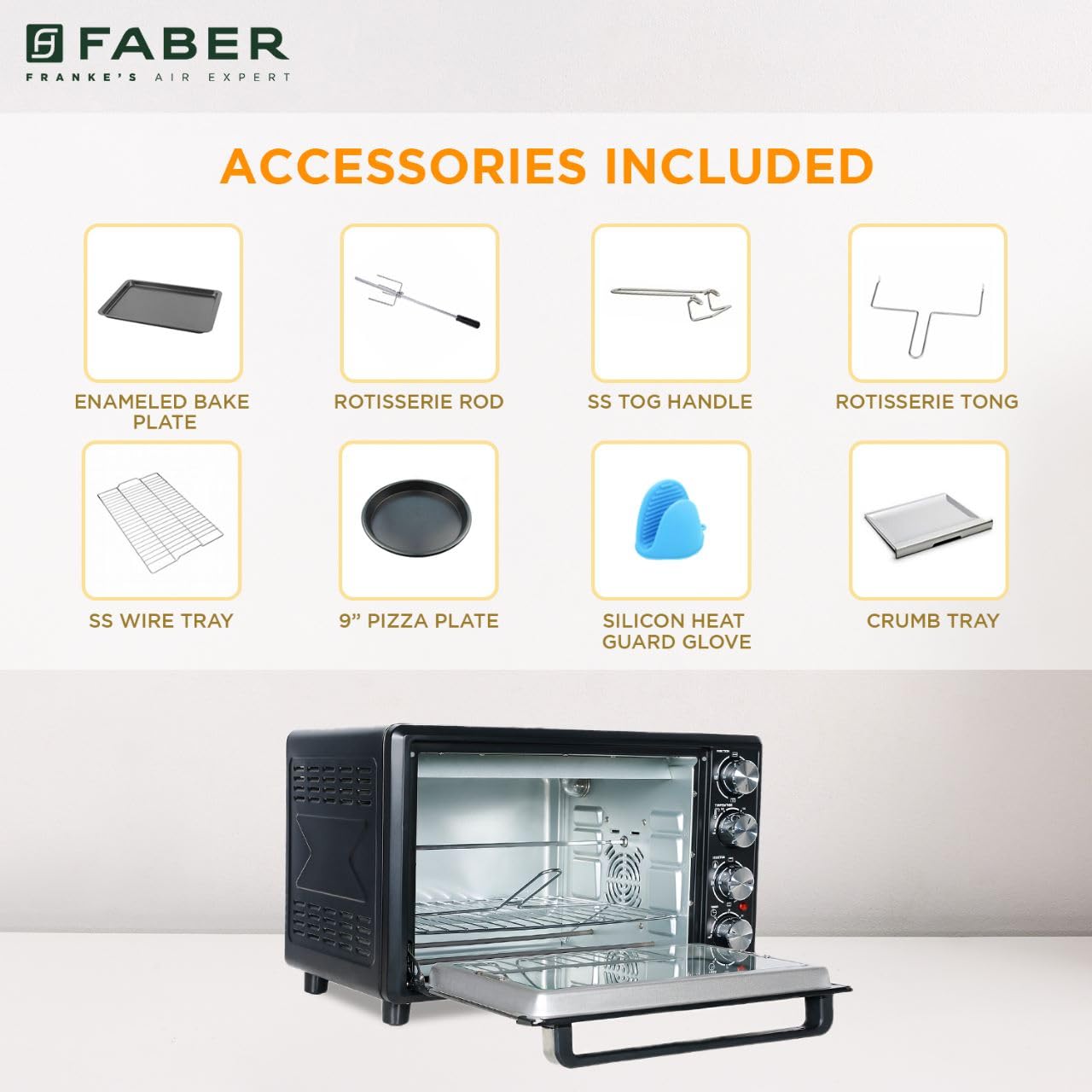
Image: The auto motorized rotisserie feature of the OTG, demonstrating two chickens being evenly grilled.
360° Convection Technology
The 360° Convection Technology ensures uniform cooking by circulating hot air throughout the oven chamber. This results in optimum browning, better crispiness, and higher nutrient retention.
- To activate convection, turn the Function Knob to 'Convection' or 'Rotisserie + Convection'.
- Convection cooking often requires slightly lower temperatures and shorter cooking times compared to conventional baking.

Image: Diagram illustrating the 360° convection technology, showing hot air circulating inside the oven for even cooking.
Timer with Auto Cut-off
The mechanical timer can be set for up to 60 minutes. Once the set time elapses, the oven will automatically switch off, indicated by a bell sound.
- Turn the Timer Knob clockwise to set the desired cooking duration.
- For shorter times (less than 10 minutes), turn the knob past 10 minutes and then back to the desired time for better accuracy.
Entretien et nettoyage
Regular cleaning and maintenance will ensure the longevity and optimal performance of your OTG.
Nettoyage général
- Débranchez toujours le four de la prise électrique et laissez-le refroidir complètement avant de le nettoyer.
- Essuyez les surfaces extérieures avec un chiffon doux, damp chiffon. N'utilisez pas de nettoyants abrasifs ou de tampons à récurer.
- Clean the interior walls, floor, and ceiling with a damp cloth and mild detergent. For stubborn stains, a non-abrasive oven cleaner designed for OTGs can be used, following the product instructions carefully.
- The double glazed glass door can be cleaned with a glass cleaner. The double glazing helps retain heat and prevents burns from touching the outer glass.
- Remove and empty the crumb tray regularly. Wash it in warm, soapy water, rinse, and dry thoroughly.
Nettoyage des accessoires
- All removable accessories (bake tray, grill tray, wire rack, rotisserie rod, pizza plate, tongs, silicon glove) can be washed in warm, soapy water. Rinse well and dry completely before storing or reusing.
- Do not use metal scouring pads or abrasive cleaners on non-stick surfaces (if applicable) to avoid damage.

Image : Intérieur view of the Faber 34L OTG with the chamber light on, highlighting the clean racks and crumb tray, ready for use or after cleaning.
Dépannage
If you encounter any issues with your Faber OTG, refer to the following table for common problems and solutions.
| Problème | Cause possible | Solution |
|---|---|---|
| Le four ne s'allume pas. | Non branché ; alimentation coupéetage; prise défectueuse; minuterie non réglée. | Ensure the power cord is securely plugged into a working outlet. Check your household's circuit breaker. Set the timer knob to the desired cooking duration. |
| Les aliments ne cuisent pas uniformément. | Incorrect temperature/mode; overcrowding; improper rack position; convection fan issue. | Verify temperature and heating mode settings. Avoid overcrowding the oven. Use the appropriate rack position. Ensure the convection fan is not obstructed (if using convection). |
| Fumée excessive pendant le fonctionnement. | Food spills; grease buildup; initial burn-off. | Clean the oven interior and accessories thoroughly. Ensure the crumb tray is clean. If it's the first use, some smoke is normal. |
| La rôtissoire ne tourne pas. | Rotisserie rod not properly seated; Function Knob not set to Rotisserie. | Ensure the rotisserie rod is correctly inserted into the drive socket and support. Set the Function Knob to 'Rotisserie' or 'Rotisserie + Convection'. |
| La minuterie ne fonctionne pas. | Knob not turned past 10 minutes for short times; mechanical issue. | For times under 10 minutes, turn the knob past 10 and then back to the desired time. If the issue persists, contact customer support. |
If the problem persists after attempting these solutions, please contact Faber customer support.
Caractéristiques
Detailed technical specifications for the Faber 34L OTG:
- Marque: Faber
- Numéro de modèle : 131.0676.817
- Capacité: 34 litres
- Quoitage: 1600 watts
- Couleur: Noir
- Dossier spécial : Temperature Control, 360° Convection, Rotisserie, Double Glazed Glass
- Type de contrôle : Bouton
- Style de porte : Porte déroulante
- Type de matériau de porte : Verre trempé
- Source d'alimentation : Électrique avec fil
- Poids de l'article : 10 kg 900 g
- Dimensions de l'article (L x l x H) : 51 x 39 x 32 centimètres
- Pays d'origine : Chine

Image: Diagram showing the physical dimensions (Length, Width, Height) of the Faber 34L OTG.
Garantie et assistance
Informations sur la garantie
Your Faber OTG is covered by a manufacturer's warranty. Please refer to the warranty card included with your product for specific terms, conditions, and duration of the warranty. Keep your purchase receipt as proof of purchase for warranty claims.
Assistance clientèle
For any service, repair, or technical assistance, please contact Faber customer support. You can find contact details on the warranty card or the official Faber website.
- Support en ligne: Visit the official Faber webSite de FAQ et de ressources d'assistance.
- Centre de services: Locate authorized service centers in your region.