1. Introduction
The Focal Theva N°3-D is a high-fidelity 3-way floorstanding loudspeaker designed for home cinema systems. It features Dolby Atmos® compatibility, achieved through a dedicated speaker driver positioned on the top of the cabinet. This driver reflects sound waves off the ceiling to create immersive 3D audio effects. This manual provides essential information for the proper setup, operation, and maintenance of your Theva N°3-D loudspeaker.
2. Consignes de sécurité
Please read these safety instructions carefully before using your loudspeaker. Keep this manual for future reference.
- Placement: Ensure the loudspeaker is placed on a stable, level surface to prevent tipping. Avoid placing it in direct sunlight, near heat sources, or in areas with high humidity.
- Ventilation: Do not block any ventilation openings. Allow adequate space around the loudspeaker for proper airflow.
- Pouvoir: Connectez le haut-parleur à un amplifier with appropriate power ratings. Exceeding recommended power can damage the speaker.
- Nettoyage: Disconnect the loudspeaker from the ampNettoyez avant d'utiliser un produit nettoyant. Utilisez un chiffon doux et sec. N'utilisez pas de nettoyants liquides ni d'aérosols.
- Entretien: N’essayez pas de réparer vous-même le haut-parleur. Confiez toute réparation à un technicien qualifié.
- Enfants: Conservez les matériaux d'emballage et les petites pièces hors de portée des enfants afin de prévenir tout risque d'étouffement.
3. Contenu du colis
Vérifiez que tous les composants sont présents dans l'emballage :
- Focal Theva N°3-D Floorstanding Loudspeaker (Model: FTHEVAN3LW-D)
- Grille (pre-installed or separate)
- Manuel de l'utilisateur (ce document)
Si des articles sont manquants ou endommagés, veuillez contacter votre revendeur.
4. Produit terminéview
The Theva N°3-D loudspeaker incorporates advanced technologies for superior audio performance and immersive sound.
Caractéristiques principales :
- 3-way floorstanding design, Dolby Atmos® compatible.
- Full-range speaker driver with directional baffle for precise Dolby Atmos® effects.
- Slatefiber technology for immersive and dynamic home cinema sound.
- TNF Tweeter for mellow treble reproduction.
- Time Alignment design for a focused sound image.
Composants:
- Dolby Atmos® Driver: Located on the top, designed to reflect sound off the ceiling.
- TNF Tweeter: Aluminum/Magnesium inverted dome tweeter for high frequencies.
- Pilote de milieu de gamme : 6.5-inch (16.5cm) Slatefiber cone for balanced and precise mid-range.
- Haut-parleurs de graves : Two 6.5-inch (16.5cm) Slatefiber cone woofers for powerful bass.
- Tilted Stand: Integrated stand for optimal Time Alignment.

Figure 1: Focal Theva N°3-D Product Sheet illustrating key components and features. This diagram shows the internal structure, driver types (TNF Tweeter, Slatefiber midrange, Slatefiber woofers), and the top-mounted Dolby Atmos driver with its directional baffle.

Figure 2 : Gros plan view of the top-mounted Dolby Atmos driver on the Focal Theva N°3-D loudspeaker. This driver is designed to project sound upwards for ceiling reflection, creating immersive 3D audio effects.

Figure 3 : Détaillé view of the Slatefiber cone material used in the midrange and woofer drivers of the Focal Theva N°3-D. This material contributes to dynamic and immersive sound reproduction.

Figure 4: Close-up of the TNF Tweeter, an Aluminum/Magnesium inverted dome, responsible for clear and mellow high-frequency reproduction in the Focal Theva N°3-D loudspeaker.
5. Installation
5.1 Placement
Optimal placement is crucial for achieving the best sound performance from your Theva N°3-D loudspeakers, especially for Dolby Atmos effects.
- Configuration stéréo : For a traditional stereo setup, place the loudspeakers equidistant from your primary listening position, forming an equilateral triangle.
- Home Cinema Setup: In a home cinema configuration, the Theva N°3-D speakers should be positioned as your front left and right channels. Ensure they are placed symmetrically relative to your screen and listening area.
- Dolby Atmos : The integrated upward-firing driver requires a reflective ceiling. Position the speakers so that the sound from the top driver can reflect off the ceiling and reach your listening position. Avoid placing them under sound-absorbing materials or very high ceilings that might diminish the effect.
- Distance des murs : Experiment with the distance from the rear and side walls. Placing speakers too close to walls can overemphasize bass, while too far can reduce bass impact. A good starting point is 1-2 feet (30-60 cm) from the rear wall.

Figure 5 : Example of a Focal Theva home cinema setup, demonstrating typical speaker placement for optimal sound dispersion and Dolby Atmos effects. Note the symmetrical positioning relative to the viewzone de travail.
5.2 Connexions
The Theva N°3-D loudspeakers connect to your amplifier using standard speaker cables.
- Sélection de câble : Use high-quality speaker cables of appropriate gauge for the length required.
- Polarité: Ensure correct polarity (+ to + and - to -) when connecting the speaker terminals to your amplifier. Incorrect polarity will result in poor sound quality and imaging.
- Type de terminal: The Theva N°3-D features binding posts that accept bare wire, spade connectors, or banana plugs.
- AmpChaînes lifier : Connect the main speaker terminals to the front left and right channels of your amplifier. For the Dolby Atmos effect, ensure your amplifier or AV receiver has dedicated height channels and connect the top-mounted driver terminals to these outputs. Consult your amplifier's manual for specific height channel connections.

Figure 6 : Arrière view of the Focal Theva N°3-D loudspeaker, showing the speaker terminals for connection to an amplifier. Note the separate terminals for the main drivers and the top-mounted Dolby Atmos driver.
6. Mode d'emploi
Once properly set up and connected, operating your Theva N°3-D loudspeakers is straightforward.
- Mise sous tension : Assurez votre amplifier est sous tension et réglé sur la source d’entrée correcte.
- Contrôle du volume : Réglez le niveau de volume sur votre amplifier. Start at a low volume and gradually increase it to a comfortable listening level.
- Documents sources : For optimal Dolby Atmos experience, use content encoded with Dolby Atmos audio tracks.
- Période de rodage : Loudspeakers typically require a break-in period of several hours of use to achieve their full sonic potential. During this time, the drivers will loosen up and perform optimally.
7. Entretien
Proper care will ensure the longevity and performance of your loudspeakers.
- Nettoyage de l'armoire : Use a soft, dry, lint-free cloth to wipe the cabinet surfaces. For stubborn marks, a slightly damp On peut utiliser un chiffon, puis un chiffon sec. Évitez les nettoyants abrasifs et les solvants.
- Nettoyage de la grille : The fabric grille can be gently vacuumed with a soft brush attachment to remove dust.
- Assistance aux conducteurs : Évitez de toucher directement les cônes des haut-parleurs ou les tweeters, car cela pourrait les endommager.
- Conditions environnementales : Protect the speakers from extreme temperatures, humidity, and direct sunlight.
8. Dépannage
If you encounter issues with your Theva N°3-D loudspeakers, refer to the following common problems and solutions:
| Problème | Cause possible | Solution |
|---|---|---|
| Aucun son du haut-parleur | Loose cable connection, incorrect input selection on amplificateur, amplifier off, speaker damaged. | Check all cable connections (speaker to amplifier, source to amplifier). Ensure amplifier is on and correct input is selected. Test with another speaker if possible. |
| Son déformé | Surmené amplifier, damaged speaker driver, incorrect cable connection (polarity). | Réduire amplifier volume. Check speaker cable polarity. Inspect speaker drivers for visible damage. |
| Basses faibles ou inexistantes | Incorrect speaker placement, phase issue, ampparamètres de lifier. | Adjust speaker placement relative to walls. Check amplifier's bass/tone controls or room correction settings. Ensure correct polarity. |
| Poor Dolby Atmos effect | Incorrect amplifier setup, unsuitable room acoustics, speaker placement. | Verify height channel connections on your amplifier. Ensure your AV receiver is configured for Dolby Atmos. Check ceiling height and material for proper reflection. Adjust speaker angle if possible. |
If the problem persists after attempting these solutions, please contact Focal customer support or your authorized dealer.
9. Spécifications
Detailed technical specifications for the Focal Theva N°3-D Floorstanding Loudspeaker.
| Fonctionnalité | Spécification |
|---|---|
| Nom du modèle | FTHEVAN3LW-D |
| Type de haut-parleur | 3-way Floorstanding, Dolby Atmos Compatible |
| Matériel | Bois |
| Couleur | Bois clair |
| Dimensions du produit (P x L x H) | 34"D x 116"W x 26.5"H (Note: Dimensions seem unusually large, please verify with manufacturer if critical) |
| Poids de l'article | 48 livres |
| Speaker Size (Woofer/Subwoofer) | 6.5 pouces |
| Puissance de sortie maximale du haut-parleur | 250 watts |
| Signal-to-Noise Ratio | 91 dB |
| Mode de sortie audio | Stereo, Dolby Atmos |
| Type de montage | Debout au sol |
| Technologie de connectivité | Power Cord (Note: This typically refers to active speakers, but Theva N°3-D is passive. This might be a data entry error in the source.) |
| Utilisations recommandées | For DVD Players, For Gaming Consoles, For Surround Sound Systems, For Televisions, Home Cinema |
| Appareils compatibles | Laptop, Smartphone, Tablet, Television (via amplifiant) |
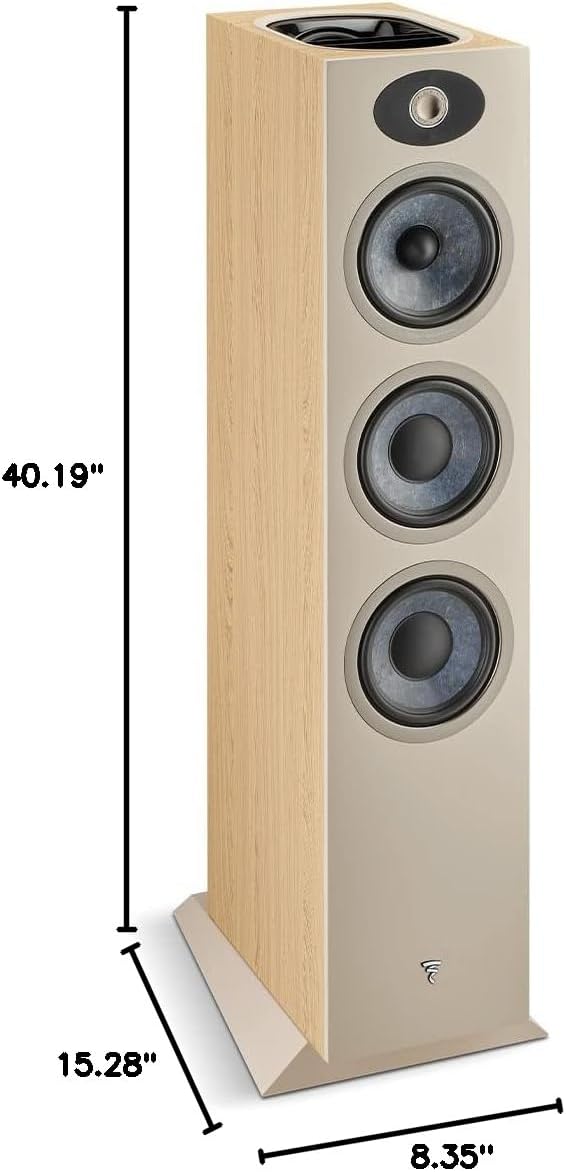
Figure 7: Dimensions diagram for the Focal Theva N°3-D loudspeaker, showing height (40.19"), depth (15.28"), and width (8.35").
10. Garantie et assistance
10.1 Informations sur la garantie
The Focal Theva N°3-D loudspeaker comes with a limited warranty. Please refer to the warranty card included with your product or visit the official Focal webConsultez le site pour connaître les conditions générales détaillées concernant la couverture, la durée et les procédures de réclamation.
10.2 Assistance clientèle
For technical assistance, troubleshooting beyond this manual, or warranty inquiries, please contact your authorized Focal dealer or visit the official Focal support website:
- Focal Website: www.focal.com
- Informations sur le revendeur : Refer to your purchase receipt or the Focal website to locate an authorized dealer near you.


