1. Introduction
Merci pour votre achatasing the SOAR XL ShockBox BTH6 Wireless Bluetooth Speaker. This speaker is designed to provide high-quality audio with versatile connectivity options, including Bluetooth 5.0, AM/FM radio, USB, and Aux inputs. Its portable and shockproof design, combined with dynamic multicolor LED lights, makes it suitable for various environments. Please read this manual carefully to ensure proper use and maintenance of your device.
2. Produit terminéview
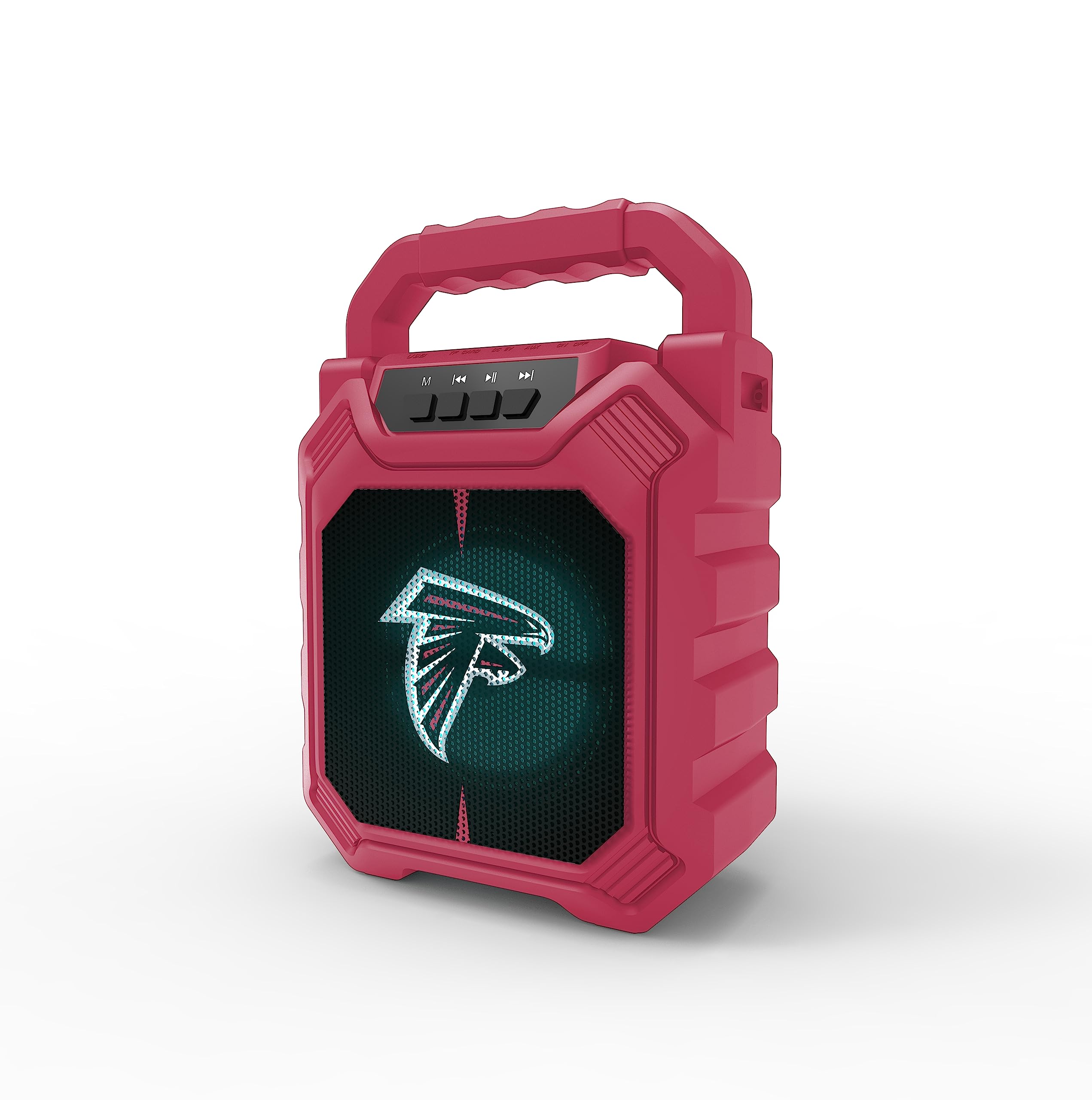
Illustration 1 : Avant view of the SOAR XL ShockBox BTH6 Wireless Bluetooth Speaker, featuring the Atlanta Falcons logo.
Caractéristiques principales :
- Connectivité Bluetooth 5.0 : For seamless wireless audio streaming.
- Plusieurs entrées audio : Supports AM/FM radio, USB, and Aux connections.
- Conception portable : Features a convenient top handle and shockproof construction.
- Longue durée de vie de la batterie : Provides over 5 hours of playback on a single charge.
- Lumières LED dynamiques : Multicolor LED lights pulse with the music.
- Véritable stéréo sans fil (TWS) : Connect two speakers for enhanced stereo sound.
3. Commandes et ports

Image 2: Top panel of the speaker, illustrating the control buttons and various input ports.
Fonctions des boutons :
- Bouton d'alimentation : Press and hold to turn the speaker ON/OFF. Short press to switch modes (Bluetooth, FM, USB, Aux).
- Bouton « M » (Mode) : Short press to cycle through input modes (Bluetooth, FM Radio, USB, Aux).
- Piste précédente / Baisser le volume : Short press for previous track (in Bluetooth/USB mode). Press and hold to decrease volume.
- Bouton Lecture/Pause : Short press to play or pause audio. In FM mode, short press to auto-scan and save stations.
- Piste suivante / Augmenter le volume : Short press for next track (in Bluetooth/USB mode). Press and hold to increase volume.
Ports d'entrée:
- Port de chargement micro-USB : Pour charger le haut-parleur.
- Port USB : Pour lire des fichiers audio depuis une clé USB.
- Aux-in Port (3.5mm): Pour connecter des périphériques audio externes via un câble auxiliaire.
- Emplacement pour carte MicroSD : For playing audio from a MicroSD card.
4. Configuration et fonctionnement
4.1 Chargement de l'enceinte
- Connect the provided micro-USB cable to the charging port on the speaker.
- Connectez l'autre extrémité du câble à un adaptateur secteur USB (non inclus) ou au port USB d'un ordinateur.
- Le voyant de charge s'allume. Une fois la charge complète, le voyant peut changer de couleur ou s'éteindre.
- A full charge provides over 5 hours of playback time.
4.2 Mise sous/hors tension
- To turn ON, press and hold the Power button until you hear an audible prompt.
- To turn OFF, press and hold the Power button again until the speaker powers down.
4.3 Couplage Bluetooth
- Allumez l'enceinte. Elle passera automatiquement en mode de couplage Bluetooth, indiqué par un voyant LED clignotant et un signal sonore.
- Sur votre appareil (smartphone, tablette, etc.), activez le Bluetooth et recherchez les appareils disponibles.
- Select "SOAR BTH6" from the list of devices.
- Une fois l'appairage effectué, l'enceinte émet une confirmation sonore et le voyant LED cesse de clignoter.
- L'enceinte se reconnectera automatiquement au dernier appareil apparié lors de sa mise sous tension, si cet appareil se trouve à portée et si le Bluetooth est activé.
Fonctionnement de la radio FM 4.4
- Turn on the speaker and press the 'M' (Mode) button until you enter FM Radio mode.
- Pour rechercher et mémoriser automatiquement les stations FM disponibles, appuyez brièvement sur le bouton Lecture/Pause. L'enceinte effectuera la recherche et la mémorisation automatiquement.
- Utilisez les boutons Piste précédente et Piste suivante pour naviguer entre les stations enregistrées.
4.5 USB and Aux Input
- Entrée USB: Insérez une clé USB dans le port USB. L'enceinte basculera automatiquement en mode USB et commencera à diffuser du son. files.
- Entrée auxiliaire: Connect an external audio device (e.g., MP3 player) to the Aux-in port using a 3.5mm audio cable. Press the 'M' button to switch to Aux mode.
4.6 modes d'éclairage LED

Image 3: The speaker displaying its dynamic LED lights in a vibrant setting.
The speaker features dynamic multicolor LED lights that pulse to the rhythm of the music. These lights activate automatically when the speaker is in use. There are no user-adjustable modes for the LED lights; they are designed to enhance the audio experience visually.
4.7 Couplage stéréo sans fil (TWS)

Image 4: Two SOAR XL ShockBox BTH6 speakers paired together for True Wireless Stereo (TWS) sound.
Pour obtenir une gamme de sons plus étenduetage, you can pair two SOAR XL ShockBox BTH6 speakers together using the TWS function:
- Ensure both speakers are turned OFF.
- Turn ON both speakers. They will enter Bluetooth pairing mode.
- Sur l'une des enceintes (qui sera votre enceinte principale), appuyez deux fois sur le bouton « M » (Mode). Les enceintes tenteront de se connecter entre elles.
- Once successfully paired, you will hear an audible confirmation. The LED lights on both speakers will synchronize.
- Connectez maintenant votre appareil à l'enceinte principale via Bluetooth comme décrit dans la section 4.3. Le son sera diffusé en stéréo sur les deux enceintes.
5. Entretien
- Nettoyage: Utilisez un chiffon doux et sec pour nettoyer l'extérieur du haut-parleur. N'utilisez pas de nettoyants abrasifs ni de solvants.
- Stockage: Rangez l'enceinte dans un endroit frais et sec, à l'abri de la lumière directe du soleil et des températures extrêmes.
- Entretien de la batterie: Pour prolonger la durée de vie de la batterie, rechargez régulièrement l'enceinte, même si vous ne l'utilisez pas fréquemment. Évitez de décharger complètement la batterie pendant une période prolongée.
- Résistance à l'eau : While designed to be durable, avoid submerging the speaker in water.
6. Dépannage
| Problème | Solution possible |
|---|---|
| Le haut-parleur ne s'allume pas. | Ensure the battery is charged. Connect the speaker to a power source using the micro-USB cable. |
| Impossible de coupler via Bluetooth. | Make sure the speaker is in Bluetooth mode and within range (approx. 10 meters). Turn off and on your device's Bluetooth. Forget "SOAR BTH6" from your device's Bluetooth list and try pairing again. |
| Aucun son ou volume faible. | Vérifiez le volume de l'enceinte et de votre appareil connecté. Assurez-vous que le mode d'entrée approprié est sélectionné. |
| La réception radio FM est mauvaise. | Adjust the speaker's position. Ensure you are in an area with good signal strength. |
| L'appairage TWS a échoué. | Ensure both speakers are fully charged and not connected to any other Bluetooth devices. Follow the TWS pairing steps carefully. |
7. Spécifications
| Fonctionnalité | Détail |
|---|---|
| Numéro de modèle | BTH6 (Variant: NFL-BTH6-DLPH) |
| Version Bluetooth | 5.0 |
| Entrées audio | Bluetooth, AM/FM Radio, USB, Aux-in, MicroSD |
| Temps de jeu | Plus de 5 heures (par charge) |
| Port de chargement | Micro-USB |
| Fabricant | Groupe Prime Brands Inc. |
| Date de première disponibilité | 6 septembre 2023 |
8. Vidéo officielle du produit
Vidéo 1 : Une vidéo de présentation officielle du produitasing the features and dynamic LED lights of the SOAR BTH6 Wireless Bluetooth Speaker.
9. Garantie et assistance
For warranty information and customer support, please refer to the documentation included with your product or contact the manufacturer, Prime Brands Group Inc., directly. Details regarding specific warranty periods and support procedures are typically provided at the point of purchase or on the manufacturer's official website.


