Introduction
This manual provides detailed instructions for the assembly, operation, maintenance, and troubleshooting of your LITFAD Contemporary Office Desk. Please read this manual thoroughly before beginning assembly or use to ensure proper setup and safe operation.

Image: The LITFAD Contemporary Office Desk, featuring a solid wood top and black metal frame, shown in an office environment with a laptop.
Consignes de sécurité
Pour votre sécurité et afin d'éviter d'endommager le produit, veuillez respecter les consignes suivantes :
- Always follow the assembly instructions carefully and in the order provided.
- Ensure all fasteners are securely tightened before using the desk.
- Do not exceed the designated weight limit of the desk.
- This desk is designed for use as a computer desk, study table, or general office workspace. Avoid using it for purposes other than its intended design.
- Gardez les petites pièces hors de portée des enfants pendant l'assemblage.
Ce qui est inclus
Before starting assembly, verify that all components are present:
- 1 x Table (Desk Top and Frame Components)
- 1 x Assembly Tool Kit (includes necessary wrenches/screwdrivers)
- 1 x Manuel d'instructions (ce document)
Si des pièces sont manquantes ou endommagées, veuillez contacter immédiatement le service client.
Configuration et assemblage
The LITFAD Contemporary Office Desk requires simple assembly. It is recommended to assemble the desk in the room where it will be used. Clear a spacious area and lay out all components on a soft, clean surface to prevent scratches.
- Déballer les composants : Carefully remove all parts from the packaging. Check against the 'What's Included' list.
- Assemblage du cadre : Attach the metal frame components using the provided screws and assembly tools. Ensure all connections are firm but do not overtighten initially.
- Fixer le plateau de bureau : Secure the solid wood desk top to the assembled frame. Align pre-drilled holes and fasten with the appropriate screws.
- Installer les tiroirs : If your model includes drawers, install the drawer slides and then the drawer units into the designated slots. Ensure smooth operation.
- Serrage final : Once all components are in place, systematically tighten all screws and fasteners. Do not overtighten to avoid stripping threads or damaging wood.
- Bureau de poste : Déplacez avec précaution le bureau assemblé à l'endroit souhaité.

Image: Detail of the three-tier drawers, highlighting their construction and handles, which are part of the desk's storage solution.
Mode d'emploi
Your LITFAD Contemporary Office Desk is designed for versatile use in various settings:
- Espace de travail : La grande table offre ample space for laptops, desktop computers, monitors, keyboards, and other office essentials.
- Stockage: Utilize the three-tier drawers to organize and store documents, stationery, books, and personal items, helping to keep your workspace tidy.
- Placement: Suitable for placement in bedrooms, living rooms, or dedicated office spaces. Ensure the desk is placed on a level surface to maintain stability.
Entretien et soins
Pour assurer la longévité et l'apparence de votre bureau, suivez ces conseils d'entretien :
- Nettoyage: Essuyez régulièrement la surface du bureau avec un chiffon doux et sec.amp cloth. For stubborn marks, use a mild wood cleaner. Avoid abrasive cleaners or harsh chemicals that can damage the wood finish.
- Déversements : Immediately wipe up any spills to prevent water damage or staining, especially on the solid wood top.
- Protection: Utilisez des sous-verres pour les boissons et des sets de table pour les plats chauds afin de protéger la surface de la chaleur et des traces d'humidité.
- Fixations : Vérifiez régulièrement le serrage de toutes les vis et fixations. Resserrer si nécessaire.
- Soleil: Évitez toute exposition prolongée à la lumière directe du soleil, qui peut entraîner une décoloration du bois.
Dépannage
Si vous rencontrez des problèmes avec votre bureau, voici quelques solutions courantes à considérer :
- Bureau oscillant :
- Ensure the desk is on a level surface. Adjust floor glides if present, or place shims under the legs if needed.
- Vérifiez toutes les vis et tous les boulons d'assemblage. Resserrer les fixations desserrées.
- Tiroirs qui coincent :
- Verify that the drawer slides are correctly installed and free of obstructions.
- Veillez à ne pas surcharger les tiroirs.
- Rayures/Bosses :
- Minor scratches on wood can sometimes be touched up with wood repair markers or polishes. For significant damage, professional repair may be required.
If the problem persists, please contact LITFAD customer support.
Caractéristiques
| Marque | LITFAD |
| Numéro de modèle | LT975484D-180 |
| Dimensions (L x l x H) | 70.9 po x 27.6 po x 29.5 po (180 cm x 70 cm x 75 cm) |
| Matériel | Solid Wood (Top), Wood (Base), Metal (Frame) |
| Couleur | Dark Brown (Top), Black (Frame) |
| Nombre de tiroirs | 3 |
| Assemblage requis | Oui |
| Hauteur réglable | Non |
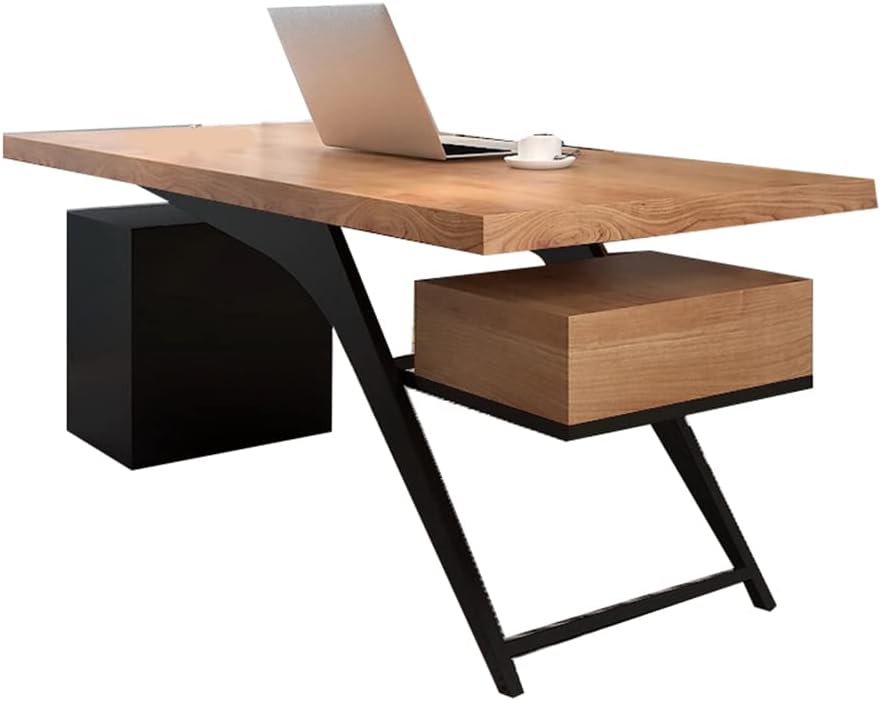
Image: Dimensional diagram of the desk, indicating its length (71"/180cm), width (27.6"/70cm), and height (29.5"/75cm).
Informations sur la garantie
LITFAD products are manufactured with quality and durability in mind. For specific warranty details regarding your Contemporary Office Desk, please refer to the warranty card included in your packaging or visit the official LITFAD website. Typically, our products come with a limited warranty covering manufacturing defects from the date of purchase.
This warranty does not cover damage resulting from improper assembly, misuse, neglect, accidents, or normal wear and tear.
Assistance clientèle
If you have any questions, require assistance with assembly, or need to report missing/damaged parts, please contact LITFAD customer support:
- En ligne: Visitez le LITFAD Store on Amazon Pour consulter la FAQ et les options de contact.
- E-mail: Refer to your product packaging or the official LITFAD website pour obtenir une assistance directe par courriel.
Please have your model number (LT975484D-180) and purchase date ready when contacting support.


