1. Introduction
Merci pour votre achatasing the LFF LDR113-EU Kitchen Radio. This manual provides essential information for the safe and efficient operation of your device. Please read it thoroughly before use and retain it for future reference.
The LFF LDR113-EU is a versatile kitchen radio featuring DAB+, FM, and Bluetooth connectivity. It includes dual alarms, a sleep timer, and 60 station presets, designed for both tabletop use and under-cabinet mounting.
2. Consignes de sécurité
- Source d'alimentation : Utilisez uniquement l'adaptateur secteur fourni. Assurez-vous que le volumetage correspond à votre alimentation électrique locale.
- Eau et humidité : Do not expose the device to water, rain, or excessive moisture. Avoid placing liquids near the radio.
- Ventilation: Assurez une ventilation adéquate autour de l'appareil. Ne bloquez pas les ouvertures de ventilation.
- Chaleur: Tenez l'appareil éloigné des sources de chaleur telles que les radiateurs, les bouches de chauffage, les poêles ou autres appareils produisant de la chaleur.
- Nettoyage: Débranchez l'appareil avant de le nettoyer. Utilisez un chiffon doux et sec. N'utilisez pas de nettoyants liquides ni d'aérosols.
- Entretien: N'essayez pas de réparer vous-même ce produit. Confiez tous les travaux d'entretien à du personnel de service qualifié.
- Placement: Place the radio on a stable, level surface or mount it securely according to the instructions.
3. Contenu du colis
Veuillez vérifier que tous les articles sont présents dans le colis :
- LFF LDR113-EU Kitchen Radio
- Adaptateur secteur
- Mounting Kit (screws, spacers, mounting template)
- Manuel de l'utilisateur (ce document)
4. Produit terminéview
Familiarisez-vous avec les composants et les commandes de la radio.

Figure 4.1 : Devant view of the LFF LDR113-EU Kitchen Radio, showing the LCD display on the left, control buttons in the center, and a large rotary knob on the right. The buttons include power, mode, menu, info, preset, timer/sleep, and navigation arrows. The rotary knob is for volume and selection.

Figure 4.2 : Diagram illustrating the key features of the LFF Kitchen Radio, including DAB/DAB+ radio, FM radio, two alarms, sleep timer, Bluetooth connectivity, and 60 station presets.
4.1. Commandes et affichage
- Écran couleur LCD : Affiche le mode actuel, les informations sur la station, l'heure et les paramètres.
- Bouton d'alimentation : Allume/éteint la radio.
- Bouton Mode : Permet de basculer entre les modes DAB+, FM et Bluetooth.
- Bouton Menu/Info : Accesses menu options or displays station information.
- Boutons préréglés (1-5) : Accès rapide aux stations enregistrées.
- Bouton Minuterie/Veille : Sets sleep timer or alarm functions.
- Boutons de navigation (haut/bas/gauche/droite) : Navigates through menus and station lists.
- Rotary Knob (Volume/Enter): Adjusts volume, scrolls through options, and confirms selections.
5. Installation
5.1. Connexion électrique
- Branchez l'adaptateur secteur au port DC IN situé à l'arrière de la radio.
- Branchez l’adaptateur secteur sur une prise murale.
- La radio s'allumera ou passera en mode veille.
5.2. Initial Scan (DAB+ and FM)
Upon first power-on, the radio will typically perform an automatic scan for DAB+ and FM stations. If not, follow these steps:
- Appuyez sur le Mode button to select DAB+ or FM mode.
- For DAB+, the radio will usually initiate a full scan automatically. If not, navigate to the 'Full Scan' option in the DAB+ menu and press the rotary knob to confirm.
- For FM, navigate to the 'Auto Scan' option in the FM menu and press the rotary knob to confirm.
- The radio will search for available stations and store them.

Figure 5.1 : The LFF Kitchen Radio's LCD color screen displaying the main menu with icons for Digital Radio (DAB+), FM Radio, and Bluetooth, indicating available modes.
6. Mode d'emploi
6.1. Marche/Arrêt
Appuyez sur le Pouvoir button to turn the radio on or off (standby mode).
6.2. Sélection du mode
Appuyez sur le Mode button repeatedly to cycle through DAB+, FM, and Bluetooth modes.
6.3. Fonctionnement de la radio DAB+
- In DAB+ mode, use the Haut/Bas navigation buttons or the rotary knob to browse available stations.
- Press the rotary knob to select a station.
- Presse Menu/Infos à view informations sur la station (par exemple, type de programme, force du signal).
6.4. Fonctionnement de la radio FM
- En mode FM, utilisez le Haut/Bas navigation buttons to tune to stations manually.
- Appuyez et maintenez enfoncé le Haut/Bas boutons pour la recherche automatique des stations.
- Presse Menu/Infos à view informations sur la gare.
6.5. Connectivité Bluetooth
Connect your smartphone or other Bluetooth-enabled device to the radio.
- Appuyez sur le Mode Appuyez sur le bouton pour sélectionner le mode Bluetooth. L'écran affichera « Appairage Bluetooth ».
- Sur votre appareil mobile, activez Bluetooth et recherchez les appareils disponibles.
- Select 'LFF LDR113-EU' from the list of devices.
- Once connected, the radio display will show 'Bluetooth Connected'. You can now play audio from your device through the radio.
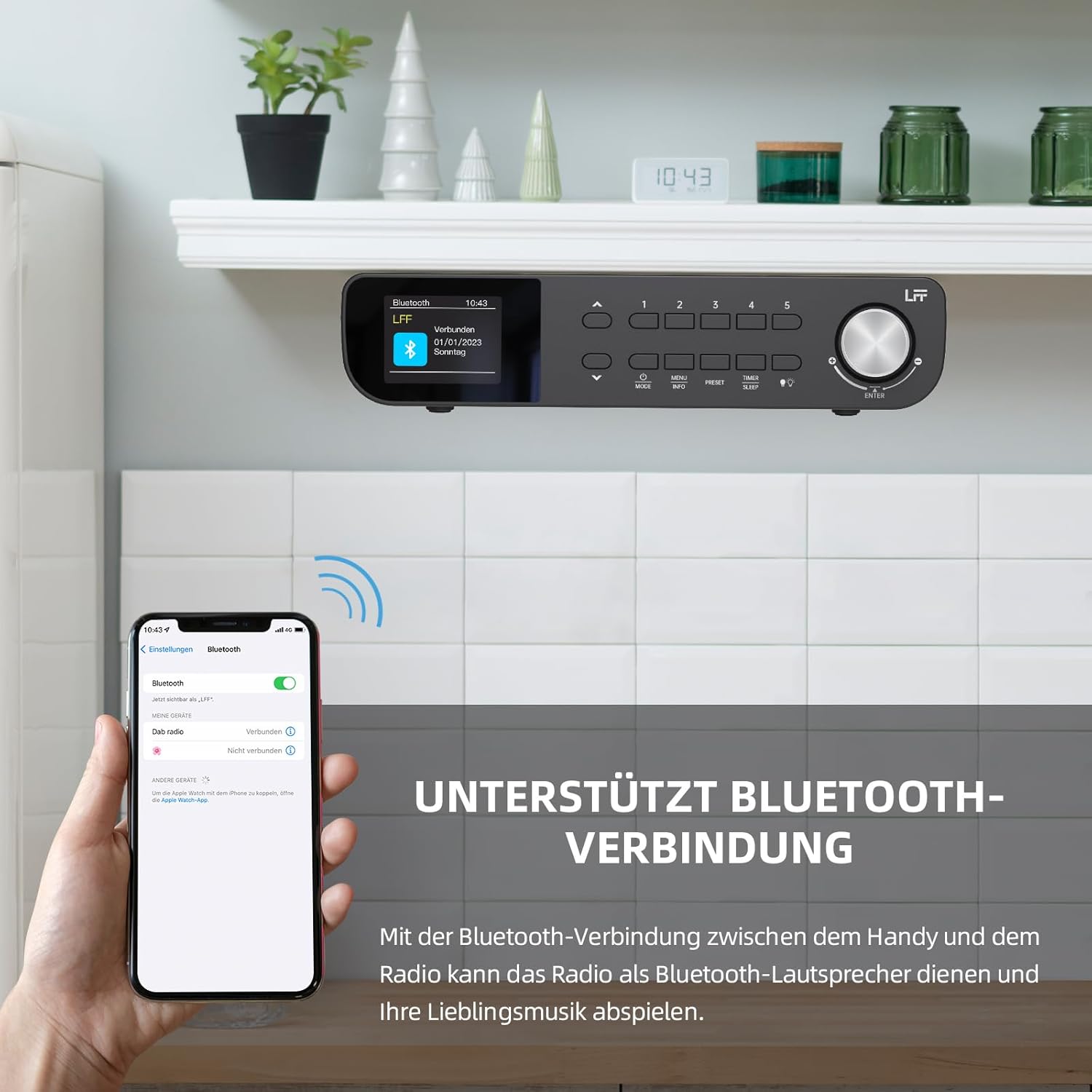
Figure 6.1 : The LFF Kitchen Radio displaying a successful Bluetooth connection, with a smartphone screen showing the radio as a connected device.

Figure 6.2 : Gros plan view of the radio's display indicating 'LFF' and 'Connected' under the Bluetooth menu, confirming a successful pairing.
6.6. Réglage des alarmes
La radio est équipée de deux alarmes indépendantes.
- Appuyez sur le Minuterie/Veille button repeatedly until 'Alarm 1' or 'Alarm 2' appears.
- Use the navigation buttons and rotary knob to set the alarm time, source (DAB+, FM, or Buzzer), and frequency (daily, weekdays, weekends, once).
- Confirm settings by pressing the rotary knob.

Figure 6.3 : Close-up of the radio's display showing the current time and options to activate or deactivate Alarm 1 and Alarm 2.
6.7. Minuterie de veille
La minuterie de mise en veille permet à la radio de s'éteindre automatiquement après une période définie.
- Appuyez sur le Minuterie/Veille button repeatedly until 'Sleep Timer' appears.
- Use the navigation buttons or rotary knob to select the desired sleep duration (e.g., 15, 30, 60 minutes).
- Confirmez en appuyant sur le bouton rotatif.

Figure 6.4 : Close-up of the radio's display showing the 'Sleep Timer' setting, with an option to set the duration, for example, to 30 minutes.
6.8. Préréglages
Enregistrez jusqu'à 60 stations favorites pour un accès rapide.
- Pour enregistrer un préréglage : Syntonisez la station souhaitée. Appuyez sur l'une des touches et maintenez-la enfoncée. Préréglage (1-5) buttons until 'Preset Saved' appears. For additional presets, use the 'Preset Store' option in the menu.
- Pour rappeler un préréglage : Appuyez brièvement sur l'un des Préréglage (1-5) buttons. For other presets, navigate to 'Preset Recall' in the menu.
6.9. Lumière LED
The radio includes an integrated LED light, useful for illuminating the area below if mounted under a cabinet.
- Appuyez sur le Lumière button (if available, or navigate through menu) to turn the LED light on or off.

Figure 6.5 : The LFF Kitchen Radio mounted under a kitchen cabinet, with its integrated LED light providing illumination to the countertop below.
6.10. Luminosité de l'affichage
Adjust the display backlight brightness to suit your environment.
- Access the 'Display' or 'Settings' menu.
- Select 'Brightness' and choose from High, Medium, or Low settings.

Figure 6.6 : A visual comparison of the LFF Kitchen Radio's display at three different backlight brightness levels: High, Medium, and Low, demonstrating the adjustable visibility.
7. Instructions de montage
The LFF LDR113-EU Kitchen Radio offers flexible placement options: tabletop or under-cabinet mounting.
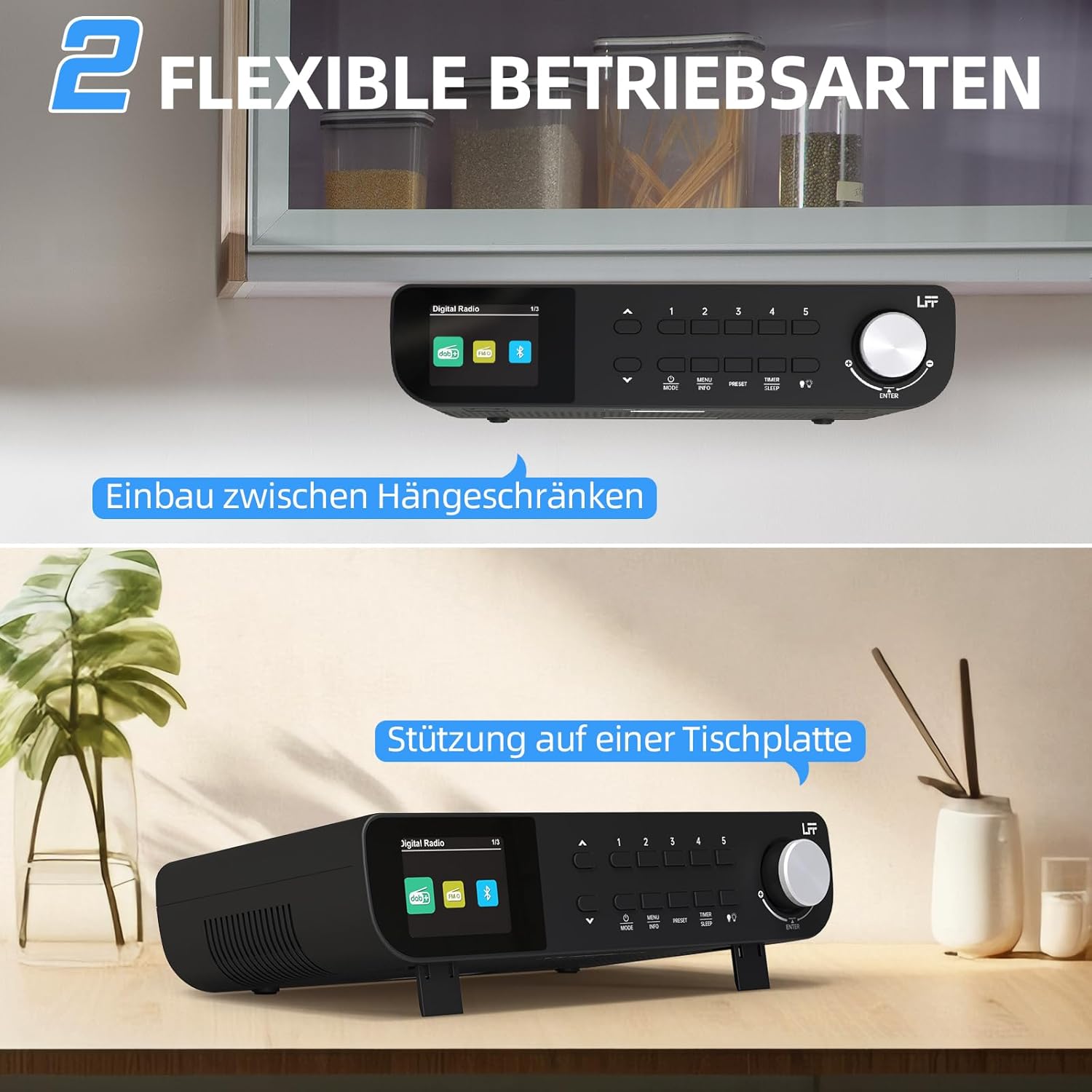
Figure 7.1 : The LFF Kitchen Radio displayed in two common installation scenarios: mounted underneath a kitchen cabinet and placed freestanding on a tabletop.
7.1. Tabletop Placement
Simply place the radio on a stable, flat surface. Ensure it is not near the edge to prevent accidental falls.
7.2. Under-Cabinet Mounting
For under-cabinet installation, use the provided mounting kit.
- Préparer le lieu : Choose a suitable location under a kitchen cabinet, ensuring there is enough space and access to a power outlet.
- Marquer les trous de perçage : Use the provided mounting template to mark the drill holes on the underside of the cabinet.
- Percer des trous pilotes : Percez des avant-trous aux emplacements marqués.
- Attach Mounting Plate (if applicable): Some models may include a separate mounting plate. Attach this to the cabinet using the screws.
- Secure the Radio: Align the radio with the mounting holes or plate and secure it using the provided screws. Ensure it is firmly attached.
- Connecter l'alimentation : Branchez l'adaptateur secteur.

Figure 7.2 : Detailed diagram showing the steps for under-cabinet mounting, including measuring distances (e.g., 58mm) and securing the radio with screws.
8. Entretien
- Nettoyage: To clean the radio, disconnect it from the power supply. Use a soft, dry, lint-free cloth. Do not use abrasive cleaners, waxes, or solvents.
- Antenne: Ensure the antenna is extended for optimal reception in DAB+ and FM modes. Handle it gently to avoid damage.
- Stockage: If storing the radio for an extended period, disconnect it from power and store it in a cool, dry place.
9. Dépannage
| Problème | Cause possible | Solution |
|---|---|---|
| Pas de courant | Adaptateur secteur non connecté ou prise défectueuse. | Vérifiez le branchement électrique. Essayez une autre prise. |
| Mauvaise réception DAB+/FM | Antenne non déployée, signal faible ou interférences. | Fully extend the antenna. Reposition the radio. Perform a full scan. |
| Bluetooth ne se connecte pas | Radio not in pairing mode, device too far, or already connected to another device. | Ensure radio is in Bluetooth mode. Move device closer. Disconnect from other devices. |
| Pas de son | Volume too low, mute activated, or incorrect mode. | Increase volume. Check if mute is active. Ensure correct mode (DAB+, FM, Bluetooth). |
| L'affichage ne fonctionne pas | Brightness too low or device malfunction. | Adjust display brightness. If problem persists, contact support. |
10. Spécifications

Figure 10.1 : Diagram showing the dimensions of the LFF Kitchen Radio: 250mm length, 146mm width, and 55mm height.
| Fonctionnalité | Détail |
|---|---|
| Marque | Prolongation LFF |
| Numéro de modèle | LDR113-UE |
| Couleur | Noir |
| Connectivité | Bluetooth |
| Technologie de réglage | DAB Plus, FM |
| Source d'énergie | Câble électrique |
| Fréquence | 108 MHz (FM max) |
| Dimensions (L x l x H) | 250 mm x 146 mm x 55 mm |
| Préréglages | 60 |
| Afficher | Écran couleur LCD |
| Caractéristiques spéciales | Dual Alarms, Sleep Timer, Under-cabinet mounting option, LED Light |
11. Garantie et assistance
This product comes with a standard manufacturer's warranty. Please refer to the warranty card included in your package for specific terms and conditions. For technical support, troubleshooting assistance, or warranty claims, please contact your retailer or the LFF customer service department.


