1. Introduction
This manual provides detailed instructions for the amazon basics Wired Gaming Mouse, Model ABIM03. This mouse is designed to enhance your gaming and computing experience with its adjustable DPI, customizable RGB lighting, and programmable buttons. Please read this manual thoroughly before use to ensure proper operation and longevity of your device.
2. caractéristiques du produit
- DPI réglable : Up to 6400 DPI for precise cursor control and quick movements.
- Éclairage RVB personnalisable : Personalize your mouse with various RGB lighting modes and driver customization options for PC.
- Boutons programmables : Equipped with multiple programmable buttons for assigning custom functions or macros.
- Gaming-Grade Sensor: Ensures accurate tracking and rapid response for gaming.
- Conception durable : Features extra durable switches and enhanced build quality for extended use.
- Honeycomb Grip: Ergonomic honeycomb design provides a comfortable and secure grip.

Image: The amazon basics Wired Gaming Mouse highlighting its adjustable DPI settings, ranging from 1200 to 7200 (though product states up to 6400).
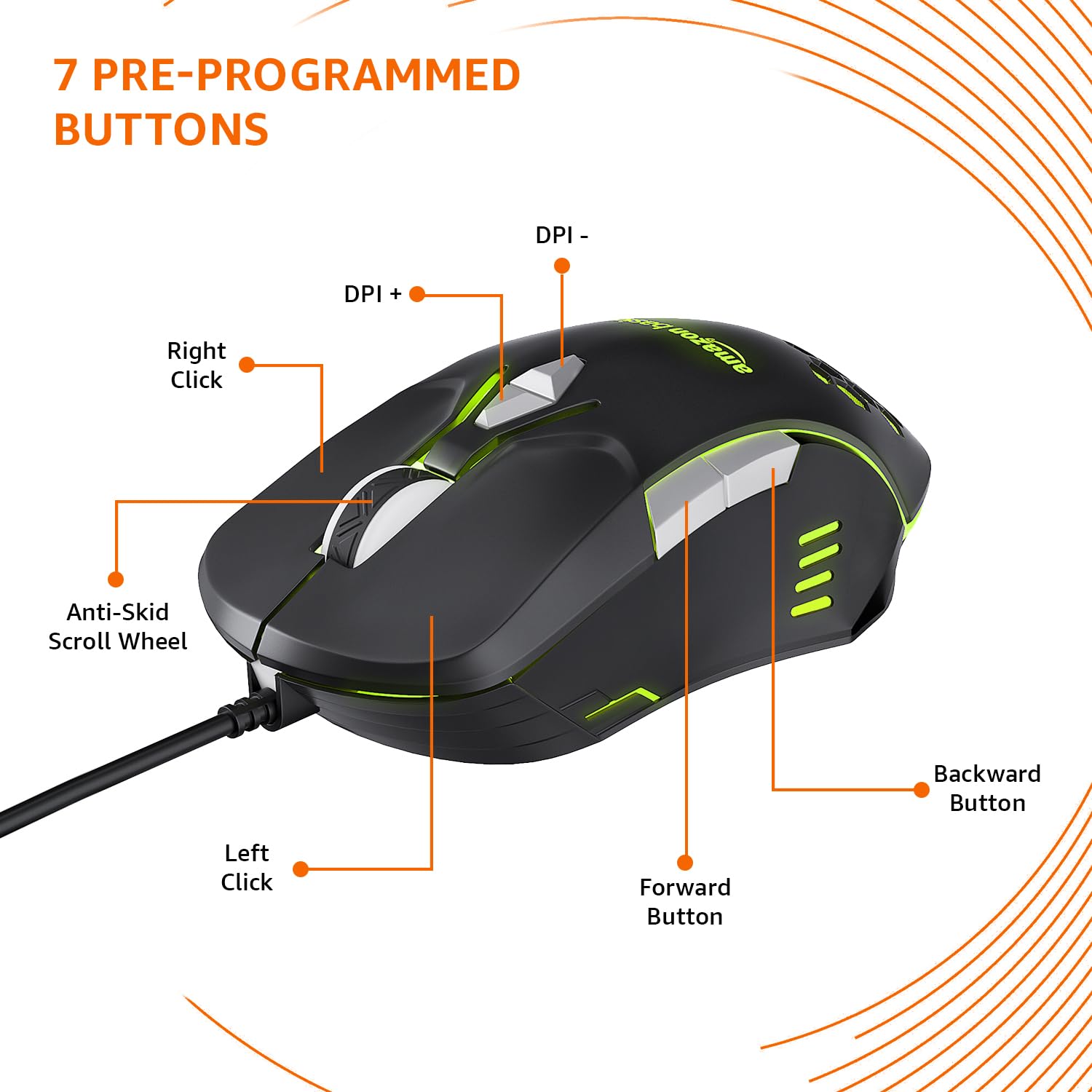
Image: The amazon basics Wired Gaming Mouse showing its 7 pre-programmed buttons, including Left Click, Right Click, Anti-Skid Scroll Wheel, DPI+, DPI-, Forward Button, and Backward Button.

Image : Vue de dessus view of the amazon basics Wired Gaming Mouse, emphasizing its honeycomb-designed surface for improved grip and airflow.

Image: The amazon basics Wired Gaming Mouse illuminated with red RGB lighting, showcasing its light and comfortable design.
3. Instructions de configuration
- Déballez la souris : Carefully remove the gaming mouse from its packaging.
- Se connecter au PC : Branchez le connecteur USB de la souris sur un port USB disponible de votre ordinateur.
- Installation du pilote : Your operating system (Windows, Linux) should automatically detect and install the necessary drivers. If prompted, follow the on-screen instructions. For advanced customization of RGB and programmable keys, refer to the manufacturer's website for specific driver software.
- Placement: Pour des performances optimales, placez la souris sur une surface plane et propre ou sur un tapis de souris.
4. Mode d'emploi
4.1 Fonctionnalité de base
- Click gauche: Action principale, sélection.
- Clic-droit: Action secondaire, menus contextuels.
- Molette: Scroll up/down pages. Pressing the scroll wheel often acts as a middle click.
- Boutons Suivant/Précédent : Généralement utilisé pour la navigation dans web navigateurs ou file explorateurs.
4.2 Réglage du DPI (points par pouce)
The mouse features dedicated DPI adjustment buttons (DPI+ and DPI-) to change cursor sensitivity on the fly. Press these buttons to cycle through different DPI levels up to 6400. A higher DPI setting results in faster cursor movement across the screen with less physical mouse movement.
4.3 Customizing RGB Lighting
The mouse includes customizable RGB lighting. Specific lighting modes can often be cycled through using a dedicated button (if present) or through the optional driver software. Refer to the driver software for advanced customization options, including color selection, effects, and brightness.
4.4 Boutons de programmation
The mouse is equipped with programmable buttons. To assign custom functions, macros, or key combinations to these buttons, you will need to install and use the specific driver software provided by the manufacturer. This software typically allows you to create profiles pour différentes applications ou jeux.
Video: A short product highlight video demonstrating the key features of the amazon basics Wired Gaming Mouse, including adjustable DPI, RGB lighting, programmable buttons, and durable design.
5. Entretien
- Nettoyage: Utilisez un chiffon doux et sec pour nettoyer l'extérieur de la souris. Pour les saletés tenaces, un chiffon légèrement plus sec peut être utile.amp Un chiffon peut être utilisé, en veillant à ce qu'aucun liquide ne pénètre dans la souris.
- Nettoyage du capteur : De temps en temps, utilisez un coton-tige pour tamponner légèrement.ampened with isopropyl alcohol to gently clean the optical sensor on the underside of the mouse. Ensure the mouse is disconnected before cleaning.
- Évitez les liquides : Do not immerse the mouse in water or any cleaning solutions.
- Stockage: Conservez la souris dans un endroit frais et sec, à l'abri de la lumière directe du soleil et des températures extrêmes.
6. Dépannage
| Problème | Solution |
|---|---|
| La souris ne répond pas. |
|
| Le mouvement du curseur est erratique ou saccadé. |
|
| Programmable buttons are not working. |
|
| L'éclairage RGB ne fonctionne pas ou est bloqué. |
|
7. Spécifications
| Fonctionnalité | Détail |
|---|---|
| Marque | notions de base sur Amazon |
| Numéro de modèle | ABIM03 |
| Technologie de connectivité | Filaire (USB) |
| Technologie de détection de mouvement | Optique |
| Plage DPI | Jusqu'à 6400 DPI |
| Touches programmables | 4 (in addition to standard left/right click and scroll) |
| Éclairage | RVB |
| Couleur | Noir |
| Poids de l'article | 145 g |
| Dimensions du produit (L x l x H) | 15.8 x 10.4 x 5.4 cm |
| Plateforme matérielle | PC |
| Compatibilité du système d'exploitation | Linux, Windows 7 and above |
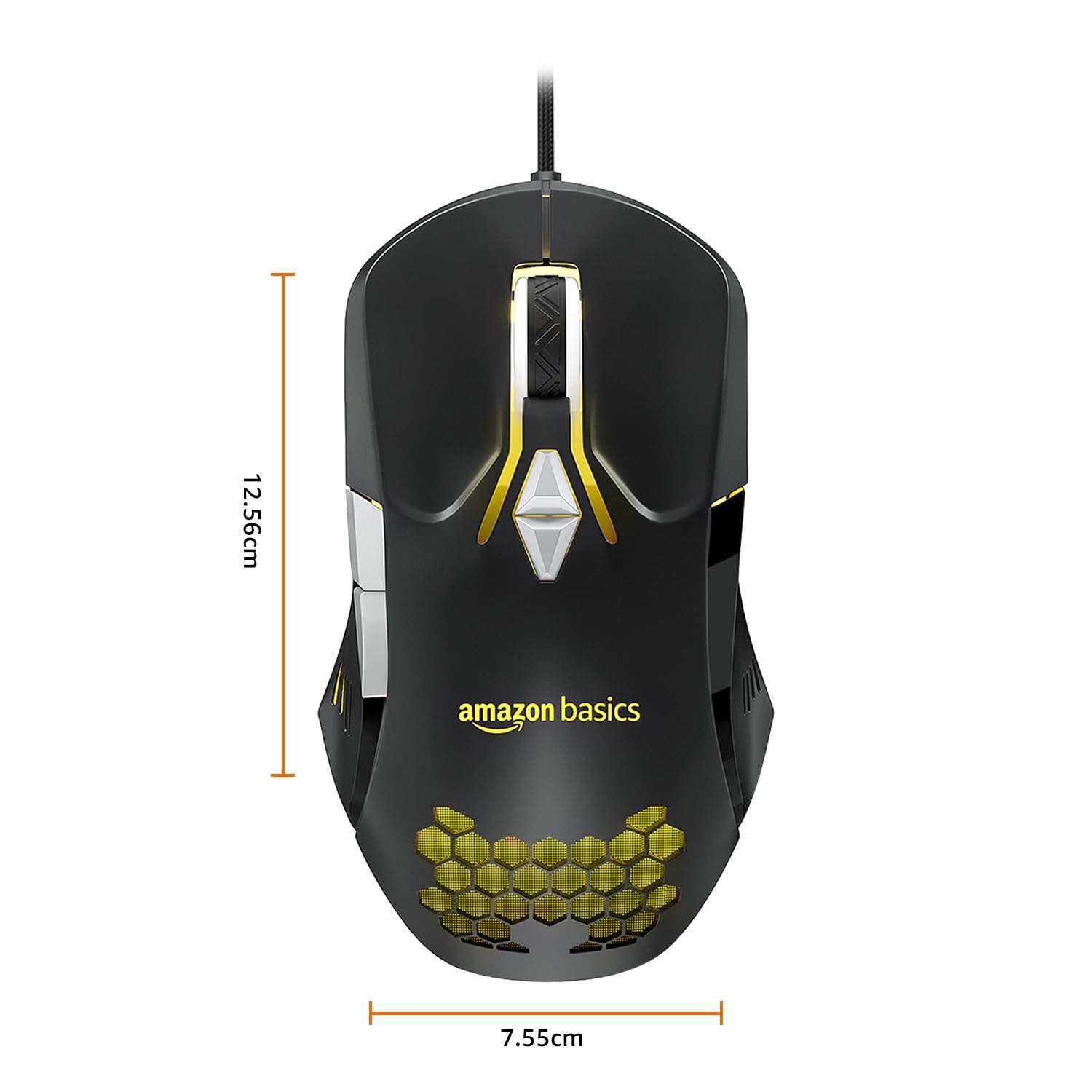
Image: The amazon basics Wired Gaming Mouse with its length (12.56cm) and width (7.55cm) dimensions indicated.
8. Informations sur la garantie
This amazon basics Wired Gaming Mouse comes with a Garantie de 1 ans from the date of purchase. This warranty covers manufacturing defects and issues arising from normal use. It does not cover damage caused by misuse, accidents, unauthorized modifications, or normal wear and tear. Please retain your proof of purchase for warranty claims.
9. Assistance
For further assistance, technical support, or warranty claims, please visit the official amazon basics support page or contact customer service through your purchase platform. Ensure you have your product model number (ABIM03) and proof of purchase ready when contacting support.
Ressources en ligne :
- Page produit: amazon.in/dp/B0BTD2YN6Y
- amazon basics Store: amazon basics Store


