Introduction
This manual provides detailed instructions for the safe and effective use of your MEIKEE 15W RGBW Landscape Lights Controller. Please read this manual thoroughly before installation and operation, and retain it for future reference.
Consignes de sécurité
- Ensure the power supply to the landscape lights is disconnected before installing or replacing the controller.
- This controller is designed for use with MEIKEE 15W RGBW landscape lights. Compatibility with other brands or wattages is not guaranteed.
- Do not expose the controller to extreme temperatures, direct sunlight for prolonged periods, or moisture.
- Gardez les piles hors de portée des enfants. En cas d'ingestion, consulter immédiatement un médecin.
- Jetez les piles usagées conformément aux réglementations locales.
Installation
1. Installation de la batterie
The MEIKEE RF Remote Control requires two (2) AAA batteries (not included) for operation.
- Localisez le compartiment à piles à l'arrière de la télécommande.
- Faites glisser le couvercle du compartiment à piles pour l'ouvrir.
- Insérez deux piles AAA en veillant à respecter la polarité (+ et -) indiquée à l'intérieur du compartiment.
- Fermez soigneusement le couvercle du compartiment à piles.

Image: MEIKEE RF Remote Control showing the back panel for battery installation.
2. Connecting to Landscape Lights
This RF remote control is designed to wirelessly control compatible MEIKEE 15W RGBW landscape lights. Ensure your landscape lights are properly installed and powered on. The remote operates via radio frequency, allowing control without direct line-of-sight, up to a maximum sensing distance of 12 meters (39.3 feet).
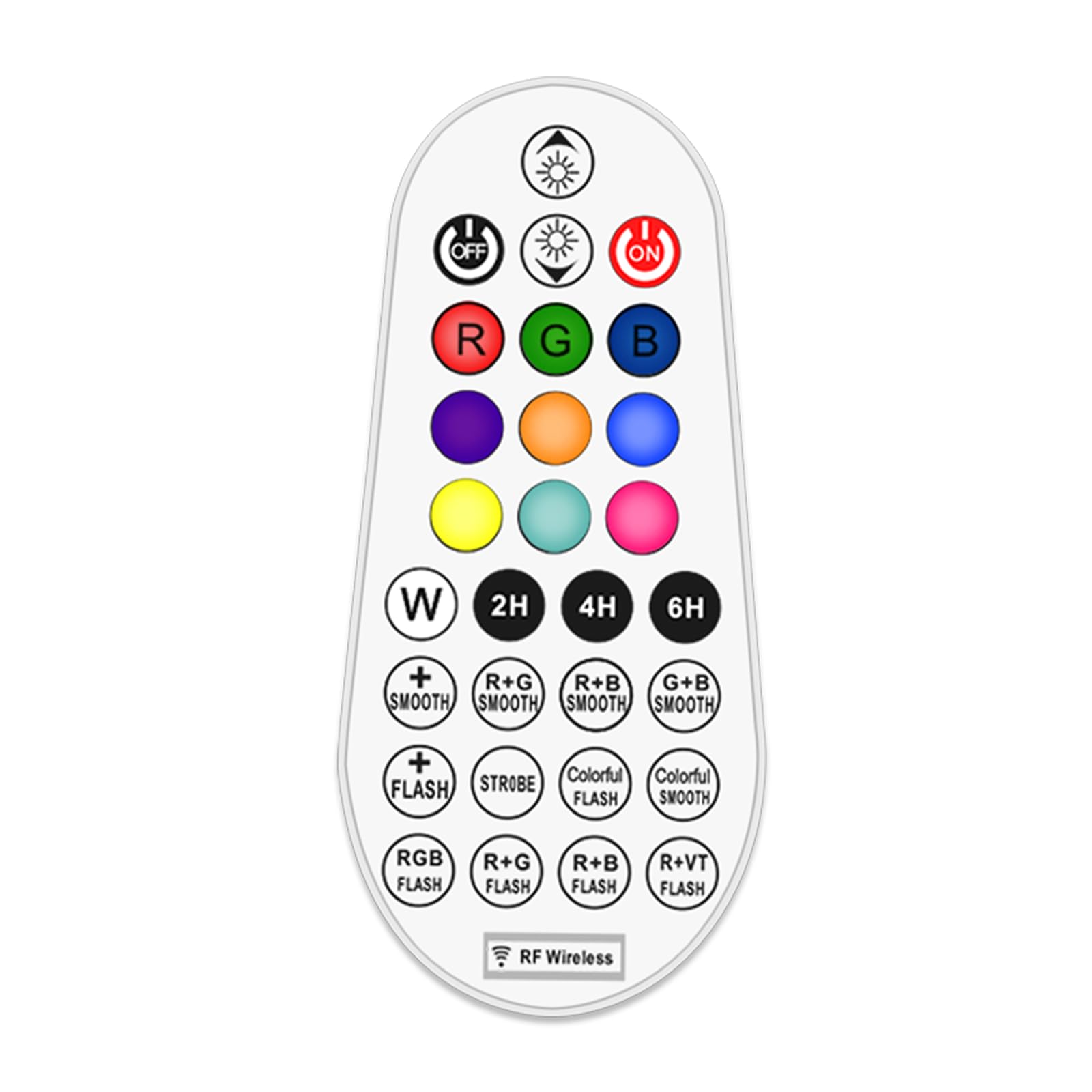
Image: Illustration of the remote control's effective range and application with landscape lights, showing a 360-degree signal.
Mode d'emploi
The 29-key remote control allows for comprehensive management of your MEIKEE RGBW landscape lights. Familiarize yourself with the button layout and functions below.

Image : Schéma détaillé des boutons de la télécommande et de leurs fonctions correspondantes.
Fonctions de la télécommande :
- Marche/Arrêt : Appuyez sur le ON button to turn lights on, and DÉSACTIVÉ bouton pour éteindre les lumières.
- Réglage de la luminosité/vitesse : Utilisez le Luminosité + et Luminosité - buttons to adjust light intensity. In dynamic modes, these buttons control the speed of the effect.
- Sélection de couleur :
- Boutons RGBW : Presse R for Red, G for Green, B for Blue, and W for White.
- Couleurs prédéfinies : Select from 10 single colors including Cyan, Purple, Indigo, Orange, Yellow, and Magenta using the dedicated color buttons.
- Modes dynamiques :
- Monochrome SMOOTH: Smooth transition for a single selected color.
- Monochrome FLASH: Flashing effect for a single selected color.
- 10 Automatic Color Changing Modes: Select from various pre-programmed color changing sequences with adjustable speed. These include R+G SMOOTH, R+B SMOOTH, G+B SMOOTH, STROBE, COLORFUL FLASH, COLORFUL SMOOTH, RGB FLASH, R+G FLASH, R+B FLASH, R+VT FLASH.
- Fonction de synchronisation : Set the lights to automatically turn off after a specified duration. Press 2H for 2 hours, 4H for 4 hours, or 6H pendant 6 heures.
- Fonction mémoire : The controller remembers your last light setting (color, brightness, mode) when turned off and will resume that setting when turned back on.

Image: Visual representation of the 10 single color modes and 10 automatic color changing modes available.

Image : Examples of 10 single color outputs and various brightness levels for the landscape spotlights.

Image: Visual explanation of the memory function (retains last setting) and timing function (auto-off after 2/4/6 hours).
Entretien
Remplacement de la batterie
When the remote control's range decreases or buttons become unresponsive, it is likely time to replace the batteries. Follow the battery installation steps outlined in the "Setup" section.
- Remplacez toujours les deux piles AAA en même temps.
- Use new, high-quality AAA alkaline batteries for optimal performance.
- Ne mélangez pas des piles anciennes et neuves, ou différents types de piles.
Nettoyage
Essuyez la télécommande avec un chiffon doux et sec. N’utilisez pas de produits nettoyants abrasifs et n’immergez pas la télécommande dans l’eau.
Dépannage
| Problème | Cause possible | Solution |
|---|---|---|
| La télécommande ne répond pas. |
|
|
| Lights not changing color or mode. |
|
|
| La fonction de minuterie ne fonctionne pas. |
|
|
Caractéristiques
- Marque: MEIKEE
- Modèle: Télécommande RF
- Méthode de contrôle : Remote Control (RF Wireless)
- Dossier spécial : 29-key RGBW color changing
- Source d'alimentation : Fonctionne sur piles (2 piles AAA non incluses)
- Couleur: RVB (rouge, vert, bleu)
- Dimensions de l'article (L xlxh): 2.36 x 0.91 x 2.84 pouces
- Poids de l'article : 0.704 onces (0.02 kilogrammes)
- Max Sensing Distance: 12 mètres (39.3 pieds)
- Fonctions: 10 single colors, 10 color changing modes, adjustable brightness, adjustable speed, timing function (2H/4H/6H), memory function.
- Date de mise en ligne sur Amazon : 6 janvier 2023
- Fabricant: MEIKEE
Garantie et assistance
For warranty information or technical support, please contact MEIKEE customer service through the retailer where the product was purchased or visit the official MEIKEE website. Please have your product model number (RF Remote Control) and purchase date available when contacting support.


