1. Introduction
This manual provides detailed instructions for the installation, operation, and maintenance of your SANSCO 8-channel 2K Home Security Camera System. This system is designed to provide comprehensive surveillance for your home or business, featuring 2MP HD cameras, an 8-channel DVR with a pre-installed 3TB hard drive, and remote access capabilities. Please read this manual thoroughly before setup and use to ensure proper functionality and safety.
2. Contenu du colis
Veuillez vérifier que tous les articles listés ci-dessous sont inclus dans votre colis. Si un article est manquant ou endommagé, veuillez contacter le service client.
- 1x DVR (Digital Video Recorder) with 3TB Hard Disk Drive preinstalled
- 8x HD Cameras (2MP)
- 8x 18.3m (60ft) Coaxial Cables for cameras
- 8x Screw sets for camera mounting
- Adaptateurs de puissance 3x
- 2x 4-way power splitters
- 1x 1M Ethernet cable
- 1x souris USB
- 1x Guide d'installation rapide

3. Installation
3.1 Connexion de votre système
Follow these steps to connect the main components of your security system:
- Connecter les caméras : Attach each camera to the DVR using the provided coaxial cables. Connect the BNC connector from the camera cable to the 'VIDEO IN' ports (V1-V8) on the back of the DVR.
- Caméras puissantes : Use the 4-way power splitters and power adapters to supply power to the cameras. Connect the power cables from the cameras to the splitter, and then connect the splitter to a power adapter, which plugs into a wall outlet.
- Connect Monitor/TV: Connect the DVR to a monitor or TV using either an HDMI cable (for HD display) or a VGA cable. Ensure your display device supports at least 1080p resolution for optimal viewing.
- Connecter la souris : Branchez la souris USB sur l'un des ports USB du DVR pour la navigation.
- Connexion au réseau (facultatif) : For remote access features, connect the DVR to your router using the provided Ethernet cable.
- Enregistreur numérique de puissance : Connect the DVR's power adapter to the DVR and then to a wall outlet.
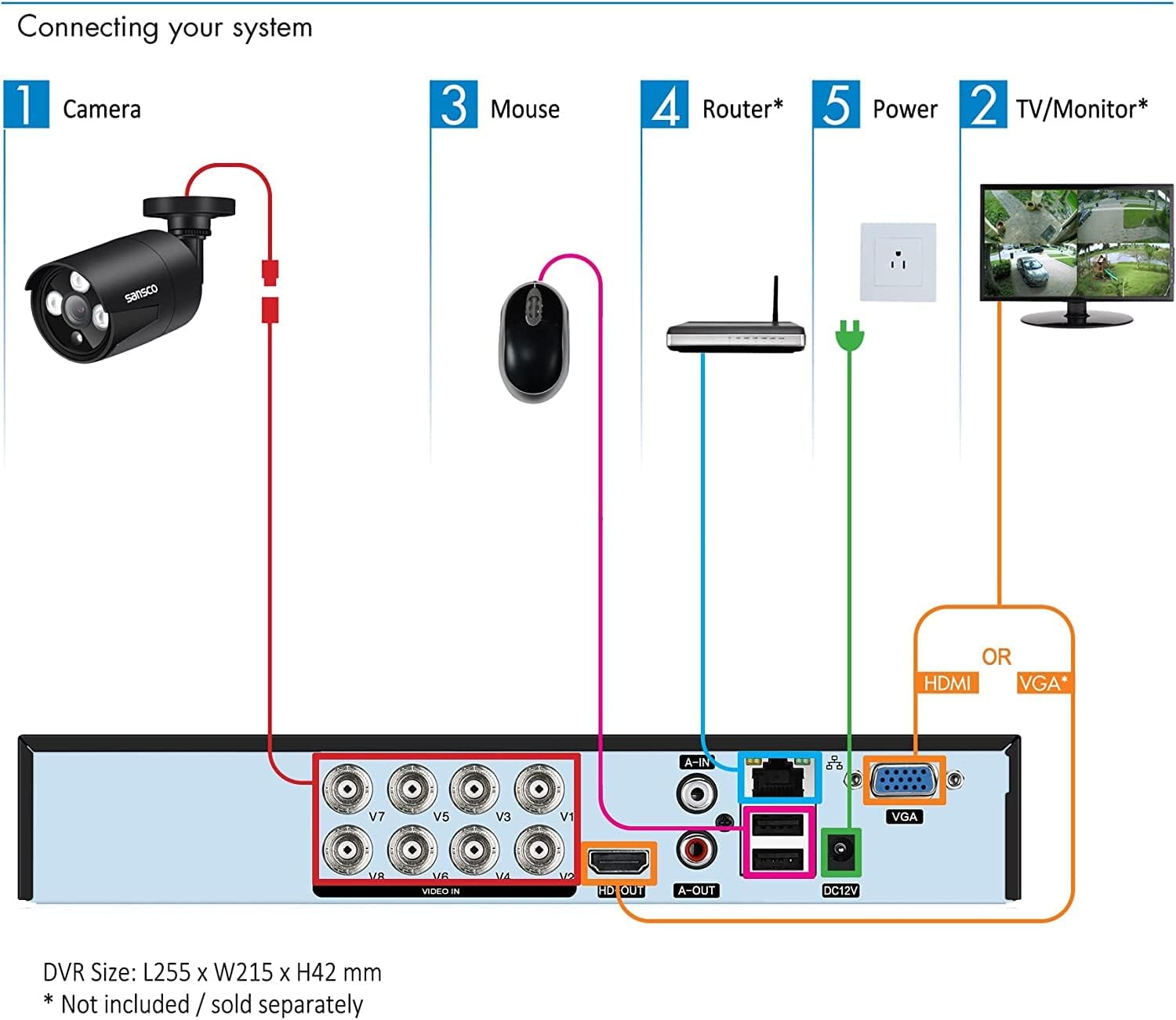
3.2 Mise sous tension et configuration initiales
After connecting all components, power on the DVR. The system will boot up and display the live view from your cameras on the connected monitor. Follow the on-screen prompts for initial setup, which may include setting the date/time, creating a password, and configuring network settings.
4. Mode d'emploi
4.1 En direct View et enregistrement
Once the system is powered on, you will see the live video feeds from all connected cameras on your monitor. The DVR is pre-configured for 24/7 continuous recording to the 3TB hard drive. You can switch between single-camera view, grille multicaméra view, and other display modes using the DVR's interface and mouse.

4.2 Remote Access (Mobile App/PC Client)
To access your security system remotely via smartphone, tablet, or computer, ensure the DVR is connected to your network. Download the official mobile application (TSEye or XVRView) from your device's app store or the PC client software from the SANSCO website. Follow the in-app instructions to add your DVR using its unique ID or QR code. This allows you to view Accédez aux flux en direct, aux enregistrements et recevez des alertes où que vous soyez grâce à une connexion Internet.

4.3 Détection de mouvement et alertes
The system supports smart motion detection. You can configure specific areas within each camera's view to trigger alerts. When motion is detected, the system can send instant push notifications to your smartphone or tablet, and/or email alerts. This feature helps you stay informed of any activity on your property. Adjust sensitivity and define detection zones to minimize false alarms.

4.4 Lecture et sauvegarde
Pour review enregistré footage, navigate to the playback menu on the DVR interface or through the remote access app. You can search for recordings by date, time, or event (e.g., motion detection). The 3TB hard drive provides approximately 2 weeks of continuous recording for all 8 cameras in FHD 1080p before overwriting the oldest footage. For long-term storage, you can back up important video clips to a USB drive connected to the DVR.

5. Entretien
5.1 Gestion du disque dur
The pre-installed 3TB hard drive is designed for 24/7 security recording. It automatically overwrites the oldest footage once full, ensuring continuous recording. Regularly check the hard drive status through the DVR's system settings to ensure it is functioning correctly.
5.2 Entretien de l'appareil photo
The outdoor cameras are weatherproof. Periodically clean the camera lenses with a soft, damp chiffon pour enlever la poussière, la saleté ou les taches d'eau qui pourraient obstruer le view. Ensure that the camera mounts are secure and that cables are not damaged. For outdoor installations, it is recommended to seal the cable connections (BNC and power) with waterproof tape or sealant to prevent moisture ingress, as these connections are not inherently waterproof.

6. Dépannage
If you encounter issues with your security system, refer to the following common problems and solutions:
- Aucun signal vidéo sur le moniteur :
Ensure the HDMI or VGA cable is securely connected between the DVR and the monitor. Verify that the monitor is powered on and set to the correct input source. Check if the DVR is powered on. Ensure your monitor has a resolution of at least 1080p; lower resolutions may not display the DVR interface correctly. - Cameras Not Displaying Video:
Check that each camera is properly connected to the DVR's 'VIDEO IN' port. Verify that all cameras are receiving power via the power adapters and splitters. Inspect coaxial cables for any damage or loose connections. - No Audio Recording/Playback:
The cameras in this system do not have built-in microphones or speakers. To enable audio, external microphones must be connected to the DVR's 'AUDIO IN' ports and an external speaker to the 'AUDIO OUT' port (Mic & Speaker are not provided). - L'accès à distance ne fonctionne pas :
Confirm that the DVR is connected to your router via the Ethernet cable and has a stable internet connection. Check your router's settings to ensure the DVR is assigned an IP address. Verify that the mobile app or PC client is correctly configured with the DVR's ID and network settings. - Frequent False Motion Alerts:
Adjust the motion detection sensitivity settings for each camera through the DVR interface. Utilize the motion detectionDocuments connexes - 8508+8x8699(3TB)+CA03

Manuel d'utilisation du DVR de vidéosurveillance SANSCO : Caractéristiques, installation et guide d'utilisation
Manuel d'utilisation complet pour l'enregistreur vidéo numérique (DVR) de vidéosurveillance SANSCO, couvrant le produit.view, main features, hardware installation, basic operations, menu navigation, recording, playback, alarm functions, system settings, and FAQs. Learn how to set up and use your SANSCO DVR for effective surveillance.
Guide d'installation rapide et manuel d'utilisation du DVR Sansco
Ce guide fournit des instructions pour l'installation et l'utilisation d'un système de surveillance DVR Sansco, couvrant la connexion initiale, la configuration du système et l'utilisation mobile. viewing via the XMEYE app, and answers to frequently asked questions.
Guide d'installation rapide du système de caméra Wi-Fi Sansco
Guide d'installation rapide complet pour le système de caméra Wi-Fi Sansco (App : TSEye), couvrant l'installation, la configuration, l'utilisation de l'application mobile et le dépannage.
Guide d'installation rapide du NVR SANSCO : Installation, configuration et utilisation
Ce guide d'installation rapide du NVR SANSCO fournit les étapes essentielles pour installer et configurer votre système de surveillance. Découvrez la connectivité réseau et les fonctionnalités mobiles. viewInstallation, configuration d'enregistrement et dépannage de votre solution de vidéosurveillance SANSCO.
Guide d'installation rapide de la caméra de sécurité à piles Sansco EseeCloud QS13
Guide d'installation rapide pour la caméra de sécurité à batterie Sansco EseeCloud, modèle QS13. Ce guide couvre l'installation, la configuration de l'application et la visualisation en direct. view, la lecture, les notifications push, les conseils sur les panneaux solaires et les questions fréquemment posées.
Guide d'installation rapide de la caméra de sécurité à piles Sansco EseeCloud QS17
Guide d'installation rapide pour la caméra de sécurité sans fil Sansco EseeCloud (modèle : QS17). Ce guide couvre les étapes avant l'installation, l'assistance technique, les mentions légales de la FCC et la configuration de l'application pour le contrôle à distance. viewajout de périphériques, en direct view et la lecture, les notifications push, des conseils d'installation de panneaux solaires et une FAQ.