1. Introduction
The ULANZI LS26 Low Profile Microphone Arm is designed to provide a stable and versatile mounting solution for microphones in various professional and home studio environments. Its low-profile design ensures an unobstructed view of your workspace, making it ideal for podcasting, streaming, gaming, and radio studio applications. Constructed from durable aluminum alloy, this arm offers robust support and flexible positioning.
2. Consignes de sécurité
- Assurez-vous que le bureau est clamp is securely fastened to a stable surface before attaching the microphone arm.
- Do not exceed the maximum load capacity of 2KG (4.4 lbs) to prevent damage or instability.
- Avoid pinching fingers or cables in the arm's joints during adjustment.
- Keep the product away from excessive heat, moisture, and corrosive materials.
- Vérifiez régulièrement le serrage de tous les raccords et fixations.
3. Contenu du colis
- Cantilever bracket x1
- 1/4 inch universal adapter x1
- 1/4 to 3/8 inch interface x1
- 1/4 to 5/8 inch interface x1
- Microphone holder x1
- Cl-Camp x1
4. Instructions de configuration
4.1. Bureauamp Installation
Attachez le C-clamp to the edge of your desk. Ensure the desk clamp is positioned on a flat, sturdy surface. Tighten the screw until the clamp is firmly secured, providing a stable base for the microphone arm. The padded desk clamp can expand up to 5cm (1.96 inches) to accommodate various desk thicknesses.
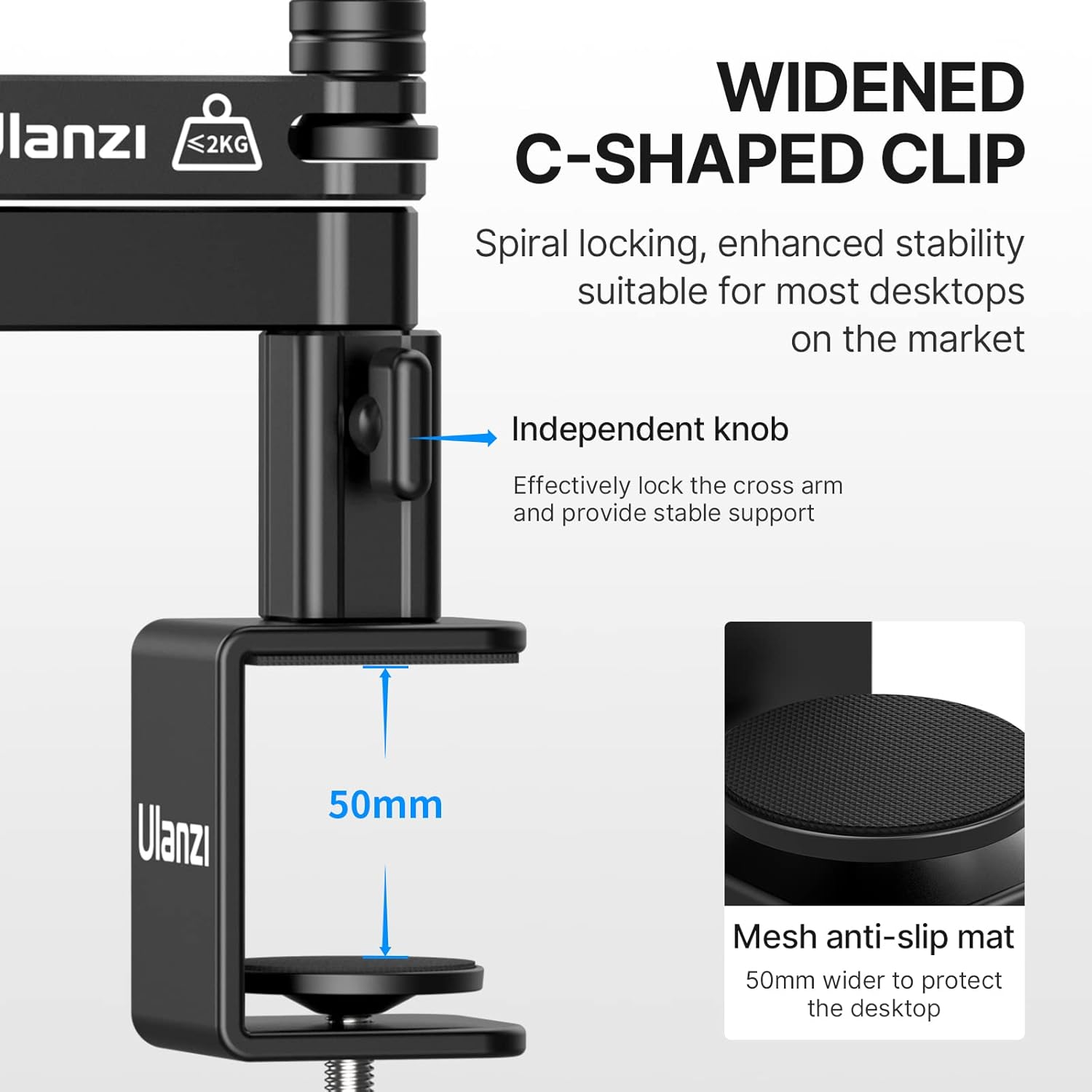
Figure 1: Securely attaching the C-clamp au bureau.
4.2. Arm Attachment
Insert the base of the cantilever bracket into the opening on the top of the C-clamp. Ensure it is fully seated. The arm should be able to rotate freely within the clamp base.

Figure 2: The microphone arm fully assembled and ready for use.
4.3. Fixation du microphone
Select the appropriate adapter (1/4", 1/4 to 3/8", or 1/4 to 5/8") for your microphone. Screw the chosen adapter onto the microphone adapter at the end of the arm. Then, attach your microphone or microphone holder to the adapter. Ensure all connections are tight to prevent the microphone from slipping.

Figure 3: Microphone compatibility with various adapters.
4.4. Gestion des câbles
Use the provided velcro straps to secure your microphone cable along the arm. This helps maintain a tidy setup and prevents cables from interfering with arm movement or getting snagged.
5. Mode d'emploi
5.1. Adjusting the Arm
The ULANZI LS26 features multiple 360° horizontal rotation points: at the microphone adapter, the elbow joint arm, and the bottom articulated arm. This allows for precise positioning of your microphone. Gently move the arm to your desired position. The robust design ensures it will hold its position once set.

Figure 4: Demonstrating the full 360° adjustability.
5.2. Horizontal Extension
The cantilever arm can be extended horizontally up to 48cm (18.9 inches), providing ample reach for comfortable use across your desktop.

Figure 5: Horizontal extension of the arm.
5.3. Storing the Arm
When not in use, the low-profile design allows the arm to be easily folded and stored under your display, freeing up valuable desk space.
6. Caractéristiques
- Faible Profile Conception: Fournit un accès dégagé view and can be stored discreetly under a display.
- Portée étendue : 48cm (18.9 inches) cross arm for comfortable desktop use.
- Large compatibilité : Includes 1/4", 1/4 to 3/8", and 1/4 to 5/8" interfaces, along with microphone clips, for most microphones.
- Entièrement réglable : 360° horizontal rotation range at the microphone adapter, elbow joint arm, and bottom articulated arm.
- Construction durable : All-aluminum alloy structure supports loads up to 2KG (4.4 lbs) with stable, wobble-free hovering.
7. Spécifications
| Fonctionnalité | Valeur |
|---|---|
| Poids de l'article | 0.98 kilogrammes (2.16 livres) |
| Dimensions du colis | 11.97 x 5.67 x 2.76 pouces |
| Numéro de modèle de l'article | LS26 |
| Matériau du corps | Alliage d'aluminium + ABS |
| Appareils compatibles | Microphone |
| Extension horizontale maximale | 48 cm (18.9 pouces) |
| Bureau Clamp Expansion | Jusqu'à 5 cm (1.96 pouces) |
| Charge maximale admissible | 2 KG (4.4 lb) |
8. Entretien
- Clean the arm regularly with a soft, dry cloth to remove dust and debris.
- Do not use harsh chemicals or abrasive cleaners, as these may damage the finish.
- Check all screws and joints periodically to ensure they are tight and secure. Tighten if necessary using an appropriate tool.
- Store the arm in a clean, dry environment when not in use for extended periods.
9. Dépannage
- Le bras ne maintient pas sa position : Ensure all joint screws are tightened. The arm is designed to hold position once set, but heavy microphones may require tighter adjustments.
- Microphone slipping: Verify that the microphone and adapter are securely screwed onto the arm. Use the correct adapter for your microphone's thread size.
- Bureau clamp instable: Resserrer le C-clamp screw. Ensure the desk surface is clean and free of obstructions, and that the clamp is fully engaged with the desk edge.
10. Garantie et assistance
The ULANZI LS26 Low Profile Microphone Arm comes with a full 3-month warranty from JUSMO. For any inquiries or support needs, a 24 hours/day online after-sale service team is available to assist you.


