1. Introduction
This manual provides detailed instructions for the setup, operation, maintenance, and troubleshooting of your Joso D3 Wireless Mobile Gaming Controller. Please read this manual thoroughly before using the product to ensure proper functionality and to maximize your gaming experience.
2. Contenu du colis
- 2 x Joso D3 Mobile Game Controllers (1 Black, 1 Gray)
- 2 câbles de chargement USB-C
- 2 x Manuels d'utilisation
3. Installation
3.1 Charger le contrôleur
Before initial use, fully charge the controller using the provided USB-C charging cable. Connect the USB-C end to the controller's charging port and the USB-A end to a compatible power source (e.g., computer USB port, wall adapter). The charging time is approximately 2-3 hours.

Image: This image illustrates the working time, charging time, and battery capacity of the Joso D3 controller. It shows a working time of 15-18 hours, a charging time of 2-3 hours, and a 400mAh battery capacity.
3.2 Connexion de votre appareil mobile
The Joso D3 controller features a telescopic holder designed to securely fit mobile phones between 5.0 and 6.9 inches in length. Gently extend the controller's sides and place your smartphone into the holder. Ensure the device is centered and stable. Note: This controller is not compatible with iPads or other tablets.
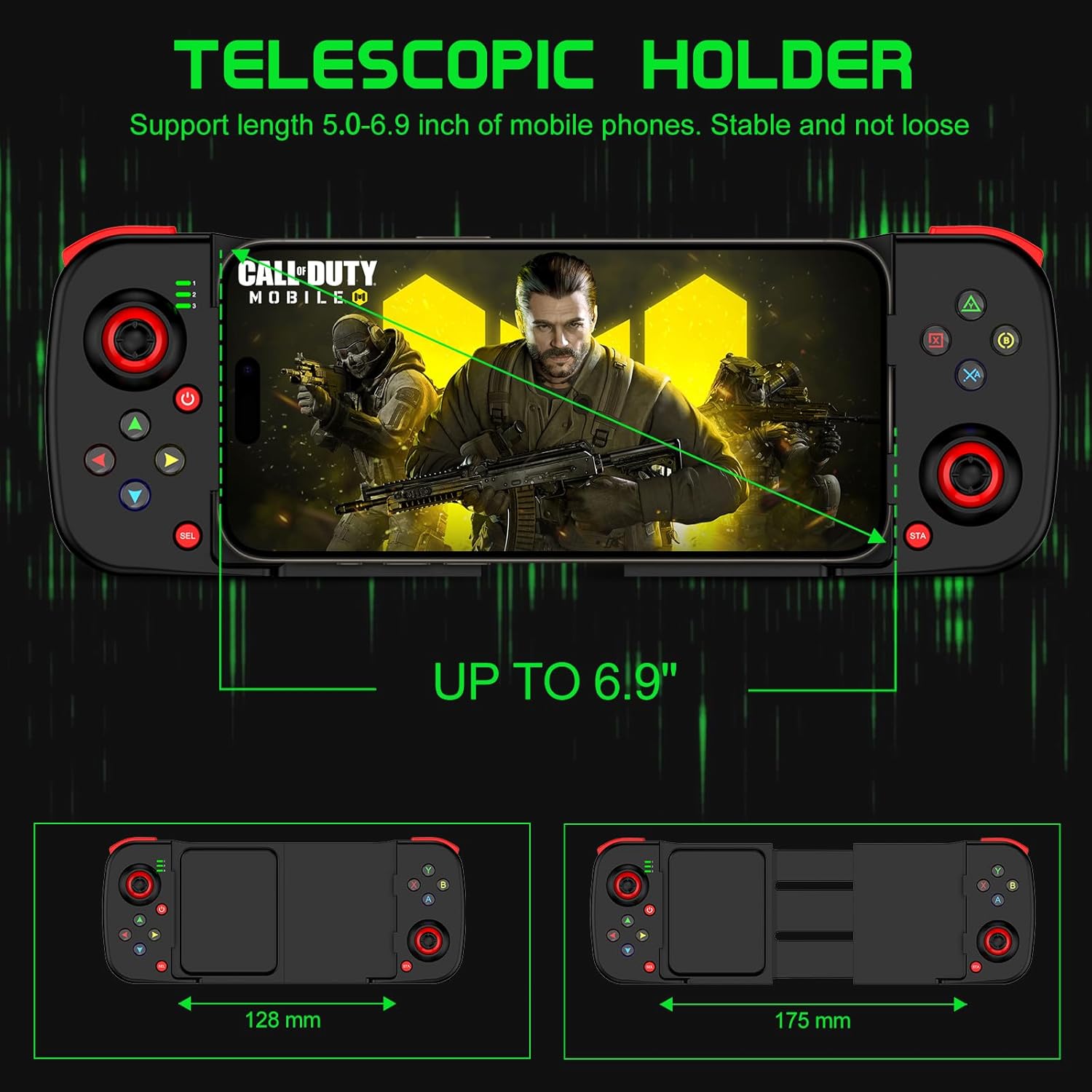
Image: This image demonstrates the telescopic holder of the Joso D3 controller, supporting mobile phones from 5.0 to 6.9 inches. It also shows the controller's dimensions, with a minimum width of 128mm and an extended width of 175mm.
3.3 Couplage Bluetooth
Follow these steps to pair your Joso D3 controller with your device:
- Ensure the controller is powered off before initiating the Bluetooth pairing connection.
- To boot the controller into the desired mode, hold down one of the following buttons, then press the 'Home' button:
- B + Home: For DUALSHOCK 4 Wireless Controller mode (typically for iOS).
- X + Home: For D3 mode (general Android compatibility).
- RB + Home: For Xbox Wireless Controller mode (for Android or PC).
- On your iPhone, Android device, or PC, navigate to the Bluetooth settings and select the Joso D3 controller from the list of available devices to connect.

Image: This image displays the universal compatibility of the Joso D3 controller with iPhone, Android, and PC. It also provides visual instructions for Bluetooth pairing using specific button combinations (B+Home, X+Home, RB+Home) for different device types.
4. Mode d'emploi
4.1 Disposition du contrôleur
Familiarize yourself with the buttons and joysticks on your Joso D3 controller:
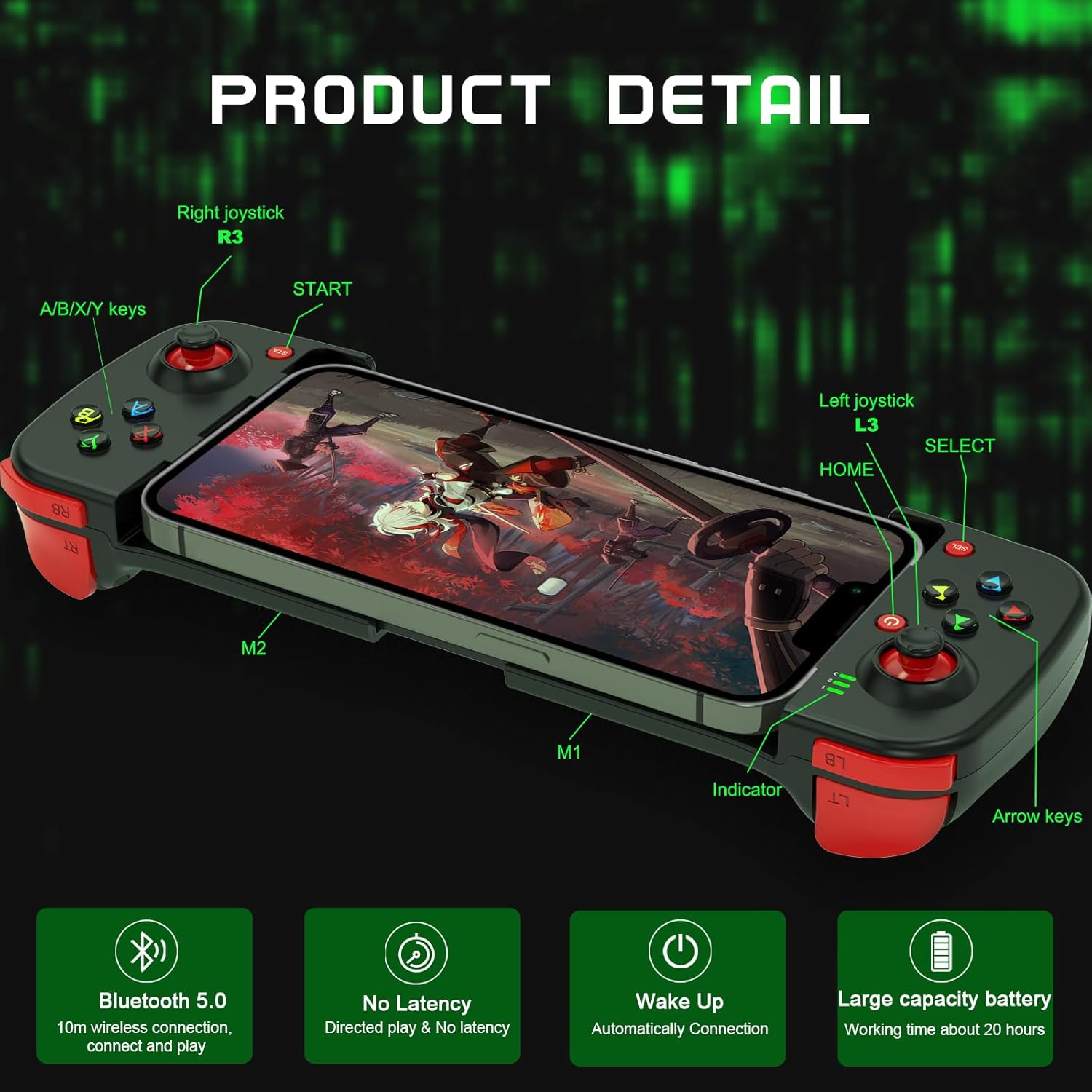
Image : Cette image fournit un aperçu détaillé view of the Joso D3 controller, labeling key components such as the Right joystick (R3), A/B/X/Y keys, START button, Left joystick (L3), HOME button, SELECT button, Indicator light, Arrow keys, and the M1/M2 back buttons.
- Joystick gauche (L3) : Pour le contrôle des mouvements et de la caméra.
- Joystick droit (R3) : Pour le contrôle et le pointage de la caméra.
- Boutons A/B/X/Y : Les fonctions des boutons d'action varient selon le jeu.
- Directional Pad (Arrow Keys): Pour une saisie directionnelle précise.
- L1/L2 (LB/LT) & R1/R2 (RB/RT) Triggers/Bumpers: Boutons latéraux pour diverses actions en jeu.
- START/SELECT (Menu/View) Boutons : For pausing, accessing menus, or specific game functions.
- Bouton d'accueil: To power on/off and for pairing.
- Boutons M1/M2 : Boutons de retour personnalisables.
4.2 Advanced Gaming Features
The Joso D3 controller is designed to enhance your mobile gaming with several advanced features:
- Six Fingers Operation: The ergonomic design and button placement allow for simultaneous aiming, shooting, moving, and switching angles, providing a competitive edge.
- 360° High Precision 3D Rocker: Experience highly accurate positioning and smooth movement control in your games.

Image: This image highlights the
Documents connexes - D3
 |
Manuel d'utilisation de la manette de jeu sans fil Joso D3 Manuel d'utilisation complet pour la manette de jeu sans fil Joso D3, couvrant la configuration, les modes de connexion pour iOS et Android, l'enregistrement de macros, l'état de l'alimentation et le dépannage. |
 |
Manuel d'utilisation de la manette de jeu sans fil Joso D6/D7 Manuel d'utilisation complet pour les manettes de jeu sans fil Joso D6 et D7, couvrant le contenu de l'emballage, la compatibilité matérielle, la disposition de l'appareil, les guides de connexion pour iOS, Android et PC, les combinaisons de boutons et le dépannage. |
 |
Guide de dépannage de la manette Joso D6 et de la lecture à distance PS Ce guide complet vous aidera à résoudre les problèmes courants de la manette de jeu mobile Joso D6, notamment la configuration, le fonctionnement des boutons et l'utilisation de PS Remote Play. Découvrez comment mettre à jour le firmware et connecter votre manette pour une expérience de jeu optimale. |
 |
Tutoriel de mise à jour de la manette de jeu pour la compatibilité avec la lecture à distance PS Guide pas à pas pour mettre à jour votre manette pour le jeu à distance PS à l'aide de l'application Shooting Plus V3. Découvrez comment connecter votre manette aux consoles PS4 et PS5 pour jouer à distance. |
 |
Joso Simhon 01 USB-C Game Controller User Manual User manual for the Joso Simhon 01 USB-C Game Controller, detailing setup, connection modes, hardware requirements, and customization options via the MooWii Gaming App. Includes device layout, troubleshooting, and button combinations. |
 |
Joso AX200 Keyboard and Mouse Adapter User Manual | Setup & Customization Guide User manual for the Joso AX200 Keyboard and Mouse Adapter, detailing hardware requirements, setup for PC and Nintendo Switch, equipment layout, key mapping, and customization options via the Geekvice app. |