Introduction
Thank you for choosing the Havit Gaming Mouse MS955. This optical gaming mouse features a USB interface, adjustable DPI settings, and RGB backlighting, designed to enhance your gaming experience. This manual provides essential information for setting up, operating, and maintaining your mouse.
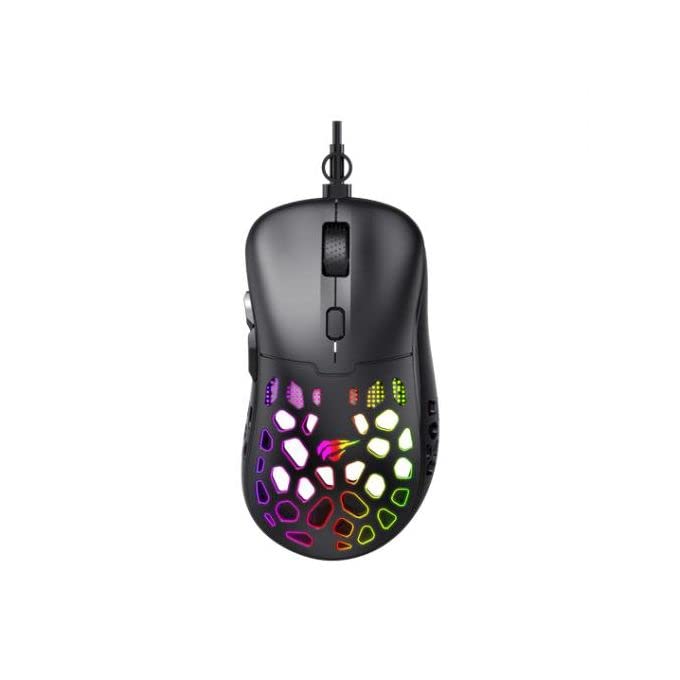
Image : Vue de dessus view of the Havit Gaming Mouse MS955, showcasing its ergonomic design and vibrant RGB lighting through the honeycomb shell.
Installation
- Déballez la souris : Carefully remove the Havit Gaming Mouse MS955 from its packaging.
- Connectez-vous à l'ordinateur : Locate an available USB port on your computer. Insert the USB connector of the mouse into the USB port.
- Installation du pilote : The mouse is plug-and-play. Your operating system (Windows XP, Windows 7, Linux, etc.) will automatically detect and install the necessary drivers. No additional software installation is typically required for basic functionality.
- Fonctionnalité de test : Une fois la connexion établie, déplacez la souris et cliquez sur les boutons pour vérifier son bon fonctionnement.
Mode d'emploi
The Havit Gaming Mouse MS955 features 6 programmable buttons and adjustable DPI settings for precise control.

Image : Côté view of the Havit Gaming Mouse MS955, highlighting the left-side buttons and scroll wheel.
- Bouton clic gauche : Bouton principal de sélection et d'interaction.
- Bouton clic droit : Secondary button for context menus and alternative actions.
- Molette: Utilisé pour faire défiler les documents et web pages. It also functions as a clickable middle button.
- Bouton de réglage DPI : Located behind the scroll wheel. Press this button to cycle through different DPI sensitivity levels (800-1200-2400-3200 DPI). Each press changes the sensitivity, allowing you to adapt to various gaming or work scenarios.
- Boutons latéraux : Two buttons are located on the left side of the mouse. These are typically used for 'forward' and 'backward' navigation in web browsers or can be programmed for in-game actions.
Éclairage RVB
The Havit Gaming Mouse MS955 features an integrated RGB backlight system. The lighting effects are typically automatic and may change with DPI settings or cycle through various colors. There are no dedicated buttons for controlling the RGB lighting directly on the mouse.
Entretien
- Nettoyage: To clean the mouse, disconnect it from your computer. Use a soft, dry cloth to wipe the surface. For stubborn dirt, a slightly damp cloth can be used, ensuring no liquid enters the mouse. Do not use harsh chemicals or abrasive cleaners.
- Stockage: Conservez la souris dans un endroit propre et sec, à l'abri des températures extrêmes et de la lumière directe du soleil.
- Entretien des câbles : Évitez de plier ou de tordre excessivement le câble USB afin d'éviter de l'endommager.
Dépannage
- Souris ne répondant pas :
- Assurez-vous que le câble USB est correctement branché sur un port USB fonctionnel de votre ordinateur.
- Essayez de brancher la souris sur un autre port USB.
- Redémarrez votre ordinateur.
- DPI inchangé :
- Press the DPI button firmly. Ensure you are pressing the correct button.
- The mouse cycles through fixed DPI settings; there is no visual indicator other than cursor speed change.
- Les lumières RVB ne fonctionnent pas :
- Vérifiez que la souris est correctement connectée à votre ordinateur.
- The RGB lighting is automatic; if the mouse is functioning otherwise, the lighting should also be active.
Caractéristiques
| Fonctionnalité | Détail |
|---|---|
| Marque | Havit |
| Modèle | MS955 |
| Type d'interface | USB |
| Dimensions | 115.2 x 63 x 37.6 mm |
| Nombre de clés | 6 |
| Jeu de puces | NST5311 |
| Résolution DPI | 800-1200-2400-3200 DPI |
| Vol d'exploitationtage | 5V |
| Durée de vie des clés | 3,000,000 clics |
| Longueur du câble | 1.5 m |
| Détection de mouvement | Optique |
| Orientation de la main | Droite |
| Utilisation recommandée | Jeux |
| Systèmes d'exploitation | Linux, Windows 7, Windows XP |
| Couleur | Noir |
Garantie et assistance
For warranty information or technical support, please refer to the documentation included with your purchase or visit the official Havit webConsultez le site. Conservez votre preuve d'achat pour toute réclamation au titre de la garantie.


