1. Introduction
The Maxcom MM724 is a simple mobile phone designed for ease of use, featuring straightforward software and practical functions. It is particularly suitable for users who prefer a device without complicated menus. Key features include an emergency SOS button, a built-in flashlight, and Bluetooth connectivity for hearing aid compatibility.
2. Contenu du colis
Veuillez cocher la case correspondant aux éléments suivants :
- 1 Maxcom MM724 Mobile Phone
- 1 Desktop Charger
- 1 Matching Cords (for charger)
- 1 Manuel d'utilisation (ce document)
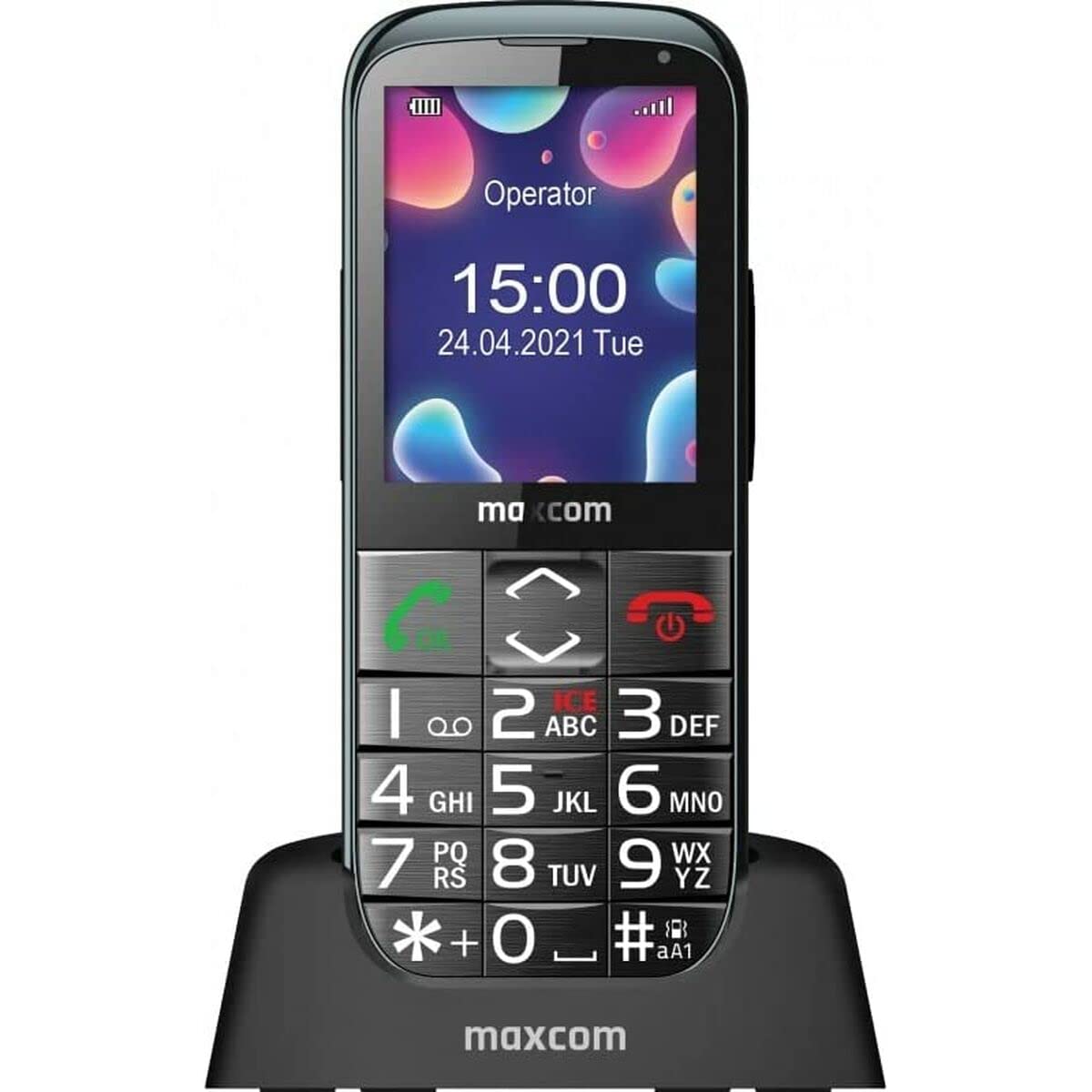
Image: The Maxcom MM724 simple mobile phone, typically black, with a clear display and large buttons.
3. Installation
3.1. Insertion de la carte SIM et de la batterie
- Retirez délicatement le cache arrière du téléphone.
- Insérez votre ou vos cartes SIM dans le ou les emplacements prévus à cet effet, les contacts dorés orientés vers le bas.
- Insérez la pile en veillant à ce que les contacts soient correctement alignés.
- Remettez le couvercle arrière en place jusqu'à ce qu'il s'enclenche correctement.
3.2. Chargement de l'appareil
The Maxcom MM724 uses a convenient desktop charger. To charge your phone:
- Connect the charger cord to a power outlet.
- Place the phone upright into the desktop charging cradle.
- Ensure the charging indicator on the phone or cradle illuminates, indicating that charging has begun.
- For optimal battery life, keep the phone in the cradle when not in use to ensure it is always charged.
4. Mode d'emploi
4.1. Mise sous/hors tension
- Pour allumer : Maintenez enfoncé le bouton Marche/Arrêt/Fin d'appel (généralement rouge) jusqu'à ce que l'écran s'allume.
- Pour éteindre : Maintenez le bouton Marche/Arrêt/Fin d'appel enfoncé jusqu'à ce que les options d'arrêt apparaissent, puis confirmez.
4.2. Passer et recevoir des appels
- Faire un appel: Composez le numéro à l'aide du clavier et appuyez sur le bouton d'appel (généralement vert).
- Pour recevoir un appel : Press the Call button when the phone rings. The phone is designed to ring very loudly to ensure calls are not missed.
- Pour terminer un appel : Appuyez sur le bouton Marche/Arrêt/Raccrocher.
4.3. Envoi et réception de messages
Navigate to the 'Messages' menu to compose new SMS messages or read incoming ones. Use the keypad to type your message.
4.4. Utilisation du bouton SOS
The SOS button is located on the back of the phone and is designed for emergencies.
- Installation: Access the phone's settings to pre-define a list of emergency contacts.
- Activation : In an emergency, press and hold the SOS button. The phone will automatically call the pre-defined contacts in sequence until one answers.
4.5. Activation de la lampe torche
The phone features a dedicated button for the flashlight, making it easy to activate when needed. Refer to your phone's specific button layout for its location.
4.6. Bluetooth and Hearing Aid Compatibility
The Maxcom MM724 supports Bluetooth connectivity, allowing it to pair with compatible devices, including certain hearing aids. This enables hands-free calling.
- Jumelage : Go to the Bluetooth settings on your phone and enable Bluetooth. Put your hearing aid into pairing mode (consult your hearing aid's manual). Select your hearing aid from the list of available devices on the phone to pair.
- Note: Compatibility with hearing aids depends on the hearing aid's features. Consult your audiologist for specific compatibility information. The phone also features a ring line and additional gain for improved audio performance with or without hearing aids.
5. Entretien
- Nettoyage: Utilisez un chiffon doux et sec pour nettoyer l'écran et le boîtier du téléphone. Évitez d'utiliser des nettoyants liquides ou des produits abrasifs.
- Entretien de la batterie: Keep the battery charged regularly. Avoid extreme temperatures, which can affect battery performance and lifespan.
- Stockage: Rangez le téléphone dans un endroit frais et sec lorsqu'il n'est pas utilisé pendant une période prolongée.
6. Dépannage
- Le téléphone ne s'allume pas : Ensure the battery is correctly inserted and charged. Connect the phone to the charger and try again.
- Aucun signal réseau : Vérifiez que la carte SIM est correctement insérée. Déplacez-vous dans une zone où la couverture réseau est meilleure. Contactez votre opérateur si le problème persiste.
- Impossible de passer/recevoir des appels : Verify that you have sufficient credit or an active plan. Check network signal strength.
- Problèmes de jumelage Bluetooth : Ensure both devices are in pairing mode and within range. Try restarting both the phone and the Bluetooth device.
7. Spécifications
| Marque | Maxcom |
| Nom du modèle | MM724 |
| Système opérateur | Androïde |
| Taille de l'écran | 3 pouces |
| Technologie de connectivité | Bluetooth |
| Technologie cellulaire | 4G |
| Technologie de réseau sans fil | GSM |
| Couleur | Noir |
| Poids de l'article | 85 gramme |
| Opérateur sans fil | Débloqué |
8. Garantie et assistance
Warranty information for the Maxcom MM724 mobile phone is typically provided with your purchase documentation or can be found on the official Maxcom website. For technical support or service inquiries, please refer to the contact information provided by your retailer or the manufacturer.


