1. Introduction
Thank you for choosing the AgfaPhoto Powerstation PPS 600 Pro. This portable power bank is designed to provide reliable power for various devices during outdoor activities, travel, and emergency situations. This manual provides essential information for safe operation, setup, maintenance, and troubleshooting. Please read it thoroughly before using the product.
2. Consignes de sécurité
- Ne pas démonter, réparer ni modifier l'appareil. Un remontage incorrect peut provoquer un incendie ou des blessures.
- Ne pas exposer l'appareil au feu ou à des températures extrêmes (supérieures à 60 °C / 140 °F).
- Ne pas utiliser ni entreposer l'appareil dans une salle de bain ou dans un endroit exposé à l'eau ou à l'humidité.
- Ne pas laisser tomber, heurter ou soumettre l'appareil à des chocs violents.
- Tenir hors de portée des enfants.
- Utilisez uniquement les accessoires et câbles de charge recommandés.
- Assurez une ventilation adéquate pendant l'utilisation et la charge afin d'éviter toute surchauffe.
- In case of leakage from the battery, avoid contact with skin and eyes. Rinse affected areas with water and seek medical attention.
3. Contenu du colis
Vérifiez que tous les articles sont présents dans la boîte :
- AgfaPhoto Powerstation PPS 600 Pro
- Power Cord (for AC charging)
- Car Cigarette Lighter Adapter
- Manuel d'utilisation
4. Produit terminéview
Familiarize yourself with the ports, buttons, and display of your Powerstation PPS 600 Pro.

Image: Front panel of the AgfaPhoto Powerstation PPS 600 Pro, showing the LCD screen, DC output, USB-A ports, USB-C port, and AC output switch.
The unit features a clear LCD display that shows battery level, input power, and output power. Various ports are available for charging different devices simultaneously.
- Écran LCD : Affiche l'état de la batterie, la puissance d'entrée/sortietage, et indicateurs d'erreur.
- DC Sortie: Pour les appareils nécessitant une alimentation CC.
- Ports USB-A : Pour recharger les smartphones, les tablettes et autres appareils alimentés par USB.
- Port USB-C : Pour les appareils compatibles avec la charge rapide.
- Sortie CA: Standard wall outlet for appliances.
- Port d'entrée : For charging the power station itself.
5. Installation
5.1 Charge initiale
Before first use, fully charge your AgfaPhoto Powerstation PPS 600 Pro. This ensures optimal battery performance and longevity.
- Connect the provided power cord to the AC input port on the power station.
- Branchez l'autre extrémité du cordon d'alimentation dans une prise murale standard.
- The LCD display will show the charging status. The unit is fully charged when the battery indicator shows 100%.
Charging can also be done via a solar panel (sold separately) or a car cigarette lighter adapter.

Image: Illustration of the three charging methods for the power station: via car cigarette lighter, AC wall adapter, and solar panel.
6. Mode d'emploi
6.1 Mise sous/hors tension
- To turn on the unit, press and hold the main power button for a few seconds. The LCD display will illuminate.
- Pour éteindre l'appareil, maintenez à nouveau le bouton d'alimentation principal enfoncé jusqu'à ce que l'écran s'éteigne.
6.2 Chargement des appareils externes
The Powerstation PPS 600 Pro offers multiple output options:
- Sortie USB : Connect your USB-powered devices (smartphones, tablets, drones, cameras) to the USB-A or USB-C ports. The unit will automatically detect and begin charging.
- Sortie CA: For devices requiring standard wall power (laptops, mini-refrigerators, LED TVs), press the AC ON/OFF button to activate the AC outlet. Plug your device into the AC outlet. Remember to turn off the AC output when not in use to conserve battery.
- DC Sortie: For 12V DC devices, connect them to the DC output port.

Image: The AgfaPhoto Powerstation PPS 600 Pro connected and charging a laptop, demonstrating its use for portable electronics.

Image: The power station in use during a power outage, providing light and charging a smartphone, highlighting its emergency backup capability.
7. Entretien
7.1 Stockage
- Entreposez la centrale électrique dans un endroit frais et sec, à l'abri de la lumière directe du soleil et des sources de chaleur.
- Pour un stockage à long terme, chargez l'appareil à environ 50-80 % tous les 3 à 6 mois afin de préserver la santé de la batterie.
- Avoid storing in environments with high humidity or extreme temperatures.
7.2 Nettoyage
- Utilisez un chiffon doux et sec pour nettoyer l'extérieur de l'appareil.
- N'utilisez pas de nettoyants abrasifs ni de solvants.
- Assurez-vous que tous les ports sont exempts de poussière et de débris.
8. Dépannage
If you encounter issues with your Powerstation PPS 600 Pro, refer to the following common problems and solutions:
| Problème | Cause possible | Solution |
|---|---|---|
| L'appareil ne s'allume pas | La batterie est complètement déchargée. | Chargez l'appareil à l'aide de l'adaptateur secteur. |
| No output from AC port | AC output not activated. Device exceeds power limit. | Press the AC ON/OFF button. Check device wattage against unit specifications. |
| Slow charging of external devices | Device requires higher current. Cable issue. | Ensure you are using the correct USB port (e.g., USB-C PD). Try a different cable. |
| L'unité surchauffe | Poor ventilation. Excessive load. | Ensure vents are clear. Reduce the number or power of connected devices. Allow unit to cool down. |
Si le problème persiste, veuillez contacter le service client.
9. Spécifications
Technical details for the AgfaPhoto Powerstation PPS 600 Pro:
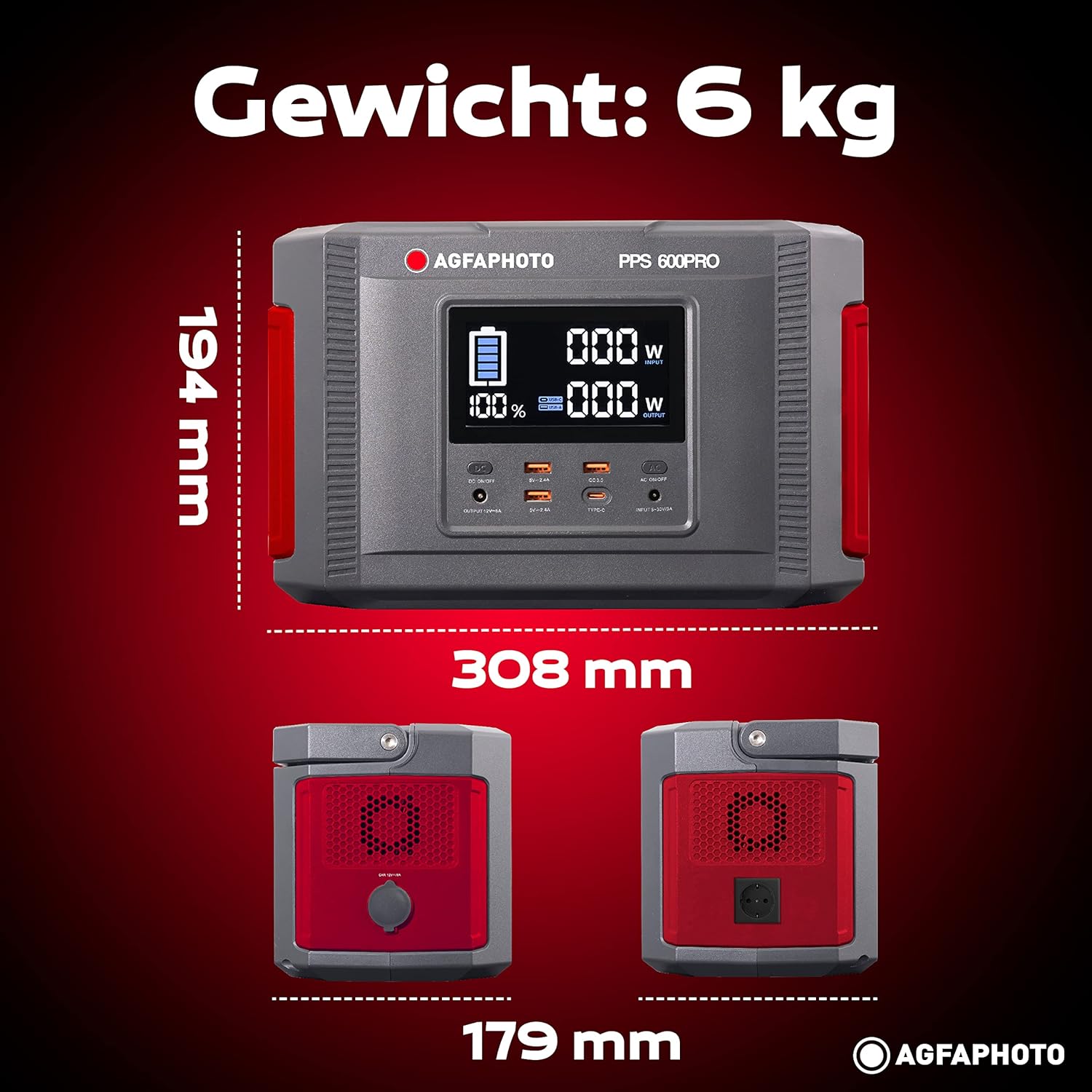
Image: Visual representation of the AgfaPhoto Powerstation PPS 600 Pro's dimensions (308 x 179 x 194 mm) and weight (6 kg).
| Fonctionnalité | Spécification |
|---|---|
| Marque | AgfaPhoto |
| Numéro de modèle | 717-854742 (PPS600) |
| Capacité de la batterie | 644 Wh |
| Puissance de sortie (continue) | 600 W |
| Puissance de sortie (crête) | 1000 W |
| Voltage | 220 volts |
| Poids de l'article | 6.1 kilogrammes |
| Dimensions (L x l x H) | 308 x 179 x 194 mm |
| Source d'énergie | Battery Powered (Solaire, électricité) |
| Utilisations recommandées | Mobile phones, cameras, laptops, tablets |
| Composants inclus | Power cord, USB ports, LCD screen, car cigarette lighter adapter |
| Dossier spécial | Conception compacte |
10. Garantie et assistance
AgfaPhoto products are manufactured to high-quality standards and are covered by a manufacturer's warranty. For specific warranty terms and conditions, please refer to the warranty card included with your product or visit the official AgfaPhoto website.
For technical support, troubleshooting assistance, or spare parts inquiries, please contact AgfaPhoto customer service. Contact details can typically be found on the product packaging or the official brand website.


