1. Introduction
The STRONG Powerline 600 Kit provides a simple and effective solution for creating a high-speed network throughout your home using existing electrical wiring. This triple pack includes three Powerline 600 adapters, allowing you to extend your internet connection up to 600 Mbps to any room without running new cables.
Simply connect one adapter to your internet router via an Ethernet port, and the other two adapters can be plugged into any power outlet in your desired rooms to provide an instant internet connection. Each adapter features a filtered pass-through socket, ensuring you don't lose the use of your power outlet.
2. Contenu du colis
Veuillez vérifier que tous les articles sont présents dans votre colis :
- 3x STRONG Powerline 600 Adapters
- 3 câbles Ethernet
- 1x Guide d'installation rapide

Image 2.1: Package contents including three Powerline adapters and Ethernet cables.
3. Configuration et installation
The STRONG Powerline 600 Kit is designed for quick and easy plug-and-play installation without complex configuration.
3.1 Configuration initiale
- Connectez le premier adaptateur : Plug one Powerline 600 adapter into a wall power outlet near your internet router. Connect this adapter to your router's Ethernet port using one of the provided Ethernet cables.
- Connect Additional Adapters: Plug the other two Powerline 600 adapters into wall power outlets in the rooms where you need internet access.
- Connecter des appareils : Use the remaining Ethernet cables to connect your devices (e.g., computer, Smart TV, game console) to the Ethernet ports on the Powerline adapters.
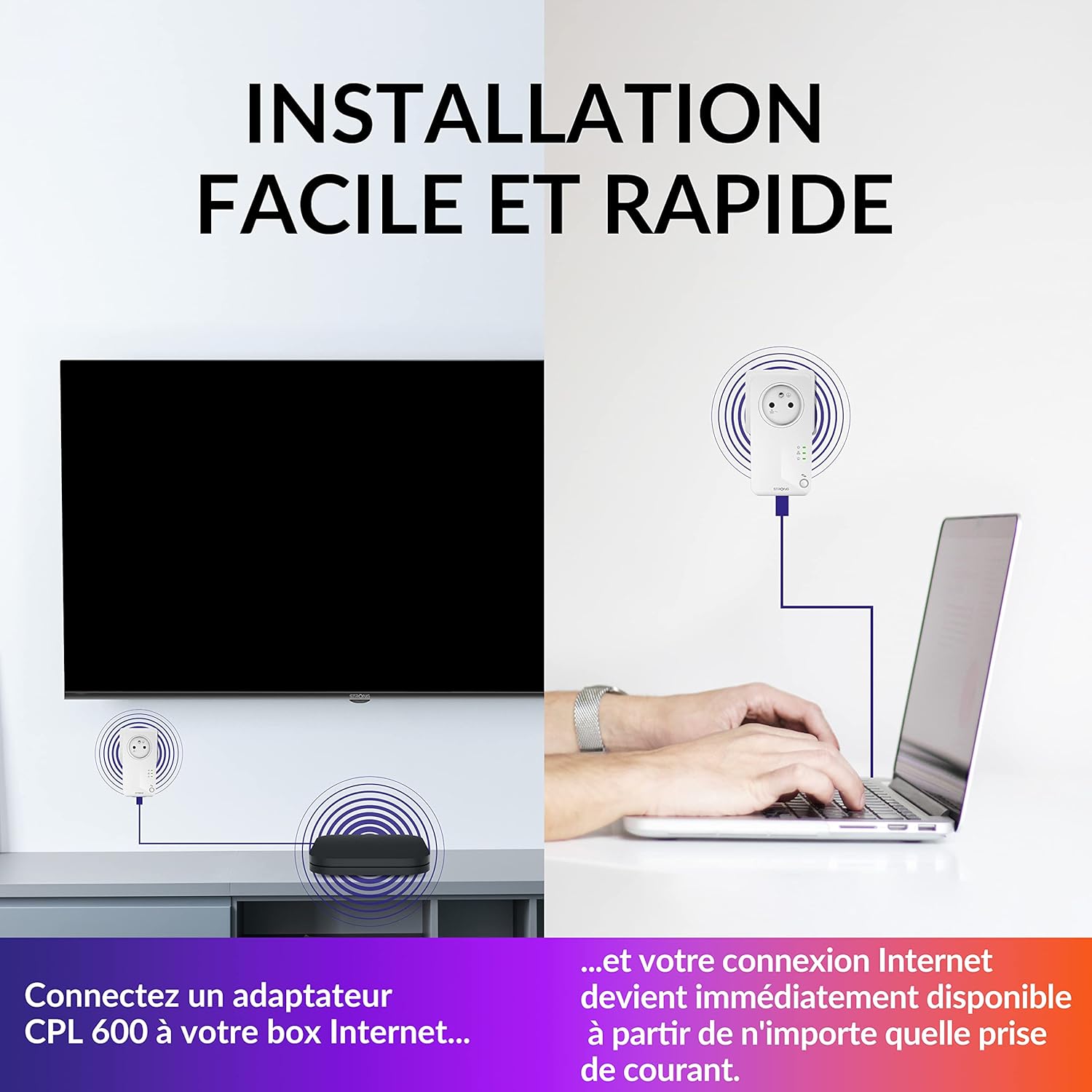
Image 3.1: Simple connection of Powerline adapters to an internet box and a laptop.

Image 3.2: Network setup showing an internet box, computer, and TV connected via Powerline adapters.
3.2 Considérations importantes
- Pour un fonctionnement optimal, branchez les adaptateurs CPL directement dans les prises murales. Évitez les multiprises, les parasurtenseurs et les rallonges, car ils peuvent perturber le signal CPL.
- Ensure all adapters are on the same electrical circuit for best results. While Powerline technology can often bridge different circuits, performance may vary.
4. Mode d'emploi
Once installed, your Powerline network operates automatically, providing a stable and high-speed internet connection.
4.1 Accès Internet haut débit
The Powerline 600 Kit delivers data transfer rates up to 600 Mbps, ideal for streaming HD video, online gaming, and general internet browsing. The connection is established through your home's electrical wiring, extending your network reach up to 300 meters from the router.

Image 4.1: Powerline adapter indicating high-speed internet at 600 Mbps.
4.2 Filtered Pass-Through Socket
Each Powerline adapter includes a filtered pass-through socket. This means you can plug other electrical devices into the adapter's socket without compromising the Powerline network performance or losing a valuable power outlet.

Image 4.2: The filtered pass-through socket feature, ensuring no power outlet is lost.
4.3 Mode économie d'énergie
The Powerline 600 adapters feature an automatic energy-saving mode. When no active network connection is detected, the adapters will enter a standby state, reducing power consumption by up to 85%.

Image 4.3: Energy-saving mode reduces power consumption by up to 85%.
4.4 Sécurité du réseau
The data transmission between Powerline 600 adapters is secured with 128-bit AES encryption, providing optimal network security and protecting your data from unauthorized access.

Image 4.4: Powerful 128-bit AES encryption for secure data transmission.
5. Entretien
The STRONG Powerline 600 Kit requires minimal maintenance to ensure optimal performance and longevity.
- Nettoyage: Essuyez délicatement les adaptateurs avec un chiffon doux et sec. N’utilisez pas de nettoyants liquides ni d’aérosols.
- Ventilation: Ensure the adapters are not covered or placed in enclosed spaces that could obstruct airflow. Proper ventilation prevents overheating.
- Mises à jour du micrologiciel : Periodically check the STRONG website for any available firmware updates for your Powerline adapters. Updates can improve performance and security.
6. Dépannage
If you encounter issues with your Powerline 600 Kit, try the following troubleshooting steps:
6.1 No Connection / Slow Speed
- Connexion directe : Ensure all Powerline adapters are plugged directly into wall outlets, not into power strips, extension cords, or surge protectors.
- Vérifiez les câbles : Verify that all Ethernet cables are securely connected to both the adapters and your devices/router.
- Cycle d'alimentation : Unplug all Powerline adapters and your router from their power sources. Wait for 30 seconds, then plug them back in, starting with the router, then the Powerline adapter connected to the router, and finally the other adapters.
- Ingérence: Large electrical appliances (e.g., washing machines, refrigerators) on the same circuit can sometimes cause interference. Try plugging the adapters into different outlets.
- Circuit électrique: Confirm that all adapters are on the same electrical circuit. While Powerline can sometimes cross circuits, performance may be significantly reduced.
6.2 Adapter Lights Not On
- Alimentation: Ensure the adapter is firmly plugged into a working power outlet.
- Prise de test : Essayez de brancher un autre appareil sur la même prise pour vérifier qu'il est alimenté.
6.3 Security Pairing Issues
If you need to re-establish a secure connection or add a new adapter, refer to the quick installation guide for instructions on using the pairing button (usually a small button on the adapter) to create a secure, encrypted network.
7. Spécifications
| Fonctionnalité | Détail |
|---|---|
| Marque | FORT |
| Numéro de modèle | PL600TRIFR |
| Couleur | Blanc |
| Taux de transfert de données | Jusqu'à 600 Mbps |
| Protocole de liaison de données | Ethernet |
| Relations | Ethernet (RJ45) |
| Appareils compatibles | Desktop computer, Smart TV, Game console, NAS, Android box, Internet box |
| Sécurité | Chiffrement AES 128-bit |
| Économie d'énergie | Automatic standby mode, up to 85% reduction |
| Product Dimensions (per adapter) | 6L x 3L x 11.7H cm |
8. Informations sur la garantie
Specific warranty details for the STRONG Powerline 600 Kit are not provided in the available product information. Please refer to the warranty card included in your product packaging or visit the official STRONG webConsultez le site pour connaître les conditions générales de garantie détaillées.
9. Assistance clientèle
For further assistance, technical support, or inquiries regarding your STRONG Powerline 600 Kit, please visit the official STRONG webConsultez le site web du fabricant ou contactez son service client. Les coordonnées sont généralement disponibles sur son site web. website ou dans la documentation du produit.