1. Introduction
This manual provides detailed instructions for the Waveshare 3.2-inch Resistive Touch Screen TFT Display. This display features a hardware resolution of 320 × 240 pixels and resistive touch control. It is designed for direct integration with various Raspberry Pi versions, including 4B, 3B+, 3A+, 3B, 2B, 1B+, 1A+, Zero 2 W, Zero W, and Zero. Drivers are provided to ensure compatibility with operating systems such as Raspbian, Ubuntu, Kali, and Retropie. The display also supports FBCP software drivers, allowing for adjustable software resolution and dual-screen display configurations.
For optimal performance, driver installation is required. Please refer to the relevant sections in this manual for installation procedures.
2. Contenu du colis
Vérifiez que tous les éléments énumérés ci-dessous sont inclus dans votre colis :
- Waveshare 3.2-inch Resistive Touch Screen TFT Display
- Style
- Mounting hardware (screws and standoffs)

Image: Contents of the Waveshare 3.2-inch Resistive Touch Screen TFT Display package, showing the display module, a black stylus, and two sets of gold standoffs with screws and nuts.
3. Principales caractéristiques
- Hardware Resolution: 320 × 240 pixels.
- Contrôle tactile : Resistive touch technology.
- Compatibilité: Directly compatible with all versions of Raspberry Pi.
- Assistance au conducteur : Drivers provided for Raspbian, Ubuntu, Kali, and Retropie systems.
- Caractéristiques d'affichage : Supports FBCP software driver for adjustable software resolution and dual-screen display.
- Interface: SPI for both display and touch.
- PCB Process: Immersion Gold.
- Consommation d'énergie : Lower power design.
- Certification: Certifié CE.

Image : Terminéview of the Waveshare 3.2-inch Touch Display, highlighting its 3.2-inch size, 320x240 resolution, SPI display and touch ports, resistive touch type, Immersion Gold PCB process, lower power consumption, and CE certification.
4. Device and System Compatibility
The Waveshare 3.2-inch Resistive Touch Screen TFT Display is designed for broad compatibility with Raspberry Pi single-board computers. It supports all versions of Raspberry Pi, including:
- Raspberry Pi 4B
- Raspberry Pi 3B+
- Raspberry Pi 3A+
- Raspberry Pi 3B
- Raspberry Pi 2B
- Raspberry Pi 1B+
- Raspberry Pi 1A+
- Raspberry Pi Zero 2 W
- Raspberry Pi Zero W
- Raspberry Pi Zéro
Drivers are provided to ensure seamless operation with popular Raspberry Pi operating systems such as Raspbian, Ubuntu MATE, Kali, and Retropie. The display also supports FBCP software drivers for advanced display configurations.
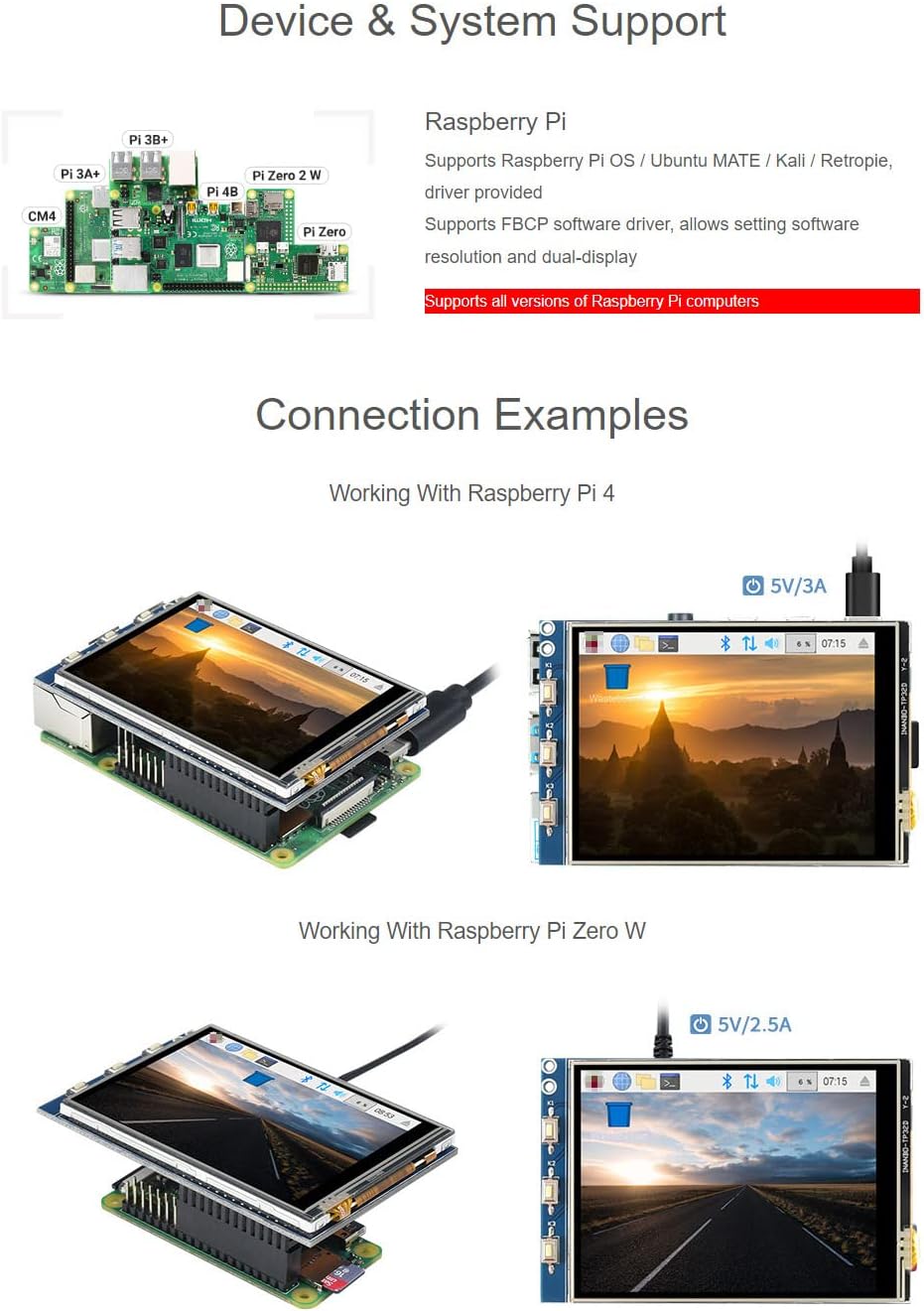
Image: Visual representation of various Raspberry Pi models (Pi 3B+, Pi 3A+, Pi 4B, Pi Zero 2 W, Pi Zero, CM4) and connection examples of the display with Raspberry Pi 4 and Raspberry Pi Zero W, demonstrating proper physical integration.
5. Configuration et installation
5.1 connexion physique
To connect the display to your Raspberry Pi, align the 26-pin header on the display with the corresponding GPIO pins on your Raspberry Pi. Gently press down to ensure a secure connection. Use the provided mounting hardware (standoffs and screws) to firmly attach the display to the Raspberry Pi, if desired, for a stable assembly.
5.2 Installation du pilote
The LCD requires a driver to function correctly. Waveshare provides drivers compatible with Raspbian, Ubuntu, Kali, and Retropie systems. Please refer to the official Waveshare documentation or product page for the most up-to-date driver installation instructions specific to your Raspberry Pi model and operating system. Typically, this involves downloading a script and running it on your Raspberry Pi to configure the display and touch functionality.
Note: Incorrect driver installation can lead to display issues. Follow the official guides carefully.
Image : détaillée view of the Waveshare 3.2-inch display connected to a Raspberry Pi 4 and a Raspberry Pi Zero W, illustrating the compact and integrated setup.
6. Définition du brochage
Understanding the pinout is crucial for advanced users or custom integrations. The display utilizes a 26-pin header for communication and power. Below is a table detailing the function of each pin:
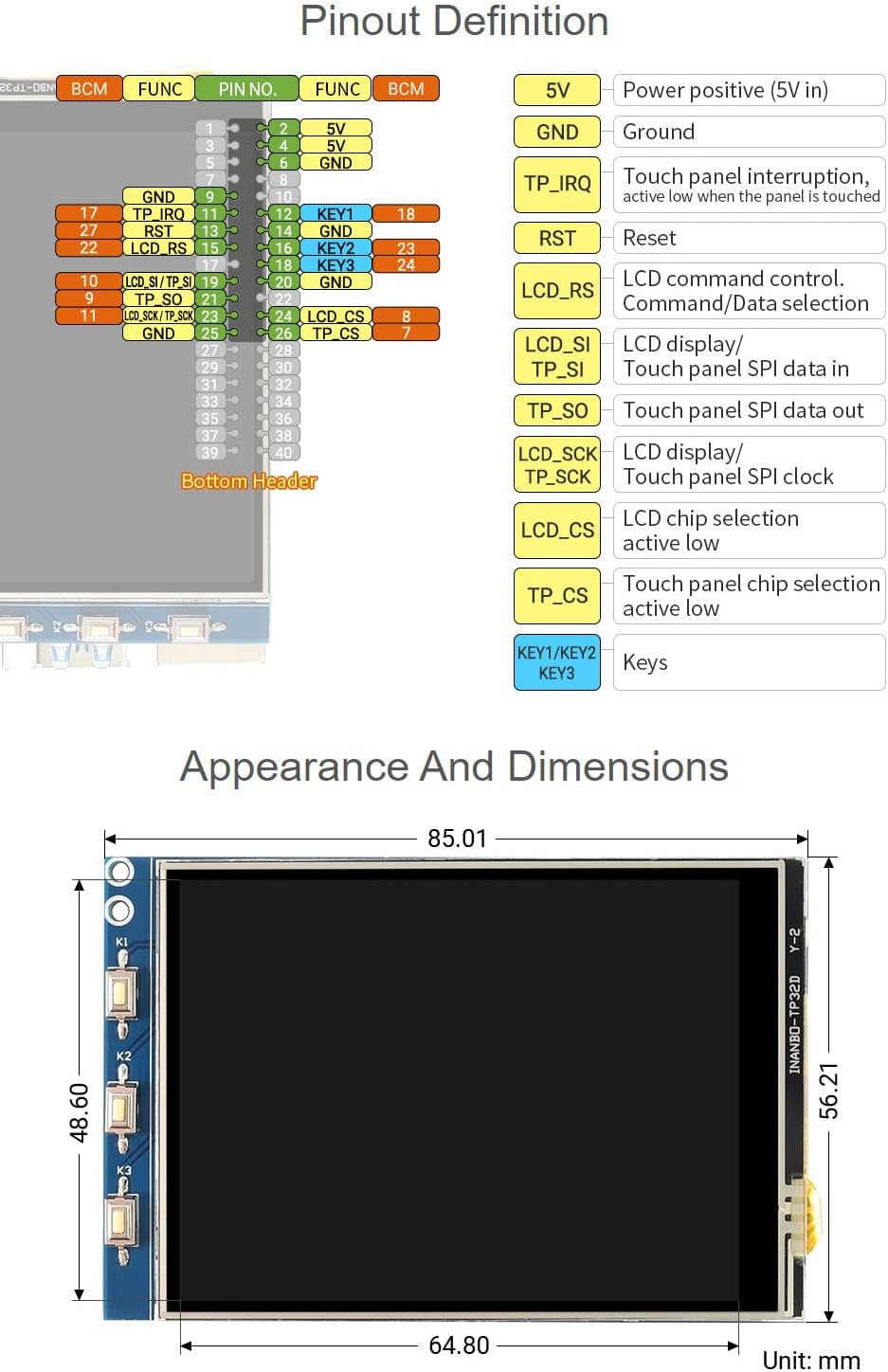
Image: A diagram illustrating the 26-pin header pinout for the Waveshare 3.2-inch display, showing pin numbers, functions (e.g., 5V, GND, TP_IRQ, RST, LCD_RS, LCD_SI, TP_SO, TP_SCK, LCD_CS, TP_CS), and corresponding BCM numbers. Also shows three physical buttons labeled K1, K2, K3.
Key Pin Functions:
- 5V: Power positive (5V input).
- GND : Connexion à la terre.
- TP_IRQ: Touch panel interrupt, active low when the panel is touched.
- TVD : Code PIN de réinitialisation.
- LCD_RS: LCD command control / data selection.
- LCD_SI / TP_SI: LCD display / Touch panel SPI data in.
- TP_SO: Touch panel SPI data out.
- LCD_SCK / TP_SCK: LCD display / Touch panel SPI clock.
- LCD_CS: LCD chip selection, active low.
- TP_CS: Touch panel chip selection, active low.
- KEY1/KEY2/KEY3: User-programmable keys.
7. Mode d'emploi
7.1 Fonctionnement de l'affichage
Once the drivers are correctly installed and the Raspberry Pi is powered on, the display should automatically initialize and show the graphical interface of your operating system. The FBCP (Framebuffer Copy) software driver allows for flexible display management, including setting custom resolutions and enabling dual-screen setups if you have another display connected.

Image: The Waveshare 3.2-inch display showing a desktop environment, illustrating its functionality as a primary or secondary display with FBCP software driver support.
7.2 Contrôle tactile
The display features resistive touch control. After driver installation, the touch functionality will be enabled. Use the provided stylus for precise input. Resistive touch screens respond to pressure, so a light press with the stylus or a fingernail is sufficient. Avoid using sharp objects that could damage the screen surface.
Image: A hand using the stylus to interact with the Waveshare 3.2-inch display, demonstrating the resistive touch control feature for navigation and input.
8. Apparence et dimensions
The Waveshare 3.2-inch Resistive Touch Screen TFT Display is compact and designed to integrate seamlessly with Raspberry Pi boards. Below are the physical dimensions of the display module:
Image: A technical drawing showing the precise dimensions of the Waveshare 3.2-inch display module in millimeters. The width is approximately 64.80 mm, and the height is approximately 85.01 mm, with the screen area being 48.60 mm by 56.21 mm.
- Dimensions hors tout : Approximately 85.01 mm (height) × 64.80 mm (width).
- Zone d'affichage : Approximately 56.21 mm (height) × 48.60 mm (width).
9. Spécifications techniques
| Fonctionnalité | Spécification |
|---|---|
| Fabricant | Waveshare |
| Numéro de modèle de l'article | 03201bfe-f4ac-4199-b39a-750c53ac1b06 |
| Taille de l'écran | 3.2 pouces |
| Résolution matérielle | 320 × 240 pixels |
| Type tactile | Résistif |
| Interface d'affichage | SPI |
| Interface tactile | SPI |
| Appareils compatibles | Raspberry Pi (all versions), Personal Computer (via Raspberry Pi) |
| Prise en charge de la plateforme | Linux (Raspbian, Ubuntu, Kali, Retropie) |
| Type de connecteur d'alimentation principale | 24-Pin (via Raspberry Pi GPIO) |
| Interface de la carte graphique | Integrated (via Raspberry Pi) |
10. Dépannage
- L'affichage ne fonctionne pas :
- Ensure the display is securely connected to the Raspberry Pi's GPIO pins.
- Verify that the correct drivers are installed for your specific Raspberry Pi model and operating system. Refer to the Waveshare official documentation for driver installation guides.
- Check power supply to the Raspberry Pi; insufficient power can affect display operation.
- L'écran tactile ne répond pas :
- Confirm that touch drivers are installed and configured correctly.
- Calibrate the touch screen if the input is inaccurate. Calibration tools are usually provided with the driver package.
- Ensure you are using a stylus or a suitable object for resistive touch input.
- Scintillement ou distorsion de l'écran :
- Check for loose connections between the display and Raspberry Pi.
- Ensure the Raspberry Pi's power supply is stable and adequate.
- Reinstall or update display drivers.
For further assistance, consult the official Waveshare wiki or support forums.
11. Entretien
- Nettoyage: Utilisez un chiffon doux et non pelucheux légèrement dampNettoyez délicatement la surface de l'écran avec de l'eau ou un nettoyant pour écrans. Évitez les matériaux abrasifs et les produits chimiques agressifs.
- Manutention: Handle the display by its edges to avoid touching the screen surface or the electronic components on the PCB.
- Stockage: Store the display in a cool, dry environment, away from direct sunlight and extreme temperatures.
- Protection: When not in use, consider covering the display to protect it from dust and scratches.
12. Garantie et assistance
Waveshare products typically come with a standard manufacturer's warranty. For specific warranty terms, duration, and conditions, please refer to the warranty information provided with your purchase or visit the official Waveshare webConsultez le site. Conservez votre preuve d'achat pour toute réclamation au titre de la garantie.
For technical support, driver downloads, and additional resources, please visit the official Waveshare support page or their product wiki. You can often find detailed tutorials, FAQs, and community forums there.
Official Waveshare Website: www.waveshare.com


