1. Introduction
This manual provides detailed instructions for the setup, operation, and maintenance of your Optoma GT1080HDRx Short Throw Gaming Projector. Designed for immersive gaming and home cinema, this projector delivers bright, high-definition images with a fast response time.
2. Contenu de la boîte
Vérifiez que tous les articles sont présents dans l'emballage :
- Optoma GT1080HDRx Projector
- Câble d'alimentation CA
- 2 piles AAA
- Télécommande
- Guide de démarrage rapide
3. Installation
3.1 Placement du projecteur
The Optoma GT1080HDRx is a short-throw projector, allowing for large images from a short distance. For example, a 120-inch image can be projected from approximately four feet away. Ensure the projector is placed on a stable, level surface or securely mounted.

Figure 3.1: Diagram illustrating short-throw projection, showing the projector placed approximately 4 feet from the screen to achieve a 120-inch image.
For optimal image geometry, position the projector directly in front of the screen. Avoid using digital keystone correction extensively, especially when using Enhanced Gaming Mode, as it can introduce input lag and image distortion.
3.2 Connectivité
Connect your video sources (gaming consoles, media players, etc.) to the projector using HDMI cables. The projector features dual HDMI inputs (1.4a 3D support).
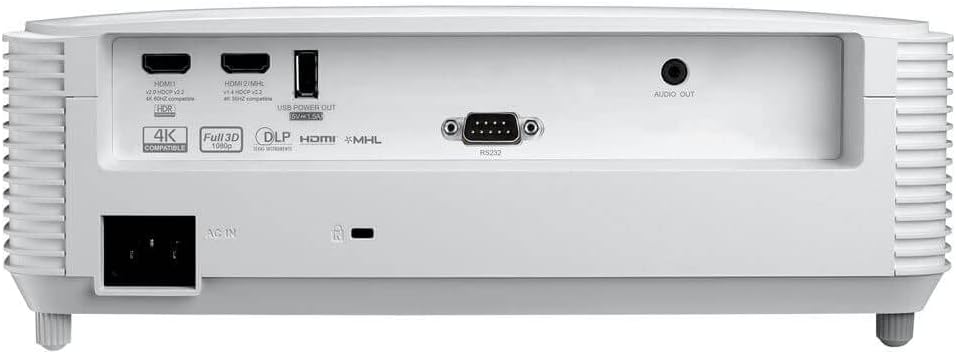
Figure 3.2 : Arrière view of the Optoma GT1080HDRx projector, highlighting the various input and output ports, including dual HDMI, USB, and audio out.
- HDMI 1 et 2 : Connect to gaming consoles, Blu-ray players, streaming devices (e.g., Google Chromecast, Amazon Fire Stick, Apple TV).
- Sortie d'alimentation USB : For powering compatible streaming devices.
- Sortie audio: Connectez-vous à des systèmes audio externes pour un son amélioré.
3.3 Mise sous/hors tension
Connect the AC power cable to the projector and a power outlet. Press the power button on the projector's top panel or the remote control to turn the projector on or off.

Figure 3.3 : Haut view of the projector, showing the control panel with buttons for power, menu navigation, and source selection.

Figure 3.4: The remote control for the Optoma GT1080HDRx projector, featuring buttons for power, source selection, menu, and image adjustments.
3.4 Réglage de la mise au point
Tournez la bague de mise au point de l'objectif du projecteur jusqu'à ce que l'image apparaisse nette et claire sur l'écran.
3.5 Ajustement des images
Use the projector's menu or remote control to access image settings. Adjust keystone correction if the image is not perfectly rectangular. Note that extensive keystone correction can degrade image quality. For optimal performance, physically adjust the projector's position.
4. Mode d'emploi
4.1 Sélection des sources
Press the 'Source' button on the remote control or projector to cycle through available input sources (HDMI 1, HDMI 2).
4.2 Enhanced Gaming Mode
Activate Enhanced Gaming Mode for a fast response time of 8.4ms at 1080p with a 120Hz refresh rate. This mode optimizes display for maximum contrast and vivid colors, crucial for competitive gaming. Note that some image adjustments like keystone, zoom, image shift, or edge masking may be disabled in this mode.

Figure 4.1: An image depicting a gaming scenario, illustrating the benefits of Enhanced Game Mode for responsive gameplay.
4.3 HDR (High Dynamic Range)
The projector supports HDR10 technology with 4K input, providing brighter whites and deeper black levels for improved detail and texture. Ensure your source device is also HDR compatible and configured correctly.

Figure 4.2: A split image demonstrating the visual difference with HDR enabled, showing enhanced contrast and color detail.
4.4 Paramètres de couleur
The six-segment color wheel (RYGCWB) produces accurate color with sRGB & REC. 709 color profile support. Adjust color settings via the OSD (On-Screen Display) menu to suit your viewing environment and preferences. Cinema mode is often recommended for accurate color reproduction.
5. Entretien
5.1 Lamp Vie
Le projecteur lamp has a life of up to 15,000 hours. To maximize lamp life, ensure proper ventilation and avoid frequent power cycles. Replace the lamp when its brightness significantly diminishes or if the projector indicates a lamp erreur.
5.2 Nettoyage
Regularly clean the projector lens with a soft, lint-free cloth designed for optical surfaces. Use a soft brush or compressed air to remove dust from the projector's vents. Do not use abrasive cleaners or solvents.
6. Dépannage
- Pas d'image:
- Vérifiez que le projecteur est allumé et que le câble d'alimentation est correctement branché.
- Vérifiez que la source d'entrée est correctement sélectionnée et que le périphérique source est actif.
- Vérifiez les connexions du câble HDMI.
- Mauvaise qualité d'image :
- Adjust the focus ring for sharpness.
- Check the resolution settings on your source device and ensure they are compatible with the projector's native resolution (1080p).
- Assurez-vous que la surface de projection est propre et plane.
- Avoid excessive keystone correction.
- Pas de son :
- Check the volume settings on the projector and your source device.
- If using external speakers, ensure they are properly connected to the Audio Out port and powered on.
7. Spécifications
| Fonctionnalité | Spécification |
|---|---|
| Nom du modèle | GT1080HDRx |
| Luminosité | 3,800 lumens |
| Résolution native | 1920 x 1080 (1080p) |
| Résolution d'affichage maximale | 3840 x 2160 Pixels (4K UHD input support) |
| Rapport de contraste | 50,000:1 |
| Response Time (Enhanced Gaming Mode) | 8.4ms (at 1080p 120Hz) |
| Technologie de connectivité | HDMI, USB |
| Entrées HDMI | Dual HDMI (1.4a 3D support) |
| Durée de vie de la source lumineuse | Jusqu'à 15,000 heures |
| Distance de projection minimale | 1.3 pieds |
| Distance de projection maximale | 11.3 pieds |
| Dimensions de l'article (L x l x H) | 12.4"L x 9.5"l x 4.5"H |
| Poids de l'article | 7.7 livres |
8. Garantie et assistance
Garantie: The Optoma GT1080HDRx projector comes with a 1-year limited parts and labor warranty. The lamp is covered by a 90-day warranty. Please retain your proof of purchase for warranty claims.
For technical support, service, or further information, please visit the official Optoma website or contact Optoma customer service. Contact details can typically be found on the Optoma website ou dans le guide de démarrage rapide inclus avec votre produit.


