1. Introduction
This manual provides detailed instructions for the installation, operation, and maintenance of your Tbest 9-inch Android Car GPS Navigation Multimedia Player. Please read this manual thoroughly before using the product to ensure proper function and safety.
2. Consignes de sécurité
- Utilisez toujours l'appareil de manière responsable et conformément au code de la route local.
- Do not attempt to install or service the device if you are not qualified. Improper installation can lead to damage or injury.
- Évitez d'exposer l'appareil à des températures extrêmes, à la lumière directe du soleil pendant des périodes prolongées ou à une humidité excessive.
- Assurez-vous que tous les câbles sont correctement connectés afin d'éviter les courts-circuits ou les risques électriques.
3. Contenu du colis
Vérifiez que tous les éléments énumérés ci-dessous sont inclus dans votre colis :
- 1 x Navigator Unit (9-inch Android Multimedia Player)
- 10 x Various Connection Cables
- 4 unités de caméra
- 1 x antenne GPS
- 1 x Manuel d'utilisation
- 2 x supports de montage
- 1 x perforatrice
- 2 x Buffer Rings
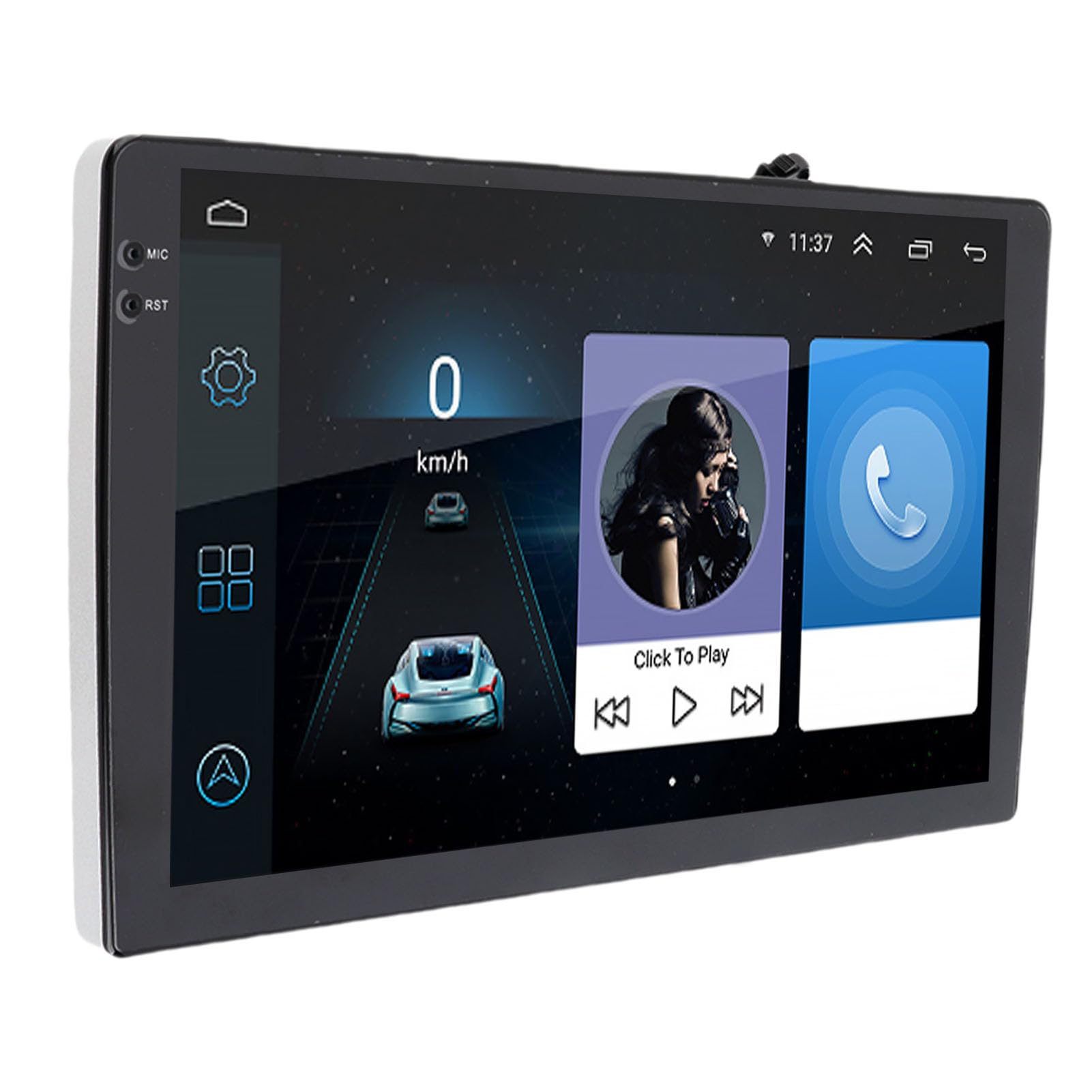
Image: The Tbest 9-inch Android Car GPS Navigation Multimedia Player unit shown with all accompanying cables, cameras, GPS antenna, mounting brackets, and other accessories.
4. Configuration et installation
4.1 Consignes générales d'installation
The Tbest multimedia player is designed for universal fit in various car models. Due to variations in vehicle dashboards, professional installation is recommended. Ensure the mounting location allows for clear visibility and safe operation.
4.2 Connexions de câblage
Carefully connect all necessary cables. Refer to your vehicle's wiring diagram and the provided cable labels for correct connections. Key connections include:
- Câbles d'alimentation : Connectez-vous à l'alimentation électrique du véhicule (ACC, B+, Masse).
- Câbles d'enceintes : Connect to your car's speaker system.
- RCA Terminals: For reverse input, video input, and audio output.
- Ports USB : For external devices or media.
- Antenne GPS: Connectez l'antenne GPS et placez-la dans un endroit dégagé. view du ciel pour une réception optimale du signal.
- Connexions de la caméra : Connect the four camera units to the designated camera inputs for panoramic view fonctionnalité.

Image : Une image détaillée view of the Tbest multimedia player's rear connections and the array of cables provided for power, audio, video, and peripheral devices.
5. Mode d'emploi
5.1 Mise sous/hors tension
The unit will typically power on automatically when the vehicle's ignition is turned on. To manually power off, press and hold the power button (if available) or turn off the vehicle's ignition.
5.2 Fonctionnement de l'écran tactile
The device features a 9-inch capacitive touch screen. Navigate through menus, select applications, and control functions by tapping, swiping, and pinching gestures similar to a smartphone or tablet.
5.3 Navigation GPS
The unit has built-in GPS reception. You can download navigation applications and maps directly from the Application Store for offline use. Ensure the GPS antenna is properly installed for accurate positioning.
5.4 fonctions Bluetooth
The device includes Bluetooth 4.0 for hands-free calling and music streaming (A2DP).
- Jumelage : Go to the Bluetooth settings on the device, enable Bluetooth, and search for available devices. Select your phone from the list and confirm the pairing code.
- Appels mains libres : Once paired, you can make and receive calls directly through the multimedia player. The phone book can be automatically loaded.
- Musique Bluetooth: Stream audio from your paired phone to the car's speakers.
5.5 Lecture multimédia
The player supports various audio formats including MP3, FLAC, APE, WMA, WAV, AAC, AMR. Video playback is also supported. You can play media from USB drives or via Bluetooth streaming.
5.6 Panoramic Camera and Recorder
The integrated 360-degree panoramic camera system provides a comprehensive view around your vehicle, aiding in safe parking. The system also supports recording, allowing you to retain video evidence if needed. Playback functionality is available directly on the unit.
5.7 Commande au volant
The unit supports steering wheel control functions, allowing you to manage audio and other features without taking your hands off the wheel. Configuration may be required in the settings menu.
5.8 Mobile Internet (Mirror Link)
The device supports screen mirroring for both iOS (one-way projection) and Android phones (two-way connection). This allows you to display your phone's screen on the multimedia player.
Radio 5.9
Access FM, AM, and RDS radio bands. Use the touch screen interface to scan for stations and save presets.

Image: The Tbest multimedia player's 9-inch screen showing a typical user interface with navigation on the left and media playback controls on the right.
6. Entretien
6.1 Nettoyage de l'écran
Utilisez un chiffon doux non pelucheux pour essuyer délicatement l'écran. Pour les traces tenaces, frottez légèrement.ampNettoyez le chiffon avec de l'eau ou une solution nettoyante pour écrans conçue pour les appareils électroniques. Évitez les produits chimiques agressifs et les matériaux abrasifs.
6.2 Mises à jour logicielles
Periodically check for software updates to ensure optimal performance and access to new features. Updates can usually be performed via a Wi-Fi connection or USB. Follow the on-screen prompts for any available updates.
7. Dépannage
If you encounter issues with your Tbest multimedia player, refer to the following common problems and solutions:
| Problème | Cause possible | Solution |
|---|---|---|
| Pas de courant | Câblage incorrect, fusible grillé, problème d'alimentation du véhicule. | Vérifiez les connexions des câbles d'alimentation, inspectez les fusibles du véhicule et assurez-vous que le contact est mis. |
| Aucun signal GPS | GPS antenna not connected, antenna obstructed, poor satellite reception. | Assurez-vous que l'antenne GPS est correctement connectée et placée de manière à dégager la vue. view du ciel. Déplacez-vous vers un espace dégagé. |
| Bluetooth ne se connecte pas | Bluetooth off on device/phone, incorrect pairing, interference. | Assurez-vous que le Bluetooth est activé sur les deux appareils. Supprimez les appairages précédents et effectuez un nouvel appairage. Redémarrez les deux appareils. |
| L'écran tactile ne répond pas | Bug logiciel, écran endommagé. | Redémarrez l'appareil. Si le problème persiste, contactez l'assistance. |
| Caméra View Non affiché | Camera cables loose, camera malfunction. | Check all camera connections. Ensure the vehicle is in reverse (if applicable for rear camera). |
Si le problème persiste après avoir essayé ces solutions, veuillez contacter le service client.
8. Spécifications
| Fonctionnalité | Spécification |
|---|---|
| Taille de l'écran | 9 pouces |
| Système opérateur | Androïde |
| Résolution de l'écran | 1024 x 600 |
| Navigation GPS | Support (Offline maps via app store) |
| Version Bluetooth | 4.0 (A2DP, Hands-free, Phone Book) |
| Bandes radio | FM, AM, RDS |
| Pouvoir Amppuce de lificateur | TDA7388 |
| Camera Host Chip | For HiSilicon 3520DV300 |
| Angle de la caméra | 181 degrés |
| Pixel de l'appareil photo | 1MP (Resolution: 1280 x 720P) |
| Vol de travailtage | DC9V-24V |
| Courant de travail | 500 mA (DC12 V) |
| Température de fonctionnement | 35°C - 75°C (Host), -25°C - 90°C (Camera) |
| Connectivité | USB, Wi-Fi |
| Formats audio pris en charge | MP3, FLAC, APE, WMA, WAV, AAC, AMR, etc. |
| Sortie vidéo | CVBS, VGA |
| Waterproof Grade (Camera) | IP67 |
| Dimensions du produit | 9 x 9 x 9 pouces |
| Poids de l'article | 3.38 livres |
9. Garantie et assistance
Your Tbest multimedia player comes with a standard manufacturer's warranty. Please refer to the warranty card included in your package for specific terms and conditions. For technical support, troubleshooting assistance, or warranty claims, please contact your retailer or the Tbest customer service department.
Coordonnées: (Please refer to your purchase documentation or the official Tbest web(Voir le site pour les coordonnées actuelles.)


