1. Introduction et informations de sécurité
This manual provides essential instructions for the safe and effective operation, maintenance, and troubleshooting of your VOLTCRAFT VC851 Digital Multimeter. Please read this manual thoroughly before using the device and keep it for future reference.
1.1 Avertissements généraux de sécurité
Always adhere to the following safety precautions to prevent electric shock, injury, or damage to the meter or equipment under test:
- The VOLTCRAFT VC851 is rated for CAT III 1000 V and CAT IV 600 V. Ensure you understand these categories and their implications for safe measurement.
- Ne pas appliquer plus que le volume nominal.tage, comme indiqué sur le compteur, entre les bornes ou entre n'importe quelle borne et la terre.
- Soyez prudent lorsque vous travaillez avec des volumestages above 30 V AC RMS, 42 V peak, or 60 V DC. These voltagils présentent un risque d'électrocution.
- Avant chaque utilisation, inspectez les cordons de test afin de détecter toute isolation endommagée ou tout métal exposé. Remplacez immédiatement les cordons endommagés.
- Ensure the rotary switch is in the correct position for the desired measurement before connecting the test leads to the circuit.
- Never use the meter if it appears damaged or if the case is open.
- Ne pas utiliser l'appareil de mesure dans des environnements explosifs contenant des gaz, des vapeurs ou de la poussière.
- Débranchez toujours les cordons de test du circuit avant de modifier la fonction ou la plage de réglage.
- Remplacez la pile dès que le témoin de pile faible apparaît afin de garantir des mesures précises.
2. Produit terminéview
The VOLTCRAFT VC851 is a versatile digital multimeter designed for precise electrical measurements. It features a 6000-count display, auto-ranging capabilities, and integrated flashlight and screen illumination for use in various environments.
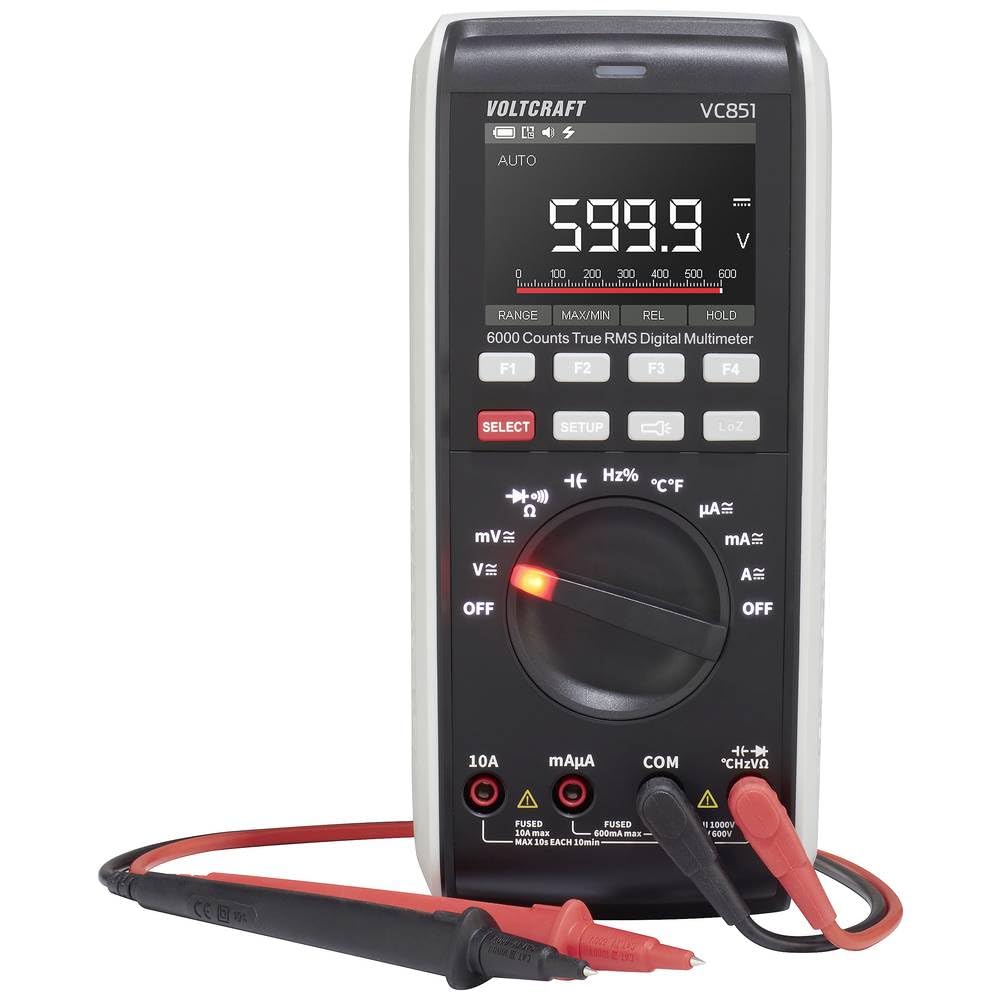
Figure 2.1 : Face avant view of the VOLTCRAFT VC851 Digital Multimeter with connected test leads. This image shows the display, rotary dial, function buttons, and input jacks.

Figure 2.2 : Arrière view of the VOLTCRAFT VC851 Digital Multimeter, illustrating the integrated test lead storage and kickstand.
3. Installation et mise en service initiale
3.1 Installation de la batterie
The VOLTCRAFT VC851 is powered by batteries. To install or replace batteries:
- Assurez-vous que le multimètre est éteint et débranchez tous les cordons de test.
- Repérez le couvercle du compartiment à piles à l'arrière de l'appareil.
- Utilisez un tournevis pour ouvrir le compartiment à piles.
- Insert new batteries, observing the correct polarity (+/-).
- Fermez fermement le couvercle du compartiment des piles.

Figure 3.1 : Retour view of the multimeter, highlighting the battery compartment for installation or replacement.
3.2 Connexion des cordons de test
Préparation aux mesures :
- Insérez le fil de test noir dans la prise d'entrée « COM » (commune).
- Insérez le fil de test rouge dans la prise d'entrée appropriée pour votre mesure :
- "VΩHz" pour voltage, resistance, frequency, capacitance, and diode tests.
- « mAµA » pour milliampet microampmesures actuelles.
- "10A" for high current (up to 10A) measurements.

Figure 3.2: The multimeter with test leads properly connected to the input jacks, ready for use.
4. Mode d'emploi
The VOLTCRAFT VC851 features a rotary dial for selecting primary measurement functions and buttons for secondary functions and settings.
4.1 Sélection de la fonction
Turn the central rotary dial to select the desired measurement function (e.g., V for voltage, A for current, Ω for resistance). The meter will automatically select the appropriate range (Auto-Range) for most measurements.
4.2 Modes de mesure
- Voltage (V~ / V-): Mesurer le volume AC ou DCtage. Select the appropriate voltage range using the rotary dial.
- Courant (A~ / A-) : Measure AC or DC current. Ensure test leads are connected to the correct current input jacks (mAµA or 10A) and the rotary dial is set to the corresponding current range.
- Résistance (Ω) : Measure resistance in ohms.
- Continuité: Test for continuity with an audible buzzer.
- Test de diodes : Test diodes for proper function.
- Capacité (F): Measure capacitance in farads.
- Fréquence (Hz) : Measure frequency in hertz.
- Température (°C/°F) : Measure temperature using the included temperature probe.
4.3 Caractéristiques spéciales
- Lampe de poche: Press the dedicated flashlight button to illuminate the work area.
- Éclairage de l'écran : The display features backlighting for improved visibility in low-light conditions.
- Maintien de données: Appuyez sur le bouton « HOLD » pour figer la lecture actuelle affichée.
- Min max: Use the "MIN/MAX" function to record the minimum and maximum values during a measurement session.

Figure 4.1: The multimeter in use, demonstrating its application in an electrical panel for voltage or current checks.

Figure 4.2: The multimeter being used for precise measurements on a circuit board, showcasing its versatility for electronics work.
5. Entretien
Proper maintenance ensures the longevity and accuracy of your VOLTCRAFT VC851 Digital Multimeter.
5.1 Nettoyage
- Always turn off the meter and disconnect test leads before cleaning.
- Essuyez le boîtier avec la publicitéamp chiffon et un détergent doux. Ne pas utiliser d'abrasifs ou de solvants.
- Ensure no moisture enters the case.
5.2 Remplacement de la batterie
Refer to Section 3.1 for detailed instructions on battery replacement. Replace batteries promptly when the low battery indicator appears to maintain measurement accuracy.
5.3 Remplacement du fusible
If the current measurement function stops working, the fuse may need replacement. Fuses are critical safety components. Always replace with a fuse of the specified type and rating.
- Assurez-vous que le multimètre est éteint et débranchez tous les cordons de test.
- Ouvrez le couvercle du compartiment de la batterie (voir section 3.1).
- Retirez soigneusement l'ancien fusible.
- Install a new fuse of the exact same type and rating. Refer to the specifications section for fuse details.
- Fermez fermement le couvercle du compartiment des piles.
6. Dépannage
If you encounter issues with your VOLTCRAFT VC851, consult the following table for common problems and solutions.
| Problème | Cause possible | Solution |
|---|---|---|
| Aucun affichage ou affichage faible | Piles faibles ou mortes | Remplacez les piles (voir section 3.1). |
| Lectures incorrectes | Incorrect function/range selected; Damaged test leads; External interference | Verify rotary switch position; Inspect and replace test leads if damaged; Move away from strong electromagnetic fields. |
| La mesure du courant ne fonctionne pas. | Blown fuse; Incorrect lead connection | Replace fuse (see Section 5.3); Ensure leads are in the correct current input jacks. |
| « OL » (Surcharge) affiché | La mesure dépasse la plage sélectionnée ou la capacité maximale du compteur | Switch to a higher range if available, or ensure the measured value is within the meter's specifications. |
7. Spécifications techniques
| Fonctionnalité | Spécification |
|---|---|
| Numéro de modèle | VC-12884325 |
| Cote de sécurité | CAT III 1000 V, CAT IV 600 V |
| Afficher les comptes | 6000 comptes |
| Portée | Plage automatique |
| Fonctions | Vol AC/DCtage, AC/DC Current, Resistance, Continuity, Diode, Capacitance, Frequency, Temperature |
| Caractéristiques spéciales | Flashlight, Screen Illumination, Data Hold, Min/Max |
| Dimensions (L x l x H) | 4.3 x 9.1 x 20 cm (1.7 x 3.6 x 7.9 pouces) |
| Poids | 430 grammes (0.95 lb) |
| Source d'énergie | Alimenté par batterie |
| Disponibilité des pièces de rechange | 1 an |
8. Garantie et assistance
VOLTCRAFT products are designed for reliability and performance. This product comes with a standard warranty. For specific warranty terms and conditions, please refer to the documentation included with your purchase or visit the official VOLTCRAFT website.
Spare parts are available for 1 year from the date of purchase. For technical support, service, or inquiries regarding spare parts, please contact VOLTCRAFT customer service through their official channels.
Veuillez conserver votre preuve d'achat pour les réclamations au titre de la garantie.


