1. Introduction
The Belkin BoostCharge Magnetic Wireless Power Bank (Model BPD004) provides portable power for your compatible devices. Featuring MagSafe technology, a 5000 mAh battery capacity, and a built-in kickstand, it offers convenient wireless charging on the go. This manual provides essential information for safe and effective use of your power bank.
2. Contenu du colis
Vérifiez que tous les articles sont présents dans votre colis :
- Belkin BoostCharge Magnetic Wireless Power Bank 5000 mAh
- 3.3ft USB-C to USB-C Charging Cable
- Manuel de l'utilisateur (ce document)
3. Installation
Charge initiale de la batterie externe
Before first use, fully charge your Belkin BoostCharge Magnetic Wireless Power Bank.
- Connectez le câble USB-C vers USB-C fourni au port USB-C de la batterie externe.
- Connectez l'autre extrémité du câble à un adaptateur secteur USB-C compatible (non inclus).
- Les voyants LED situés sur le côté de la batterie externe s'allument pour indiquer la progression de la charge. Les quatre voyants restent allumés en continu une fois la batterie complètement chargée.
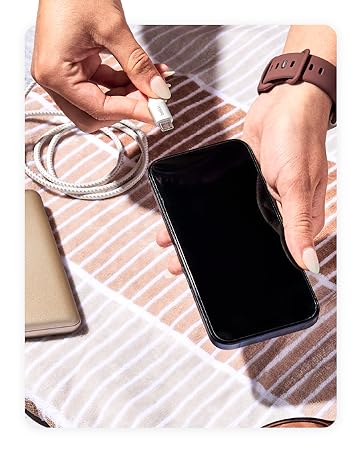
Figure 1: Connecting the USB-C cable to the power bank for charging.
4. Mode d'emploi
Attaching to Your Device (MagSafe)
The power bank uses MagSafe technology for secure attachment and wireless charging.
- Ensure your device is MagSafe compatible (iPhone 12 series or newer) or has a MagSafe compatible case.
- Align the power bank with the back of your device. The magnets will automatically snap it into place.
- Wireless charging will begin automatically. The LED indicator lights on the power bank will show its remaining charge.

Figure 2: Magnetic attachment of the power bank to a compatible iPhone.
Utilisation de la béquille intégrée
The integrated pop-up kickstand allows for hands-free viewpendant la charge.
- With the power bank attached to your device, gently pull out the kickstand from the back of the power bank.
- Position your device vertically or horizontally for optimal viewing.

Figure 3: Device standing vertically using the power bank's kickstand.

Figure 4: Device standing horizontally using the power bank's kickstand.
Chargement direct
The power bank supports pass-through charging, allowing you to charge both the power bank and your device simultaneously.
- Attach the power bank to your MagSafe-compatible device.
- Connect the USB-C to USB-C cable to the power bank's USB-C port and a power source.
- La batterie externe et votre appareil se chargeront tous les deux.
Video 1: Official product video demonstrating features including pass-through charging and kickstand functionality.
Voyants lumineux à LED
The LED lights on the side of the power bank indicate its charge level:
- 4 LED fixes : 75-100% chargé
- 3 LED fixes : 50-75% chargé
- 2 LED fixes : 25-50% chargé
- 1 LED fixes : 0-25% chargé
5. Compatibilité
The Belkin BoostCharge Magnetic Wireless Power Bank is compatible with a wide range of devices:
- iPhone : iPhone 17, iPhone Air, iPhone 17 Pro, iPhone 17 Pro Max, iPhone 16 Pro Max, iPhone 16 Pro, iPhone 16 Plus, iPhone 16, iPhone 15 Pro Max, iPhone 15 Pro, iPhone 15 Plus, iPhone 15, iPhone 14 Pro Max, iPhone 14 Pro, iPhone 14 Plus, iPhone 14.
- Apple Accessories: AirPods Pro, AirPods.
- Google Pixel : Google Pixel 10 Pro XL, Google Pixel 10 Pro Fold, Google Pixel 10 Pro, Google Pixel 10.
- Cas: Compatible with official MagSafe cases.
6. Consignes de sécurité
Your Belkin BoostCharge Magnetic Wireless Power Bank is designed with multiple safety features:
- Advanced Safety Testing: Undergoes rigorous 16-point testing for hardware design, including temperature protection, overcharge protection, drop test, and plug and unplug test.
- Protection à double puce : Equipped with two intelligent safety chips to prevent damage from overvoltage, surintensité et autres défauts.
- Carry-On Safe: The power bank features 18.5 Wh (watt-hours) to be fully compliant with 100 Wh-limit TSA carry-on requirements for air travel.
Figure 5: Carry-On Safe features of the power bank.
7. Entretien
Pour garantir la longévité et les performances optimales de votre batterie externe :
- Gardez l'appareil au sec et à l'abri de l'humidité.
- Évitez les températures extrêmes.
- Nettoyez l'appareil avec un chiffon doux et sec. N'utilisez pas de produits chimiques agressifs ni de matériaux abrasifs.
- Conserver dans un endroit frais et sec lorsqu'il n'est pas utilisé.
8. Dépannage
Si vous rencontrez des problèmes avec votre batterie externe, consultez les solutions courantes suivantes :
- L'appareil ne se charge pas sans fil : Ensure your device is MagSafe compatible and properly aligned with the power bank. Remove any non-MagSafe cases that may interfere with the magnetic connection.
- La batterie externe ne charge pas : Verify that the USB-C cable is securely connected to both the power bank and a functioning power adapter. Try a different cable or power adapter.
- Charge lente : Ensure you are using a compatible power adapter for optimal charging speed. Wireless charging (7.5W) is generally slower than wired charging (12W via USB-C).
- Les voyants LED ne fonctionnent pas : Press the power button on the side of the power bank to activate the LED indicators. If they still do not light up, the power bank may be fully depleted or require service.
9. Spécifications
| Fonctionnalité | Détail |
|---|---|
| Numéro de modèle | BPD004 |
| Capacité de la batterie | 5000 mAh |
| Sortie de charge sans fil | 7.5 W (compatible MagSafe) |
| Sortie/entrée de charge filaire | USB-C (up to 12W) |
| Dimensions (L x l x H) | 3.69 x 2.5 x 0.65 pouces |
| Poids de l'article | 5.3 onces |
| Caractéristiques spéciales | LED Indicator Lights, Pass-Through Charging, Wireless Charging, Built-in Kickstand |
| Couleur | Blanc |
10. Garantie et assistance
Belkin stands by the quality of its products. Your Belkin BoostCharge Magnetic Wireless Power Bank comes with:
- Garantie limitée de 2 ans : Couvre les défauts de matériaux et de fabrication dans des conditions normales d'utilisation.
- Garantie de 2 500 $ sur les équipements connectés (CEW) : Provides coverage for connected electronic devices damaged by an electrical surge while properly connected to the power bank.
Pour connaître les conditions générales détaillées, veuillez consulter le site officiel de Belkin. webconsultez le site ou contactez le service client de Belkin.
Figure 6: Belkin offers a range of charging solutions and accessories.


