1. Produit terminéview
The Sinotimer TM618N-2 is a versatile 7-day weekly digital programmable timer designed for automated control of electrical equipment. It allows users to set specific daily or weekly schedules for turning devices on and off, ensuring efficient energy management and convenience. This timer is suitable for a wide range of applications, including controlling lighting, heating, ventilation, and other electrical appliances.

Figure 1 : Face avant view of the Sinotimer TM618N-2 Digital Timer, showing the display and control buttons.
2. Principales caractéristiques
- Programmable hebdomadairement : Allows up to 16 ON/OFF programs per day or week.
- Multifonctionnel: Includes Clock display, Timer, Countdown, Automatic weekly time deviation correction, and Sleep mode.
- Haute capacité : Prend en charge 16 Amp / 220 Volt AC loads.
- Vol largetagCompatibilité : Operates with 220V, 230V, 240V AC.
- Batterie intégrée : Conserve les paramètres pendant la mise sous tensiontages (Lithium battery type).
- Applications polyvalentes : Ideal for controlling dryers, defrosting equipment, swimming pool pumps, gates, lighting, and more.
3. Spécifications
| Fonctionnalité | Détail |
|---|---|
| Modèle | TM618N-2 |
| Marque | Sinotimer |
| Voltage | 220V / 230V / 240V CA |
| Évaluation actuelle | 16 Amp |
| Nombre de programmes | 16 programmes marche/arrêt |
| Matériel | Plastique |
| Type de batterie | Lithium (internal, non-replaceable by user) |
| Couleur | Multi-color (typically white/grey) |
4. Installation
Avis de sécurité important : Installation should only be performed by a qualified electrician. Ensure power is disconnected before attempting any wiring.
- Montage: The TM618N-2 is designed for DIN rail mounting or screw mounting. Secure the timer in a suitable electrical enclosure.
- Câblage : Refer to the wiring diagram on the back of the unit.
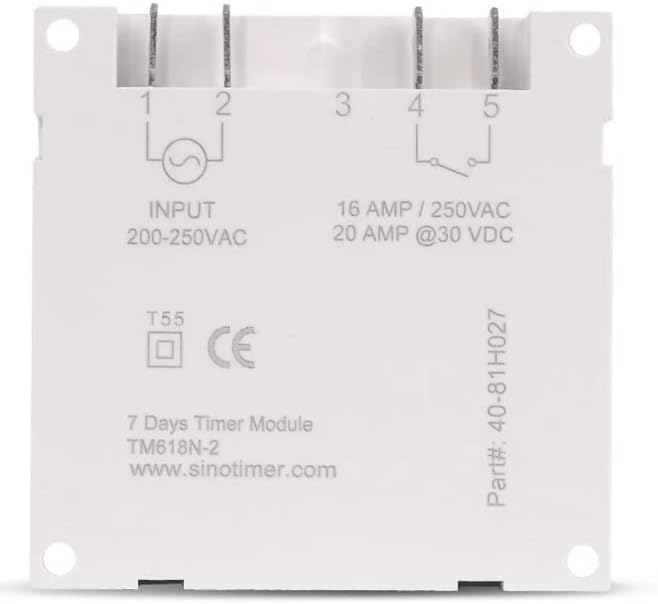
Figure 2 : Retour view of the Sinotimer TM618N-2, showing input/output terminals and wiring diagram.
- Entrée (Terminaux 1 et 2) : Raccordez votre alimentation 200-250 V CA à ces bornes.
- Output (Terminals 3, 4, & 5):
- Terminal 3 : Commun (COM)
- Terminal 4: Normally Open (NO) - Connect your load here for switched power.
- Terminal 5: Normally Closed (NC) - (Less commonly used for timer applications, but available).
- Mise sous tension : Once wiring is complete and secure, restore power to the circuit. The timer display should illuminate.

Figure 3: Technical drawing showing the dimensions of the Sinotimer TM618N-2 timer.
5. Mode d'emploi
5.1. Fonctions des boutons
- HORLOGE: Permet de régler l'heure et la date actuelles.
- PROG: Enters/exits programming mode for ON/OFF schedules.
- LA SEMAINE: Selects the day(s) of the week during time or program setting.
- HEURE: Adjusts the hour during time or program setting.
- MIN: Adjusts the minute during time or program setting.
- RAPPEL: Recalls or cancels a program setting.
- MANUEL: Manually overrides the timer's current state (ON/AUTO/OFF).
- R (Réinitialiser) : Small button (requires a pointed object) to reset the timer to factory defaults.
5.2. Réglage de l'heure et de la date actuelles
- Appuyez et maintenez enfoncé le HORLOGE bouton.
- Tout en tenant HORLOGE, presse SEMAINE pour définir le jour actuel (LU, TU, ME, JE, VEN, SA, DI).
- Tout en tenant HORLOGE, presse HEURE pour régler l'heure actuelle.
- Tout en tenant HORLOGE, presse MIN pour régler la minute actuelle.
- Relâchez le HORLOGE bouton pour enregistrer les paramètres.
5.3. Programmation des horaires de marche/arrêt
The timer supports up to 16 ON and 16 OFF programs. Each program can be set for a specific day or group of days.
- Appuyez sur le PROGRAMME Appuyez une fois sur le bouton. L'écran affichera « 1 ON ».
- Presse SEMAINE repeatedly to select the desired day(s) for this program (e.g., MO, TU, WE, TH, FR, SA, SU; MO-FR; SA-SU; MO-SA; etc.).
- Presse HEURE pour régler l'heure de mise en marche souhaitée.
- Presse MIN pour régler la durée de marche souhaitée (en minutes).
- Presse PROGRAMME À nouveau. L'écran affichera « 1 OFF ».
- Répétez les étapes 2 et 4 pour régler la durée d'arrêt souhaitée pour le premier programme.
- Presse PROGRAMME to move to the next program ("2 ON", "2 OFF", etc.) and repeat the process for up to 16 programs.
- Pour quitter le mode programmation et enregistrer les paramètres, appuyez sur HORLOGE bouton.
5.4. Commande manuelle
Appuyez sur le MANUEL button to cycle through the output modes:
- SUR: La sortie est activée en permanence, ignorant les programmes.
- VOITURE: Output follows the programmed schedules.
- OFF: La sortie est constamment désactivée, ignorant les programmes.
Assurez-vous que la minuterie est en marche AUTO mode for programmed operation.
5.5. Réinitialisation du minuteur
To clear all settings and return the timer to its factory default state, insert a pointed object (like a paperclip) into the small R (Reset) hole and press gently.
6. Entretien
The Sinotimer TM618N-2 requires minimal maintenance.
- Veillez à ce que l'appareil reste propre et exempt de poussière. Utilisez un chiffon doux et sec pour le nettoyer.
- N'utilisez pas de nettoyants abrasifs ni de solvants.
- Ensure the timer is installed in a dry environment, away from direct moisture or extreme temperatures.
- The internal battery is designed for long life and is not user-replaceable. If the display goes blank or settings are not retained after a power outage, the battery may need professional service.
7. Dépannage
| Problème | Cause possible | Solution |
|---|---|---|
| L'affichage est vide. | Pas d'alimentation électrique ; batterie interne déchargée. | Check power connections. If power is present, the internal battery may need charging (leave connected to power for several hours) or replacement (professional service required). |
| La minuterie ne s'allume/s'éteint pas comme prévu. | Timer is not in AUTO mode; incorrect program settings; wiring issue. | Presse MANUEL jusqu'à ce que « AUTO » s'affiche. Review and correct program settings. Verify wiring connections. |
| Les paramètres sont perdus après une coupure de courant.tage. | Internal battery is depleted or faulty. | Leave the timer connected to power for at least 4 hours to charge the internal battery. If the problem persists, the battery may need replacement (professional service recommended). |
| Les boutons ne répondent pas. | Temporary software glitch; unit needs reset. | Effectuez une réinitialisation complète à l'aide de R button. If the issue continues, contact support. |
8. Garantie et assistance
Pour toute information relative à la garantie et pour obtenir une assistance technique, veuillez consulter la documentation fournie avec votre achat ou contacter votre revendeur. Conservez votre preuve d'achat pour toute réclamation au titre de la garantie.
Manufacturer: Sinotimer


