Introduction
This manual provides detailed instructions for the safe and efficient operation, installation, and maintenance of your PowerDrive 2000 Watt Power Inverter, Model PWD2000P. This device converts 12V DC power from your vehicle battery into 110V AC power, allowing you to operate various AC devices and charge electronic devices on the go. Please read this manual thoroughly before using the inverter.
Informations importantes sur la sécurité
Always observe the following safety precautions to prevent injury or damage to the inverter or connected devices:
- N'ouvrez pas l'onduleur casing. Il n'y a aucune pièce réparable par l'utilisateur à l'intérieur.
- Assurez une ventilation adéquate autour de l'onduleur. Ne bloquez pas les orifices de ventilation.
- Tenez l'onduleur éloigné de l'eau, de l'humidité et des matériaux inflammables.
- Connectez l'onduleur uniquement à une source d'alimentation 12 V CC.
- Do not exceed the inverter's rated power output (2000 Watts continuous, 4000 Watts surge).
- Always connect the inverter to the battery before plugging in AC devices.
- Débranchez l'onduleur de la batterie lorsqu'il n'est pas utilisé.
- Ce produit contient des produits chimiques connus de l'État de Californie pour causer le cancer et des malformations congénitales ou d'autres troubles de la reproduction. Se laver les mains après manipulation.
Composants du produit
The PowerDrive 2000 Watt Power Inverter comes with the following components:
- PowerDrive 2000 Watt Power Inverter unit
- 39-inch heavy-duty installation cables (red for positive, black for negative)
- Écran ACL amovible
- Supports de montage

Figure 1 : Devant view of the PowerDrive 2000 Watt Power Inverter, showing the digital display, power button, Bluetooth indicator, four AC 120V outlets, one USB-C port, and one USB-A port. The unit features a durable yellow and black casing avec des grilles de ventilation.

Figure 2 : Surview of the PowerDrive 2000 Watt Power Inverter with key dimensions (14.54" length, 9.8" width, 4.25" height) and included accessories. The image displays the inverter unit, red and black 39-inch battery cables, and a 12-foot remote LCD cable.
Configuration et installation
Proper installation is crucial for the inverter's performance and safety. Follow these steps carefully:
- Choisissez un emplacement : Select a dry, well-ventilated area for mounting the inverter. Ensure it is away from direct sunlight, heat sources, and any flammable materials. The mounting brackets can be used to secure the unit.
- Préparez la batterie : Ensure your vehicle's battery is a 12V DC system. Turn off the vehicle and any accessories.
- Connecter les câbles :
- Connectez le rouge (positive) cable to the positif (+) borne de l'onduleur.
- Connectez le noir (negative) cable to the négatif (-) borne de l'onduleur.
- Connectez l'autre extrémité du rouge câble à la positif (+) borne de la batterie du véhicule.
- Connectez l'autre extrémité du noir câble à la négatif (-) borne de la batterie du véhicule.
Important: Always connect the inverter terminals first, then the battery terminals. Ensure connections are tight and secure.
- Connect Remote LCD (Optional): If desired, connect the removable LCD screen to the inverter using the provided cable. This allows for remote monitoring and control.
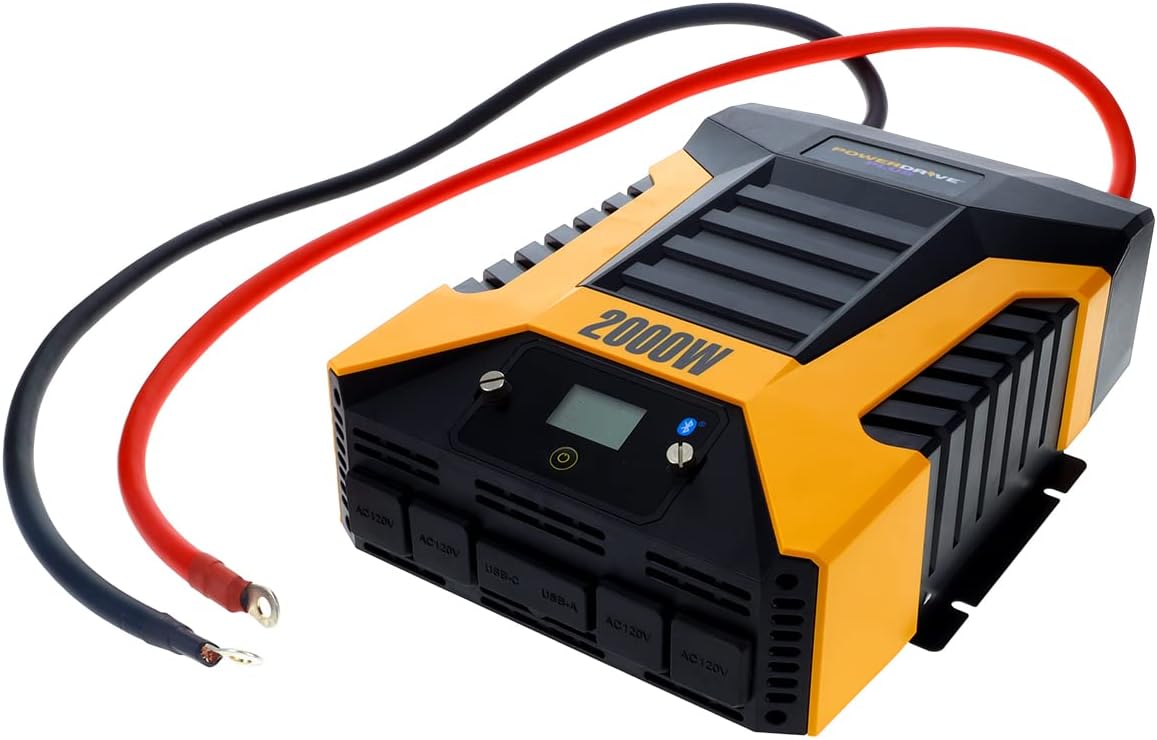
Figure 3 : The PowerDrive 2000 Watt Power Inverter with the red positive and black negative battery cables securely connected to its terminals, ready for connection to a vehicle battery. This illustrates the correct cable attachment for power input.
Mode d'emploi
Once installed, the inverter is ready for operation:
- Mise sous tension : Press the power button on the inverter's front panel or on the remote LCD screen. The digital display will illuminate, showing battery voltage et sortie wtage.
- Connexion d'appareils : Plug your AC devices into the four 3-prong AC outlets. For charging smartphones and tablets, use the standard USB 2.4 Amp port or the fast-charging USB-C 3.0 Amp port.
- Surveillance: The digital display provides real-time information on battery voltage, output power (watts), and any error codes.
- Technologie sans fil Bluetooth :
- Téléchargez gratuitement PowerDrive Plus app from your smartphone's app store (compatible with Android and iOS).
- Enable Bluetooth on your smartphone and pair it with the inverter.
- The app allows you to remotely monitor battery voltage, output power, and product temperature. You can also set up protections like undervoltage and overload, and power the inverter on/off from a distance.
- Mise hors tension : Press and hold the power button until the display turns off, or use the PowerDrive Plus app. Disconnect devices before turning off the inverter.

Figure 4 : Gros plan sur l'avant view of the PowerDrive 2000 Watt Power Inverter, highlighting its four AC 120V outlets, one USB-C port, and one USB-A port. These ports provide versatile power options for various electronic devices and appliances.

Figure 5 : A smartphone screen showing the PowerDrive Plus application interface. The app displays real-time data such as output power (842 watts), battery power percentage (88%), battery voltage (12.6 VDC), and output voltage (120 VAC), along with temperature readings and control options.
Entretien
To ensure the longevity and optimal performance of your PowerDrive inverter, follow these maintenance guidelines:
- Garder propre: Essuyez régulièrement l'extérieur de l'onduleur avec un chiffon doux et sec. N'utilisez pas de nettoyants liquides ni de solvants.
- Ventilation: Ensure the cooling fan vents are clear of dust and debris. The high-speed cooling fan automatically activates when needed and is designed for quiet operation.
- Connexions de câble : Periodically check that all cable connections to the battery and inverter terminals are secure and free from corrosion.
- Stockage: Lorsqu'il n'est pas utilisé pendant une période prolongée, rangez l'onduleur dans un endroit frais et sec, déconnecté de la batterie.

Figure 6 : Arrière view of the PowerDrive 2000 Watt Power Inverter, showcasing its two high-speed cooling fans and the robust battery input terminals. Proper airflow through these fans is essential for maintaining optimal operating temperature.
Dépannage
Si vous rencontrez des problèmes avec votre onduleur, consultez les problèmes et solutions courants suivants :
| Problème | Cause possible | Solution |
|---|---|---|
| Pas de sortie de courant / Onduleur ne s'allume pas |
|
|
| L'onduleur s'arrête fréquemment |
|
|
| L'écran numérique affiche le code d'erreur | Specific error condition (e.g., over-voltage, sous-voltage, overload, short circuit) | Refer to the PowerDrive Plus app or contact customer support for specific error code interpretations and solutions. Address the underlying issue (e.g., reduce load, check battery). |
Spécifications du produit
| Fonctionnalité | Détail |
|---|---|
| Marque | Moteur PowerDrive |
| Numéro de modèle | PWD2000P |
| Puissance continue | 2000 watts |
| Surtension | 4000 watts |
| Vol d'entréetage | 12 V CC |
| Volume de sortietage | 110 V c.a. |
| Prises CA | Four 3-prong outlets |
| Ports USB | Un USB 2.4 Amp, One USB-C 3.0 Amp |
| Connectivité | Bluetooth Wireless Technology (PowerDrive Plus App compatible) |
| Afficher | Digital display (removable LCD screen) |
| Refroidissement | Ventilateur de refroidissement à grande vitesse |
| Poids de l'article | 9 livres |
| Dimensions du produit | 5.7 x 17 x 12 pouces |
Garantie et assistance
For warranty information, technical support, or service inquiries, please contact PowerDrive customer service. Keep your purchase receipt as proof of purchase.
For additional resources and frequently asked questions, visit the official PowerDrive website or refer to the PowerDrive Plus app.


