Introduction
Merci pour votre achatasing the Max Power MPD15EQ Portable Rechargeable PA Speaker. This manual provides important information regarding the setup, operation, and maintenance of your speaker. Please read it thoroughly before using the product to ensure proper function and to maximize its lifespan.
Consignes de sécurité
- N'exposez pas l'appareil à la pluie ou à l'humidité pour éviter tout risque d'incendie ou d'électrocution.
- Do not open the speaker cabinet. There are no user-serviceable parts inside. Refer all servicing to qualified personnel.
- Assurez une ventilation adéquate. Ne bloquez aucune ouverture de ventilation.
- Utilisez uniquement l'adaptateur secteur fourni avec l'appareil.
- Keep the speaker away from heat sources, direct sunlight, and strong magnetic fields.
- Nettoyer uniquement avec un chiffon sec.
Contenu du colis
- Max Power MPD15EQ PA Speaker
- Microphone filaire
- Télécommande
- Adaptateur secteur
- Manuel de l'utilisateur (ce document)
Produit terminéview
Familiarize yourself with the various parts of your MPD15EQ speaker.
Panneau avant
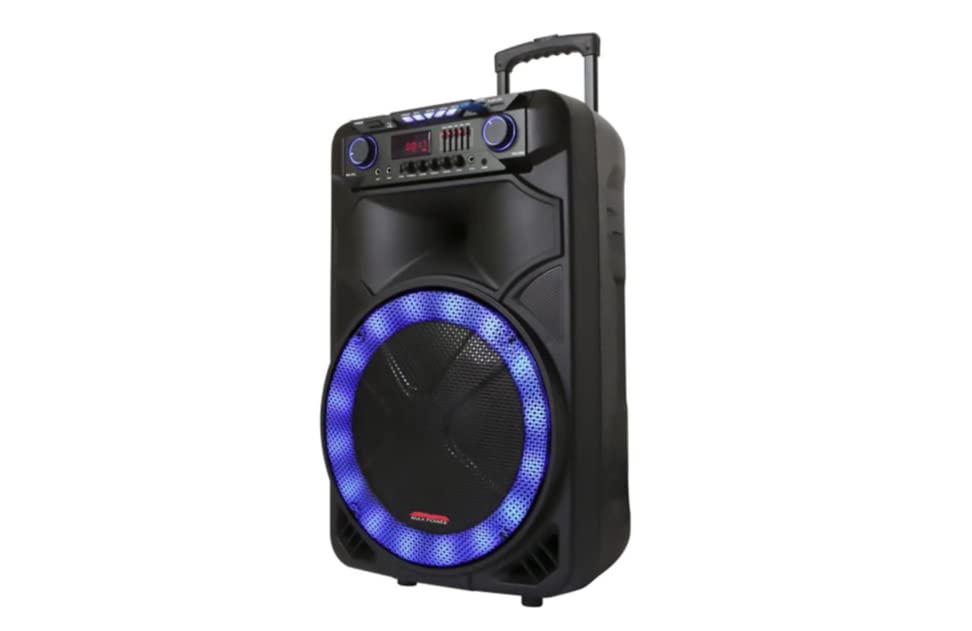
Description de l'image : This image displays the front of the Max Power MPD15EQ speaker. It features a large 15-inch woofer at the bottom, a 5-inch horn tweeter above it, and a control panel with an LED display screen. The speaker grille covers the woofer and tweeter, and the overall design is robust and portable.
- Haut-parleur de graves de 15 pouces : Provides powerful bass frequencies.
- 5" Horn Tweeter: Delivers clear high frequencies.
- Écran d'affichage LED : Affiche le mode actuel, les informations de la piste et les paramètres.
- Panneau de contrôle: Buttons and knobs for various functions (volume, EQ, mode, etc.).
- Interrupteur marche/arrêt pour lampe LED : Contrôle l'éclairage LED intégré.
Panneau arrière (Example - specific details not provided in source)
The rear panel typically includes input/output ports and the power connection.
- Puissance d'entrée : For connecting the power adapter to charge the battery or operate the unit.
- Port USB : Pour lire des fichiers audio depuis des clés USB.
- Emplacement pour carte SD : Pour lire des fichiers audio depuis des cartes SD.
- Entrée microphone : Pour connecter le microphone filaire.
- Entrée auxiliaire : Pour connecter des appareils audio externes via un câble 3.5 mm ou RCA.
Installation
Charger la batterie
The MPD15EQ features a built-in rechargeable battery. Before first use, fully charge the speaker for approximately 6-8 hours.
- Connect the supplied power adapter to the speaker's power input port.
- Branchez l'adaptateur secteur dans une prise murale standard.
- The LED display or an indicator light will show the charging status.
- Une fois complètement chargé, débranchez l'adaptateur secteur.
Mise sous tension initiale
- Ensure the speaker is fully charged or connected to power.
- Locate the power switch (usually on the rear or control panel) and turn it to the "ON" position.
- The LED display will illuminate, indicating the speaker is ready for use.
Mode d'emploi
Connexion Bluetooth
- Turn on the MPD15EQ speaker.
- Press the "MODE" button on the control panel until "BLUETOOTH" or "BT" appears on the LED display.
- Activez le Bluetooth sur votre smartphone, tablette ou autre appareil audio.
- Rechercher available devices and select "MPD15EQ" from the list.
- Once paired, you will hear a confirmation sound, and you can now play audio wirelessly.
Utilisation du microphone filaire
- Connect the supplied wired microphone to the "MIC IN" port on the speaker.
- Adjust the microphone volume knob (if available) on the control panel to your desired level.
- Parlez dans le microphone.
Lecture de carte USB/SD
- Insérez une clé USB ou une carte SD (préchargée avec des fichiers audio MP3). files) dans le port respectif.
- The speaker should automatically switch to USB/SD mode and begin playing. If not, press the "MODE" button.
- Use the playback controls (Play/Pause, Next, Previous) on the control panel or remote control.
5-Band Graphic EQ Adjustment
The MPD15EQ features a 5-band graphic equalizer to fine-tune your audio output.
- Locate the EQ sliders on the control panel.
- Each slider corresponds to a specific frequency band. Adjust them up or down to boost or cut those frequencies.
- Experiment with the settings to achieve your preferred sound profile.
Lumières LED
The speaker includes integrated LED lights. Use the "LED Light On/Off Switch" to activate or deactivate them.
Utilisation de la télécommande
The included remote control allows for convenient operation from a distance. It typically includes buttons for power, mode selection, volume, track control, and EQ presets.
Entretien
Nettoyage
- Éteignez et débranchez toujours l'enceinte avant de la nettoyer.
- Utilisez un chiffon doux et sec pour essuyer les surfaces extérieures.
- N’utilisez pas de nettoyants liquides, d’aérosols ni de produits chimiques abrasifs.
Stockage
- Rangez l'enceinte dans un endroit frais et sec, à l'abri de la lumière directe du soleil et des températures extrêmes.
- If storing for extended periods, charge the battery periodically (e.g., every 3 months) to maintain battery health.
Dépannage
| Problème | Cause possible | Solution |
|---|---|---|
| Pas de courant | Batterie déchargée ; câble d'alimentation non connecté ; interrupteur d'alimentation éteint. | Chargez la batterie ; vérifiez la connexion du câble d’alimentation ; mettez l’interrupteur d’alimentation sur ON. |
| Pas de son | Volume trop faible ; mode d’entrée incorrect ; appareil non apparié (Bluetooth). | Increase master volume; Select correct input mode (Bluetooth, USB, AUX); Re-pair Bluetooth device. |
| Le microphone ne fonctionne pas | Microphone not connected; Microphone volume low; Microphone switch off. | Ensure microphone is securely plugged in; Increase microphone volume; Check microphone's ON/OFF switch. |
| Connexion Bluetooth instable | Appareil trop éloigné ; Interférences ; Batterie faible. | Move device closer to speaker; Avoid obstacles; Ensure speaker battery is charged. |
Caractéristiques
- woofer: Single 15"
- tweeter: Single 5" Horn
- Réponse en fréquence : 40 Hz-20 kHz
- Impédance: 4 Ohms
- Sensibilité: 93 dB
- Dimensions (L x P x H) : 19" x 16.75" x 32"
- Poids: Environ 38 livres
- Batterie: Rechargeable intégré
- Connectivité : Bluetooth, USB, SD Card, Microphone Input, Auxiliary Input
- EQ: Égaliseur graphique à 5 bandes
- Afficher: Écran d'affichage LED
- Accessoires inclus : Wired Microphone, Remote Control
Garantie et assistance
Max Power products are designed for reliability and performance. For warranty information or technical support, please refer to the warranty card included with your purchase or visit the official Max Power webConsultez le site. Conservez votre preuve d'achat pour toute réclamation au titre de la garantie.
Coordonnées: Please refer to the packaging or official website pour obtenir les coordonnées les plus récentes du service client.
Vidéos officielles des produits
No official product videos from the seller were available for embedding at this time. If available, they would appear here with detailed descriptions.


