Introduction
Thank you for choosing the iJoy Ultra Wireless Over-Ear Bluetooth Headphones. These headphones are designed to provide a versatile audio experience with multiple connectivity options and comfortable wear. This manual will guide you through the features, setup, and operation of your new headphones.

Image: iJoy Ultra Wireless Over-Ear Bluetooth Headphones, showcasing the sleek design and over-ear cushions.
Qu'y a-t-il dans la boîte
Veuillez vous assurer que tous les articles sont présents dans votre colis :
- iJoy Ultra Wireless Over-Ear Bluetooth Headphones
- Câble de charge USB Type C
- Câble AUX (3.5 mm)
Produit terminéview
Familiarisez-vous avec les commandes et les ports du casque :

Image : Côté view of the headphone ear cup, highlighting the control buttons for volume, track skipping, and power/play/pause/call management.
- Volume + / Passer à la chanson suivante : Hold for Volume Up, Press for Next Song.
- Power / Play / Pause / Answer/Reject Calls: Press to Play/Pause or Answer/Reject Calls. Hold to Power On/Off.
- Volume - / Chanson précédente : Hold for Volume Down, Press for Previous Song.
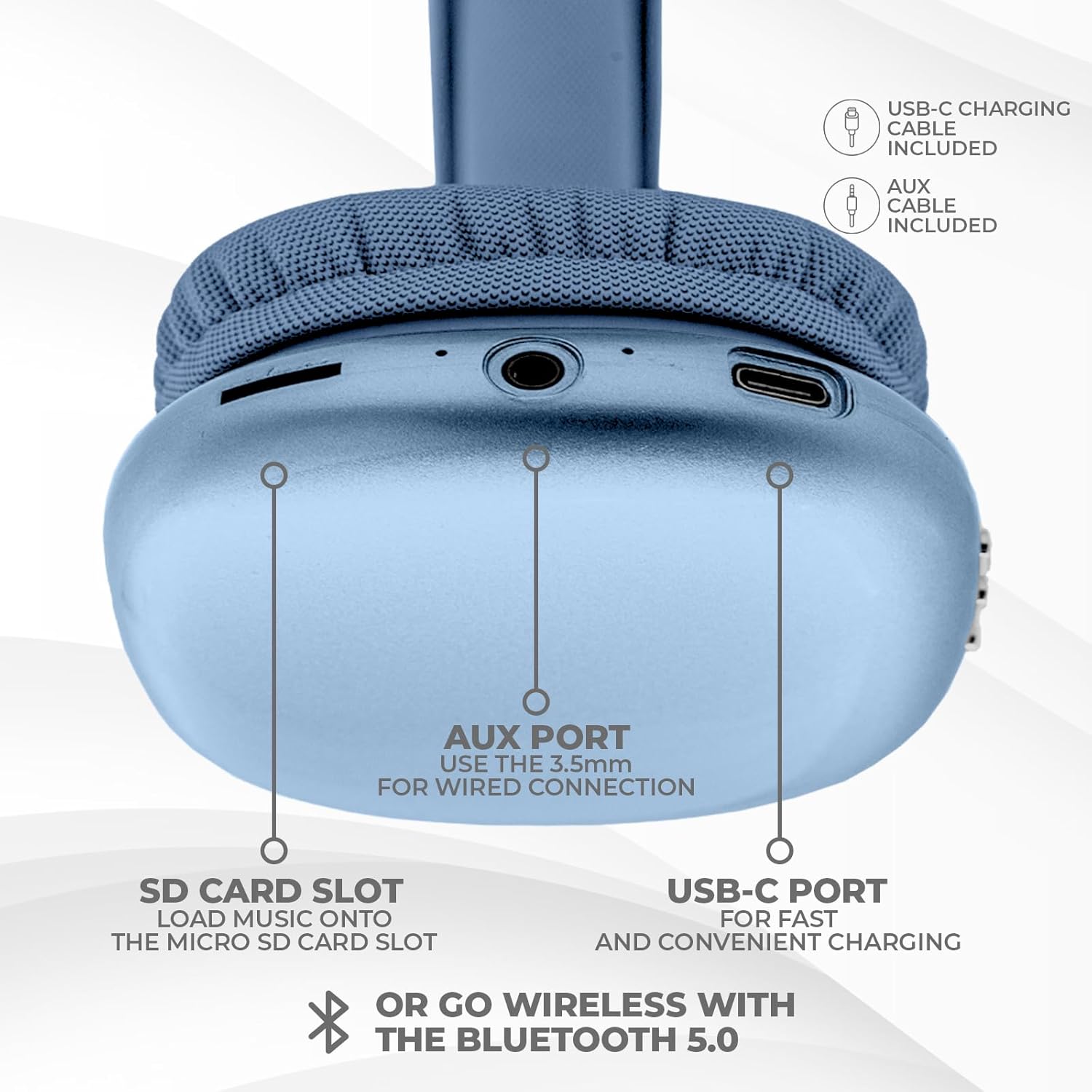
Image : Bas view of the headphone ear cup, showing the USB-C charging port, AUX port, and SD card slot.
- Port USB-C : Pour charger les écouteurs.
- Port AUX (3.5 mm) : Pour une connexion audio filaire.
- Emplacement pour carte SD : Pour la lecture audio directe à partir d'une carte Micro SD.
Installation
1. Charger les écouteurs
Avant la première utilisation, chargez complètement vos écouteurs. Une charge complète prend environ 2 heures.
- Connect the provided USB Type C charging cable to the USB-C port on the headphone.
- Connectez l'autre extrémité du câble USB à une source d'alimentation USB compatible (par exemple, un adaptateur secteur, un port USB d'ordinateur).
- Le voyant LED indiquera l'état de charge et s'éteindra ou changera de couleur une fois la charge complète.
2. Couplage Bluetooth
Pour connecter vos écouteurs sans fil :
- Assurez-vous que les écouteurs sont chargés et éteints.
- Maintenez le bouton Marche/Arrêt enfoncé jusqu'à ce que le voyant LED clignote, indiquant le mode de couplage.
- Sur votre appareil (smartphone, tablette, ordinateur portable), activez le Bluetooth et recherchez les appareils disponibles.
- Select "iJoy Ultra" from the list of devices.
- Once connected, the LED indicator will typically show a solid light or slow flash.
Note: The Bluetooth range is approximately 10 meters (33 feet).
3. Connexion filaire (AUX)
For a non-wireless connection or when the battery is low:
- Connect one end of the provided 3.5mm AUX cable to the AUX port on the headphone.
- Connect the other end of the AUX cable to the 3.5mm audio jack on your device.
- Les écouteurs passeront automatiquement en mode filaire.
4. Lecture sur carte SD
Pour lire de la musique directement depuis une carte Micro SD :
- Insert a Micro SD card (with music files) into the SD card slot on the headphone.
- The headphones will automatically detect the card and begin playing music.
- Use the track control buttons to navigate your music.
Mode d'emploi
Marche/Arrêt
- Mise sous tension : Maintenez le bouton Marche/Arrêt enfoncé pendant environ 3 secondes.
- Éteindre: Maintenez le bouton Marche/Arrêt enfoncé pendant environ 3 secondes.
Lecture de musique
- Lecture/Pause : Appuyez une fois sur le bouton d'alimentation.
- Piste suivante : Appuyez une fois sur le bouton Volume +.
- Piste précédente: Appuyez une fois sur le bouton Volume -.
- Monter le son: Hold the Volume + button.
- Baisser le volume: Hold the Volume - button.
Gestion des appels
Lorsqu'il est connecté via Bluetooth :
- Répondre à l'appel : Appuyez une fois sur le bouton d'alimentation.
- Fin d'appel : Appuyez une fois sur le bouton Marche/Arrêt pendant un appel.
- Rejeter l'appel : Maintenez le bouton Marche/Arrêt enfoncé pendant environ 2 secondes.
Autonomie de la batterie
The headphones offer up to 10 hours of wireless playtime on a single charge.

Image: Visual representation of the headphones' battery life, indicating up to 10 hours of wireless playtime.
Entretien
To ensure the longevity and optimal performance of your iJoy Ultra headphones:
- Nettoyez régulièrement les écouteurs avec un chiffon doux et sec.
- Évitez d'exposer les écouteurs à des températures extrêmes, à l'humidité ou à la lumière directe du soleil.
- N'utilisez pas de nettoyants abrasifs ni de solvants.
- Rangez le casque dans un endroit frais et sec lorsqu'il n'est pas utilisé.
- Évitez de faire tomber les écouteurs ou de les soumettre à des chocs violents.
Dépannage
Si vous rencontrez des problèmes avec vos écouteurs, consultez les solutions courantes suivantes :
| Problème | Solution |
|---|---|
| Les écouteurs ne s'allument pas. | Assurez-vous que les écouteurs sont complètement chargés. Branchez-les à une source d'alimentation à l'aide du câble USB-C. |
| Impossible de coupler via Bluetooth. | Make sure the headphones are in pairing mode (flashing LED). Turn off and on Bluetooth on your device. Ensure no other devices are currently connected to the headphones. Try 'forgetting' the device on your phone and re-pairing. |
| No sound or choppy audio. | Check volume levels on both headphones and your device. Ensure Bluetooth connection is stable or try a wired AUX connection. If using an SD card, ensure it is properly inserted and the filesont compatibles. |
| Headphones are uncomfortable or too tight. | Adjust the headband for a better fit. The over-ear cushions are designed for comfort, but individual fit may vary. |
| Cannot connect to multiple devices simultaneously. | These headphones typically support connection to one device at a time. Disconnect from the current device before attempting to connect to another. |
Caractéristiques
| Fonctionnalité | Détail |
|---|---|
| Nom du modèle | Ultra |
| Numéro de modèle de l'article | IJHP21 |
| Technologie de connectivité | Sans fil (Bluetooth), filaire (prise auxiliaire 3.5 mm) |
| Technologie de communication sans fil | Bluetooth |
| Portée Bluetooth | 10 mètres (pieds 33) |
| Prise pour casque | 3.5 mm Jack |
| Caractéristiques spéciales | SD Card Slot, Soft Cushion Padding, USB Type C |
| Autonomie de la batterie | Jusqu'à 10 heures |
| Temps de charge | 2 heures |
| Type de contrôle | Volume Control, Track Management, Call Management |
| Placement des oreilles | Sur l'oreille |
| Matériel | Plastique |
| Poids de l'article | 8 onces |
| Dimensions du produit | 7 x 3 x 8 pouces |
| Code UPC | 842700193053 |
Vidéo officielle du produit
Vidéo : Une vidéo produit officielle d'iJoy Electronics présenteasing the features and design of the iJoy Ultra Bluetooth Over-Ear Headphones.
Garantie et assistance
For warranty information or technical support, please refer to the documentation included with your product or contact iJoy customer service directly. Keep your proof of purchase for any warranty claims.