Introduction
The FrSky TD R18 is a Tandem dual-band receiver designed for remote control applications, offering simultaneous 2.4GHz and 900MHz operation. It features 18 configurable channel ports and advanced functionalities like Black Box and 4ms Race Mode with Telemetry. This manual provides essential information for the proper setup, operation, and maintenance of your TD R18 receiver.

Image: The FrSky TD R18 Tandem Dual-Band Receiver, showcasing son design compact et ses multiples ports.
Caractéristiques
- Mode TD double bande fonctionnant simultanément
- Conception à triple antenne pour une couverture multidirectionnelle
- Black Box function for flight data recording
- Interrupteur d'alimentation intégré
- Courant et volume intégréstage capteurs
- Mode course 4 ms avec télémétrie
- Longue plage de contrôle (jusqu'à 50KM - 100KM)
- Over-The-Air (OTA) FW update capability
- 18 ports de canal configurables :
- CP1: PWM / SBUS Out / FBUS / S.Port / SBUS In (Redundancy Function)
- CP2-18 : PWM/sortie SBUS/FBUS/S. Port
- Connecteur d'entrée d'alimentation double XT30
- Triple 2.4G/900M Antenna System: 1* Interior 2.4G chip antenna, 1* External 2.4G antenna (IPEX1), 1* Newly designed 900M antenna
Caractéristiques
| Paramètre | Valeur |
|---|---|
| Fréquence | 2.4 GHz et 900 MHz |
| Dimensions (L x l x H) | 53*40*16 mm (2.09 x 1.57 x 0.63 pouces) |
| Poids | 28.9 g (1.02 onces) |
| Vol d'exploitationtage | 4-10V (Recommended 2S Li batteries) |
| Courant de fonctionnement | ≤185mA@5V |
| Courant continu | ≤30A (power the device) |
| Courant instantané | ≤60A (power the device) |
| Compatibilité | Tandem series radio & TD protocol capable RF module |
Contenu du colis
A l'ouverture du colis, vous devriez trouver les éléments suivants :
- FrSky TD R18 Receiver
- 2.4GHz Antennas (external)
- 900MHz Antenna
- Wiring Harness (servo cables)
- Optional: External Switch Module (may be included depending on package variant)
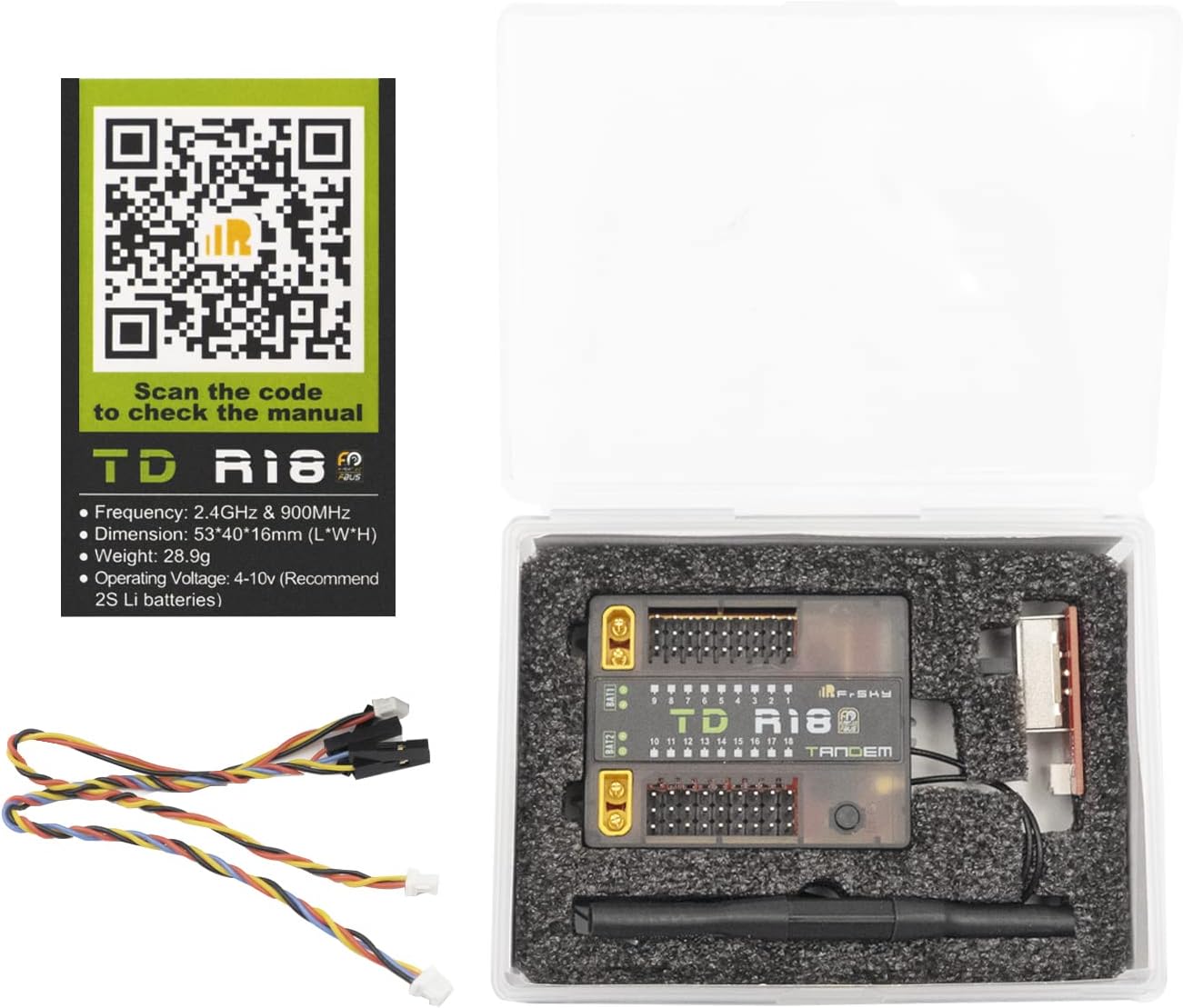
Image: Contents of the FrSky TD R18 package, including the receiver, antennas, and wiring.
Installation
Installation d'antenne
The TD R18 receiver features a triple antenna design for optimal signal reception. Ensure all antennas are securely connected and positioned for multi-directional coverage. One interior 2.4G chip antenna, one external 2.4G antenna (IPEX1), and one newly designed 900M antenna are included. Refer to the diagram below for proper antenna connection points and orientation.

Image: Diagram illustrating the antenna connection points on the FrSky TD R18 receiver, showing 2.4G and 900M antenna ports.

Image: Diagram showing the radiation pattern for the 900MHz receiver antenna, indicating optimal orientation for signal reception.
Câblage
The TD R18 has 18 configurable channel ports (CP1-CP18) and dual XT30 power input connectors. Connect your servos and other peripherals to the appropriate channel ports. CP1 supports PWM, SBUS Out, FBUS, S.Port, and SBUS In for redundancy. CP2-18 support PWM, SBUS Out, FBUS, and S.Port. For power, use the dual XT30 connectors, ensuring proper polarity. The receiver operates between 4-10V.

Image: Wiring diagram for the FrSky TD R18 receiver, detailing connections for channels, power, and other ports.

Image: Close-up of the FrSky TD R18 receiver highlighting the dual XT30 power input connectors.
Procédure de reliure
To bind the TD R18 receiver to your FrSky Tandem series radio or TD protocol capable RF module, follow these steps:
- Mettez votre émetteur en mode affectation.
- Power on the receiver while holding the F/S button. Release the button when the Green LED and Red LED are flashing simultaneously.
- Sélectionner [BIND] on your transmitter. The Green LED on the receiver will flash, and the Red LED will be off, indicating successful binding.
- Power cycle the receiver. The Green LED will be on, and the Blue LED will flash, indicating successful binding and normal operation.
- Si la liaison échoue, répétez le processus.
Opération
Indicateurs d'état à LED
The receiver uses Green, Blue, and Red LEDs to indicate its status. Refer to the table below for interpretations:
| LED verte | LED bleue | LED rouge | Statut |
|---|---|---|---|
| On | Désactivé | On | Registre |
| Éclair | Désactivé | Éclair | Inscription réussie |
| On | Désactivé | Désactivé | Lier |
| On | Éclair | Désactivé | Lier avec succès |
| On | Éclair | Désactivé | Fonctionne normalement |
| Désactivé | Désactivé | On | Sécurité intégrée |

Image: Table detailing the meaning of different LED light combinations on the FrSky TD R18 receiver.
Flight Data Record (Black Box)
The Black Box function records flight data. Access this feature through your compatible FrSky transmitter's RF System menu under 'Flight Data Record' to review various reset cases and operational parameters. This can be useful for diagnostics and performance analysis.

Image: Screenshot of a FrSky transmitter interface showing the 'Flight Data Record' menu option.
Vérification de la gamme
Perform a range check before each flight. In your transmitter's RF System menu, select 'Range Check'. This will display the 2.4G and 900M signal strength (VFR and RSSI) to ensure adequate control range. Always conduct a range check in a safe, open area.

Image: Screenshot of a FrSky transmitter interface displaying the 'Range Check' results, showing 2.4G and 900M signal values.
Entretien
To ensure the longevity and reliable performance of your FrSky TD R18 receiver, follow these maintenance guidelines:
- Veillez à ce que le récepteur reste propre et exempt de poussière, de saleté et d'humidité. Utilisez un chiffon doux et sec pour le nettoyer.
- Regularly inspect antenna connections and wiring for any signs of wear, fraying, or damage. Replace damaged components immediately.
- Ensure proper ventilation around the receiver to prevent overheating, especially during extended operation.
- Évitez d'exposer le récepteur à des températures extrêmes ou à la lumière directe du soleil pendant des périodes prolongées.
Dépannage
If you encounter issues with your TD R18 receiver, consider the following:
- Récepteur non contraignant : Ensure your transmitter is in bind mode. Verify that the F/S button on the receiver is pressed correctly during power-up. Check the LED status indicators for specific binding feedback.
- Perte de signal : Confirm that all antennas are securely connected and properly positioned for optimal reception. Check for any obstructions or sources of interference in your operating environment.
- Pas d'alimentation : Vérifiez que le volume d'alimentationtage is within the specified 4-10V range and that the XT30 connectors are properly seated with correct polarity. Inspect power cables for damage.
- Fonctionnement intermittent : Check all wiring connections for looseness or damage. Ensure the receiver is not experiencing excessive vibration or physical stress.
Garantie et assistance
For detailed warranty information, technical support, and firmware updates, please visit the official FrSky website or contact your local authorized FrSky dealer. A digital version of this manual and additional resources can be found on the product page: