1. Introduction
Merci pour votre achatasing the Depusheng U6 Audio Mixer. This 6-channel DJ sound controller is designed for versatile audio mixing, recording, and live streaming applications. It features a built-in USB audio interface, Bluetooth connectivity, and U-Disk playback/recording capabilities. This manual provides essential information for safe operation, setup, and optimal performance of your device. Please read it thoroughly before use and retain it for future reference.
2. Consignes de sécurité
- Source d'alimentation : Use only the specified power adapter or a compatible USB power source. Ensure the voltage correspond aux exigences de l'appareil.
- Eau et humidité : N’exposez pas le mélangeur à l’eau, à la pluie ou à une humidité excessive. Évitez de placer des objets contenant du liquide sur l’appareil.
- Ventilation: Assurez une ventilation adéquate. Ne bloquez pas les ouvertures de ventilation.
- Chaleur: Tenez l'appareil éloigné des sources de chaleur telles que les radiateurs, les bouches de chauffage, les poêles ou autres appareils produisant de la chaleur.
- Nettoyage: Nettoyez uniquement avec un chiffon sec. Ne pas utiliser de nettoyants liquides ou aerosols.
- Entretien: N'essayez pas de réparer vous-même ce produit. Confiez tous les travaux d'entretien à du personnel de service qualifié.
- Puissance fantôme: When using condenser microphones, ensure +48V phantom power is activated only when necessary and that the microphone is compatible.
3. Contenu du colis
Veuillez vérifier que tous les éléments suivants sont inclus dans votre colis :
- Depusheng U6 Audio Mixer
- Câble d'alimentation USB
- Manuel d'utilisation
4. Produit terminéview
The Depusheng U6 is a compact 6-channel mixer designed for various audio applications. It features multiple input and output options, integrated effects, and digital connectivity.
4.1 Commandes et connexions du panneau avant
The front panel provides access to all mixing controls and primary input/output ports.

Description de l'image : Un détail view of the Depusheng U6 Audio Mixer's front panel, showing all knobs, faders, buttons, and the digital display for USB/Bluetooth functions. Key controls include GAIN, HIGH, LOW, EFX, PEAK, VOL for each channel, along with DELAY, REPEAT, and MAIN volume controls. The USB port and Bluetooth indicator are also visible.
- Entrées MIC/LINE (canaux 1 à 4) : Combo jacks supporting both XLR and 1/4" (6.35mm) inputs for microphones or line-level instruments.
- +48V PHANTOM : Bouton permettant d'activer l'alimentation fantôme +48V pour les microphones à condensateur sur les canaux 1 à 4.
- GAIN: Ajuste la sensibilité d'entrée pour chaque canal.
- HAUT/BAS : 2-band equalizer for adjusting treble and bass frequencies for each channel.
- Effets visuels : Sends signal to the built-in effects processor (DELAY/REPEAT).
- LED DE PIC : S'allume lorsque le signal d'entrée est trop élevé, indiquant un risque d'écrêtage.
- VOL : Channel volume control.
- S/S (Stereo Input 5/6): 1/4" stereo inputs for connecting line-level devices.
- REC/MAIN OUT (RCA): Stereo RCA outputs for recording or connecting to external devices.
- MAIN OUT (1/4"): Stereo 1/4" outputs for connecting to power amplificateurs ou enceintes actives.
- Port USB : For U-Disk playback/recording and connection to a computer as an audio interface.
- MODE/BT (Bluetooth): Button to switch between USB, Bluetooth, and other modes.
- PLAY/PAUSE, PREVIOUS, NEXT: Controls for U-Disk and Bluetooth playback.
- RETARD/RÉPÉTER : Controls for adjusting the built-in delay effect.
- DEL CLIP : Indicates output signal clipping.
- DEL D'ALIMENTATION : Indique que l'appareil est sous tension.
- PRINCIPAL: Réglage du volume principal pour la sortie principale.
- TÉLÉPHONE: Contrôle du volume du casque.
- Prise casque: 1/4" stereo output for monitoring.
4.2 Input Interface Types

Description de l'image : Gros plan view of the input jacks on the Depusheng U6 Audio Mixer, illustrating both the 6.5mm (1/4 inch) and XLR connection types for microphones and line-level devices. This image highlights the versatility of the combo input jacks.
- 6.5mm (1/4") Interface: For connecting instruments or line-level audio sources.
- Interface XLR : For connecting microphones, providing a balanced connection.
5. Installation
5.1 Alimentation de la table de mixage
The Depusheng U6 mixer can be powered via its USB port.

Description de l'image : This image demonstrates two methods of powering the Depusheng U6 Audio Mixer via USB: connecting it to a computer's USB port or to a portable power bank. This highlights the flexibility of its power options.
- Connectez le câble USB fourni à l'entrée d'alimentation USB de la table de mixage.
- Connect the other end of the USB cable to a computer's USB port or a USB power adapter (not included) connected to a wall outlet, or a power bank.
- The POWER LED on the mixer will illuminate when power is supplied.
5.2 Connexions de base
Refer to the diagram below for typical connection setups.

Description de l'image : A comprehensive diagram illustrating various connection possibilities for the Depusheng U6 Audio Mixer. It shows connections for a computer, condenser microphone, dynamic microphone, wireless microphone receiver, power amplifier, passive speakers, and headphones, demonstrating a complete audio setup.
- Micros : Connect dynamic or condenser microphones to the MIC/LINE inputs (Channels 1-4) using XLR cables. Activate +48V phantom power for condenser microphones.
- Instruments/Dispositifs de ligne : Connect instruments or other line-level devices to the MIC/LINE inputs (Channels 1-4) using 1/4" cables, or to the S/S (Stereo Input 5/6) using 1/4" stereo cables.
- Output to Speakers/Amplifier : Connect the MAIN OUT (1/4") to your power amplificateur ou enceintes actives.
- Casque audio : Branchez les écouteurs à la prise PHONE pour l'écoute.
- Ordinateur: Connect the mixer's USB port to your computer for use as an audio interface.
6. Mode d'emploi
6.1 Diffusion Bluetooth sans fil
The U6 mixer supports wireless Bluetooth audio streaming from compatible devices.
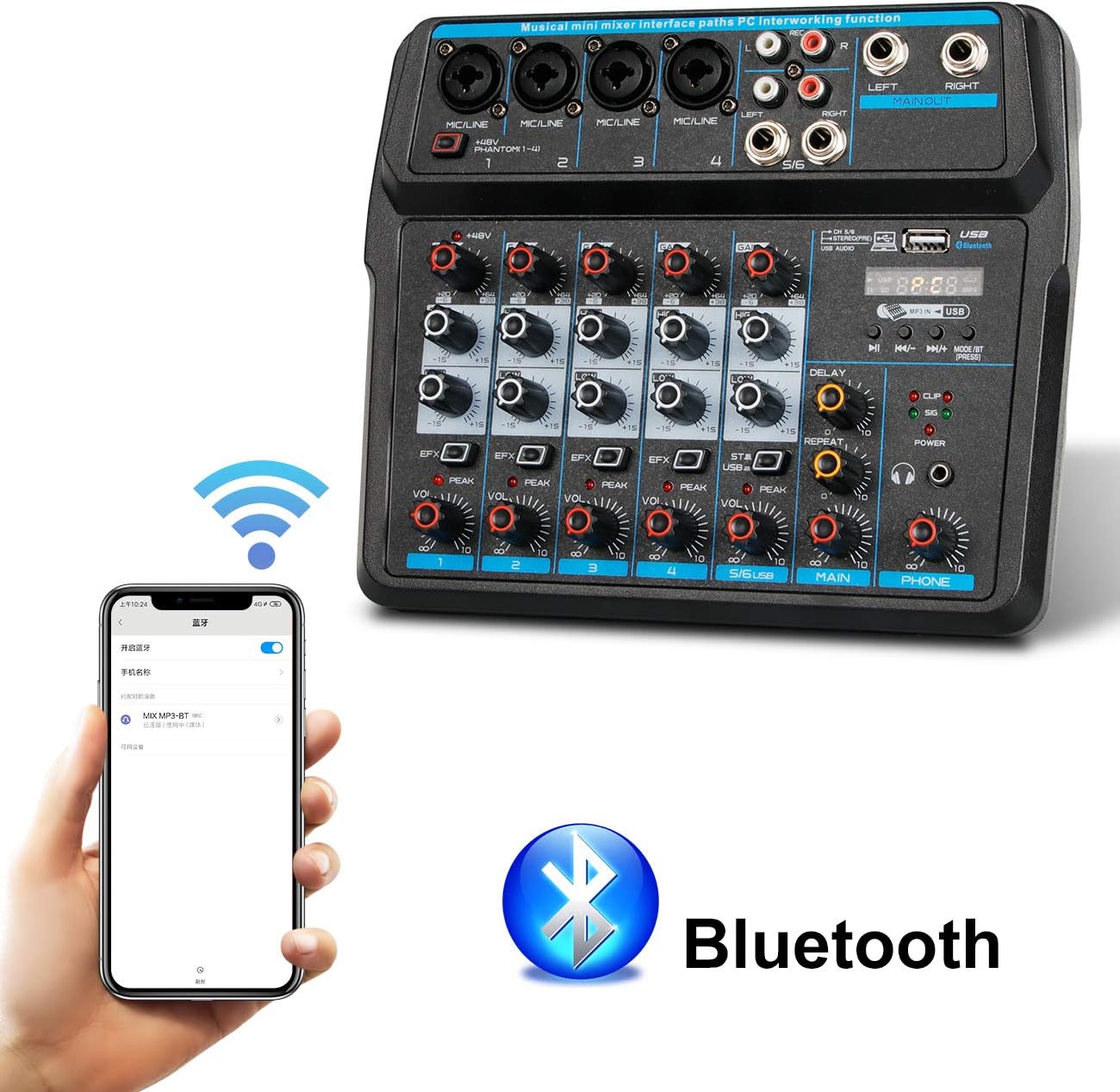
Description de l'image : This image shows a smartphone displaying its Bluetooth settings, with the Depusheng U6 Audio Mixer (labeled 'U6 MP3-BT') available for connection. A large Bluetooth logo is also present, indicating the wireless connectivity feature.
- Appuyez sur le MODE/BT button on the mixer until the Bluetooth indicator lights up and the display shows 'BT'.
- Sur votre appareil mobile (smartphone, tablette, etc.), activez le Bluetooth et recherchez les appareils disponibles.
- Select 'U6 MP3-BT' from the list to pair.
- Once paired, you can stream audio wirelessly from your device to the mixer. Bluetooth operates effectively within approximately 1.5 feet.
6.2 USB Audio Interface (PC Recording/Playback)
The U6 mixer can function as an external sound card for your computer.

Description de l'image : This diagram illustrates how to connect the Depusheng U6 Audio Mixer to a laptop via USB for both playback and recording. It shows audio signals flowing from the computer to the mixer (background music) and from the mixer to the computer (for recording), with a close-up of the USB connection port on the mixer.
- Connectez la table de mixage à votre PC à l'aide d'un câble USB.
- The mixer will be recognized as a USB audio device by your computer.
- In your computer's sound settings or DAW (Digital Audio Workstation) software (e.g., Pro Tools, Logic Pro X, GarageBand, Audacity), select the U6 mixer as the input and output audio device.
- Vous pouvez désormais enregistrer l'audio provenant des entrées de la table de mixage sur votre ordinateur ou lire l'audio de votre ordinateur via la table de mixage.
6.3 U-Disk Playback and Recording
The mixer supports direct playback of audio files from a USB flash drive (U-Disk) and recording to it.

Description de l'image : This image highlights the U-Disk functionality of the Depusheng U6 Audio Mixer. It shows a USB flash drive inserted into the mixer's USB port, with text indicating its capabilities: 1. Play MP3/WAV/WMA/FLAC files, and 2. Record audio. The mixer's digital display shows '88:88', likely indicating playback time or a menu option.
- Lecture: Insert a U-Disk containing audio files (MP3/WAV/WMA/FLAC) into the USB port. The mixer will automatically switch to U-Disk mode or you may need to press MODE/BT. Use the PLAY/PAUSE, PREVIOUS, and NEXT buttons to control playback.
- Enregistrement: To record to a U-Disk, ensure it is inserted and the mixer is in U-Disk mode. Follow the specific recording instructions in the full manual (if available) or typically press and hold the PLAY/PAUSE button to initiate recording.
6.4 Using Effects (DELAY and REPEAT)
The U6 mixer includes built-in DELAY and REPEAT effects to enhance your audio.
- Utilisez le EFX Un bouton sur chaque canal permet d'envoyer une partie du signal de ce canal au processeur d'effets.
- Ajustez le RETARD Bouton permettant de contrôler le temps de délai de l'effet.
- Ajustez le RÉPÉTER Bouton permettant de contrôler le nombre de répétitions de l'effet de délai.
- The overall level of the effects return can be controlled via a dedicated EFX return knob (if present) or integrated into the main mix.
7. Entretien
- Nettoyage: Use a soft, dry cloth to clean the surface of the mixer. Do not use abrasive cleaners, waxes, or solvents.
- Stockage: Lorsqu'il n'est pas utilisé pendant une période prolongée, rangez le mixeur dans un endroit frais et sec, à l'abri de la lumière directe du soleil et des températures extrêmes.
- Entretien des câbles : Always grasp the connector, not the cable, when unplugging. Avoid bending or kinking cables excessively.
8. Dépannage
If you encounter issues with your Depusheng U6 Audio Mixer, refer to the following common problems and solutions:
| Problème | Cause possible | Solution |
|---|---|---|
| Pas de sortie audio |
|
|
| Le microphone ne fonctionne pas |
|
|
| Bluetooth ne se connecte pas |
|
|
| Problèmes d'enregistrement/lecture USB |
|
|
9. Spécifications
| Fonctionnalité | Spécification |
|---|---|
| Marque | Dépusheng |
| Numéro de modèle | U6 |
| Nombre de canaux | 6 |
| Technologie de connectivité | Bluetooth, USB |
| Entrée audio | XLR, 1/4" (6.35mm) |
| Source d'énergie | Câble USB |
| Poids de l'article | 1.02 kilogrammes |
| Dimensions du colis | 29.3 x 24.3 x 9.2 cm |
| Interface matérielle | Bluetooth |
10. Garantie et assistance
Depusheng products are designed for reliability and performance. This product comes with a standard manufacturer's warranty. For specific warranty terms and conditions, please refer to the documentation provided at the time of purchase or contact your retailer.
If you require technical support or have questions not covered in this manual, please contact Depusheng customer service through the retailer where you purchased the product. Please have your model number (U6) and purchase information ready.