1. Produit terminéview
The STABILA LD220 is a compact and easy-to-use laser distance measuring tool designed for quick and accurate measurements. It features an impact-resistant housing with a shock-absorbent STABILA soft grip casing, ensuring durability in various working conditions. The large digits on the display facilitate easy reading of measurements.
Caractéristiques principales :
- Compact, easy-to-use laser.
- 4 basic measuring functions: length, area, volume, and continuous measurement.
- Calculates measuring results quickly.
- Large digits for easy readability.
- Impact-resistant housing with shock-absorbent STABILA soft grip casing.
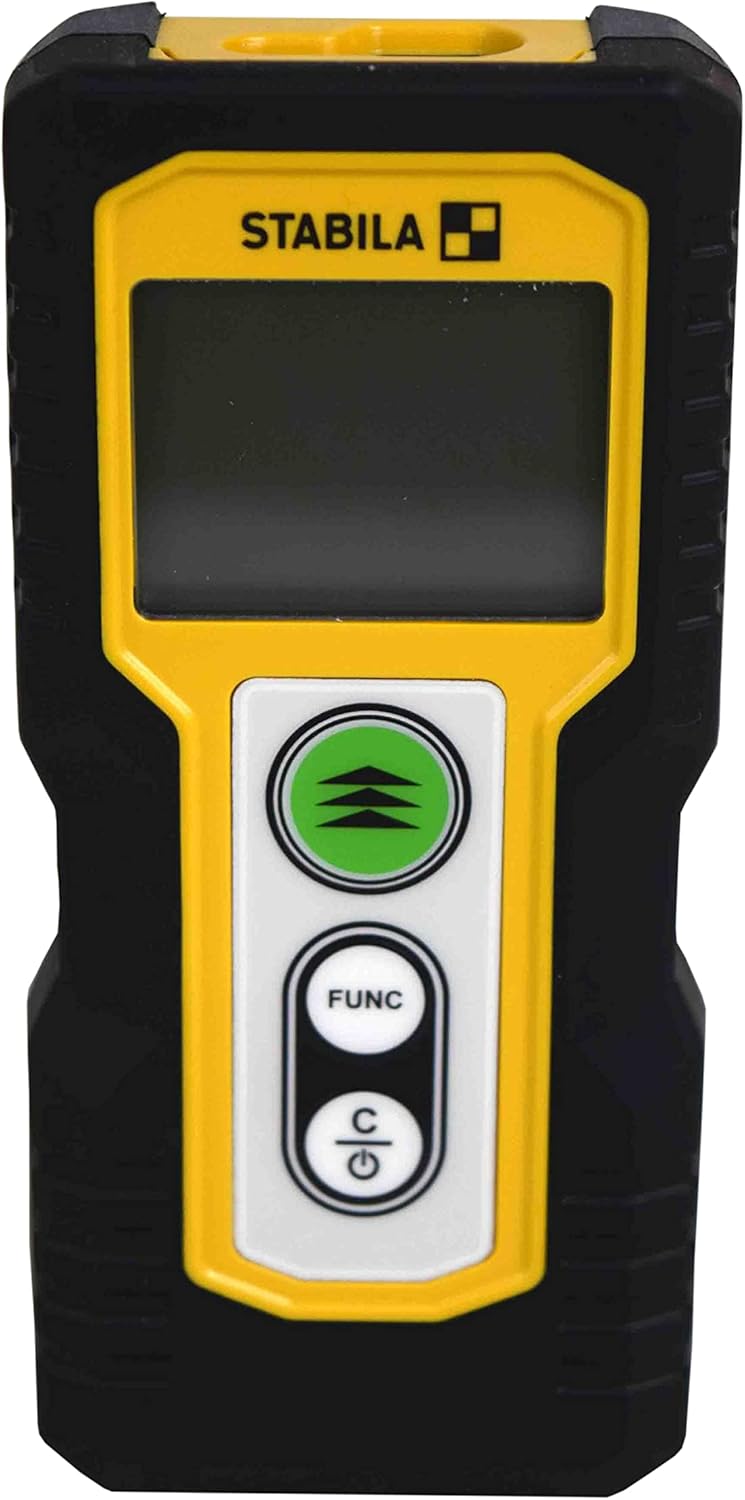
Figure 1.1 : Face avant view of the STABILA LD220 laser distance measuring tool, showcasing son design compact et son écran.
2. Mise en route
2.1 Contenu du paquet
Assurez-vous que tous les composants sont présents :
- STABILA LD220 Laser Distance Measuring Tool
- Batteries (Alkaline, LR03/AAA type)
2.2 Installation de la batterie
The STABILA LD220 requires two AAA alkaline batteries for operation. Follow these steps to install them:
- Repérez le couvercle du compartiment à piles à l'arrière de l'appareil.
- Faites glisser le couvercle vers le bas ou dans la direction indiquée par la flèche pour l'ouvrir.
- Insert two AAA alkaline batteries, ensuring the correct polarity (+ and -) as marked inside the compartment.
- Refermez le couvercle du compartiment à piles en le faisant glisser en place jusqu'à ce qu'il s'enclenche correctement.

Figure 2.1: The STABILA LD220 device shown alongside two AAA batteries, indicating the power source.

Figure 2.2 : Gros plan view of the two AAA alkaline batteries, which power the device.
2.3 Mise sous/hors tension
Pour allumer l'appareil, appuyez sur le bouton Power/Clear (C) bouton. Pour éteindre, appuyez et maintenez le bouton Power/Clear (C) Appuyez sur le bouton pendant quelques secondes, sinon l'appareil s'éteindra automatiquement après une période d'inactivité afin de préserver la batterie.
3. Mode d'emploi
The STABILA LD220 offers four primary measuring functions. Familiarize yourself with the buttons:
- Measurement Button (Green, with three arrows): Initiates a measurement or activates continuous measurement.
- Function Button (FUNC): Cycles through different measurement modes (Length, Area, Volume, Continuous).
- Power/Clear Button (C): Powers the device on/off, clears the last measurement, or exits a function.

Figure 3.1 : Un aperçu détaillé view of the STABILA LD220's control panel, highlighting the measurement, function, and power/clear buttons.
3.1 Mesure de la longueur
This is the default mode for single distance measurements.
- Assurez-vous que l'appareil est sous tension.
- Dirigez le faisceau laser vers la surface cible.
- Appuyez sur le Bouton de mesure once. The measured distance will appear on the display.
3.2 Mesure continue (suivi)
This mode allows for dynamic measurement, displaying real-time distance as you move the device.
- Appuyez sur le FUNC button until the continuous measurement icon (often a series of horizontal lines or a tracking symbol) appears on the display.
- Appuyez sur le Bouton de mesure pour démarrer la mesure continue.
- Move the device slowly towards or away from the target. The display will update the distance continuously.
- Appuyez sur le Bouton de mesure encore ou le C bouton pour arrêter la mesure continue.
3.3 Mesure de surface
To calculate the area of a rectangular space (Length x Width).
- Appuyez sur le FUNC button until the area measurement icon (a square or rectangle) appears.
- Measure the first side (e.g., length) by pointing the laser and pressing the Bouton de mesure.
- Measure the second side (e.g., width) by pointing the laser and pressing the Bouton de mesure encore.
- L'appareil calculera et affichera automatiquement la surface.
3.4 Mesure du volume
To calculate the volume of a rectangular space (Length x Width x Height).
- Appuyez sur le FUNC button until the volume measurement icon (a cube or rectangular prism) appears.
- Measure the first side (e.g., length) by pointing the laser and pressing the Bouton de mesure.
- Measure the second side (e.g., width) by pointing the laser and pressing the Bouton de mesure.
- Measure the third side (e.g., height) by pointing the laser and pressing the Bouton de mesure.
- L'appareil calculera et affichera automatiquement le volume.

Figure 3.2: The product packaging illustrating the various measuring functions, including length, area, volume, and tracking.
4. Entretien et maintenance
Proper care and maintenance will extend the life of your STABILA LD220.
- Nettoyage: Utilisez un chiffon doux et sec.amp cloth to clean the device. Do not use harsh chemicals, abrasive cleaners, or solvents. Ensure the laser lens and display are kept clean for accurate readings.
- Stockage: Rangez l'appareil dans un endroit sec et frais, à l'abri de la lumière directe du soleil et des températures extrêmes. En cas de stockage prolongé, retirez les piles pour éviter les fuites.
- Manutention: Although the device has an impact-resistant housing, avoid dropping it or subjecting it to severe shocks.
- Entretien de la batterie: Remplacez les piles lorsque le témoin de batterie faible s'affiche. Jetez les piles usagées conformément à la réglementation locale.
5. Dépannage
If you encounter issues with your STABILA LD220, refer to the following common problems and solutions:
| Problème | Cause possible | Solution |
|---|---|---|
| L'appareil ne s'allume pas. | Piles mortes ou mal installées. | Vérifiez la polarité des piles. Remplacez-les par des piles alcalines AAA neuves. |
| Mesures inexactes. | Laser lens is dirty; target surface is too reflective/absorbent; device is unstable during measurement. | Clean the laser lens with a soft cloth. Use a target plate for difficult surfaces. Ensure the device is held steady. |
| L'écran affiche un message d'erreur. | Mesure hors plage ; erreur interne. | Ensure target is within the 100ft (30m) range. Power off and restart the device. If the error persists, contact support. |
| Le faisceau laser n'est pas visible. | Lumière ambiante vive ; laser non activé. | Use in lower light conditions or use a laser target plate. Press the measurement button to activate the laser. |
6. Spécifications techniques
Detailed specifications for the STABILA LD220 Laser Distance Measuring Tool:
| Spécification | Valeur |
|---|---|
| Numéro de modèle | Stabila - 06220 |
| Plage de mesure | Jusqu'à 100 pieds (30 m) |
| Fonctions de mesure | Length, Area, Volume, Continuous Measurement |
| Couleur | Noir |
| Matériel | Plastique |
| Dimensions de l'article (L x l x H) | 8 x 5 x 2 pouces |
| Poids de l'article | 8 onces |
| Piles requises | No (Included Components: Stabila - 06220, but requires 2x AAA Alkaline batteries for operation) |
| Type de batterie | Alcalin (AAA) |
| Fabricant | Stabila |
| Date de première disponibilité | 17er mars 2022 |

Figure 6.1 : Arrière view of the STABILA LD220, displaying the product label with model number, power requirements, and laser class information.
7. Garantie et assistance
For information regarding product warranty, returns, or technical support, please refer to the documentation included with your purchase or visit the official Stabila webLes conditions générales de garantie peuvent varier selon la région et le détaillant.


