1. Produit terminéview
This document provides essential information for the safe and effective use of your RDSJK 5800mAh Li-ion replacement battery. This high-capacity battery is designed to provide extended runtime for compatible iRobot Roomba robot vacuums, ensuring reliable performance.
2. Spécifications

This image details the key specifications of the battery, including its model number VB-063237, Li-ion type, 14.4V voltage, and 5800mAh/83.52Wh capacity.
| Type de batterie | Li-ion |
| Voltage | 14.4V |
| Capacité | 5800mAh / 83.52Wh |
| Couleur | Vert |
| Numéro de modèle | 1800LI (VB-063237) |
| Replace Part Numbers | VB-063237, 1800LI, 4INR19/65, 4376392, 4INR19/65-2 |
| Dimensions | 6.5 x 3.86 x 2.4 pouces |
| Poids de l'article | 1.41 livres |
| Fabricant | RDSJK |
| Composition des cellules de batterie | Lithium-ion |
| Utilisations recommandées | iRobot |
| Cycles de recharge | Jusqu'à 500 |
3. Compatibilité

This image illustrates the battery's compatibility with iRobot Roomba R3 500, 600, 700, and 800 series models, shown alongside a robot vacuum and a pet in a home setting.
This replacement battery is compatible with iRobot Roomba R3 500, 600, 700, 800, and 900 Series robot vacuums. A detailed list of compatible models includes:
- Roomba 500 Series: 500, 510, 530, 531, 532, 535, 536, 540, 550, 552, 560, 570, 580, 595
- Roomba 600 Series: 600, 614, 615, 620, 640, 652, 660, 665, 670, 671, 675, 677, 680, 681, 685, 690, 691, 695, 696, R3 80501 4419696
- Roomba 700 Series: 700, 760, 761, 770, 780, 790
- Roomba 800 Series: 800, 801, 805, 850, 860, 870, 871, 877, 880, 890, 891, 895, 896
- Roomba 900 Series: 900, 940, 960, 965, 966, 980, 985
4. Configuration et installation

This image displays the green 5800mAh Li-ion replacement battery for iRobot Roomba, alongside a small screwdriver, indicating tools for installation.
Follow these general steps to replace the battery in your iRobot Roomba. Specific steps may vary slightly by Roomba model; refer to your Roomba's original manual for precise instructions.
- Éteindre: Ensure your Roomba is turned off and disconnected from its charging base or power supply.
- Retourner : Place the Roomba upside down on a clean, flat surface.
- Retirer les vis : Locate the battery compartment cover, typically secured by screws. Use a screwdriver (often a Phillips head, a small screwdriver may be included with the battery) to remove these screws.
- Retirer le couvercle : Carefully lift off the battery compartment cover.
- Retirer l'ancienne batterie : Gently pull out the old battery. Note its orientation for correct installation of the new battery.
- Insérer une nouvelle batterie : Insert the new RDSJK battery into the compartment, ensuring it is correctly oriented and securely seated.
- Remplacer le couvercle : Place the battery compartment cover back on and secure it with the screws. Do not overtighten.
- Charge: Place your Roomba back on its charging base to initiate the first charge cycle.

This image highlights specific design elements of the battery, including its precise installation interface and construction from premium PC+ABS material, aiding in proper installation.
5. Mode d'emploi
For optimal performance and longevity of your new battery, follow these initial charging and usage guidelines:
- Premier cycle d'utilisation : Upon initial installation, discharge the battery to approximately 5% of its capacity (do not allow it to fully drain to 0%).
- Charge complète : After discharging, charge the battery fully to 95%.
- Repeat Cycle: Repeat this discharge-to-5% and charge-to-95% cycle 3-4 times. This process helps to calibrate the battery and optimize its performance.
The actual operation time of your Roomba will depend on factors such as the cleaning mode, floor type, and the amount of power required by the device during operation.
6. Entretien

This graph demonstrates the battery's low self-discharge rate, indicating that it retains approximately 80% of its capacity after one year of non-use, contributing to longer shelf life.
Un entretien adéquat peut prolonger la durée de vie de votre batterie :
- Chargement régulier : Keep the Roomba on its charging base when not in use to ensure the battery remains charged and ready.
- Évitez les températures extrêmes : Do not expose the battery or Roomba to extreme heat or cold, as this can degrade battery performance and lifespan.
- Stockage: If storing the Roomba for an extended period, ensure the battery is partially charged (around 50%) and store it in a cool, dry place. Recharge every few months to prevent deep discharge.
- Nettoyage: Periodically clean the charging contacts on both the Roomba and the charging base to ensure a good connection.
7. Consignes de sécurité
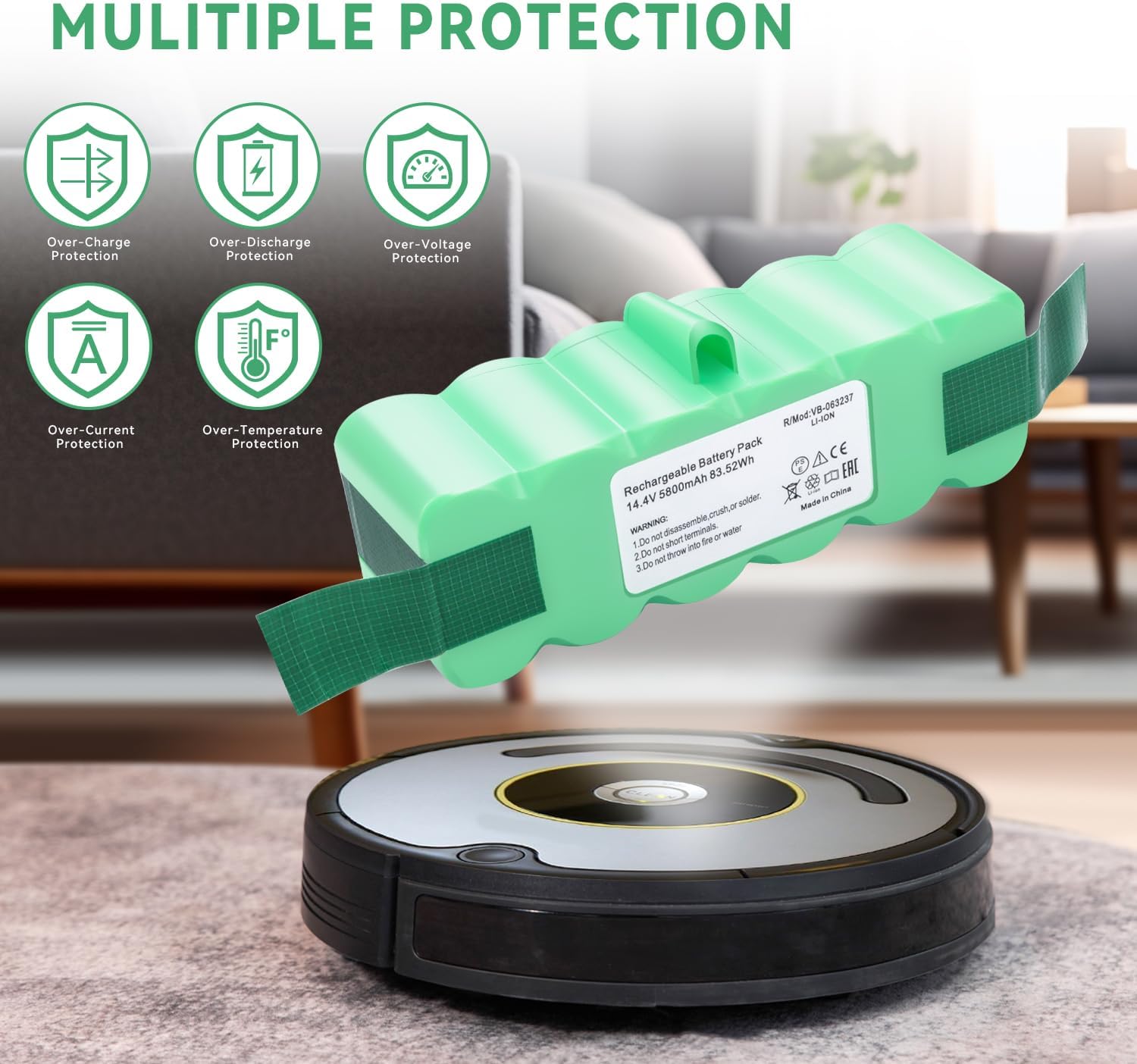
This image emphasizes the battery's integrated safety features, including protection against over-charge, over-discharge, over-voltage, surintensité et surchauffe, garantissant un fonctionnement sûr.
Observe the following warnings and safety precautions to prevent injury or damage:
- Do not disassemble, crush, or solder la batterie.
- Do not short terminals de la batterie.
- Ne pas jeter au feu ou à l'eau.
- Gardez la batterie hors de portée des enfants et des animaux domestiques.
- Si la batterie présente des signes de dommages, de gonflement ou de fuite, cessez immédiatement de l'utiliser et jetez-la correctement.
- Use only with compatible iRobot Roomba models as specified.
8. Dépannage
Si vous rencontrez des problèmes avec votre nouvelle batterie, tenez compte des étapes de dépannage courantes suivantes :
- Roomba Not Charging: Ensure the battery is correctly installed and the charging contacts on both the Roomba and the charging base are clean and free of debris. Try resetting the Roomba (refer to your Roomba's manual for specific reset procedures).
- Durée d'exécution réduite : After initial installation, ensure you have completed the recommended 3-4 charge/discharge cycles to calibrate the battery. If runtime remains significantly low, verify that the Roomba's brushes and filters are clean, as excessive resistance can drain the battery faster.
- Batterie non reconnue : Double-check that the battery is fully seated in its compartment. If the issue persists, remove and reinsert the battery.
Si les problèmes persistent après avoir suivi ces étapes, contactez le service client pour obtenir de l'aide supplémentaire.
9. Garantie et assistance
This product is manufactured by RDSJK. For specific warranty information or technical support, please refer to the product packaging or contact the manufacturer directly through their official channels. Keep your purchase receipt as proof of purchase.
