1. Introduction
Thank you for choosing the Dalton 2000VA Uninterruptible Power Supply (UPS). This device is designed to provide reliable power backup and protection for your electronic equipment against power outages, surges, and fluctuations. Please read this manual thoroughly before installation and operation to ensure optimal performance and safety.
2. Consignes de sécurité importantes
Suivez toujours ces précautions de sécurité de base afin de réduire les risques d'incendie, d'électrocution et de blessure :
- N'ouvrez pas le boîtier UPSasing. L'appareil ne contient aucune pièce réparable par l'utilisateur. Confiez toute réparation à un technicien qualifié.
- Do not use the UPS in environments with excessive dust, humidity, or extreme temperatures.
- Assurez-vous que l'onduleur est branché sur une prise de courant mise à la terre.
- Do not connect non-computer related items like medical equipment, life support equipment, or household appliances to the UPS.
- Placez l'onduleur dans un endroit bien ventilé, à l'abri de la lumière directe du soleil ou des sources de chaleur.
- In case of emergency, press the power button to turn off the UPS and disconnect it from the AC power source.
3. Contenu du colis
Vérifiez que tous les éléments sont présents dans votre colis :
- Dalton 2000VA UPS Unit
- Cordon d'alimentation
- USB Communication Cable (if applicable)
- Manuel de l'utilisateur (ce document)

Figure 3.1 : Face avant view of the Dalton 2000VA UPS unit, showing the display screen and power button.
4. Configuration et installation
Follow these steps to set up your UPS:
- Déballage: Retirez délicatement le colis UPS de son emballage. Vérifiez qu'il n'a pas été endommagé pendant le transport.
- Placement: Place the UPS on a flat, stable surface in a cool, dry, and well-ventilated area. Ensure there is adequate space around the unit for airflow.
- Charge initiale: Before connecting any devices, plug the UPS power cord into a grounded wall outlet. Allow the unit to charge for at least 8 hours to ensure the battery is fully charged. The display will indicate charging status.
- Connexion d'appareils :
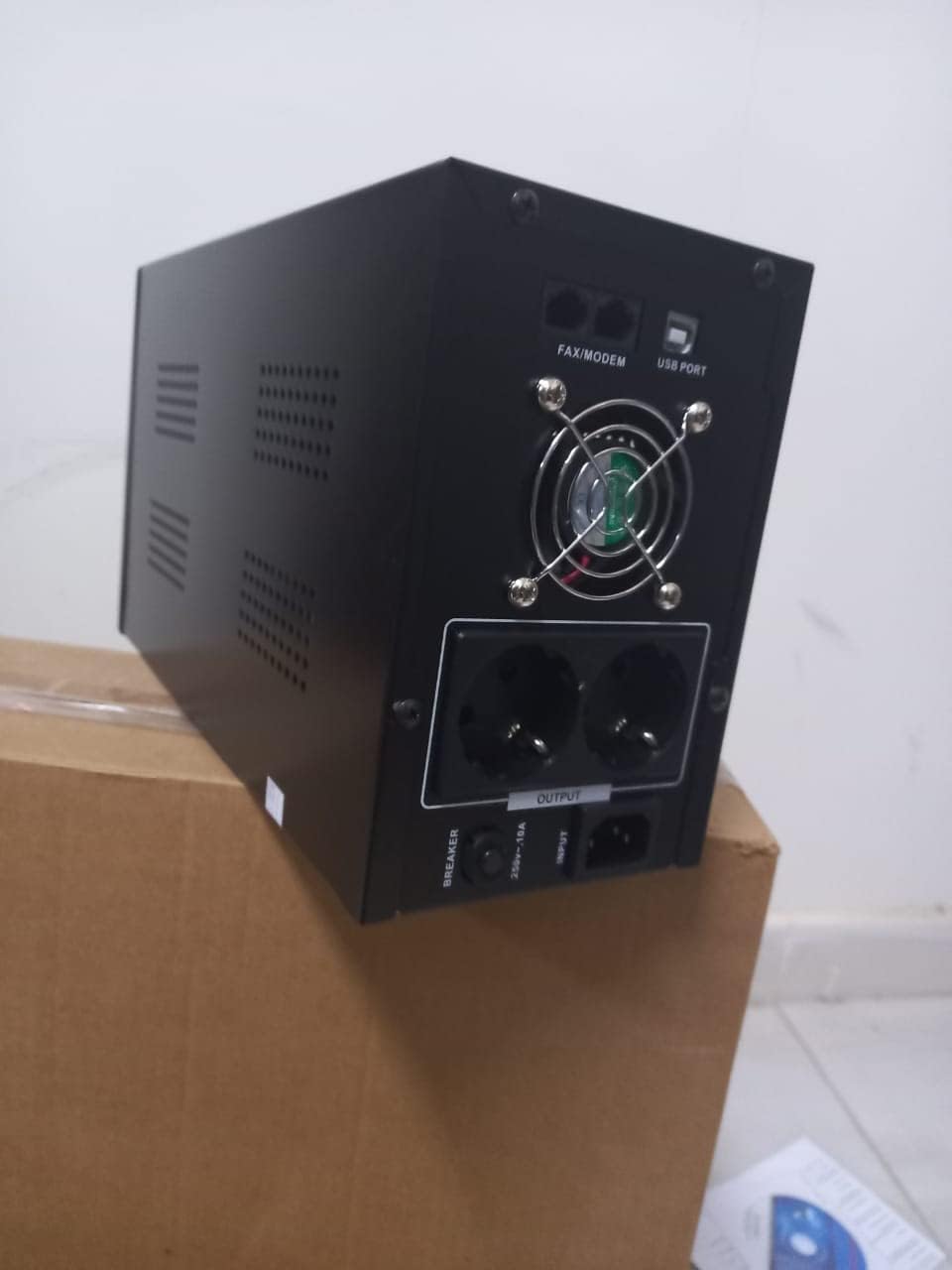
Figure 4.1 : Arrière view of the Dalton 2000VA UPS, highlighting the input power port, output sockets, and USB/Modem ports.
- Once the battery is charged, connect your computer, monitor, and other critical electronic devices to the UPS output sockets.
- Do not overload the UPS. Refer to the specifications section for maximum load capacity.
- If applicable, connect the USB communication cable from the UPS to your computer for monitoring software (software not included, check manufacturer's webplacer).
5. Utilisation de l'onduleur
5.1 Mise sous/hors tension
- Pour allumer : After connecting to AC power and charging, press and hold the power button on the front panel for approximately 3 seconds until you hear a beep and the display illuminates.
- Pour éteindre : Press and hold the power button for approximately 3 seconds until you hear a beep and the display turns off. If the UPS is running on battery, it will shut down immediately. If connected to AC, it will switch to bypass mode before shutting down.
5.2 Comprendre l'affichage
The front panel LCD display provides real-time status information:
- DANS: Affiche le volume d'entréetage provenant du réseau électrique.
- DEHORS: Affiche le volume de sortietage provided by the UPS to connected devices.
- NORMALE: Indicates the UPS is operating on utility power.
- Batte: Affiche le niveau de charge actuel de la batterie.
- Charger: Indique le pourcentagetage de la capacité de l'onduleur utilisée par les appareils connectés.
- Battery Mode Icon: Appears when the UPS is running on battery power during an outage.

Figure 5.1 : Côté view of the UPS, showing the illuminated display with power status indicators.
5.3 Fonction de secours par batterie
En cas de panne de couranttage, the UPS will automatically switch to battery power, providing continuous power to your connected devices. The duration of backup power depends on the load connected and the battery's charge level. The UPS will emit an audible alarm during battery operation.
When utility power returns, the UPS will automatically switch back to AC power and begin recharging its battery.
6. Entretien
- Entretien de la batterie: To maximize battery life, ensure the UPS is always connected to an AC outlet to keep the battery charged. If the UPS is stored for an extended period, recharge it every three months for at least 8 hours.
- Nettoyage: Disconnect the UPS from all power sources before cleaning. Use a soft, dry cloth to wipe the exterior. Do not use liquid or aerosol cleaners.
- Ventilation: Regularly check that the ventilation openings are not blocked by dust or debris to prevent overheating.
7. Dépannage
Consultez le tableau ci-dessous pour connaître les problèmes courants et leurs solutions :
| Problème | Cause possible | Solution |
|---|---|---|
| L'onduleur ne s'allume pas. | Battery not charged or power cord disconnected. | Ensure power cord is securely plugged in and allow battery to charge for 8 hours. |
| L'onduleur émet un bip continu en mode normal. | État de surcharge. | Disconnect non-essential equipment until the alarm stops. Check total load. |
| Temps de sauvegarde court. | Batterie non complètement chargée ou batterie en fin de vie. | Allow UPS to charge for 8 hours. If issue persists, battery may need replacement (contact service center). |
| L'onduleur ne fournit pas d'alimentation pendant les coupures de courant.tage. | Battery discharged or internal fault. | Ensure UPS was fully charged. If problem persists, contact authorized service center. |
8. Spécifications techniques
| Fonctionnalité | Détail |
|---|---|
| Dimensions du produit | 12.5 x 22.5 x 38 cm |
| Fabricant | Dalton |
| Nom de marque | Générique |
| Couleur | Noir |
| Matériel | Métal |
| Actuel | 5 Ampavant |
| Facteur de forme | Étagère |
| Gamme de fréquences | 50-60 Hz |
| Volume de sortietage | 220 volts |
| Type de connecteur | AC |
9. Garantie et assistance
Dalton provides an authorized maintenance center for all Uninterruptible Power Supply units. For warranty claims, technical support, or service inquiries, please contact your local Dalton authorized distributor or service center. Keep your purchase receipt as proof of purchase for warranty validation.
For further assistance, please visit the official Dalton website ou contacter le support client.


