1. Introduction
This user manual provides detailed instructions for the safe and effective use of the Wellue BabyO2 S2 Multifunction Heart Rate and Oxygen Monitor. Please read this manual thoroughly before operating the device and retain it for future reference. The BabyO2 S2 is designed to continuously track your baby's blood oxygen level (SpO2), heart rate, and body movement during sleep. It is intended for general wellness and health purposes and is not a medical device. It is not intended to diagnose, treat, cure, or prevent any disease or medical condition.
2. Produit terminéview

Description de l'image : The complete Wellue BabyO2 S2 system, including the main monitor unit, the base station, the sensor with soft straps, and a smartphone displaying the ViHealth application with real-time oxygen level and pulse rate data.
The Wellue BabyO2 S2 system consists of a main unit (monitor), a sensor, a base station, and a charging base. It offers continuous monitoring and real-time alerts for abnormal readings.
2.1 Contenu du paquet
- 1 Main Unit (Monitor)
- Capteur 1
- 1 station de base
- 1 Base de chargement
- 1 Charging Cable for Main Unit
- 1 câble de chargement de type C
- 1 Spare Soft Strap
- 1 Manuel d'utilisation
- 1 Service Card
- 1 Personalized Sticker
2.2 Principales caractéristiques
- Surveillance continue : Tracks blood oxygen level (SpO2), heart rate, and sleep movement.
- Alertes en temps réel : Base station and mobile application provide alerts for abnormal SpO2 levels, heart rate, or baby movement.
- Adjustable Thresholds: Alarm thresholds for SpO2 and heart rate are customizable via the device, base station, or app.
- Conception confortable : Soft bandages are suitable for infants aged 0-3 years, accommodating different foot sizes.
- Facile à utiliser : No complex network settings required; the device is ready for use out-of-the-box and connects automatically after startup.
- Gestion des données : Free iOS/Android application and PC/Mac software allow for unlimited export, printing, and sharing of detailed PDF/CSV reports.
- Longue durée de vie de la batterie : Main unit operates for up to 16 hours; the base station provides continuous use for up to 7 days.
2.3 Composants de l'appareil

Description de l'image : An illustration showing the Wellue BabyO2 S2 main unit, sensor, and a smartphone displaying the app interface, with various components labeled such as OLED Screen, Volume, ON/OFF button, Heart Rate, Charging Base Station, Bluetooth, Real-time Trends, Sensor, and Soft Bands.
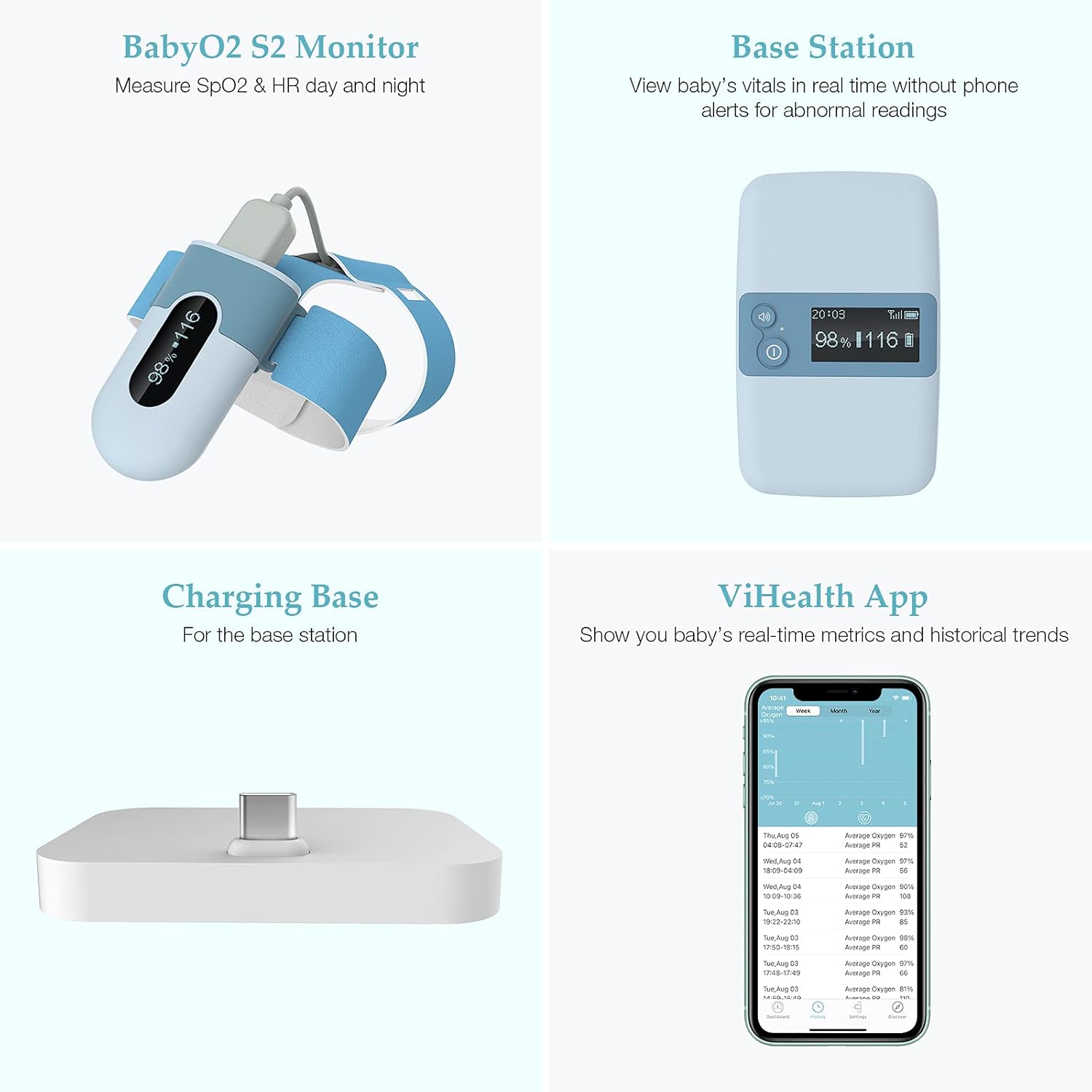
Description de l'image : A composite image displaying the four main parts of the Wellue BabyO2 S2 system: the BabyO2 S2 Monitor (sensor and main unit), the Base Station, the Charging Base, and a smartphone screen showing the ViHealth App interface with real-time metrics and historical trends.
3. Installation
3.1 Chargement de l'appareil
Before first use, ensure both the main unit and the base station are fully charged.
- Connect the main unit to its charging cable and charging base.
- Connect the base station to the Type-C charging cable.
- Allow sufficient time for a full charge. The main unit provides up to 16 hours of operation, and the base station up to 7 days of continuous use.
3.2 Assembling the Sensor
Attach the soft strap to the sensor unit. Ensure it is securely fastened.
3.3 Mise sous tension et appariement initiaux
The device is designed for ease of use and typically pairs automatically.
- Press the ON/OFF button on the main unit to power it on.
- Allumez la station de base.
- The main unit and base station will automatically connect.
- For smartphone connectivity, download the "ViHealth" application from your device's app store (iOS/Android).
- Open the app and follow the on-screen instructions to connect to the monitor via Bluetooth. No complex network settings are required.
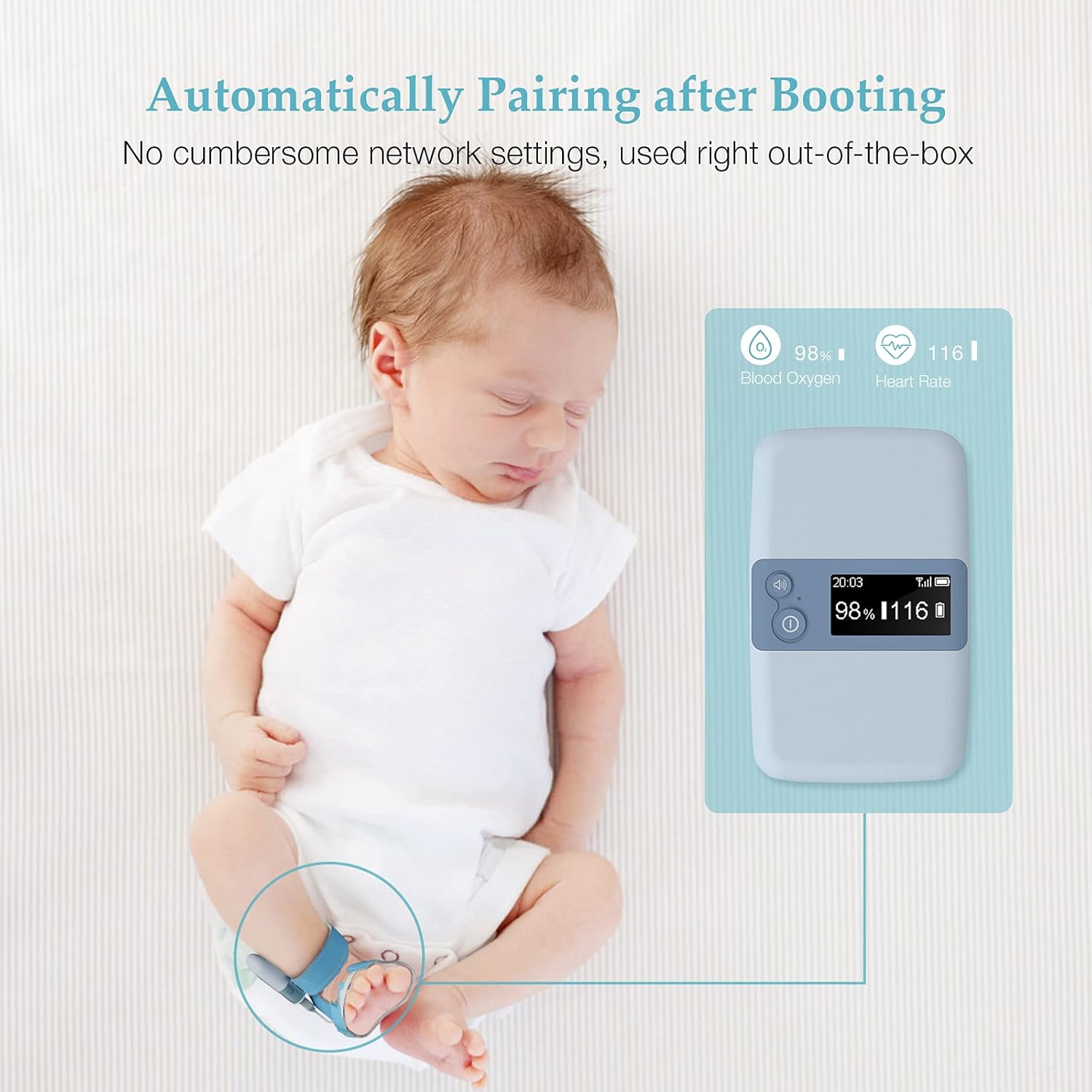
Description de l'image : A sleeping baby with the Wellue BabyO2 S2 monitor attached to their foot. An illustration shows the main unit displaying "98% Blood Oxygen" and "116 Heart Rate," indicating automatic pairing upon booting without cumbersome network settings.
4. Mode d'emploi
4.1 Wearing the Sensor
Proper placement of the sensor is crucial for accurate readings.
- Place the sensor on your baby's foot, ensuring the soft strap is snug but not too tight. The sensor should be positioned correctly to detect blood flow.
- The soft bandages are designed for comfort and adaptability for infants aged 0-3 years.
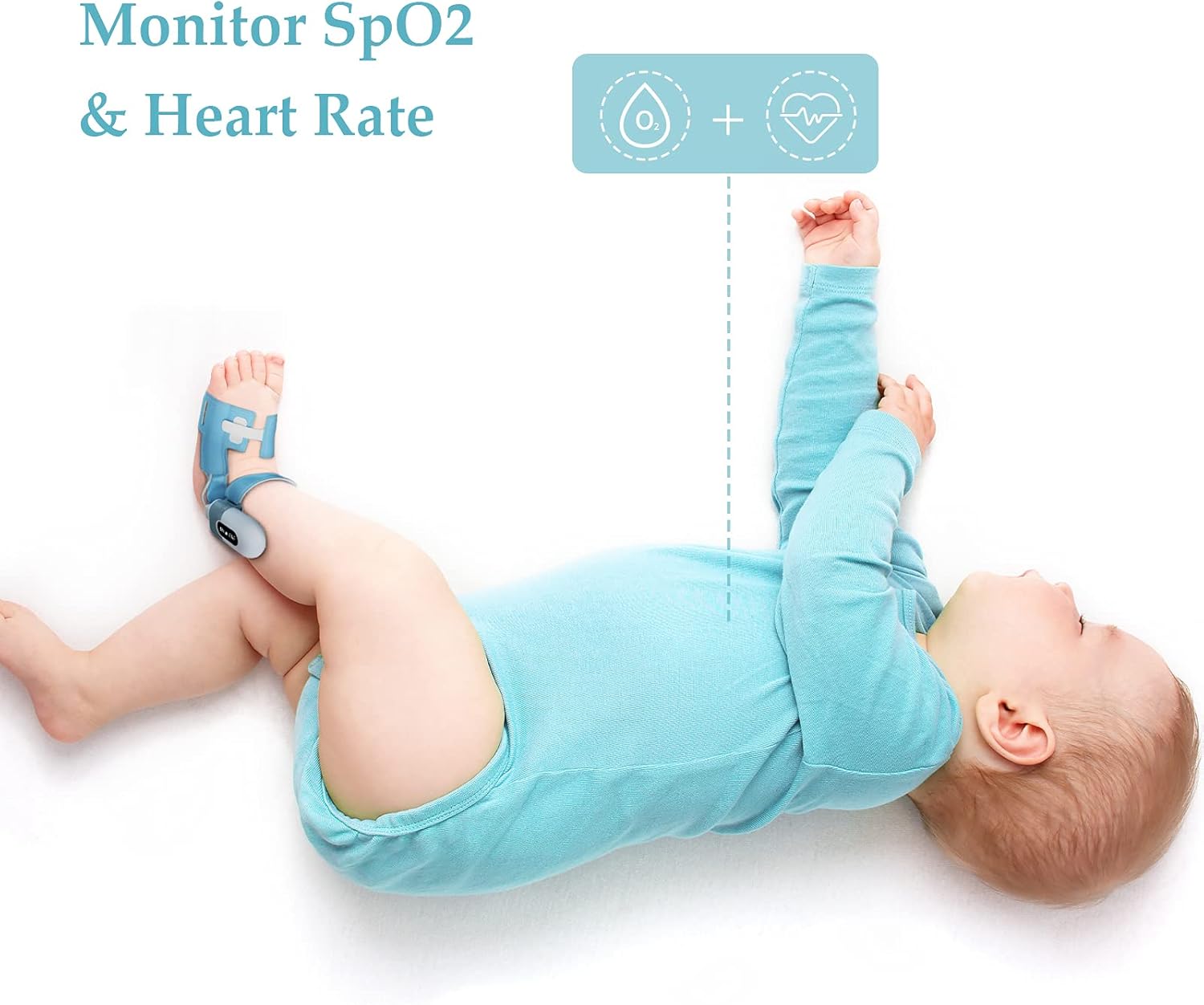
Description de l'image : A baby lying on their back, wearing the Wellue BabyO2 S2 sensor on their foot. An overlay indicates "Monitor SpO2 & Heart Rate," demonstrating the device in use for continuous tracking.

Description de l'image : A close-up image showing an adult's hand gently holding a baby's foot, with the Wellue BabyO2 S2 sensor securely attached. This highlights the comfortable and secure fit of the sensor.
4.2 Données de surveillance
Once the sensor is correctly placed and the device is powered on, monitoring begins automatically.
- Affichage de la station de base : The base station provides real-time display of your baby's SpO2 and heart rate.
- Application mobile : For detailed real-time metrics and historical trends, use the ViHealth app on your smartphone.

Description de l'image : The Wellue BabyO2 S2 main unit displaying current readings, alongside a smartphone showing the ViHealth app interface. Icons indicate monitoring of Blood Oxygen, Heart Rate, Body Movement, and alerts for Invalid Value, emphasizing comprehensive monitoring.
4.3 Paramètres d'alarme
You can customize the alarm thresholds to suit your preferences.
- Adjust the alarm volume and threshold values for SpO2 and heart rate directly on the base station, the main unit, or through the ViHealth application settings.
- The system will alert you via the base station and the app if readings fall outside the set parameters or if significant body movement is detected.
5. Application Usage (ViHealth App)
The ViHealth app enhances the monitoring experience by providing detailed data, historical trends, and report generation.
- Données en temps réel : View current SpO2 levels, heart rate, and perfusion index (PI) on your smartphone.
- Tendances historiques : Access graphs and summaries of past monitoring sessions.
- Génération de rapport : Export, print, and share detailed PDF or CSV reports of your baby's data. This feature is useful for sharing information with healthcare providers.
- Paramètres: Customize alarm thresholds, volume, and other device settings directly from the app.

Description de l'image : A hand holding a smartphone displaying the Wellue ViHealth application. The screen shows current oxygen level (97%) and pulse rate (79), along with historical trend graphs for both metrics, illustrating the app's data visualization capabilities.

Description de l'image : A laptop screen displaying a detailed "Sleep Report" generated by the Wellue software. The report includes graphs and data points for oxygen levels and heart rate over time, demonstrating the comprehensive reporting feature.
6. Entretien
6.1 Nettoyage
- Wipe the main unit, base station, and sensor with a soft, dry cloth.
- Pour la désinfection, utilisez un chiffon légèrement humidifié.ampterminé avec de l'alcool isopropylique (70%).
- N'immergez aucune partie de l'appareil dans l'eau ou d'autres liquides.
- Assurez-vous que l'appareil est complètement sec avant de le ranger ou de le réutiliser.
6.2 Stockage
- Conservez l'appareil dans un endroit frais et sec, à l'abri de la lumière directe du soleil et des températures extrêmes.
- Tenir hors de portée des enfants.
6.3 Entretien de la batterie
- Rechargez régulièrement l'appareil, même si vous ne l'utilisez pas fréquemment, afin de préserver la durée de vie de la batterie.
- Évitez de décharger complètement les batteries pendant des périodes prolongées.
7. Dépannage
| Problème | Cause possible | Solution |
|---|---|---|
| No Reading / Inaccurate Readings |
|
|
| L'appareil ne s'allume pas |
|
|
| App Not Connecting to Device |
|
|
| Alarms Not Sounding |
|
|
8. Spécifications
| Paramètre | Valeur |
|---|---|
| Marque | Wellue |
| Modèle | BabyO2 S2 |
| Matériau principal | Polycarbonate (PC) |
| Main Unit Battery Life | Jusqu'à 16 XNUMX heures |
| Base Station Battery Life | Jusqu'à 7 jours (utilisation continue) |
| Appareils compatibles | Smartphone (iOS/Android), PC/Mac |
| Display Size (Main Unit) | 3.3 pouces |
| ASIN | B09BVFNZYF |
| Piles incluses | 2 Lithium-polymer |
| Dimensions du produit | 19.2 x 16.2 x 8 cm ; 528 grammes (emballage) |
9. Garantie et assistance
The Wellue BabyO2 S2 Multifunction Heart Rate and Oxygen Monitor comes with a Garantie d'un an. For technical support, warranty claims, or any questions regarding the product, please refer to the service card included in your package or visit the official Wellue support website.
Remarque importante : This device is not a medical device and is not intended for medical use or to replace a medical device. Consult with a healthcare professional for any medical concerns.


