1. Produit terminéview
The DALY Smart BMS (Battery Management System) is designed for Li-ion 17S 60V 60A battery packs. It features a programmable Bluetooth module and a common port for both charging and discharging. This BMS provides essential protection functions and allows for real-time monitoring and parameter adjustments via a mobile application.

Figure 1: DALY Smart BMS with Bluetooth module and smartphone app interface.
Caractéristiques principales :
- Supports up to 60A continuous discharge and 30A charge current. Suitable for high current applications.
- Programmable temperature protection: Stops current if battery temperature limits are exceeded.
- Programmable over-charge and over-discharge protection: Stops charging/discharging when voltage limits are reached.
- Programmable over-current protection: Stops charging/discharging if current exceeds limits.
- Integrated Bluetooth module for mobile app (iOS & Android) connectivity.
- UART cable for PC monitoring and parameter setting.
- SOC (State of Charge) calculation with automatic learning function.
- Automatic battery charge function or static balance function.

Figure 2: The DALY Smart BMS offers 12 protection functions including Bluetooth, programmable settings, over-charging, over-discharging, over-current, short-circuit, over-voltage, balance, NTC temperature, waterproof, moistureproof, fireproof, and dustproof features.
2. Consignes de sécurité
Adherence to safety guidelines is crucial for the proper and safe operation of the DALY Smart BMS. Failure to follow these instructions may result in damage to the product, battery, or personal injury.
- Do not charge the battery pack at temperatures below -1°C.
- Always follow battery management guidelines to prevent over-charge, over-discharge, and voltage déséquilibre.
- Keep the BMS and battery pack away from extreme temperatures and humidity.
- Ensure all wiring connections are secure and correct before operation. Incorrect wiring can cause damage.
- Only use the specified balance wires and cables provided with the BMS.
- Consult a qualified professional if you are unsure about any installation or operation steps.
3. Configuration et installation
Careful installation is essential for the correct functioning of your DALY Smart BMS. Please follow these steps precisely.
3.1 Connexion de câblage
- Préparation: Ensure all power sources are disconnected. Tools needed include a soldering machine (suggested 662°F/350°C), scissors, double-sided tape, tin wire, and a multimeter.
- Balance Wires: Disconnect balance wires from the BMS connection port. Connect the balance wires to your battery pack, ensuring correct polarity and sequence.
- BMS Connection: Connect the main negative (B-) and positive (P+) wires from the battery pack to the BMS.
- Balance Wire Reconnection: After confirming all balance wires are correctly welded and installed, connect them to the BMS connection port.
- NTC and Bluetooth Module: Plug in the NTC (temperature sensor) and Bluetooth module into their respective ports on the BMS.
- Activation : Press the button on the Bluetooth module to activate the smart BMS.

Figure 3: Wiring diagram showing connections for the DALY Smart BMS, battery pack, charger, and motor/load. Ensure balance wires are connected correctly from the last series to the first series of the battery cells.
3.2 Configuration de l'application mobile
- Téléchargez l'application: Rechercher "Smart BMS" in the Huawei App Store or Apple App Store and download the application.
- Connectez-vous via Bluetooth : Open the Smart BMS app and connect to the corresponding Bluetooth device listed.
- Paramétrage initial : For the first power-on, the battery capacity must be set to the actual capacity of your battery pack. The initial password for parameter changes is 123456.
Video 1: Official DALY Smart BMS setup and app connection guide. This video demonstrates the wiring process, activating the BMS, connecting to the mobile app, viewing battery parameters, and setting initial battery capacity.
4. Mode d'emploi
The DALY Smart BMS allows for comprehensive monitoring and control of your battery pack.
4.1 Surveillance en temps réel
Use the "Smart BMS" mobile application to monitor battery status in real-time. This includes:
- État de charge (SOC)
- Courant (charge/décharge)
- Voltage (total and individual cell voltagc'est)
- Température
- Warning and fault messages
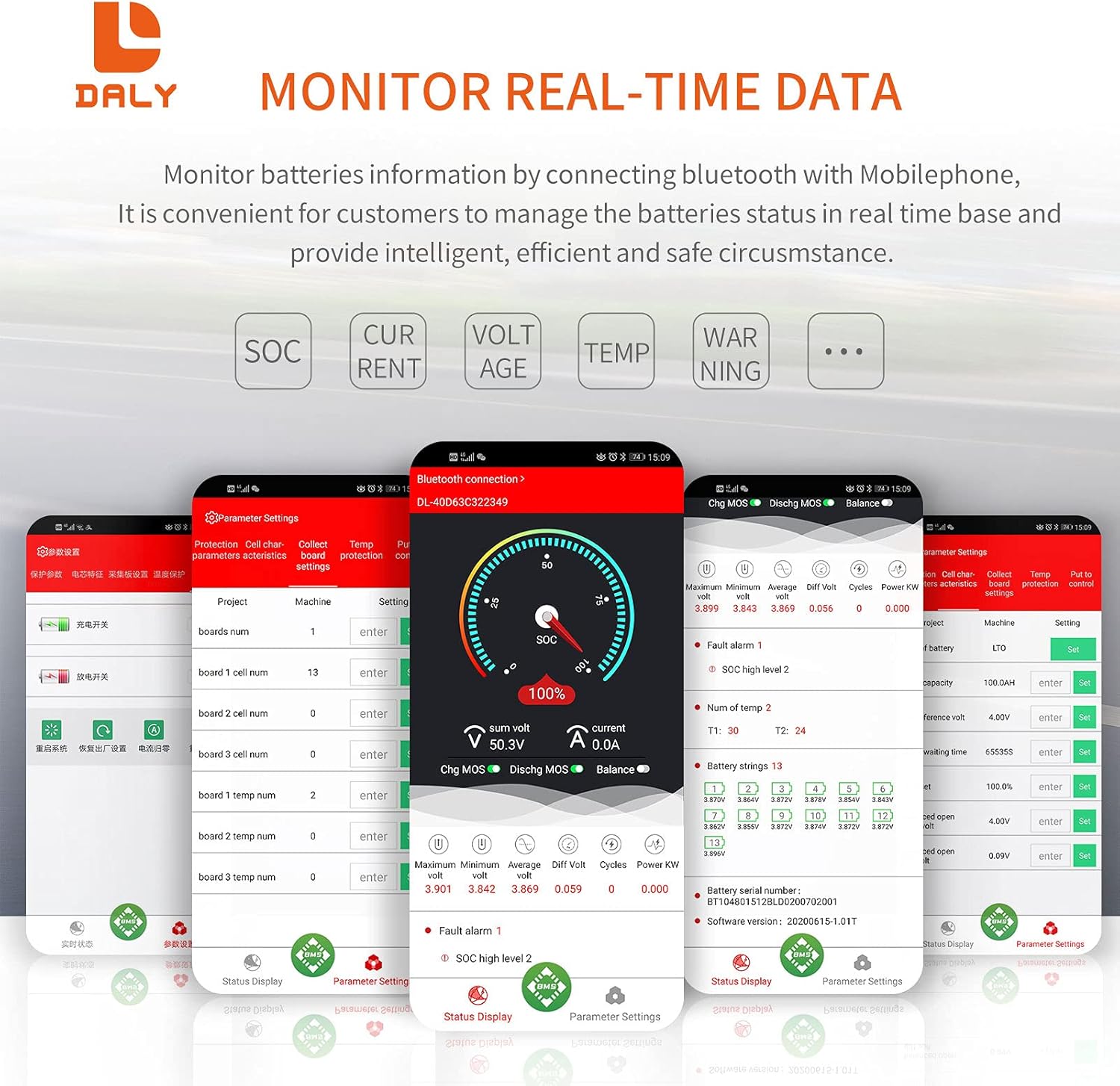
Figure 4: Real-time data monitoring via the DALY Smart BMS mobile application, showing SOC, current, voltage, et la température.
4.2 Réglages des paramètres
The app allows you to adjust various protection parameters to suit your battery type and application. Always ensure you understand the implications of changing these settings.
- Vol cellulairetage high/low protection limits.
- Volume totaltage high/low protection limits.
- Charge/discharge over-current protection limits.
- High/low temperature protection limits for charging and discharging.
- Vol de départ du soldetage et vol différentieltage.
The BMS also supports PC monitoring via the UART cable, providing a detailed interface for advanced users to view et régler les paramètres.
5. Entretien
Regular maintenance ensures the longevity and optimal performance of your DALY Smart BMS and battery pack.
- Vérifications de connexion : Vérifiez régulièrement le serrage et l'absence de corrosion de tous les raccordements électriques. Des connexions desserrées peuvent entraîner une baisse de performance ou des risques pour la sécurité.
- Mises à jour du micrologiciel : Check the DALY website or app for any available firmware updates for your BMS model. Updates can improve performance and add new features.
- Conditions environnementales : Ensure the BMS is operated within its specified temperature and humidity ranges. Avoid exposure to direct sunlight, water, or excessive dust.
- Nettoyage: Veillez à ce que le système de gestion du bâtiment (BMS) reste propre et exempt de poussière et de débris. Utilisez un chiffon doux et sec pour le nettoyer. N'utilisez pas de nettoyants liquides.
- Étalonnage de la batterie : The BMS features automatic SOC calibration. For accurate readings, ensure the battery is fully charged periodically until the voltage reaches the high protection limit, allowing the BMS to recalibrate.
6. Dépannage
This section addresses common issues you might encounter with your DALY Smart BMS.
| Problème | Cause possible | Solution |
|---|---|---|
| BMS not activating / no power output |
|
|
| L'application Bluetooth ne se connecte pas |
|
|
| BMS shuts down unexpectedly |
|
|
| Inaccurate SOC or cell voltage lectures |
|
|
7. Spécifications
Detailed technical specifications for the DALY Smart BMS Li-ion 17S 60V 60A.
| Fonctionnalité | Détail |
|---|---|
| Type de produit | Li-ion 17S 60A Common Port with Balance |
| Communications | UART, Bluetooth (Optional: CAN/RS485) |
| Courant de décharge | 60A (continu) |
| Courant de décharge excessive | 90A ± 9A (Programmable) |
| Courant de charge | 30A (continu) |
| Overcharge Current | 90A ± 9A (Programmable) |
| Volume de surchargetage | 4.25V ± 0.05V (per string, Programmable) |
| Vol de décharge excessivetage | 2.7V ± 0.1V (per string, Programmable) |
| Vol de chargetage | 71.4V (Programmable) |
| Modèle | R25T |
| Dimensions | 128 x 66 x 18 mm (5.04 x 2.6 x 0.71 pouces) |
| Output Wire Gauge | 16AWG |
| Balance Wires | 24AWG/350 mm |
| Poids | ~333g (12.8 ounces) |
| Matériel | Polycarbonate (PC) |
| Technologie de connectivité | Bluetooth |
| Source d'énergie | Alimenté par batterie |
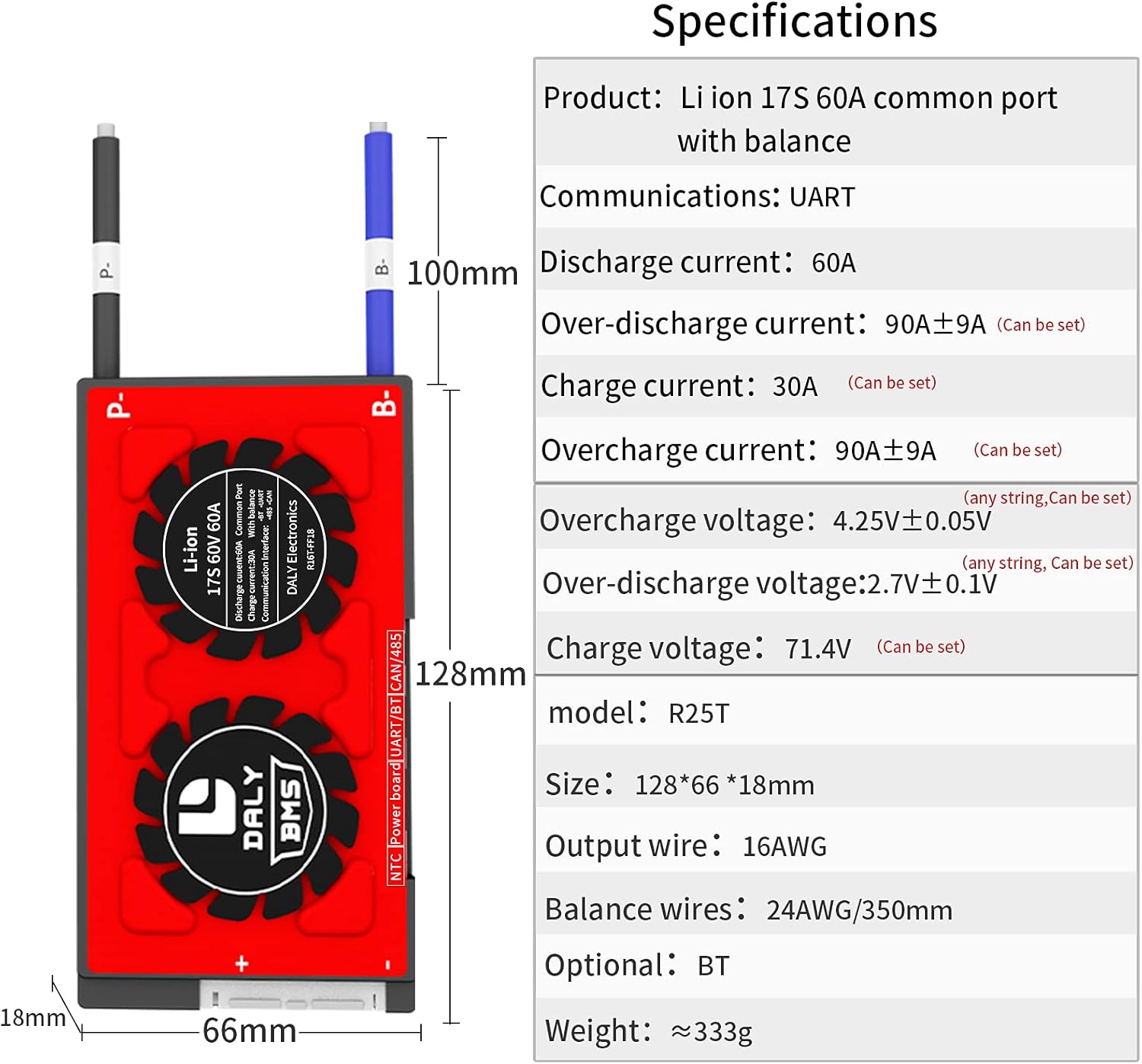
Figure 5: Physical dimensions and key electrical specifications of the DALY Smart BMS.
8. Garantie et assistance
For warranty information, technical support, or service inquiries, please refer to the official DALY webou contactez votre revendeur.
- Plans de protection : Optional 2-Year and 3-Year protection plans may be available for purchase. Refer to your purchase documentation for details.
- Politique de retour: A 30-day refund/replacement return policy typically applies. Consult your seller for specific terms.
- Fabricant: QUOTIDIEN
- Contact: Pour obtenir de l'aide supplémentaire, visitez le DalyBMS Store on Amazon or the official DALY website.


