1. Introduction
Thank you for choosing the Soundmaster DAB60WE DAB+/FM Radio. This manual provides essential information for the safe and efficient operation of your device. Please read it thoroughly before use and keep it for future reference.
The Soundmaster DAB60WE is a versatile portable radio featuring DAB+ and FM reception, Bluetooth connectivity for hands-free calls, an integrated rechargeable battery, and a motion detector for automatic power management. Its splash-proof design makes it suitable for various environments.
2. Consignes de sécurité importantes
- Résistance à l'eau : This device is splash-proof (IPX4 rated). Do not immerse it in water or expose it to direct jets of water. Ensure the USB port cover is securely closed when not in use to maintain splash protection.
- Entretien de la batterie: The radio contains an integrated lithium battery. Do not expose it to excessive heat, direct sunlight, or fire. Do not attempt to replace the battery yourself.
- Chargement : Use only the provided removable 5V/1A AC adapter/charger or a compatible USB power source. Do not use damaged cables or chargers.
- Placement: Avoid placing the radio near heat sources, in direct sunlight, or in extremely humid or dusty environments. Ensure adequate ventilation.
- Nettoyage: Disconnect the power before cleaning. Use a soft, dry cloth. Do not use liquid cleaners or aerosols.
- Entretien: N’essayez pas de réparer l’appareil vous-même. Confiez toute réparation à un personnel qualifié.
3. Contenu du colis
Veuillez vérifier que tous les articles sont présents dans l'emballage :
- Soundmaster DAB60WE Radio Unit
- Removable 5V/1A AC Adapter/Charger
- Manuel d'instructions (ce document)
4. Produit terminéview
Familiarize yourself with the various parts and controls of your Soundmaster DAB60WE radio.
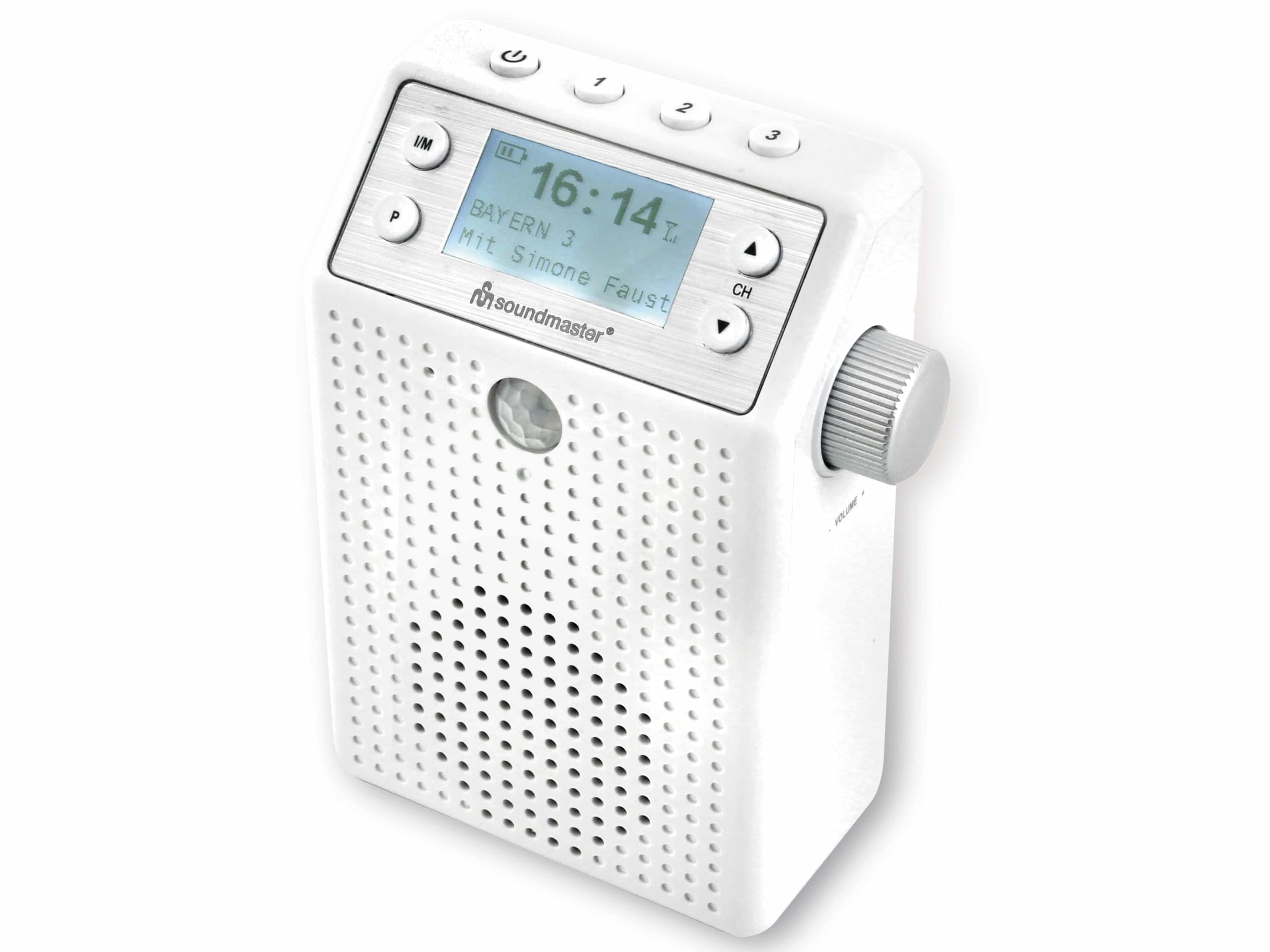
Illustration 4.1 : Avant View of the DAB60WE Radio. This image displays the front of the Soundmaster DAB60WE radio, highlighting the central LCD display, control buttons (Power, FM/DAB, Presets, Channel Up/Down), the speaker grille, and the motion sensor located below the display. The volume knob is visible on the right side.
Contrôles et fonctionnalités :
- Bouton d'alimentation (⏻) : Located at the top left. Press and hold to turn the radio on or off.
- Mode Button (I/M): Permet de basculer entre les modes radio DAB+ et FM.
- Preset Buttons (1, 2, 3, P): Allows quick access to stored radio stations. 'P' button is for additional fixed memory presets.
- Channel/Navigation Buttons (▲ / ▼): Used to navigate menus or change radio stations.
- Volume Knob (CH): Located on the right side. Rotate to adjust the volume. Press to confirm selections in menu mode.
- Écran LCD : Affiche les informations de la station, l'heure, l'état de la batterie et les options du menu.
- Détecteur de mouvement : Located below the display, this sensor detects movement to automatically turn the radio on or off based on settings.
- Integrated USB Plug: Located on the back, this allows the radio to be directly plugged into a wall socket for power and charging.
- Port de charge USB: Located on the back, under a protective cover, for charging external devices like smartphones.

Image 4.2 : Arrière View with Integrated Plug. This image shows the back of the Soundmaster DAB60WE radio, featuring the integrated European-style plug for direct connection to a wall outlet. The protective cover for the USB charging port is also visible at the bottom.

Image 4.3 : Côté View with Volume Control. Cette image offre un côté view of the radio, clearly showing the rotary volume knob and the integrated plug extending from the back of the unit.
5. Configuration initiale
5.1 Chargement de la batterie
Before first use, it is recommended to fully charge the integrated lithium battery. The radio can operate for approximately 2 to 3 hours on a full charge.
- Extend the integrated plug from the back of the radio.
- Plug the radio directly into a standard wall power socket. Alternatively, use the provided 5V/1A AC adapter/charger and a USB cable (not always included, but implied by "removable adapter") to connect the radio to a power outlet.
- The battery charging indicator on the display will show the charging status. The radio can be used while charging.
- Once fully charged, the indicator will show a full battery icon.
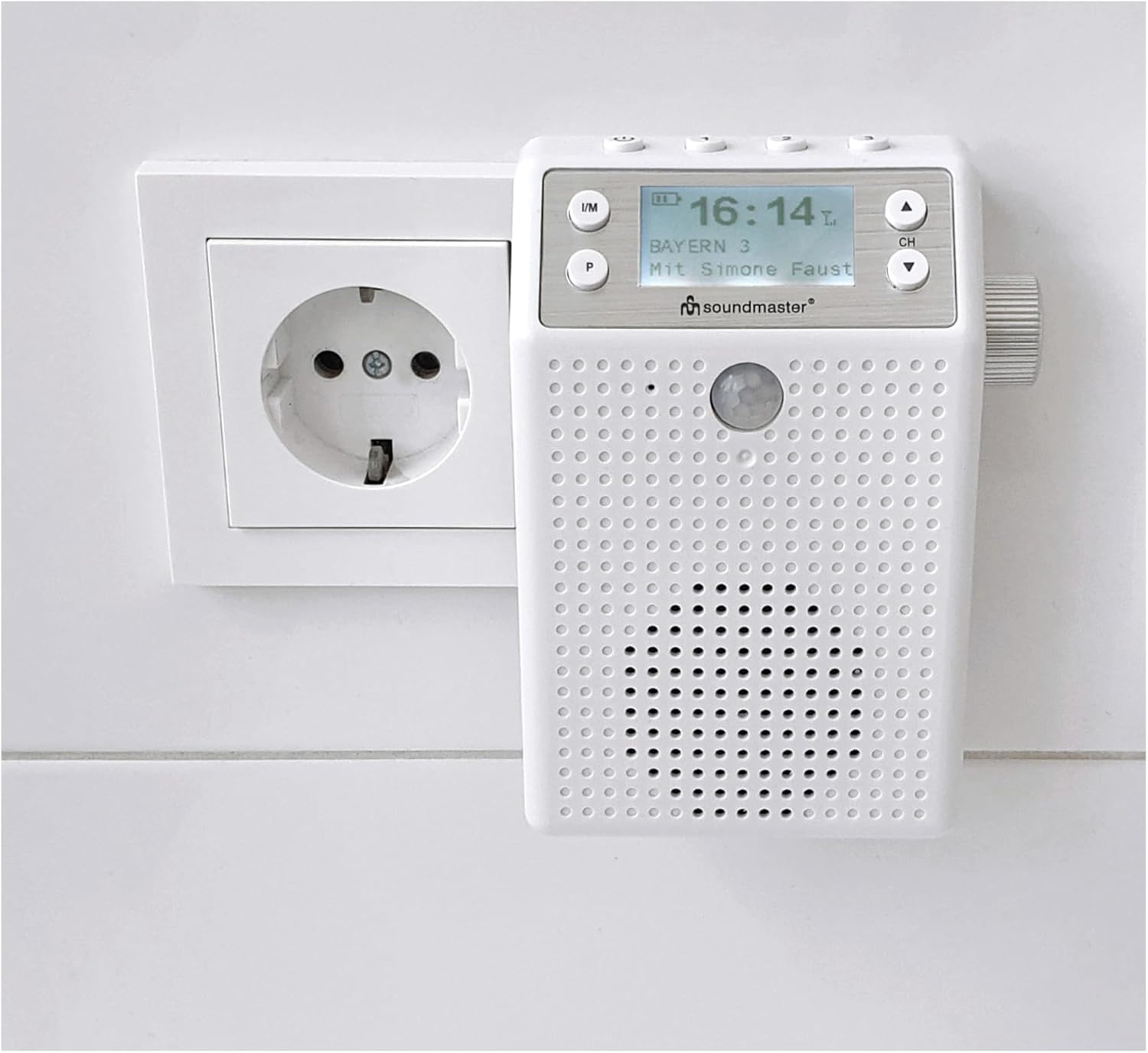
Image 5.1: Radio Plugged into Wall Socket. This image demonstrates the Soundmaster DAB60WE radio plugged directly into a wall power outlet for charging or continuous operation.
5.2 First Power On and DAB+ Scan
- Press and hold the Power button (⏻) for a few seconds to turn on the radio.
- Upon first power-on, the radio will typically initiate an automatic scan for DAB+ stations. This may take a few minutes.
- Une fois la recherche terminée, la radio se syntonisera sur la première station DAB+ disponible.
6. Utilisation de votre radio
6.1 Mise sous/hors tension
- Pour allumer: Press and hold the Power button (⏻) until the display lights up.
- Éteindre: Press and hold the Power button (⏻) until the display turns off.
6.2 Sélection du mode radio (DAB+/FM)
Appuyez sur le DANS LE Appuyez plusieurs fois sur le bouton pour basculer entre les modes radio DAB+ et FM.
6.3 Fonctionnement de la radio DAB+
- Ensure the radio is in DAB+ mode (display shows "DAB+").
- Recherche de stations : If no stations are found or you wish to rescan, navigate to the "Scan" option in the menu (usually by pressing the CH knob or a dedicated menu button, then using ▲ / ▼ to select and CH knob to confirm).
- Sélection des stations : Use the ▲ / ▼ buttons to browse through available DAB+ stations. The display will show the station name.
- Stockage des préréglages: To store a station, tune to the desired station, then press and hold one of the preset buttons (1, 2, 3, or P) until the display confirms the station has been saved. To recall a preset, simply press the corresponding preset button.
Fonctionnement de la radio FM 6.4
- Ensure the radio is in FM mode (display shows "FM").
- Recherche de stations : Press and hold the ▲ or ▼ button to automatically scan for the next available FM station. Short presses will fine-tune the frequency.
- Stockage des préréglages: Similar to DAB+, tune to the desired FM station, then press and hold one of the preset buttons (1, 2, 3, or P) until the display confirms the station has been saved. To recall a preset, simply press the corresponding preset button.
6.5 Bluetooth Connectivity and Hands-Free Function
The radio features Bluetooth for wireless audio streaming and hands-free calling.
- Activer le Bluetooth : Switch the radio to Bluetooth mode (usually by pressing the I/M button until "Bluetooth" or a Bluetooth icon appears on the display). The radio will enter pairing mode, indicated by a flashing Bluetooth icon.
- Jumelage : On your smartphone or tablet, go to Bluetooth settings and search for available devices. Select "Soundmaster DAB60WE" (or similar name) from the list.
- Connexion: Une fois l'appairage effectué, l'icône Bluetooth sur l'écran de la radio deviendra fixe. Vous pouvez alors diffuser du contenu audio depuis votre appareil via la radio.
- Appels mains libres : When a call comes in, the radio will pause audio playback. You can answer/end calls using the radio's controls (specific button may vary, often the CH knob or a dedicated call button).

Image 6.1: Charging External Devices. This image illustrates the Soundmaster DAB60WE radio, while plugged into a wall socket, being used to charge a smartphone via its integrated USB charging port. This highlights its dual functionality as a power source.
6.6 Motion Detector Function
The integrated motion detector can automatically turn the radio on or off, saving battery life and providing convenience.
- Activation : Refer to the radio's menu settings to enable or disable the motion detector function.
- Délai réglable : The motion detector features an adjustable delay for automatic shutdown. This allows you to set how long the radio remains on after no motion is detected before it automatically turns off. Consult the menu for specific delay settings.
- Usage: When enabled, the radio will turn on when motion is detected and turn off after the set delay if no further motion is sensed.

Image 6.2: Splash-Proof Design in Use. This image illustrates the Soundmaster DAB60WE radio hanging from a shower head, showcasing its splash-proof capabilities and suitability for bathroom environments. The motion sensor is visible on the front.
7. Entretien et maintenance
- Nettoyage: Always unplug the radio from the power source before cleaning. Use a soft, slightly damp cloth to wipe the exterior. Do not use abrasive cleaners, solvents, or strong detergents.
- Stockage: If storing the radio for an extended period, ensure the battery is partially charged (around 50%) and store it in a cool, dry place. Recharge the battery every few months to prevent deep discharge.
- Protection contre les éclaboussures : Regularly check that the USB port cover on the back is clean and securely closed to maintain the device's splash-proof rating.
8. Dépannage
If you encounter issues with your Soundmaster DAB60WE radio, please consult the following table before seeking professional service.
| Problème | Cause possible | Solution |
|---|---|---|
| La radio ne s'allume pas. | La batterie est épuisée. Le bouton d'alimentation n'est pas enfoncé correctement. | Connect the radio to a power source and charge the battery. Appuyez et maintenez enfoncé le bouton d'alimentation pendant quelques secondes. |
| Mauvaise réception DAB+ ou FM. | Signal faible à votre emplacement. Interférence provenant d'autres appareils électroniques. Radio placed in a shielded area (e.g., inside a cabinet, certain bathrooms). | Déplacez la radio dans une zone où la réception du signal est meilleure. Éloignez la radio des autres appareils électroniques. Perform a full station scan in DAB+ mode. |
| L'appareil Bluetooth ne peut pas être apparié. | La radio n'est pas en mode de couplage Bluetooth. Appareil trop éloigné. Le Bluetooth est désactivé sur l'appareil source. | Ensure the radio is in Bluetooth mode and the icon is flashing. Move the source device closer to the radio (within 10 meters). Activez le Bluetooth sur votre smartphone/tablette. |
| Durée de vie de la batterie courte. | La batterie n'est pas complètement chargée. Utilisation à volume élevé. Dégradation de la batterie au fil du temps. | Assurez-vous que la batterie est complètement chargée avant utilisation. Reduce volume to extend battery life. Battery life naturally decreases over many charge cycles. |
| Le détecteur de mouvement ne fonctionne pas. | Motion detector is disabled in settings. Obstruction devant le capteur. | Check the radio's menu settings to ensure the motion detector is enabled. Ensure the sensor area is clear. |
9. Spécifications techniques
- Marque: Maître du son
- Numéro de modèle : DAB60WE
- Couleur: Blanc
- Technologie de connectivité: Bluetooth
- Caractéristiques spéciales : Rechargeable, Motion Detector with adjustable delay, Hands-free function
- Appareils compatibles : Smartphone, Tablette
- Dimensions (L x l x H) : 8.5 cm x 4 cm x 12.2 cm
- Technologie de réglage : DAB+, FM (RDS)
- Bandes radio prises en charge : DAB+, FM
- Source d'alimentation : Rechargeable Lithium Battery (1200 mAh) / AC Power
- Autonomie de la batterie : Approximately 2-3 hours (mobile operation)
- Puissance de sortie : 1 x 3 W RMS
- Protection contre les éclaboussures : Oui (classé IPX4)
10. Garantie et assistance
Disponibilité des pièces de rechange : Les pièces détachées pour ce produit sont disponibles pendant 1 an à compter de la date d'achat.
For technical support, warranty claims, or further assistance, please contact your retailer or the Soundmaster customer service department. Please have your model number (DAB60WE) and proof of purchase ready.


