1. Introduction
This manual provides essential information for setting up, operating, and maintaining your Samsung Galaxy S21 Ultra 5G. Please read this guide thoroughly to ensure proper use and to maximize the device's features.

Illustration 1.1 : Avant view of the Samsung Galaxy S21 Ultra 5G.
2. Contenu de la boîte
Upon unboxing your Samsung Galaxy S21 Ultra 5G, verify that the following items are included:
- Samsung Galaxy S21 Ultra 5G Device
- Câble de données (USB-C)
- Standard Battery (pre-installed)
- Cling (protective film)
Remarque : Des accessoires supplémentaires peuvent être vendus séparément.
3. Installation
3.1. Mise sous/hors tension
- To power on: Press and hold the Power/Side key until the Samsung logo appears.
- To power off: Press and hold the Power/Side key and Volume Down button simultaneously, then tap "Power off" on the screen. Alternatively, swipe down from the top of the screen to open the Quick Panel, then tap the Power icon and select "Power off".
3.2. Insertion de la carte SIM
Locate the SIM card tray on the bottom edge of the device. Use the provided ejection tool to open the tray. Insert your Nano-SIM card with the gold contacts facing down. Close the tray securely.
3.3. Configuration initiale
Suivez les instructions à l'écran pour terminer la configuration initiale, notamment :
- Sélection de la langue
- Connexion au réseau Wi-Fi
- Connexion au compte Google
- Transfert de données depuis un appareil précédent (facultatif)
- Setting up security features (fingerprint, face recognition, PIN/pattern)
4. Utilisation de votre appareil
4.1. Naviguer dans l'interface
- Écran d'accueil : Your main screen for accessing apps and widgets.
- Tiroir d'applications : Balayez vers le haut depuis l'écran d'accueil pour view toutes les applications installées.
- Panneau de notifications : Faites glisser votre doigt du haut vers le bas de l'écran pour accéder aux notifications et aux paramètres rapides.
- Panneau de bordure : Swipe from the curved edge of the screen to access frequently used apps and contacts.
4.2. Caractéristiques de l'appareil photo
The Samsung Galaxy S21 Ultra 5G features a versatile camera system. To open the camera, tap the Camera icon on the Home screen or App Drawer.
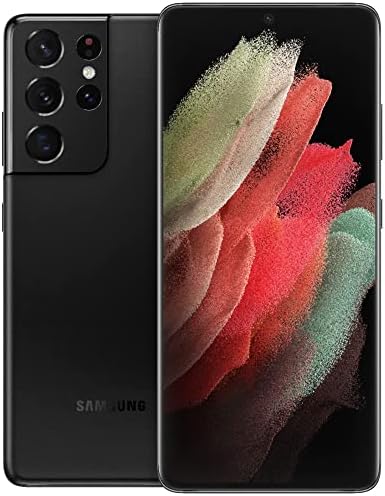
Image 4.1 : Détail view of the multi-lens rear camera system.
- Mode photo: Mode standard pour la capture d'images fixes.
- Mode vidéo : Enregistrez des vidéos en haute résolution.
- Le mode Pro: Manual control over camera settings like ISO, shutter speed, and white balance.
- Single Take: Capture multiple types of photos and videos with one tap.
- Zoom spatial : Utilize the advanced zoom capabilities, including 100x Space Zoom.
4.3. Gestion de la batterie
L'appareil est équipé d'une batterie de 5000 mAh. Pour optimiser l'autonomie de la batterie :
- Ajuster la luminosité de l'écran.
- Enable Power saving mode.
- Fermez les applications inutilisées exécutées en arrière-plan.
- Utilize fast wireless charging or wired fast charging for quick power-ups.
5. Entretien
5.1. Nettoyage de votre appareil
Utilisez un chiffon doux non pelucheux pour nettoyer l'écran et le boîtier de votre téléphone. Évitez les produits chimiques agressifs et les matériaux abrasifs.
5.2. Mises à jour logicielles
Vérifiez et installez régulièrement les mises à jour logicielles pour garantir des performances et une sécurité optimales. Accédez à Paramètres > Mise à jour logicielle > Télécharger et installer.
6. Dépannage
6.1. L'appareil ne s'allume pas
Assurez-vous que la batterie est chargée. Branchez l'appareil à un chargeur et attendez quelques minutes avant de tenter de le rallumer.
6.2. Problèmes de connectivité
- Wifi: Restart your router and device. Forget and reconnect to the Wi-Fi network.
- Données mobiles: Check if mobile data is enabled in Quick Settings. Verify your SIM card is properly inserted and your plan is active.
6.3. Écran non réactif
Perform a forced restart by pressing and holding the Power/Side key and Volume Down button for more than 7 seconds.
7. Spécifications
Key technical specifications for the Samsung Galaxy S21 Ultra 5G:
| Fonctionnalité | Spécification |
|---|---|
| Nom du modèle | Galaxy S21 Ultra 5G |
| Dimensions du produit | 6.5 x 2.98 x 0.35 pouces |
| Poids de l'article | 12.3 onces |
| Système opérateur | Androïde |
| Taille de l'écran | 6.8 pouces |
| Résolution | 3200 x 1440 |
| Taux de rafraîchissement | 120 Hz |
| Modèle de processeur | Snapdragon / Exynos 2100 |
| Vitesse du processeur | 2.42 GHz |
| Taille de la mémoire RAM installée | 12 Go |
| Capacité de stockage de la mémoire | 128 Go |
| Capacité de la batterie | 5000 millièmeamp Heures |
| Temps de conversation téléphonique | 18 heures |
| Technologies de connectivité | Wi-Fi, GPS |
| Caractéristiques spéciales | Wireless Charging Support, High Performance Processor, High Battery Capacity |
| Prise audio | Pas de prise casque |
| Couleur | Fantôme Noir |
8. Garantie et assistance
This product is an Amazon Renewed device. Amazon Renewed products are professionally inspected, tested, and cleaned by Amazon-qualified suppliers. They come with a 90-day return policy for refund or replacement.
Pour obtenir de l'aide, veuillez vous référer au Boutique Amazon Renewed or contact Amazon customer support.

Image 8.1: General information regarding Amazon Renewed products.