Introduction
This instruction manual provides comprehensive guidance for the SOAR NFL True Wireless Earbuds V.4. These earbuds feature Bluetooth 5.0 technology, a built-in microphone, and touch controls, offering 3-4 hours of playtime per charge. The included charging case ensures portability and extended use. Please read this manual thoroughly before using your earbuds to ensure proper operation and longevity.
Qu'y a-t-il dans la boîte
Upon opening your SOAR NFL True Wireless Earbuds V.4 package, you should find the following items:
- One (1) Pair of True Wireless Earbuds
- Un (1) étui de chargement
- Un (1) câble de chargement micro-USB

The image above displays the SOAR NFL True Wireless Earbuds V.4 in their retail packaging. The package includes the earbuds, the charging case, and a micro-USB charging cable.
Produit terminéview
The SOAR NFL True Wireless Earbuds V.4 consist of two individual earbuds and a portable charging case. Each earbud features a touch-sensitive area for controls and an LED indicator. The charging case has a lid, charging ports for the earbuds, and LED indicators to show its battery status.

This image shows the earbuds outside their charging case, which is open and connected to a charging cable. The charging case has designated slots for each earbud (Left and Right) and LED indicators for charging status.
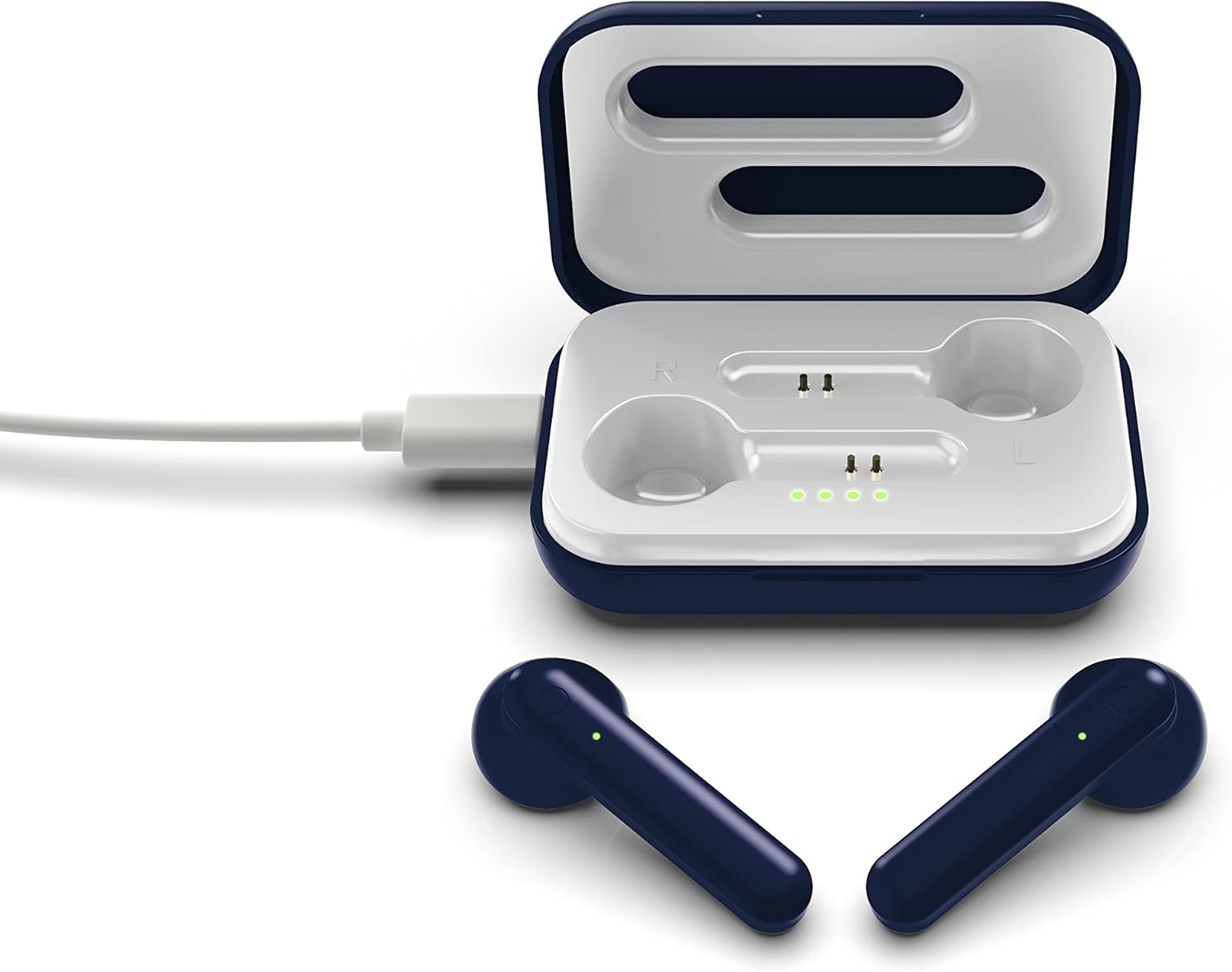
The image above illustrates the earbuds securely placed within their charging case. The illuminated LED lights on the case indicate the charging status of both the case and the earbuds.
Installation
1. Chargement des écouteurs et de l'étui
Avant la première utilisation, chargez complètement les écouteurs et l'étui de chargement.
- Chargement du boîtier : Connect the provided Micro-USB cable to the charging port on the case and the other end to a USB power source (e.g., computer, wall adapter). The LED indicators on the case will illuminate to show charging progress.
- Chargement des écouteurs : Place the earbuds into their respective slots in the charging case. Ensure they are correctly seated. The earbuds will begin charging automatically from the case's internal battery. The LED indicators on the earbuds will show their charging status.
- Une charge complète offre environ 3 à 4 heures d'autonomie.
2. Couplage Bluetooth
Pour connecter vos écouteurs à un appareil :
- Assurez-vous que les écouteurs sont chargés.
- Ouvrez le boîtier de charge. Les écouteurs s'allumeront automatiquement et passeront en mode appairage. Le voyant LED d'un des écouteurs clignotera pour indiquer qu'il est prêt à être appairé.
- Sur votre appareil (smartphone, tablette, etc.), activez le Bluetooth.
- Rechercher available Bluetooth devices and select "SOAR TWS4" from the list.
- Once connected, the earbud LED indicator will stop flashing. You will hear an audible confirmation.
- Les écouteurs se reconnecteront automatiquement au dernier appareil apparié lorsqu'ils seront retirés de l'étui, si le Bluetooth est activé sur l'appareil.
Mode d'emploi
The SOAR NFL True Wireless Earbuds V.4 feature touch controls for easy management of audio and calls.
Marche/Arrêt
- Mise sous tension : Ouvrez le boîtier de charge ou appuyez longuement sur la zone tactile des deux écouteurs pendant 3 secondes.
- Éteindre: Replacez les écouteurs dans l'étui de chargement et fermez le couvercle, ou appuyez longuement sur la zone tactile des deux écouteurs pendant 5 secondes.
Lecture de musique
- Lecture/Pause : Appuyez une fois sur l'un des écouteurs.
- Piste suivante : Appuyez deux fois sur l’écouteur droit.
- Piste précédente: Appuyez deux fois sur l’écouteur gauche.
Gestion des appels
- Répondre/Terminer l'appel : Appuyez une seule fois sur l'un ou l'autre écouteur pendant un appel entrant ou en cours.
- Rejeter l'appel : Appuyez longuement sur l'un ou l'autre écouteur pendant 2 secondes lors d'un appel entrant.
Assistant vocal
- Activer l'assistant vocal: Appuyez trois fois sur l'un ou l'autre écouteur.
Entretien
Un entretien approprié prolongera la durée de vie de vos écouteurs.
- Nettoyage: Utilisez un chiffon doux et sec pour nettoyer les écouteurs et le boîtier de charge. N'utilisez pas de produits chimiques agressifs ni de matériaux abrasifs.
- Stockage: Lorsque vous ne les utilisez pas, rangez les écouteurs dans leur étui de chargement pour les protéger et les garder chargés.
- Résistance à l'eau : Ces écouteurs sont non résistant à l'eau. Avoid exposure to liquids, moisture, and extreme temperatures.
- Chargement : Utilisez uniquement le câble Micro-USB fourni ou un équivalent certifié pour la charge.
Dépannage
Si vous rencontrez des problèmes avec vos écouteurs, consultez les solutions courantes suivantes :
| Problème | Solution |
|---|---|
| One earbud is not connecting or producing sound. |
|
| Earbuds are not pairing with my device. |
|
| Les écouteurs ne se rechargent pas. |
|
Caractéristiques
| Fonctionnalité | Détail |
|---|---|
| Nom du modèle | Véritables écouteurs sans fil V.4 |
| Numéro de modèle de l'article | NFL-TWS4-SHKS |
| Technologie de connectivité | Bluetooth, sans fil |
| Technologie de communication sans fil | Bluetooth 5.0 |
| Portée Bluetooth | Jusqu'à 30 pieds (9.14 mètres) |
| Autonomie de la batterie (temps de lecture) | 3-4 heures par charge |
| Type de contrôle | Tactile, commandes multimédias |
| Dossier spécial | Microphone inclus |
| Placement des oreilles | Dans l'oreille |
| Niveau de résistance à l'eau | Non résistant à l'eau |
| Matériel | Plastique |
| Dimensions du produit | 1.25 x 4.5 x 6.5 pouces |
| Poids de l'article | 3.52 onces |
| Fabricant | Prime Brands Group, Inc. |
| Code UPC | 192129070757 |
Vidéo officielle du produit
Cette vidéo offre un aperçu visuelview of the SOAR TWS4 True Wireless Earbuds V.4, highlighting key features such as the wireless charging case, touch controls, and Bluetooth 5.0 technology. It demonstrates the product's design and functionality.
Garantie et assistance
Your SOAR NFL True Wireless Earbuds V.4 are covered by a Garantie limitée de 1 ans. This warranty covers manufacturing defects and issues arising from normal use. It does not cover damage caused by misuse, accidents, unauthorized modifications, or exposure to liquids.
For warranty claims, technical support, or further assistance, please contact the manufacturer, Prime Brands Group, Inc., or visit their official webConsultez le site. Conservez votre preuve d'achat pour faire valoir la garantie.