1. Introduction
Thank you for choosing the KALINCO P96 Smartwatch. This device is designed to help you monitor your health, track your fitness activities, and stay connected. This manual provides essential information for setting up, operating, and maintaining your smartwatch to ensure optimal performance and longevity.
2. Produit terminéview
The KALINCO P96 Smartwatch features a 1.69-inch TFT display and offers a wide range of functionalities:
- Surveillance de la santé : Continuous monitoring of heart rate, blood oxygen (SpO2), blood pressure, and sleep patterns. Includes a menstrual cycle tracking function for women.
- Personnalisation : Split-screen mode for quick access to frequently used functions and over 100 stylish watch faces available via the GloryFit app. You can also upload personal photos as watch faces.
- Modes sportifs : Over 100 sports modes (running, cycling, rope skipping, dancing, yoga, etc.) with activity tracking for steps, calories burned, distance, heart rate, and blood oxygen during exercise.
- Notifications intelligentes: Receive text messages and notifications from apps like WhatsApp, Messenger, Facebook, and Instagram directly on your watch. Notifications can be individually deleted from the watch.
- Durability & Battery Life: IP67 water resistance for daily use (hand washing, rain). Equipped with a 260 mAh battery, providing 5-7 days of active use and 15-20 days of standby time with a 2-hour charge.
- Fonctions supplémentaires : Features include phone/watch finder, screen brightness adjustment, breathing training, remote photography, music control, sedentary reminder, alarm clock, timer, stopwatch, and weather forecasts.

Image: The KALINCO P96 Smartwatch displaying its 1.69-inch screen with multiple customizable watch faces and user interface elements.
3. Installation
3.1. Recharge de la montre connectée
Before initial use, fully charge your smartwatch. Connect the magnetic charging cable to the charging contacts on the back of the watch and plug the USB end into a standard USB power adapter (not included). A full charge typically takes approximately 2 hours.
3.2. Téléchargement et installation de l'application
The KALINCO P96 Smartwatch requires the GloireFit Application pour une fonctionnalité complète et la synchronisation des données. Vous pouvez télécharger l'application ici :
- The Apple App Store (for iOS devices)
- Google Play Store (pour appareils Android)
- Scan the QR code provided in the quick start guide (if available).
The GloryFit app is compatible with smartphones running Android 5.0 or iOS 9.0 and above.
3.3. Appairage avec votre smartphone
- Assurez-vous que le Bluetooth de votre smartphone est activé.
- Open the GloryFit app on your smartphone.
- Follow the in-app instructions to search for and connect to your KALINCO P96 Smartwatch. The watch will typically appear as 'P96' or a similar device name.
- Confirmez la demande de jumelage sur votre smartphone et sur votre montre connectée si vous y êtes invité.
Une fois jumelée, la montre synchronisera l'heure et les données avec votre téléphone.
4. Mode d'emploi
4.1. Navigation de base
- Balayez vers le haut/bas : Naviguez dans les menus et les notifications.
- Balayez vers la gauche/droite : Accédez rapidement aux fonctions ou aux différents écrans de données.
- Robinet: Sélectionnez un élément ou confirmez une action.
- Bouton latéral: Appuyez pour réveiller l'écran, retourner à l'écran d'accueil ou accéder au menu principal.
4.2. Surveillance de la santé
La montre connectée surveille en permanence plusieurs indicateurs de santé :
- Fréquence cardiaque : Assure une surveillance de la fréquence cardiaque 24 heures sur 24. View Données en temps réel sur la montre ou tendances détaillées dans l'application GloryFit.
- Oxygène sanguin (SpO2) : Monitors blood oxygen levels using infrared technology. Access readings on the watch or app.
- Pression artérielle: Measures blood pressure. For accurate readings, ensure the watch is worn correctly and remain still during measurement. Consult a medical professional for precise medical data.
- Suivi du sommeil : Automatically tracks your sleep patterns, including deep sleep, light sleep, and awake times. Review your sleep quality analysis in the GloryFit app.
- Suivi du cycle menstruel : A dedicated feature for women to record and track menstrual cycles within the GloryFit app.

Image: The smartwatch interface showing health monitoring features such as blood oxygen, blood pressure, heart rate, and a visual representation of sleep tracking data.
4.3. Modes sportifs et suivi d'activité
The P96 Smartwatch supports over 100 sports modes. To use:
- Navigate to the 'Sports' section on your watch.
- Choisissez l'activité que vous souhaitez (par exemple, course à pied, cyclisme, yoga).
- Start the activity. The watch will track metrics like steps, calories, distance, and heart rate.
- End the activity to save your data. Detailed reports are available in the GloryFit app.

Image: A visual representation of the smartwatch's 100+ sports modes icons and a smartphone screen displaying detailed daily activity tracking data including steps, distance, and calories.
4.4. Notifications intelligentes
Once paired with your phone, the watch can display notifications:
- Ensure app notifications are enabled in the GloryFit app settings.
- Incoming calls, text messages, and app alerts will vibrate the watch and display content on the screen.
- You can dismiss or delete notifications directly from the watch.

Image: The smartwatch showing icons for various smart notifications (calls, Facebook, Line, Instagram, etc.) and illustrations of vibration reminders for calls, sedentary alerts, and alarms.
4.5. Personnalisation
- Regarder les visages: In the GloryFit app, browse and select from over 100 watch faces. You can also upload your own photos to personalize the watch face.
- Mode écran partagé : Swipe right on the main screen to access the split-screen area, allowing quick selection of frequently used functions.
4.6. Fonctions supplémentaires
Explore other useful features:
- Chronomètre: Utilisez le chronomètre intégré pour mesurer la durée des activités.
- Prévisions météorologiques: View Conditions météorologiques actuelles et prévisions (nécessite une synchronisation avec l'application).
- Contrôle de la musique : Contrôlez la lecture de musique sur votre smartphone (lecture, pause, passage au morceau suivant).
- Réglage de la luminosité : Ajustez la luminosité de l'écran pour une visibilité optimale dans différentes conditions d'éclairage.
- Localiser mon téléphone/ma montre : Localisez votre téléphone ou votre montre jumelée si vous l'avez égarée.
- Entraînement respiratoire : Exercices de respiration guidée pour la relaxation.
- Photographie à distance : Utilisez votre montre comme déclencheur à distance pour l'appareil photo de votre téléphone.
- Rappel sédentaire : Vous recevrez des alertes vous invitant à bouger si vous êtes resté inactif trop longtemps.
- Réveil et minuterie : Set alarms and timers directly from your watch.
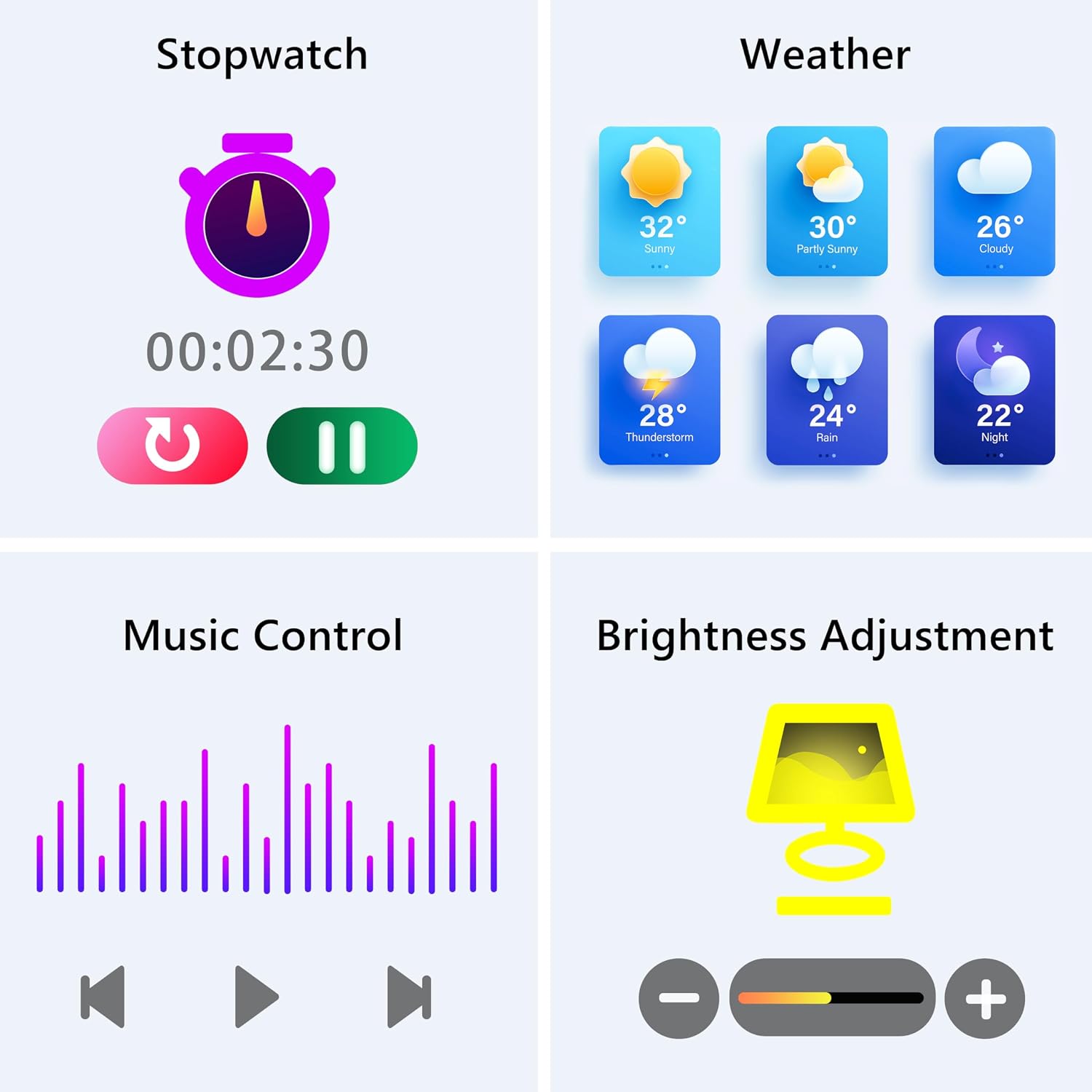
Image: The smartwatch screen showing various utility functions including a stopwatch, weather forecast, music control interface, and brightness adjustment slider.
5. Entretien
- Nettoyage: Regularly clean your smartwatch and strap with a soft, dry cloth. Avoid using harsh chemicals or abrasive materials.
- Résistance à l'eau (IP67) : The watch is IP67 water-resistant, meaning it can withstand splashes, hand washing, and rain. It is pas suitable for swimming, showering with hot water, or diving. Avoid prolonged exposure to water.
- Entretien de la batterie: Charge the battery fully when indicated. Avoid completely draining the battery frequently to prolong its lifespan. Store the watch in a cool, dry place when not in use for extended periods.
- Mises à jour logicielles : Keep the GloryFit app updated to ensure your smartwatch has the latest features and performance improvements.
6. Dépannage
If you encounter issues with your KALINCO P96 Smartwatch, try the following solutions:
- La montre ne s'allume pas : Assurez-vous que la montre est complètement chargée. Branchez-la au chargeur pendant au moins 10 à 15 minutes.
- Impossible de connecter le téléphone :
- Assurez-vous que Bluetooth est activé sur votre téléphone.
- Assurez-vous que la montre se trouve à portée Bluetooth (généralement 10 mètres).
- Redémarrez votre téléphone et votre montre connectée.
- Vérifiez si l'application GloryFit est mise à jour vers la dernière version.
- Si l'appareil a déjà été jumelé, essayez de le dissocier puis de le jumeler à nouveau via l'application GloryFit.
- Notifications non reçues :
- Verify that notifications are enabled for specific apps in the GloryFit app settings.
- Assurez-vous que les paramètres de notification de votre téléphone autorisent l'application GloryFit à afficher des alertes.
- Check if the watch is properly connected via Bluetooth.
- Données sanitaires inexactes :
- Veillez à ce que la montre soit bien ajustée à votre poignet, ni trop serrée ni trop lâche.
- For blood pressure readings, remain still and follow instructions. Note that smartwatch blood pressure measurements are for reference only and should not replace professional medical equipment.
- Nettoyez le capteur situé à l'arrière de la montre.
- Autonomie courte de la batterie :
- Réduire la luminosité de l'écran.
- Désactivez la surveillance continue de la fréquence cardiaque si elle n'est pas nécessaire 24h/24 et 7j/7.
- Limitez le nombre d'applications envoyant des notifications à la montre.
Si les problèmes persistent, veuillez consulter la section d'assistance pour obtenir les informations de contact.
7. Spécifications
| Fonctionnalité | Détail |
|---|---|
| Marque | KALINCO |
| Numéro de modèle | P96 |
| Taille de l'écran | 1.69 pouces |
| Système opérateur | Plusieurs versions d'iOS et d'Android |
| Technologie de connectivité | Bluetooth 4.0 |
| Capacité de la batterie | 13 000 mAh (Lithium-polymère) |
| Résistance à l'eau | IP67 |
| Appareils compatibles | Smartphone (Android 5.0+ / iOS 9.0+) |
| Caractéristiques spéciales | Text Messaging, Notification, Health Monitoring |
| GPS | GPS via smartphone |
8. Garantie et assistance
KALINCO is committed to providing exceptional products. Your KALINCO P96 Smartwatch comes with a Garantie de 12 mois à compter de la date d'achat.
If you encounter any problems, have suggestions, or require assistance, please do not hesitate to contact KALINCO customer support. We are dedicated to providing you with satisfactory solutions at all times.
For support, please refer to the contact information provided with your product packaging or visit the official KALINCO website.


