1. Introduction
Merci pour votre achatasing the ONIKUMA K1 RGB Gaming Headset. This manual provides detailed instructions for setup, operation, maintenance, and troubleshooting to ensure optimal performance and longevity of your headset. Please read this manual carefully before use and retain it for future reference.
2. Produit terminéview
The ONIKUMA K1 is a wired gaming headset designed for multi-platform compatibility, featuring vibrant RGB lighting, 7.1 surround sound, and a noise-cancelling microphone. It is built for comfort during extended gaming sessions.
Caractéristiques principales :
- Son surround 7.1 : Provides immersive audio for an enhanced gaming experience.
- Microphone antibruit : Ensures clear communication by reducing background noise.
- Éclairage RVB : Dynamic lighting effects for an aesthetic appeal.
- Compatibilité multi-plateforme : Works with PC, PlayStation (PS3, PS4), Mobile devices, and Xbox (Xbox One requires an adapter, not included).
- Conception confortable : Features soft protein earpads, an adjustable headband, and cozy head cushions.
- Contrôles en ligne : Easy access to volume adjustment and microphone mute.
Composants:
The headset includes the main unit with integrated microphone and a wired connection featuring a 3.5mm audio jack and a USB connector for RGB lighting.

Figure 1: Headset with in-line volume and microphone mute control, USB connector for RGB lighting, and 3.5mm audio jack.

Figure 2: Flexible microphone with 160-degree adjustment and 360-degree voice pick-up for clear communication.

Figure 3: Soft protein earpads, adjustable headband, and cozy head cushions designed for supreme comfort.
3. Instructions de configuration
Follow these steps to connect your ONIKUMA K1 headset to your device.
Compatibilité multi-plateforme :
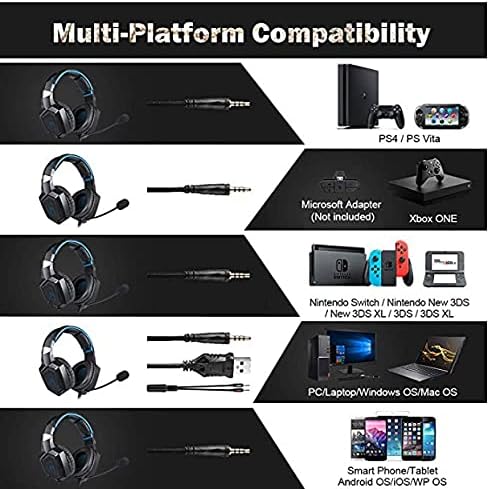
Figure 4 : Compatibilité surview for PC, PlayStation, Xbox, Nintendo Switch, and mobile devices.
- For PC/Laptop (Windows OS/Mac OS):
Connect the 3.5mm audio jack to your computer's audio output/input port. Connect the USB cable to a USB port for RGB lighting. Ensure your sound settings are configured to use the headset. - For PlayStation (PS4/PS Vita/PS3):
Connect the 3.5mm audio jack to the controller or console's audio port. For PS4, go to Settings > Devices > Audio Devices > Output to Headphones > All Audio. Connect the USB for RGB lighting if a USB port is available. - For Xbox ONE:
An additional Microsoft Adapter (not included) is required for older Xbox One controllers. Connect the 3.5mm audio jack to the adapter, then connect the adapter to your controller. Newer Xbox One controllers have a built-in 3.5mm jack. Connect the USB for RGB lighting if a USB port is available on the console. - For Nintendo Switch/New 3DS XL/3DS/3DS XL:
Connect the 3.5mm audio jack directly to the console's audio port. - For Smart Phone/Tablet (Android OS/iOS/WP OS):
Connect the 3.5mm audio jack directly to your mobile device's headphone jack.
4. Mode d'emploi
Once connected, you can begin using your headset. Here are the basic operating functions:
- Contrôle du volume : Use the in-line volume roller to adjust the audio output level. Roll up to increase volume, roll down to decrease.
- Micro muet : Use the in-line switch to mute or unmute the microphone. Slide the switch to the 'OFF' position to mute and 'ON' to unmute.
- Réglage du microphone : The microphone is flexible. Adjust its position closer to your mouth for optimal voice pickup or away when not in use.
- Éclairage RVB : The RGB lighting is powered via the USB connection. Once the USB is plugged in, the lighting will activate automatically. There are no user-adjustable controls for the RGB lighting patterns on the headset itself.
- Ajustement du casque : Adjust the headband to ensure a comfortable and secure fit over your ears. The earpads should fully cover your ears for optimal sound isolation and comfort.
5. Entretien
Un entretien approprié prolongera la durée de vie de votre casque.
- Nettoyage: Utilisez un chiffon doux et sec pour nettoyer le casque. N'utilisez pas de nettoyants liquides ni de produits abrasifs.
- Stockage: Rangez le casque dans un endroit frais et sec, à l'abri de la lumière directe du soleil et des températures extrêmes.
- Entretien des câbles : Avoid sharp bends or excessive pulling on the cables to prevent damage. The cable is designed to be tangle-free.
- Éviter l’humidité : The headset is not water-resistant. Keep it away from liquids.
6. Dépannage
Si vous rencontrez des problèmes avec votre casque, veuillez consulter les solutions courantes suivantes :
| Problème | Solution possible |
|---|---|
| Pas de son ou volume faible |
|
| Le microphone ne fonctionne pas |
|
| L'éclairage RVB ne fonctionne pas |
|
| Sound quality issues (e.g., no 7.1 surround sound) |
|
7. Spécifications
| Fonctionnalité | Détail |
|---|---|
| Nom du modèle | K1-B-Black RGB |
| Technologie de connectivité | Câblé |
| Prise casque | 3.5 mm Jack |
| Sensibilité | 104 dB |
| Réponse en fréquence | Not specified (Original data: 3045 Unknown Rate) |
| Contrôle du bruit | Annulation active du bruit |
| Facteur de forme du casque | Sur l'oreille |
| Placement des oreilles | Sur l'oreille |
| Couleur | Noir |
| Nom de marque | ONIKUMA |
| Dimensions du produit | 22.5 x 19.5 x 10.5 cm |
| Poids de l'article | 394 grammes |
| Fonctionnalité du câble | Sans enchevêtrement |
| Type de contrôle | Contrôle du volume |
| Appareils compatibles | Multi-plateforme |
| Utilisations recommandées | Gaming, Making Calls |
| Utilisations spécifiques du produit | Casque de jeu |
| Matériels | Plastic, Polycarbonate Leather (PC) |
| Description de la tranche d'âge | Adulte |
| Niveau de résistance à l'eau | Non résistant à l'eau |
8. Garantie et assistance
Pour toute information relative à la garantie ou pour obtenir une assistance technique, veuillez consulter la documentation fournie avec votre achat ou contacter directement le vendeur. Conservez votre preuve d'achat pour toute réclamation au titre de la garantie.


