Introduction
Merci pour votre achatasing the Bytech True Wireless Bluetooth Boost Link True Speaker. This manual provides essential information for setting up, operating, and maintaining your new speakers. Please read this manual thoroughly before use to ensure proper operation and to maximize your listening experience. These speakers feature True Wireless Stereo (TWS) functionality, Bluetooth connectivity, FM Radio, and Bass Boost for rich audio.
Consignes de sécurité
- Do not expose the speakers to extreme temperatures, humidity, or direct sunlight.
- Évitez de faire tomber les haut-parleurs ou de les soumettre à des chocs violents.
- Do not disassemble, repair, or modify the speakers yourself. Refer all servicing to qualified personnel.
- Keep the speakers away from water and other liquids.
- Utilisez uniquement le câble de charge et l'adaptateur secteur spécifiés.
- Nettoyez les haut-parleurs avec un chiffon doux et sec. N’utilisez pas de produits nettoyants abrasifs ni de solvants.
- Listen at moderate volume levels to avoid hearing damage.
Contenu du colis

Image: The Bytech Boost Link True Wireless Speakers shown in their retail packaging, highlighting the two speakers and the Bluetooth connectivity feature.
Veuillez vérifier que tous les articles sont présents et en bon état :
- 2 x Bytech Boost Link True Wireless Speakers
- 1 x câble de chargement (USB)
- 1 x Manuel d'utilisation (ce document)
Produit terminéview

Image : Gros plan de face view of the two Bytech Boost Link True Wireless Speakers, showing the speaker grilles and control buttons at the bottom.
Familiarisez-vous avec les composants et les commandes de l'enceinte :
- Grille de haut-parleur : Protège le haut-parleur.
- Boutons de contrôle :
- Bouton d'alimentation : Power On/Off, Play/Pause.
- Bouton Mode : Switch between Bluetooth, FM Radio, etc.
- Bouton Piste précédente/Volume bas : Appui court pour le morceau précédent, appui long pour baisser le volume.
- Bouton Piste suivante/Augmentation du volume : Appuyez brièvement pour passer à la piste suivante, appuyez longuement pour augmenter le volume.
- Port de charge : Pour connecter le câble de chargement USB.
- Indicateur LED : Shows power status, charging status, and pairing status.
Installation
Chargement des enceintes
Before first use, fully charge both speakers. Connect the supplied USB charging cable to the charging port on each speaker and plug the other end into a USB power adapter (not included) or a computer's USB port. The LED indicator will show charging status and turn off or change color when fully charged.
Mise sous/hors tension
- Pour allumer : Press and hold the Power button on each speaker until the LED indicator lights up and you hear a power-on prompt.
- Pour éteindre : Press and hold the Power button on each speaker until the LED indicator turns off and you hear a power-off prompt.
Mode d'emploi
Appairage Bluetooth (mode enceinte unique)
- Assurez-vous que l'enceinte est allumée et en mode de couplage Bluetooth (le voyant LED clignotera).
- Sur votre appareil (smartphone, tablette, ordinateur portable), activez le Bluetooth et recherchez les appareils disponibles.
- Select "BYTECH BOOST LINK" (or similar name) from the list.
- Une fois l'appairage effectué, le voyant LED cessera de clignoter et restera allumé en continu, et vous entendrez un son de confirmation.
Appairage True Wireless Stereo (TWS) (Deux enceintes)
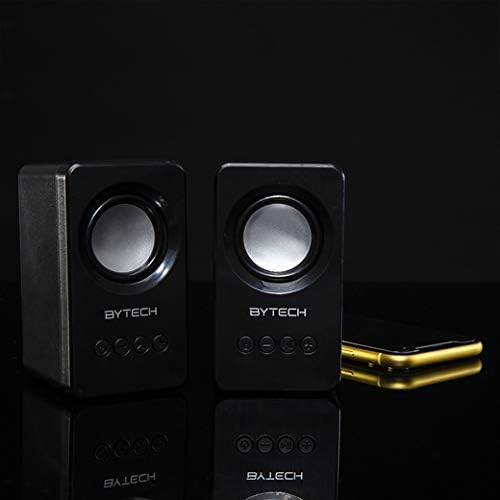
Image: The two Bytech Boost Link True Wireless Speakers positioned next to a smartphone, symbolizing their ability to connect wirelessly to each other and a device for stereo sound.
For a true stereo sound experience, you can pair both speakers together:
- Power on both Bytech Boost Link speakers. Do not connect them to your Bluetooth device yet.
- The speakers will automatically attempt to pair with each other. You will hear a confirmation sound when they are successfully linked for TWS. One speaker will become the master (left channel) and the other the slave (right channel).
- Once TWS paired, the master speaker will enter Bluetooth pairing mode (LED flashing).
- On your device, enable Bluetooth and search for "BYTECH BOOST LINK". Connect to this single entry.
- Les deux haut-parleurs diffuseront désormais le son en stéréo.
- Note: If the speakers do not automatically pair, try double-pressing the Mode button on one of the speakers to initiate TWS pairing.
Fonctionnement de la radio FM
- Power on the speaker(s).
- Appuyez sur le Mode Appuyez plusieurs fois sur le bouton jusqu'à entendre l'annonce de la radio FM.
- Pour scanner et enregistrer automatiquement les stations, appuyez longuement sur Lecture/Pause bouton. L'enceinte recherchera et mémorisera les stations FM disponibles.
- Utilisez le Piste précédente et Piste suivante boutons pour naviguer entre les stations enregistrées.
Audio Playback and Volume Control
- Lecture/Pause : Appuyez brièvement sur le bouton d'alimentation.
- Piste suivante : Short press the Next Track/Volume Up button.
- Piste précédente: Short press the Previous Track/Volume Down button.
- Monter le son: Long press the Next Track/Volume Up button.
- Baisser le volume: Long press the Previous Track/Volume Down button.
Entretien
- Nettoyage: Use a soft, dry, lint-free cloth to clean the surface of the speakers. Do not use liquid cleaners, aerosols, or solvents.
- Stockage: Lorsqu'ils ne sont pas utilisés pendant une période prolongée, rangez les haut-parleurs dans un endroit frais et sec, à l'abri de la lumière directe du soleil et des températures extrêmes.
- Entretien de la batterie: To prolong battery life, avoid fully discharging the battery frequently. Charge the speakers regularly, even if not in use.
Dépannage
| Problème | Cause possible | Solution |
|---|---|---|
| Le haut-parleur ne s'allume pas. | Batterie faible. | Chargez complètement l'enceinte. |
| Impossible de coupler via Bluetooth. | Enceinte non en mode appariement ; Bluetooth de l’appareil désactivé ; Trop éloignée de l’appareil. | Assurez-vous que la LED du haut-parleur clignote ; activez le Bluetooth sur votre appareil ; rapprochez le haut-parleur de l’appareil (à moins de 10 mètres). |
| Pas de son. | Volume too low; Speaker not connected; Incorrect mode. | Increase volume on speaker and device; Re-pair Bluetooth; Ensure correct mode (Bluetooth/FM). |
| L'appairage TWS a échoué. | Des haut-parleurs sont déjà connectés à un appareil ; les haut-parleurs sont trop éloignés les uns des autres. | Disconnect speakers from any device; Power off and on both speakers, then try TWS pairing again; Ensure speakers are close to each other. |
| Mauvaise réception radio FM. | Signal faible ; interférences. | Relocate the speaker to an area with better reception; Extend the charging cable (can act as an antenna). |
Caractéristiques
- Modèle: PAR-AU-BS-152-BK
- Marque: Bytech
- Technologie de connectivité: Sans fil (Bluetooth)
- Mode de sortie audio : Entourer
- Type de haut-parleur : Son surround
- Caractéristiques spéciales : Wireless Bluetooth, Bass Boost, FM Radio, True Wireless Stereo (TWS)
- Utilisations recommandées : Pour les lecteurs de musique
- Appareils compatibles : Ordinateur portable, Tablette, Smartphone
- Type de contrôleur: Boutons sur l'appareil
- Dimensions du colis : 20.7 x 16 x 9 cm
- Poids: 560 g
Garantie et assistance
Bytech products are designed and manufactured to the highest quality standards. For information regarding warranty coverage, technical support, or service inquiries, please refer to the warranty card included with your purchase or visit the official Bytech webVeuillez conserver votre preuve d'achat pour toute réclamation au titre de la garantie.
For further assistance, please contact Bytech customer support.