Introduction
This manual provides essential information for the proper installation, operation, and maintenance of your Zebronics Zeb-D370S DVD Player. Please read this manual thoroughly before using the device to ensure safe and efficient operation. Keep this manual for future reference.
Informations importantes sur la sécurité
- N’exposez pas l’appareil à la pluie ou à l’humidité afin d’éviter tout risque d’incendie ou d’électrocution.
- N'ouvrez pas le casing. Confiez toutes les interventions de maintenance à un personnel qualifié.
- Assurez une ventilation adéquate autour de l'appareil. Ne bloquez pas les ouvertures de ventilation.
- Use only the power adapter supplied with the unit or specified by the manufacturer.
- Évitez de placer l'appareil sur des surfaces instables.
- Débranchez le cordon d'alimentation en cas d'orage ou lorsque l'appareil n'est pas utilisé pendant une période prolongée.
Contenu du colis
Vérifiez que tous les éléments sont présents dans le colis :
- Zebronics Zeb-D370S DVD Player Unit
- Télécommande
- Câble AV
- Câble d'alimentation
- Manuel d'instructions
Produit terminéview
The Zebronics Zeb-D370S is a versatile DVD player featuring a built-in stereo speaker and amplifier, HDMI, USB, and SD card support, and dual karaoke microphone inputs. It supports multiple formats and offers 5.1 channel, coaxial, and optical audio outputs.
Commandes et ports du panneau avant
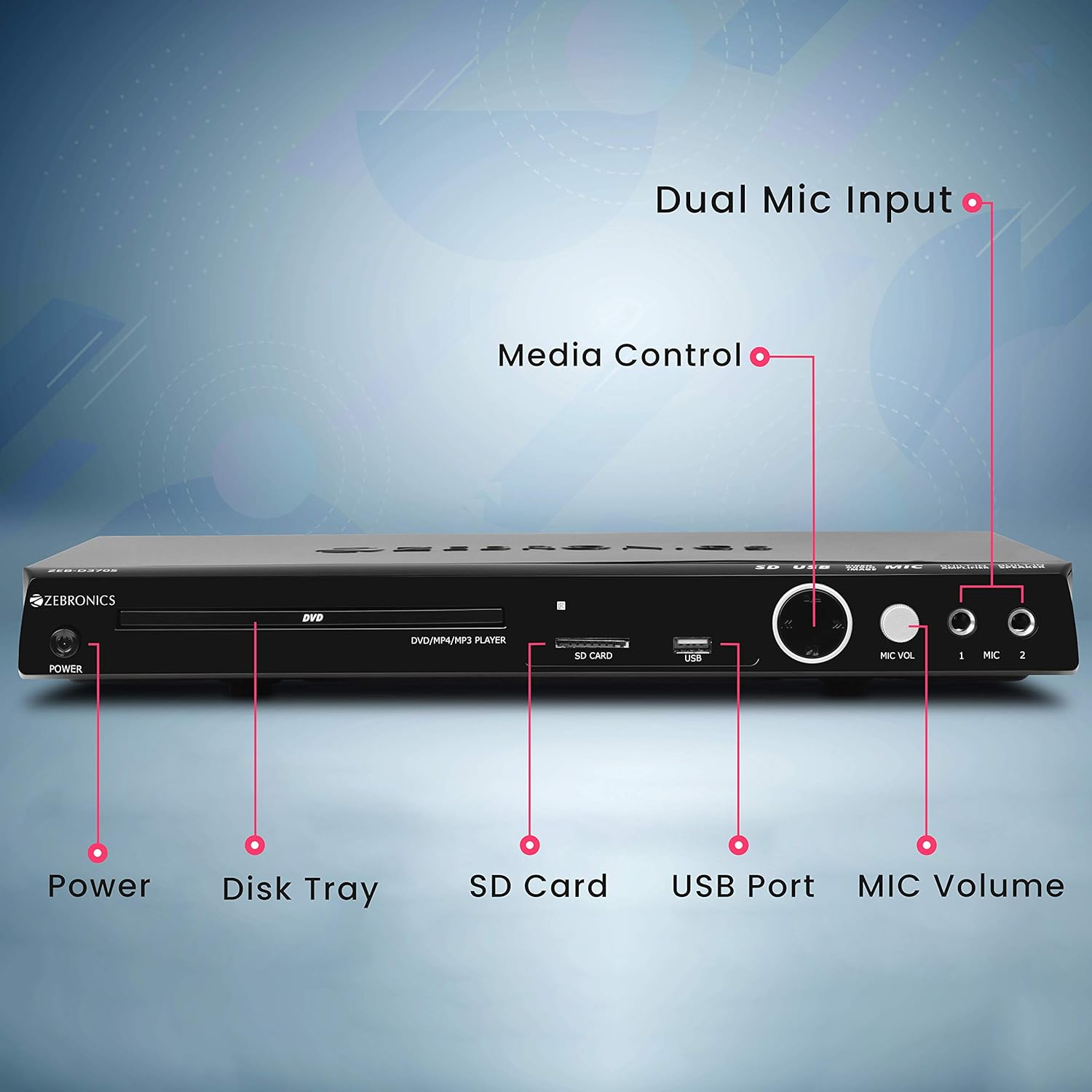
Front panel of the Zebronics Zeb-D370S DVD Player, showing the Power button, Disk Tray, SD Card slot, USB Port, MIC Volume control, and two Microphone inputs (MIC 1, MIC 2).
- Bouton d'alimentation : Allume ou éteint l'appareil.
- Disk Tray: For inserting DVDs, CDs, VCDs, and SVCDs.
- Emplacement pour carte SD : Pour lire des médias files depuis une carte SD.
- Port USB : Pour lire des médias files depuis une clé USB.
- Volume MIC: Régle le volume des microphones connectés.
- MICRO 1 et MICRO 2 : Inputs for connecting microphones for karaoke.
- Boutons de contrôle multimédia : Play/Pause, Stop, Skip, etc.
Connexions du panneau arrière

Rear panel of the Zebronics Zeb-D370S DVD Player, detailing the Coaxial Output, Optical Output, 5.1 Channel Output, HDMI port, Composite video output, Component video output, S-Video output, and Ext-Audio Output.
- Sortie HDMI : For high-definition video and audio connection to a TV or display.
- Sortie vidéo composite : Sortie vidéo en définition standard.
- Sortie vidéo composante : Higher quality analog video output (YPbPr).
- Sortie S-Vidéo : Improved analog video output.
- Digital Audio Output (Optical & Coaxial): For connecting to external audio receivers or sound systems.
- Analog 5.1 Channel Output: For connecting to a 5.1 channel speaker system.
- Ext-Audio Output: Additional audio output connections.
- Sortie haut-parleur : Terminals for connecting external speakers, utilizing the built-in amplifier.

Arrière view of the Zebronics Zeb-D370S DVD Player highlighting the built-in amplifier, built-in speaker, and speaker output terminals.
Instructions d'installation
1. Connexion électrique
- Ensure the DVD player is placed on a stable, flat surface with adequate ventilation.
- Connect the power cable to the AC input on the rear of the DVD player.
- Plug the other end of the power cable into a standard electrical outlet (110V - 260V AC).
2. Video Connection to TV/Display
Choisissez l'une des méthodes de connexion suivantes :
- HDMI (recommandé pour une qualité optimale) : Connect an HDMI cable from the HDMI output on the DVD player to an HDMI input on your TV.
- Vidéo du composant : Connect component video cables (Red, Green, Blue) from the DVD player's component outputs to the corresponding inputs on your TV.
- Vidéo composite : Connect a composite video cable (Yellow) from the DVD player's composite output to the yellow video input on your TV.
- S-Vidéo: Connect an S-Video cable from the DVD player's S-Video output to the S-Video input on your TV.
3. Connexion audio
Choisissez l'une des méthodes de connexion audio suivantes :
- HDMI: If using HDMI for video, audio will also be transmitted via the HDMI cable.
- Sortie analogique 5.1 canaux : Connect RCA cables from the 5.1 channel outputs (Front Left, Front Right, Center, Subwoofer, Surround Left, Surround Right) on the DVD player to a compatible 5.1 channel ampamplificateur ou système de haut-parleurs.
- Digital Audio (Optical/Coaxial): Connect an optical or coaxial cable from the respective output on the DVD player to a digital audio input on your amplifier or home theater system for surround sound.
- Sortie haut-parleur intégrée : If using the built-in speakers, ensure no external speakers are connected to the 5.1 channel outputs unless desired.
4. Connexion microphone (en option)
- Plug your microphones into the MIC 1 and/or MIC 2 inputs on the front panel.
- Adjust the MIC Volume knob to control microphone audio levels.
Mode d'emploi

Zebronics Zeb-D370S DVD Player with a disc inserted, remote control, and a visual representation of content playing on a screen, illustrating its multimedia capabilities.
1. Lecture du disque
- Appuyez sur le Pouvoir bouton pour allumer le lecteur DVD.
- Appuyez sur le Ouvrir/Fermer button (usually on the remote or front panel) to open the disc tray.
- Place a compatible disc (DVD Video, DVD+RW/-RW/+R/-R, Dual Layer Disc, CD Audio, CD-R/-RW, VCD, SVCD) onto the disc tray with the label side facing up.
- Appuyez sur le Ouvrir/Fermer Appuyez de nouveau sur le bouton pour fermer le tiroir. Le lecteur lancera automatiquement la lecture ou affichera un menu.
- Use the remote control for playback functions such as Play, Pause, Stop, Fast Forward, Rewind, and Chapter Skip.
2. Lecture multimédia USB/SD
- Insérez une clé USB dans le port USB ou une carte SD dans le lecteur de carte SD situé sur le panneau avant.
- The player should automatically detect the media and display a menu to browse files. If not, select the USB or SD source using the remote control's Source or Saisir bouton.
- Naviguez à travers votre files (VOB, MP4, DIVX, AVI, MPEG-1, MPEG-2, 3GP, MP3, WMA, AAC, JPEG, TXT) using the remote control and press Jouer pour démarrer la lecture.
3. Fonction karaoké
- Connect one or two microphones to the MIC 1 and MIC 2 inputs.
- Play a karaoke disc or a media file with instrumental tracks.
- Adjust the MIC Volume knob on the front panel to control the microphone audio level.
4. Fonctions avancées
- Extraction de CD : Convert audio CDs to digital formats (refer to on-screen menu for options).
- Picture Slideshow: View JPEG images from disc, USB, or SD card as a slideshow.
- Balayage progressif : Provides a smoother, flicker-free image on compatible displays.
- Zoom IN/OUT: Magnify or reduce the displayed image during playback.
- High Speed Search: Quickly scan through disc or media content.
- Contrôle Parental: Restrict playback of certain content based on ratings.
- Répétition instantanée: Revenez en arrière de quelques secondes pendant la lecture.
- Disc Resume: Resume playback from where it was last stopped on a disc.
Entretien
- Nettoyage de l'unité : Use a soft, dry cloth to clean the exterior of the DVD player. Do not use liquid cleaners or abrasive materials.
- Entretien du disque : Manipulez les disques par les bords. Veillez à ce qu'ils restent propres et sans rayures. Essuyez-les du centre vers l'extérieur avec un chiffon doux non pelucheux.
- Ventilation: Assurez-vous que les ouvertures de ventilation ne sont pas obstruées pour éviter une surchauffe.
Dépannage
If you encounter issues with your DVD player, refer to the table below for common problems and solutions:
| Problème | Cause possible | Solution |
|---|---|---|
| Pas de courant | Câble d'alimentation non branché ; prise de courant défectueuse | Vérifiez la connexion du câble d'alimentation ; essayez une autre prise. |
| Pas de sortie vidéo | Incorrect video cable connection; Incorrect input selected on TV | Ensure video cables are securely connected; Select the correct input source on your TV (e.g., HDMI 1, AV) |
| Pas de sortie audio | Incorrect audio cable connection; TV/amplifier volume too low; Mute activated | Check audio cable connections; Increase volume; Deactivate mute function |
| Le disque ne joue pas | Disc is dirty or scratched; Disc format not supported; Disc inserted incorrectly | Clean the disc; Ensure disc is compatible; Insert disc with label side up |
| USB/SD media not detected | USB drive/SD card not inserted correctly; Incompatible file format; Corrupted media | Reinsert USB/SD; Check supported file formats; Try a different USB/SD device |
Caractéristiques

Dimensions of the Zebronics Zeb-D370S DVD Player: 360mm (width), 220mm (depth), and 50mm (height).
| Fonctionnalité | Détail |
|---|---|
| Nom du modèle | Zeb D370S |
| Marque | ZEBRONIQUE |
| Dimensions du produit | 28 x 39 x 82 mm (1.4 kg) |
| Résolution | 1920 x 1080 (Supported resolutions: 480i/576i/480p/576p/720p/1080i/1080p) |
| Caractéristiques spéciales | Surround Sound, Built-in Amplifier, Built-in Stereo Speaker, Karaoke Mic Input |
| Mode de sortie audio | Stereo, Surround (2CH / 5.1CH / Virtual Surround Sound) |
| Configuration des canaux de son surround des haut-parleurs | 5.1 |
| Formats audio pris en charge | Dolby Digital, MP3, WMA, AAC |
| Video Playback System | NTSC / PAL / AUTO |
| Type de connecteur | HDMI, USB, SD Slot, MIC 1 & MIC 2, Composite, Component, S-Video, Digital Audio Output (Optical & Coaxial), Analog 5.1Ch Output, Ext-Audio Output x 2 |
| Media Type (Playback Disc) | DVD Video, DVD+RW/-RW/+R/-R, Dual Layer Disc, CD Audio, CD-R/-RW, VCD, SVCD |
| Médias Files Prise en charge | VOB, MP4, DIVX, AVI, MPEG-1, MPEG-2, 3GP, MP3, WMA, AAC, JPEG, TXT |
| Vol d'exploitationtage | 110 V - 260 V CA |
| Fonctions | CD Ripping, Picture SlideShow, Progressive scan, Zoom IN/OUT, High speed search, Parental lock, Instant replay, Disc resume |
Garantie et assistance
For warranty information, technical support, or service inquiries, please refer to the warranty card included with your product or visit the official Zebronics website. N'essayez pas de réparer l'appareil vous-même.