1. Introduction
The Tycon TPSC2440NMPPT is an advanced Maximum Power Point Tracking (MPPT) solar charge controller designed for efficient battery charging from solar panels. It automatically adjusts to 12V or 24V battery systems and supports various battery types including Flooded, AGM, GEL, and Lithium, with a customizable USER setting. This controller features an integral LCD display for monitoring key system parameters.
2. Consignes de sécurité
Veuillez lire et comprendre toutes les instructions avant l'installation et l'utilisation. Le non-respect de ces instructions peut entraîner un choc électrique, un incendie ou des blessures graves.
- Assurez-vous que tous les câbles sont correctement polarisés et solidement connectés.
- Do not disassemble or attempt to repair the controller. Refer to qualified service personnel.
- Installez le contrôleur dans un endroit bien ventilé, à l'écart des matériaux inflammables et des gaz corrosifs.
- Always disconnect the battery and solar panel before installing or moving the controller.
- Portez un équipement de protection individuelle (EPI) approprié lors de l'installation.
- The controller is designed for indoor use or protected outdoor environments (IP32 rating). Avoid direct exposure to water.
3. Produit terminéview
The TPSC2440NMPPT controller is equipped with several features to optimize solar charging and battery management:
- Technologie MPPT : Optimise la production d'énergie des panneaux solaires.
- Auto-Ranging Voltage: Compatible with 12V or 24V battery arrays.
- Multimode Load Operation: Offers 5 selectable modes for load control.
- Soft Start Load Output: Powers high capacitive loads safely.
- Automatic Battery Equalization: Performs 30-day equalization for optimal battery health.
- Conformal Coated Electronics: Provides environmental protection.
- TVS Lightning Protection: Enhances durability against electrical surges.
- Integral LCD Display: Affiche le volume de la batterietage, Capacity, Charging Capacity, Temperature, Load Current, and Solar Current.
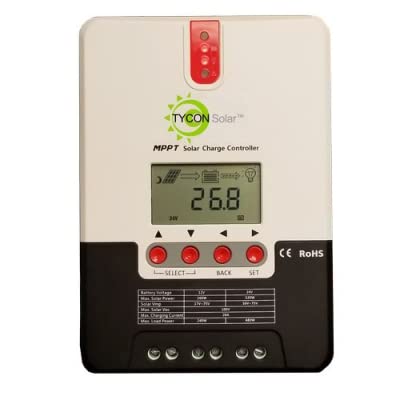
Figure 1 : Face avant view of the Tycon TPSC2440NMPPT Solar MPPT Battery Charging Controller, showing the LCD display and connection terminals.
4. Configuration et installation
Suivez ces étapes pour une installation correcte :
- Montage: Choose a suitable location for mounting the controller. Ensure good ventilation and protection from direct sunlight and moisture.
- Connexion de la batterie : Connectez d'abord la batterie aux bornes de la manette. Assurez-vous de respecter la polarité (+ sur + et - sur -). La manette détectera automatiquement la tension de la batterie.tage (12V ou 24V).
- Connexion du panneau solaire : Connect the solar panel array to the controller's solar input terminals. Observe correct polarity. Ensure the open-circuit voltage of the solar array does not exceed the controller's maximum input voltage (110V at 25°C).
- Connexion de chargement (facultatif) : If using the load output, connect your DC loads to the controller's load terminals. Do not exceed the rated load current (20A Max).
- Capteur de température : Connect the included battery temperature probe cable to the designated port on the controller. Place the sensor near the battery for accurate temperature compensation.
- Mise sous tension : Une fois toutes les connexions sécurisées, le contrôleur s'allumera et commencera à fonctionner.
5. Mode d'emploi
The integral LCD display provides real-time information about your solar charging system. Use the buttons (if present, assuming standard UP/DOWN/SET) to navigate through the display menus and adjust settings.
5.1 Informations sur l'écran LCD
- Vol batterietage: Vol actueltage de la batterie connectée.
- Capacité de la batterie : Estimated state of charge.
- Capacité de charge: Current power being delivered to the battery.
- Température de la batterie : Temperature measured by the external probe.
- Courant de charge: Current being drawn by connected DC loads.
- Solar Current: Current being generated by the solar panels.
5.2 Paramètres du type de batterie
The controller supports Flooded, AGM, GEL, and Lithium battery types. A USER setting allows for custom charge parameters. Refer to the on-screen menu for selecting and configuring the battery type.
5.3 Load Operation Modes
The controller offers 5 selectable load operation modes. Consult the device's menu for details on each mode and how to select them, typically involving timed operation or dusk-to-dawn control.
6. Entretien
Un entretien régulier garantit des performances optimales et une longue durée de vie à votre régulateur de charge solaire.
- Inspecter les connexions : Vérifiez périodiquement le serrage et l'absence de corrosion de tous les raccordements électriques.
- Contrôleur propre : Keep the controller clean and free of dust. Use a dry cloth for cleaning. Do not use liquids.
- État de la batterie : Surveiller le volume de la batterietage and capacity on the LCD. Ensure batteries are properly maintained according to their manufacturer's guidelines.
- Ventilation: Veillez à ce que la zone d'installation reste bien ventilée afin d'éviter toute surchauffe.
7. Dépannage
| Problème | Cause possible | Solution |
|---|---|---|
| Pas d'affichage/Pas d'alimentation | Loose battery connection; Battery voltage too low; Blown fuse (external, if applicable). | Check battery connections and polarity. Charge battery if voltage is below operating threshold. Check and replace any external fuses. |
| Pas de recharge solaire | Solar panel not connected; Incorrect polarity; Insufficient sunlight; Damaged solar panel/wiring. | Verify solar panel connections and polarity. Ensure panels are receiving adequate sunlight. Inspect panels and wiring for damage. |
| Chargement impossible | Load disconnected; Overload; Short circuit; Battery voltage trop bas. | Check load connections. Reduce load if exceeding 20A. Check for short circuits. Ensure battery is sufficiently charged. |
| Lectures inexactes | Loose connections; Faulty sensor. | Check all wiring connections. Ensure temperature sensor is properly connected and placed. |
8. Spécifications
- Modèle: TPSC2440NMPPT
- Vol automatiquetage: 12V/24V (System)
- Ampavant: 40A
- Courant de charge nominal : 20 A maximum
- Charge capacitive maximale : 10,000 uF
- Vol d'entrée solaire max.tage: 110V (25°C), 90V (25°C)
- Max Power Point Range: 2VDC to 75VDC (Battery Volts)
- Efficacité de conversion : 96% Typ.
- MPPT Tracking Efficiency: 99%
- Consommation personnelle: 1W
- Compensation de température : -3.0mV/°C/cellule
- Taille maximale du fil : 8 AWG
- Voltage and Current Accuracy: +/-2%
- Mise à la terre : Terrain négatif
- Protection de l'environnement : IP32
- Dimensions du produit : 12 x 9 x 6 pouces
- Poids de l'article : 5.16 livres
- Type d'affichage : Écran LCD


