1. Introduction
Thank you for choosing the Tbest CCD HD IP68 Reversing Camera. This manual provides detailed instructions for the installation, operation, and maintenance of your new reversing camera system. Please read this manual thoroughly before installation and use to ensure proper function and safety. This camera is designed to enhance your vehicle's safety by providing a clear view of the area behind your car when reversing.
2. Produit terminéview
2.1 Principales caractéristiques
- High-Definition CCD Sensor: Fournit des images nettes et précises.
- Indice d'étanchéité IP68 : Garantit la durabilité et des performances fiables dans diverses conditions météorologiques.
- Objectif grand angle 170 degrés : Offers an expansive field of view pour minimiser les angles morts.
- Capacité de vision nocturne : Operates effectively in low-light conditions.
- Integrated License Plate Light Design: Replaces the original license plate light for a seamless, factory-like installation.
- Directives de stationnement : Assists with precise parking maneuvers.
- Universal RCA Connector: Compatible with most aftermarket car displays and head units.
2.2 Contenu du paquet
- 1 x Tbest CCD HD Reversing Camera
- 1 x Video Cable (approx. 6 meters / 19.7 feet)
- 1 x câble d'alimentation
- 1 x Manuel d'utilisation (ce document)

This image displays the complete set of cables provided with the camera, including the video cable (approximately 6 meters long) and the power cable.
3. Consignes de sécurité
Veuillez respecter les consignes de sécurité suivantes :
- Débranchez toujours la batterie du véhicule avant d'effectuer des travaux électriques.
- Veillez à ce que tous les câbles soient correctement isolés et fixés afin d'éviter les courts-circuits ou les dommages.
- Ne pas gêner le conducteur view ou interférer avec les commandes du véhicule pendant l'installation.
- This camera is an aid for reversing and parking; it does not replace the driver's responsibility to check surroundings manually.
- Consultez un professionnel si vous avez des doutes concernant une quelconque étape du processus d'installation.
4. Configuration et installation
The Tbest Reversing Camera is designed for specific vehicle models, integrating into the license plate light housing. Compatible vehicles include Renault Fluence (2019-2014), Renault Duster (2009-2014), Dacia Duster (2010-2014), Renault Megane 3 (2008-2016), and Nissan Terrano (2010-2014).
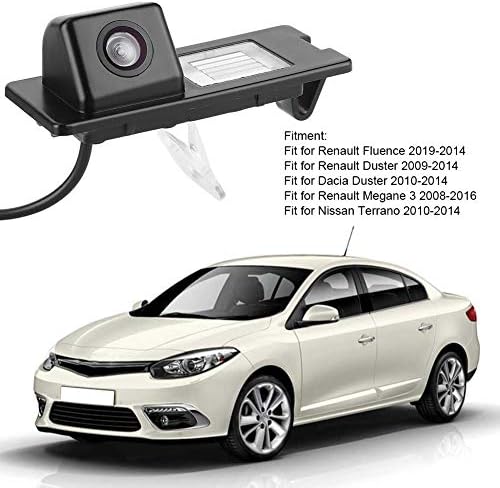
The camera unit is shown next to a list detailing compatible vehicle models, including Renault Fluence, Duster, and Megane, and Nissan Terrano.
4.1 étapes d'installation
- Préparez le véhicule : Ensure the vehicle is turned off and the parking brake is engaged. Disconnect the negative terminal of the car battery to prevent electrical shorts.
- Remove Original License Plate Light: Carefully remove the existing license plate light housing from your vehicle's rear. This usually involves unfastening screws or clips.
- Install the Camera Unit: Insert the Tbest reversing camera unit into the vacant license plate light slot. Ensure it fits securely and the camera lens is facing outwards and downwards for optimal viewangle de vue.
- Connecter l'alimentation : Connect the camera's power cable (red and black wires) to the vehicle's reverse light power supply. The red wire connects to the positive (+) lead of the reverse light, and the black wire connects to a ground (-) point. This ensures the camera activates automatically when reverse gear is engaged.
- Câble vidéo de routage : Run the video cable (RCA connector) from the camera unit through the vehicle's interior to the location of your car's display screen (e.g., infotainment system, rearview mirror monitor). Ensure the cable is routed safely, away from moving parts or heat sources, and secured to prevent damage.
- Se connecter à l'écran : Plug the RCA video cable into the video input port of your car's display unit.
- Tester le système : Reconnect the car battery. Turn on the vehicle and engage reverse gear. The camera image should appear on your display screen. Adjust the camera's position slightly if needed to optimize the view.
- Câblage sécurisé : Once tested and confirmed working, secure all wiring with cable ties or electrical tape to prevent rattling or damage.

The camera is shown integrated into a vehicle's rear license plate light housing, with the corresponding view on the car's display screen, complete with dynamic parking guidelines.
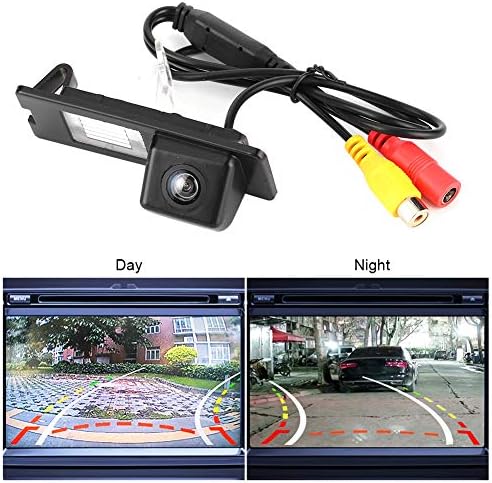
The camera unit is pictured with its RCA video and power cables. Below, two screens demonstrate the camera's performance in both bright daylight and low-light night conditions.
5. Mode d'emploi
Once properly installed, the Tbest Reversing Camera operates automatically:
- Activation automatique: When you shift your vehicle into reverse gear, the camera will automatically power on and transmit its video feed to your connected display screen.
- Directives de stationnement : The display will show dynamic parking guidelines overlaid on the camera's view, assisting you in judging distances and positioning your vehicle.
- Grand angle View: Utilize the 170-degree wide-angle view to observe obstacles and surroundings that may not be visible in your rearview miroirs.
- Vision nocturne : The camera's low-light capability ensures a clear view even in dark conditions.
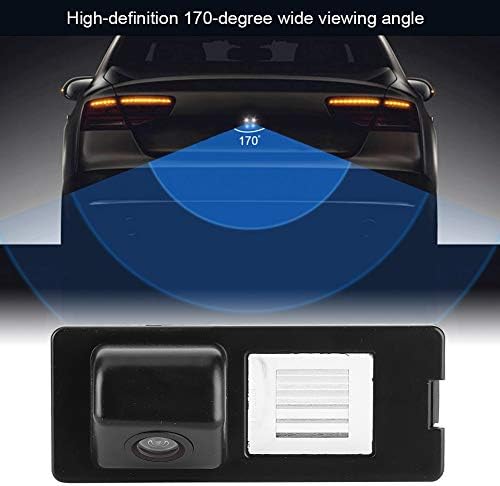
This diagram visually represents the camera's 170-degree wide viewing angle, highlighting the broad area it covers behind the vehicle for enhanced safety.
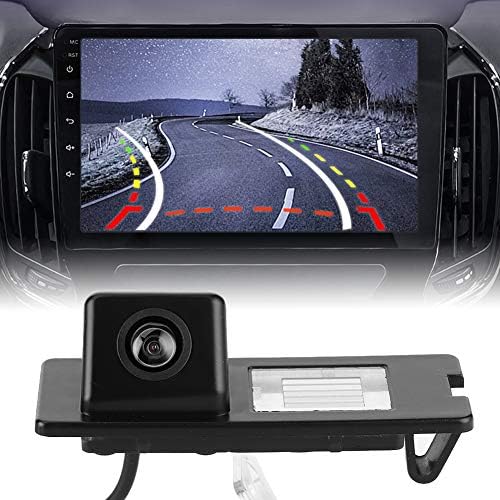
This image displays the Tbest reversing camera unit alongside a car's infotainment screen, illustrating the camera's output with parking guidelines.
6. Entretien
To ensure the longevity and optimal performance of your Tbest Reversing Camera, follow these maintenance guidelines:
- Nettoyage régulier : Nettoyez régulièrement l'objectif de l'appareil photo avec un chiffon doux et sec.amp chiffon pour enlever la saleté, la poussière ou les taches d'eau qui pourraient obstruer le viewÉvitez les nettoyants abrasifs.
- Inspecter le câblage : Occasionally check the wiring for any signs of wear, fraying, or loose connections. Secure any loose wires.
- Évitez les produits chimiques agressifs : Do not use strong chemical cleaners or solvents on the camera unit, as they may damage the housing or lens.
- Températures extrêmes : While designed for automotive use, prolonged exposure to extreme temperatures (hot or cold) can affect electronic components.

A detailed close-up of the camera unit, showing its compact design and lens.
7. Dépannage
If you encounter issues with your reversing camera, refer to the following troubleshooting guide:
- Aucune image affichée :
- Vérifiez si le véhicule est en marche arrière.
- Verify all power and video cable connections are secure and correctly plugged in.
- Ensure the display unit is set to the correct video input channel.
- Check the camera's power supply by testing the reverse light circuit with a multimeter.
- Image clignotante ou déformée :
- Vérifiez que les câbles vidéo ne sont pas endommagés ou que les connexions ne sont pas desserrées.
- Ensure proper grounding for the camera's power supply.
- Vérifiez la présence d'interférences électromagnétiques provenant d'autres appareils électroniques du véhicule.
- Mauvaise qualité d'image (floue/sombre) :
- Nettoyez soigneusement l'objectif de l'appareil photo.
- Ensure there is sufficient ambient light for optimal night vision performance.
- Vérifiez que la caméra est bien fixée et ne vibre pas.
- Lignes de stationnement incorrectes :
- Parking lines are typically fixed and cannot be adjusted. Ensure the camera is mounted straight.
If the problem persists after following these steps, please contact Tbest customer support.
8. Spécifications
| Fonctionnalité | Spécification |
|---|---|
| Marque | Le meilleur |
| Appareils compatibles | Renault Fluence, Duster, Megane |
| Type d'installation | Surface Mount (License Plate Light Housing) |
| Voltage | 12 volts |
| Technologie de capteur optique | CCD |
| Type de lentille | Grand angle |
| Réel View Angle | 170 degrés |
| Type de connecteur | RCA |
| Taille du capteur optique | 1/3 pouce |
| Domaine de View | 170 degrés |
| Éclairage (Lux) | 0.2 |
| Screen Capture Resolution | 720p |
| Effective Capture Resolution | 720 pixels |
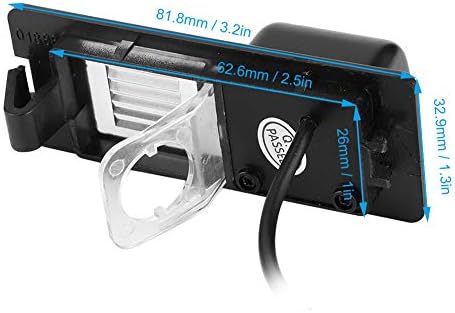
This image provides precise measurements of the camera unit, including its length, width, and height, in both millimeters and inches.
9. Garantie et assistance
Tbest products are manufactured to high-quality standards. This product comes with a standard manufacturer's warranty. Please refer to the warranty card included with your purchase or visit the official Tbest webConsultez le site pour connaître les conditions générales de garantie détaillées.
For technical support, troubleshooting assistance, or warranty claims, please contact Tbest customer service through the retailer where you purchased the product or via the contact information provided on the official Tbest website.


