Introduction
This manual provides comprehensive instructions for the safe and efficient use of your SUNMI M2 MAX Industrial Tablet, model TF700. Please read this manual thoroughly before operating the device and retain it for future reference.

Figure 1 : Face avant view of the SUNMI M2 MAX Industrial Tablet, showing its display with various application icons.
Installation
1. Déballage et inspection initiale
Retirez soigneusement tous les composants de l'emballage. Vérifiez que tous les éléments énumérés ci-dessous sont présents et non endommagés :
- SUNMI M2 MAX Industrial Tablet (TF700)
- Adaptateur secteur
- Câble USB Type-C
- Hand Strap (optional, if included with your model)
2. Chargement de l'appareil
Before first use, fully charge the tablet. Connect the USB Type-C cable to the tablet's charging port and the other end to the power adapter. Plug the power adapter into a wall outlet. The charging indicator will illuminate.
The tablet is equipped with an 8360mAh non-removable lithium polymer battery. A full charge can provide over 12 hours of continuous operation.
3. Installing SIM Card and MicroSD Card (Optional)
The device supports MicroSIM or NanoSIM cards (Config 1) and an eSIM (Config 2). It also supports MicroSD cards up to 128GB for expanded storage.
- Repérez l'emplacement pour carte SIM/MicroSD sur le côté de la tablette.
- Use the provided SIM ejector tool (if applicable) or a small paperclip to open the tray.
- Carefully place the SIM card(s) and/or MicroSD card into the tray according to the diagram on the tray.
- Repoussez délicatement le plateau dans son logement jusqu'à ce qu'il s'enclenche.

Figure 2 : Arrière view of the SUNMI M2 MAX, highlighting the camera, pogo pin charging interface, and the location of the SIM/MicroSD card slot.
4. Attaching the Hand Strap (Optional)
If your model includes a hand strap, attach it to the designated points on the back of the tablet for secure handling during mobile operations.
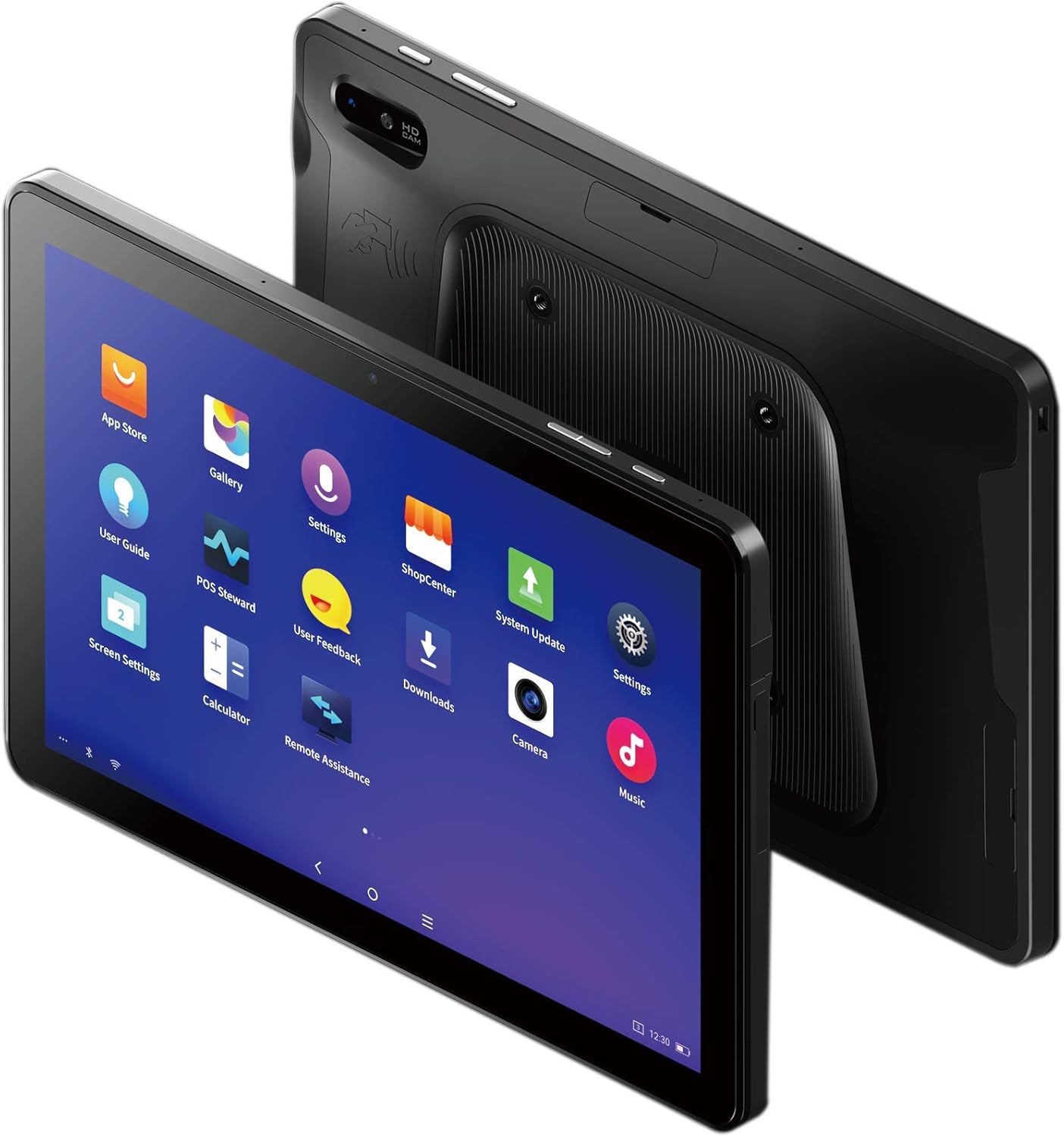
Figure 3: The SUNMI M2 MAX Industrial Tablet being held with an optional hand strap, demonstrating enhanced portability and secure grip.
Utilisation de l'appareil
1. Marche/Arrêt
- Mise sous tension : Press and hold the Power button (located on the side) until the SUNMI logo appears on the screen.
- Éteindre: Press and hold the Power button until a power-off menu appears. Select "Power Off" and confirm.
- Redémarrage: Dans le menu d'arrêt, sélectionnez « Redémarrer » pour redémarrer l'appareil.
2. Navigation de base
The SUNMI M2 MAX runs on the Android operating system. Navigation is primarily touch-based:
- Robinet: Pour sélectionner un élément ou ouvrir une application.
- Glisser: Pour faire défiler les listes ou passer d'un écran à l'autre.
- Pincer pour zoomer : Pour zoomer ou dézoomer sur les images ou web pages.
- Bouton d'accueil: Retourne à l'écran d'accueil.
- Bouton Retour : Revient à l'écran précédent.
- Bouton Applications récentes : Affiche les applications récemment utilisées.
3. Connexion aux réseaux
The tablet supports Wi-Fi (2.4GHz/5GHz, 802.11 a/b/g/n/ac) and cellular networks (2G, 3G, 4G).
- Wifi: Aller à Paramètres > Réseau et Internet > Wi-FiActivez le Wi-Fi, sélectionnez le réseau souhaité et saisissez le mot de passe si nécessaire.
- Données cellulaires : Assurez-vous qu'une carte SIM valide est insérée. Allez à Paramètres > Réseau et Internet > Réseau mobile to enable mobile data and configure APN settings if necessary.
- Bluetooth : Aller à Paramètres > Appareils connectés > Bluetooth to pair with Bluetooth devices (supports Bluetooth 5.0).
4. Using NFC
The SUNMI M2 MAX is equipped with NFC (Near Field Communication) for contactless transactions and data exchange. To use NFC, ensure it is enabled in settings and hold the tablet near a compatible NFC reader or device.
5. Fonctionnement de la caméra
The tablet features a 13 MP rear camera with flash and autofocus, and a 5 MP front camera. Open the "Camera" application to capture photos or record videos.
Entretien
1. Nettoyage de l'appareil
Utilisez un chiffon doux et non pelucheux légèrement dampened with water or a screen cleaner to wipe the display and exterior. Avoid using harsh chemicals, abrasive cleaners, or excessive moisture.
2. Entretien de la batterie
- Évitez d’exposer le comprimé à des températures extrêmes (inférieures à -20 °C ou supérieures à 70 °C).
- Ne laissez pas la batterie se décharger complètement fréquemment.
- Use only the original or certified compatible power adapter and cable.
3. Mises à jour logicielles
Vérifiez et installez régulièrement les mises à jour système pour garantir des performances et une sécurité optimales. Accédez à Paramètres > Système > Mise à jour du système.
4. Protection de l'environnement
The SUNMI M2 MAX is designed with IP68 protection and a 1m drop specification, making it suitable for demanding environments. However, avoid intentional drops or prolonged submersion in water.
Dépannage
| Problème | Cause possible | Solution |
|---|---|---|
| L'appareil ne s'allume pas. | Batterie faible ; crash logiciel. | Chargez l'appareil pendant au moins 30 minutes. Appuyez sur le bouton Marche/Arrêt et maintenez-le enfoncé pendant 10 à 15 secondes pour forcer le redémarrage. |
| Impossible de se connecter au Wi-Fi. | Incorrect password; Wi-Fi disabled; router issue. | Verify password. Ensure Wi-Fi is enabled in settings. Restart router. Forget and reconnect to the network. |
| L'écran tactile ne répond plus. | Problème logiciel temporaire. | Forcez le redémarrage de l'appareil en maintenant le bouton d'alimentation enfoncé. |
| Applications crashing. | Insufficient RAM; app bug. | Close background apps. Clear app cache/data (Settings > Apps). Update the app. |
Caractéristiques
The following table outlines the key technical specifications of the SUNMI M2 MAX Industrial Tablet (Model: TF700).

Figure 4: Comprehensive technical specifications for the SUNMI M2 MAX Industrial Tablet.
- Modèle: TF700
- Système opérateur: Android 9.0 (SUNMI OS)
- Processeur: Kryo-260, Octa-core 2.2GHz (Qualcomm)
- Mémoire: 3GB RAM + 32GB ROM (eMMC)
- Afficher: 10.1-inch FHD, 1920x1200, Capacitive multitouch, Corning Gorilla Glass 3
- Caméras : Front: 5MP FF; Rear: 13MP AF + Flashlight, supports 1D/2D barcode recognition
- NFC: Type-A&B card, Mifare card, Felica card, ISO/IEC 14443 and ISO/IEC 15693 compliant
- Speaker/MIC: 1W Speaker, 2x MIC
- Fente pour carte PSAM : 1x PSAM
- Emplacement pour carte SIM : 1x MicroSD (TF), 1x MicroSIM or 1x NanoSIM (TF700 Config 1), eSIM (TF700 Config 2)
- Réseau: 2G, 3G et 4G
- Wifi: 2.4GHz/5GHz, 802.11 a/b/g/n/ac
- Bluetooth : Supports Bluetooth 2.1/3.0/4.2/5.0 (BLE)
- GPS: Supports AGPS, GPS, GLONASS, Beidou (Config 2)
- Capteur: Gravity sensor, light sensor, compass, Hall
- Boutons: 1x Power (lock screen), 2x Volume (+/-)
- Ports: 1x Type-C (supports OTG), 1x Audio Jack, 1x MicroSD (up to 128GB expansion)
- Batterie: Non-removable Lithium Polymer battery, 8360mAh
- Adaptateur secteur : Input: AC 100-240V, Output: DC 5V/2A
- Dimensions (LxlxH) : 249.8 x 160 x 9.9 mm (0.39 x 6.3 x 9.84 pouces)
- Poids total: 673g (1.48 livres)
- Protection: IP68, 1m drop spec
- Température de fonctionnement : -20°C à 55°C
- Température de stockage : -40°C à 70°C
Garantie et assistance
For warranty information and technical support, please refer to the documentation provided with your purchase or visit the official SUNMI webConsultez le site. Conservez votre preuve d'achat pour toute réclamation au titre de la garantie.
SUNMI Official Website: www.sunmi.com


