1. Introduction
Thank you for choosing the Sygonix RSL Wireless Socket Set. This set includes three remote-controlled sockets and one remote control, designed to provide convenient wireless control over your electrical appliances. This manual provides essential information for safe and efficient use, including setup, operation, maintenance, and troubleshooting.
Contenu du colis
- 3 x Sygonix RSL Wireless Sockets
- 1 x télécommande
- 1 x CR2032 Battery (for remote control)
- 1 x Manuel d'instructions (ce document)
Caractéristiques principales
- Wireless control of up to 3 devices.
- Compatible with other Sygonix RSL 433MHz transmitters (e.g., models 1761736, 1761748, 1761740, 1761732, 1761735, 1761752, 1761744).
- Maximum output power of 1000 W per socket.
- LED indicators for operational and pairing status.
- Enhanced touch protection.
- Protection contre les surcharges et la surchauffe.
- Fréquence de fonctionnement : 433.92 MHz.
- Remote control with up to 12 channels and LED transmission indicator.
- Portée opérationnelle jusqu'à 30 mètres en champ libre.

Image 1.1: The Sygonix RSL Wireless Socket Set, showing three sockets and the remote control.
2. Consignes de sécurité
Veuillez lire attentivement ces consignes de sécurité avant d'utiliser l'appareil. Le non-respect de ces consignes peut entraîner un choc électrique, un incendie ou des blessures graves.
- Utilisation en intérieur uniquement : This product is designed for indoor use in dry environments. Do not expose to moisture, rain, or extreme temperatures.
- Charge électrique : Do not exceed the maximum output power of 1000 W per socket. Overloading can cause overheating and fire hazards.
- Voltage: Ensure the connected devices operate within the specified voltage range of 230 V/AC.
- Enfants: Keep the device and remote control out of reach of children. The product features enhanced touch protection, but supervision is always recommended.
- Dommage: Do not operate the device if it is damaged. Disconnect it from the power supply immediately and contact qualified personnel for repair.
- Démontage: Do not attempt to disassemble or modify the device. This will void the warranty and may pose safety risks.
- Sécurité des batteries : The remote control uses a CR2032 button cell battery. Keep batteries away from children. If swallowed, seek immediate medical attention. Dispose of used batteries responsibly.
3. Installation
3.1 Installation des piles de la télécommande
- Localisez le compartiment à piles à l'arrière de la télécommande.
- Ouvrez le couvercle du compartiment.
- Insérez la pile CR2032 avec le côté positif (+) orienté vers le haut.
- Fermez soigneusement le couvercle du compartiment à piles.
3.2 Pairing Sockets with the Remote Control
Each socket needs to be paired with the remote control to function. The remote control supports up to 12 channels.
- Plug the wireless socket into a wall outlet. The LED indicator on the socket will flash slowly.
- Within 5 seconds of plugging in the socket, press the desired "ON" button (e.g., 1 ON, 2 ON, 3 ON) on the remote control.
- The LED indicator on the socket will flash rapidly and then turn solid, indicating successful pairing.
- Repeat this process for each wireless socket you wish to pair.
- To unpair a socket, plug it into a wall outlet, and within 5 seconds, press the corresponding "OFF" button on the remote control. The LED will flash rapidly and then turn off.
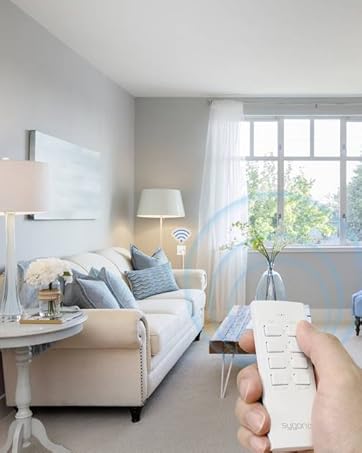
Image 3.1: A hand operating the remote control, demonstrating wireless functionality with a socket.
4. Operating the Wireless Sockets
Once paired, you can control your connected devices using the remote control.
4.1 Contrôle individuel
- To turn on a device connected to a specific socket, press the corresponding "ON" button (e.g., 1 ON) on the remote control. The LED on the socket will illuminate.
- To turn off a device connected to a specific socket, press the corresponding "OFF" button (e.g., 1 OFF) on the remote control. The LED on the socket will turn off.
4.2 Contrôle de groupe
- To turn on all paired devices simultaneously, slide the switch on the remote control to "ALL ON".
- To turn off all paired devices simultaneously, slide the switch on the remote control to "ALL OFF".
The remote control has an LED transmission indicator that lights up when a button is pressed, confirming signal transmission.
The maximum operating range is 30 meters in an open field. Obstacles such as walls, furniture, and other electronic devices may reduce this range.
5. Entretien
5.1 Nettoyage
- Before cleaning, ensure the sockets are unplugged from the wall outlets and no devices are connected.
- Wipe the devices with a soft, dry, lint-free cloth.
- N’utilisez pas de nettoyants abrasifs, de solvants ou de produits chimiques agressifs, car ils peuvent endommager la surface.
- Do not immerse the devices in water or any other liquid.
5.2 Remplacement de la batterie
If the remote control's range decreases or the LED transmission indicator does not light up, the CR2032 battery may need replacement. Follow the steps in Section 3.1 to replace the battery.
6. Dépannage
| Problème | Cause possible | Solution |
|---|---|---|
| Socket does not respond to remote control. |
|
|
| L'appareil connecté ne s'allume/ne s'éteint pas. |
|
|
| Plage de fonctionnement réduite. |
|
|
7. Spécifications
| Fonctionnalité | Spécification |
|---|---|
| Numéro de modèle | SY-4532434 |
| ASIN | B08HT3T2SC |
| Marque | Sygonix |
| Nombre de prises | 3 |
| Max. Output Power per Socket | 1000 W |
| Fréquence de fonctionnement | 433.92 MHz |
| Max. Range (open field) | 30 m |
| Alimentation électrique | 230 V/CA |
| Nombre de canaux (à distance) | 12 |
| Pile de la télécommande | CR2032 (inclus) |
| Emplacement | Intérieur |
| Type de montage | Prise enfichable |
| Couleur | Blanc |
| Dimensions du colis | 49 x 41.2 x 15.1 cm |
| Poids du colis | 26 kg |


Image 7.1 : Face et dos views of a single Sygonix RSL wireless socket.
8. Garantie et assistance
8.1 Informations sur la garantie
This product comes with a minimum 2-year warranty from the date of purchase. Please retain your proof of purchase for warranty claims. The warranty covers manufacturing defects and malfunctions under normal use. It does not cover damage caused by misuse, accidents, unauthorized modifications, or failure to follow the instructions in this manual.
8.2 Assistance clientèle
For technical assistance, troubleshooting beyond the scope of this manual, or warranty inquiries, please refer to the contact information provided with your purchase or visit the official Sygonix website. Please have your model number (SY-4532434) and proof of purchase ready when contacting support.


