Produit terminéview
The Refoss Wireless Garage Door Keypad provides keyless entry for your garage, offering convenience and security. This keypad is designed to work specifically with garage door openers featuring a purple learn button, operating on a 315 MHz frequency. It supports control of up to three individual garage doors with unique PINs.

Image: Refoss Wireless Garage Door Keypad. This image displays the keypad with its protective cover lifted, revealing the numeric buttons and the specific compatibility label for purple learn buttons.
Compatibilité
This Refoss Wireless Garage Door Keypad is only compatible with garage door openers that have a PURPLE learn button. It works with Security+ 315 MHz Chamberlain, LiftMaster, and Craftsman garage openers manufactured between 2006 and 2014. Please verify your garage door opener's learn button color before proceeding with installation or programming.
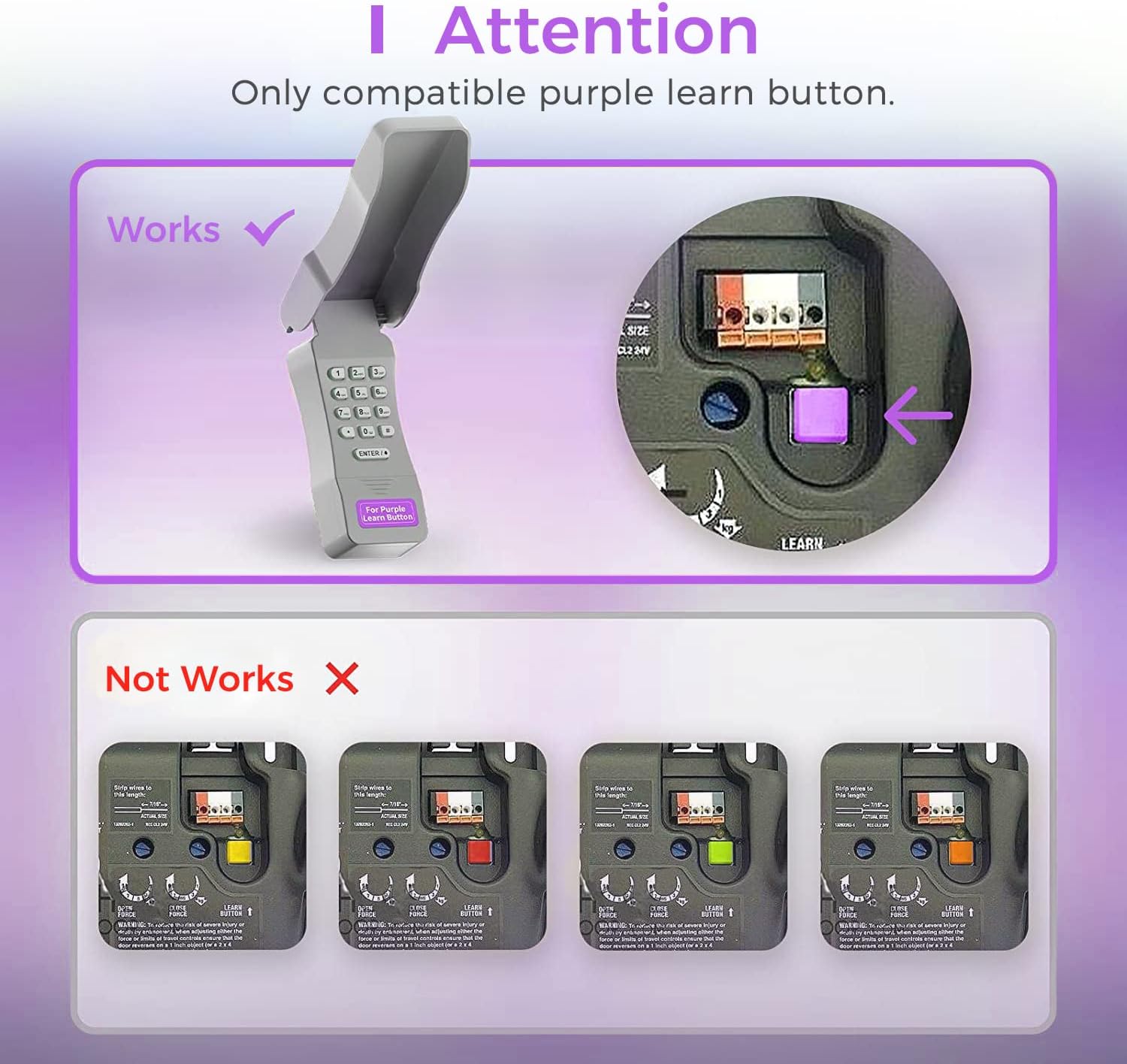
Image: Compatibility Diagram. This visual guide illustrates the correct purple learn button for compatibility and shows examples of incompatible learn button colors (red, orange, green, yellow).
Contenu du colis
Avant de commencer l'installation, assurez-vous que tous les composants sont présents dans l'emballage :
- 1 x Refoss Wireless Keypad
- 1 x Manuel d'utilisation (ce document)
- 4 x vis
- 4 x vis d'ancrage
- 4 x ruban adhésif double face 3M
- Batterie 1 x 9V

Image: Package Contents. This illustration details all items included in the product box, ensuring users can verify they have everything needed for installation.
Configuration et programmation
The Refoss Wireless Keypad is designed for easy, wireless programming. Follow these steps carefully to set up your keypad and program it to your garage door opener.
Étape 1 : Installer la batterie
- Ouvrez le compartiment à piles situé à l'arrière du clavier.
- Insérez la pile 9V fournie en respectant la polarité.
- Fermez soigneusement le compartiment à piles.
Étape 2 : Programmer le clavier
This keypad can control up to three garage doors. Each door requires its own unique PIN.
- Localisez le PURPLE Learn Button on your garage door opener motor unit. This button is typically found on the back or side panel of the motor.
- Appuyez et relâchez immédiatement le PURPLE Learn Button. The learn indicator light on the opener will glow steadily for 30 seconds.
- Within 30 seconds, enter your desired 4-digit PIN on the Refoss keypad.
- Appuyez et maintenez enfoncé le ENTER / # Appuyez sur le bouton du clavier jusqu'à ce que les voyants de l'ouvre-porte de garage clignotent ou que vous entendiez deux clics. Cela indique que la programmation a réussi.
- Test the keypad by entering your PIN and pressing ENTER / #La porte de garage devrait s'activer.
To program additional garage doors (up to three), repeat Step 2 for each door, using a different 4-digit PIN for each.
Mode d'emploi
Opening/Closing a Garage Door
- Enter your 4-digit PIN for the desired garage door.
- Appuyez sur le ENTER / # bouton.
- The garage door will open or close.
Controlling Multiple Doors
The keypad supports individual PINs for up to three garage doors. Simply enter the specific PIN for the door you wish to operate.

Image: One Keypad for Three Doors. This image visually represents the keypad's capability to manage up to three distinct garage doors using individual access codes.
Entretien
Remplacement de la batterie
The keypad uses one 9V alkaline battery. When the keypad backlight dims or the keypad becomes unresponsive, it is time to replace the battery.
- Ouvrez le compartiment à piles situé à l'arrière du clavier.
- Retirez la pile 9V usagée.
- Insérez une nouvelle pile alcaline 9V en respectant la polarité.
- Fermez soigneusement le compartiment à piles.
Nettoyage
Essuyez la surface du clavier avec un chiffon doux et sec.amp chiffon. N'utilisez pas de nettoyants abrasifs ou de solvants.
Protection contre les intempéries
The keypad features a weatherproof protective cover designed to shield it from various weather conditions. Ensure the cover is properly closed when not in use to maximize its protective capabilities.

Image: Weatherproof and Fluorescent Features. This image demonstrates the keypad's durability against outdoor elements and its illuminated keys for visibility in low-light conditions.
Dépannage
| Problème | Cause possible | Solution |
|---|---|---|
| Le clavier ne répond pas. | Batterie morte ou faible. | Remplacez la pile 9V. |
| La porte de garage ne s'ouvre/ne se ferme pas après la saisie du code PIN. | Keypad not programmed correctly or incompatible opener. |
|
| Keypad backlight is dim. | Batterie faible. | Remplacez la pile 9V. |
| Cannot program multiple doors. | Incorrect programming sequence for additional doors. | Ensure you are using a unique PIN for each door and repeating the programming steps for each. |
Caractéristiques
- Modèle: RGR545
- Compatibilité: Chamberlain, LiftMaster, Craftsman garage door openers with PURPLE learn button (Security+ 315 MHz, manufactured 2006-2014)
- Fréquence: 315 MHz
- Nombre de portes prises en charge : Jusqu'à 3
- Source d'alimentation : 1 pile alcaline 9 V
- Dimensions: Environ 2 x 6 x 1 pouces
- Poids: Environ 7.8 onces
- Caractéristiques spéciales : Weatherproof, Fluorescent Keypad
Informations sur la garantie
This Refoss Wireless Garage Door Keypad comes with a Garantie de 1 ans À compter de la date d'achat, cette garantie couvre les défauts de matériaux et de fabrication dans des conditions normales d'utilisation. Elle ne couvre pas les dommages causés par une mauvaise utilisation, un accident, une modification non autorisée ou une installation incorrecte.
Veuillez conserver votre preuve d'achat pour les réclamations au titre de la garantie.
Assistance clientèle
For any questions, technical assistance, or support regarding your Refoss Wireless Garage Door Keypad, please contact our customer support team. We offer caring customer support 7 days a week.
Refer to the product packaging or the Refoss official website pour les informations de contact les plus récentes.


