Introduction
This manual provides comprehensive instructions for setting up, operating, and maintaining your Macally Bluetooth Keyboard. Designed for multi-device compatibility, this wireless keyboard features a built-in stand, a rechargeable battery, and 78 keys for efficient typing across various devices including tablets, smartphones, and computers.

Image: The Macally Bluetooth Keyboard in white, with a tablet securely docked in its integrated stand, showcasing son design compact et sa fonctionnalité.
Qu'y a-t-il dans la boîte
Upon unboxing your Macally Bluetooth Keyboard, please ensure all the following items are present:
- Macally Bluetooth Keyboard
- Câble de chargement USB
- Manuel de l'utilisateur (ce document)
If any items are missing or damaged, please contact Macally customer support.
Caractéristiques du produit
The Macally Bluetooth Keyboard is designed for versatility and convenience, offering several key features:
- Connectivité multi-appareils : Seamlessly switch between up to 3 Bluetooth-enabled devices (e.g., tablet, smartphone, computer).
- Support d'appareil intégré : Features a built-in 10.5-inch slot to securely hold your smartphone or tablet.
- Compact et portable : Small enough to fit into most bags, making it ideal for on-the-go use.
- Batterie rechargeable : Doté d'une batterie rechargeable de 280 mAh pour une utilisation prolongée.
- Efficient Layout: Includes 78 quiet scissor-switch keys and 13 convenient shortcut/media keys for enhanced productivity.

Image: The keyboard demonstrating seamless Bluetooth connectivity with a 30ft wireless range, compatible with Apple, Windows, iOS, and Android operating systems.

Image: A visual representation of the keyboard's multi-device capability, showing it paired with a laptop, a desktop computer, and a smartphone simultaneously.

Image: The keyboard positioned on a desk, with both a tablet and a smartphone docked in its integrated 10.5-inch stand, highlighting its "setup anywhere" convenience.
Installation
Charger le clavier
Before first use, fully charge your Macally Bluetooth Keyboard. Connect the provided USB charging cable to the keyboard's charging port and the other end to a USB power source (e.g., computer USB port, USB wall adapter). The charging indicator light will show the charging status.

Image: The keyboard with its charging cable connected, illustrating the rechargeable 280mAh battery and the included charging cable.
Appariement Bluetooth
Suivez ces étapes pour associer votre clavier à un appareil :
- Ensure the keyboard is charged and powered on. The power switch is located on the top right of the keyboard.
- On your device (tablet, smartphone, computer), enable Bluetooth.
- Appuyez et maintenez enfoncé le Fn clé et l'une des clés du canal Bluetooth (B1, B2, ou B3) simultaneously for a few seconds until the corresponding Bluetooth indicator light starts blinking rapidly. This indicates the keyboard is in pairing mode.
- On your device, search for "Macally Keyboard" or a similar name in the Bluetooth device list and select it to connect.
- Once connected, the indicator light will stop blinking and remain solid for a moment before turning off, indicating successful pairing.
To pair additional devices, repeat steps 3-5 using a different Bluetooth channel key (B1, B2, or B3).
Mode d'emploi
Basculer entre les appareils
Pour basculer entre les appareils appairés, appuyez simplement sur Fn clé ainsi que la clé de canal Bluetooth correspondante (B1, B2, ou B3) for the desired device. The keyboard will quickly connect to the selected device.
Utilisation des raccourcis clavier
The keyboard features 13 dedicated shortcut/media keys for quick access to common functions. These keys are typically located on the top row (F1-F12 and an additional key). Functions may vary slightly depending on the operating system of your connected device.
Les fonctions de raccourci courantes incluent :
- Commandes de lecture multimédia (lecture/pause, piste suivante/précédente)
- Contrôle du volume (muet, augmentation/diminution du volume)
- Réglage de la luminosité de l'écran
- Home screen/desktop access
- Fonction de recherche
Refer to your device's operating system documentation for specific compatibility and functionality of these keys.

Image : Une image détaillée view of the keyboard's layout, emphasizing its 78 quiet scissor-switch keys and the 13 dedicated shortcut/media keys for efficient use.
Entretien
To ensure the longevity and optimal performance of your Macally Bluetooth Keyboard, follow these maintenance guidelines:
- Nettoyage: Utilisez un chiffon doux, sec et non pelucheux pour nettoyer la surface du clavier. Pour les saletés tenaces, frottez légèrement avec un chiffon doux.ampNettoyez le chiffon avec de l'eau ou un nettoyant doux non abrasif. Évitez l'humidité excessive.
- Stockage: Lorsqu'il n'est pas utilisé pendant une période prolongée, rangez le clavier dans un endroit frais et sec, à l'abri de la lumière directe du soleil et des températures extrêmes.
- Entretien de la batterie: To preserve battery life, avoid fully discharging the keyboard frequently. Recharge it when the low battery indicator appears. If storing for a long time, charge it to about 50% every few months.
- Évitez les déversements : Keep liquids away from the keyboard to prevent internal damage.
Dépannage
If you encounter issues with your Macally Bluetooth Keyboard, try the following solutions:
| Problème | Solution possible |
|---|---|
| Le clavier ne s'allume pas. | Ensure the keyboard is charged. Connect it to a power source using the USB cable. |
| Impossible de coupler le clavier. |
|
| Le clavier se déconnecte fréquemment. |
|
| Les touches ne répondent pas. |
|
If these solutions do not resolve the issue, please contact Macally customer support for further assistance.
Caractéristiques
| Fonctionnalité | Détail |
|---|---|
| Numéro de modèle | BTTABKEYBAT |
| Technologie de connectivité | Bluetooth |
| Nombre de clés | 78 |
| Type de batterie | 1 batterie lithium-ion (incluse) |
| Poids de l'article | 1.92 livres |
| Dimensions du colis | 13.98 x 7.91 x 2.48 pouces |
| Fabricant | Mace Group Inc / Macally Peripherals |
| Appareils compatibles | PC, Tablet, Apple devices, Windows Desktop/Laptop, Surface, Chromebook, Smartphones, TVs (any device with Bluetooth) |
| Utilisations recommandées | Office, School, Everyday Use, Personal, Education, Business |
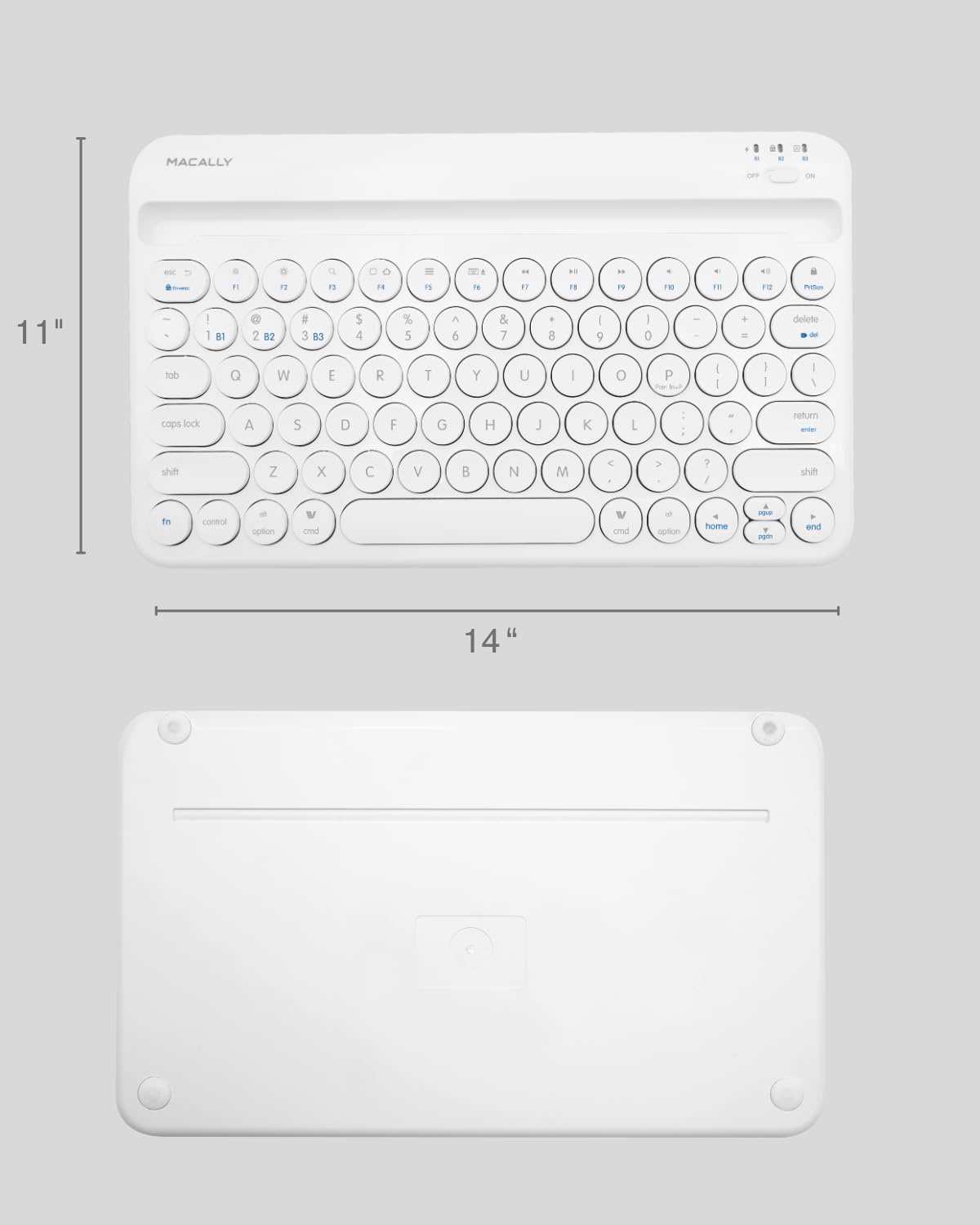
Image: The physical dimensions of the keyboard, measuring approximately 11 inches in width and 14 inches in length.

Image: The keyboard fitting easily into a backpack, demonstrating its compact size and suitability for travel and on-the-go use.
Garantie et assistance
Macally products are designed for quality and reliability. For information regarding product warranty, technical support, or service, please visit the official Macally webConsultez leur site web ou contactez leur service client. Conservez votre reçu d'achat comme preuve d'achat pour toute réclamation au titre de la garantie.
Vous trouverez plus d'informations et d'aide sur le site web suivant : Macally Store on Amazon.


