1. Produit terminéview
The EXCEL Tankless Gas Water Heater is designed to provide instant hot water for various applications, including small apartments, lofts, flats, RVs, and mobile homes. This unit operates on Propane (LPG) and features exclusive low water pressure startup technology, requiring only 2 PSI of water pressure to activate. Its vent-free design eliminates the need for complex and costly flue installations, making it a convenient and energy-efficient solution for on-demand hot water.

Figure 1.1 : Avant et côté view of the EXCEL Tankless Gas Water Heater, showcasing son design compact et ses boutons de commande.
Caractéristiques principales :
- Propane Gas (LPG) Unit: Designed for use with liquid propane gas.
- Low Water Pressure Startup: Activates with as little as 2 PSI of water pressure, ideal for areas with fluctuating water supply. This is achieved through a magnetic water flow sensor, unlike older units that rely on rubber diaphragms requiring higher pressure.
- Vent-Free Technology: Does not require a traditional flue or ductwork for exhaust. Equipped with an Oxygen Depletion Safety (ODS) shutoff and an exclusive 20-minute safety shutoff feature for indoor installation with proper ventilation.
- Taille compacte : Dimensions are approximately 12.8 inches (front width) x 8 inches (depth) x 18.75 inches (height), allowing for flexible installation.
- Allumage automatique : Powered by 2 D-size batteries (included) for automatic ignition upon water flow.
- Économie d'énergie et d'eau : Delivers hot water instantly, reducing waste.
2. Consignes de sécurité
Read and understand all safety warnings and instructions before installing, operating, or performing maintenance on this appliance. Failure to follow these instructions could result in property damage, personal injury, or death.
Précautions générales de sécurité :
- Cet appareil doit être installé par un professionnel qualifié, conformément à toutes les normes et réglementations locales.
- Ensure adequate ventilation when installing the unit indoors due to its vent-free design.
- Ne stockez pas et n’utilisez pas d’essence ou d’autres vapeurs et liquides inflammables à proximité de cet appareil ou de tout autre appareil.
- Check for gas leaks using a soapy water solution after installation and during maintenance. Never use an open flame.
- The unit is equipped with an Oxygen Depletion Safety (ODS) shutoff system and a 20-minute safety shutoff feature. Do not bypass or tampeuh avec ces dispositifs de sécurité.
- Ensure proper battery installation for automatic ignition. Use new, high-quality D-size alkaline batteries.
- Protect the unit from freezing temperatures. Drain the unit if it will be exposed to freezing conditions (see Maintenance section).
- Ce produit contient des substances chimiques reconnues par l'État de Californie comme pouvant causer le cancer et des anomalies congénitales ou d'autres problèmes de reproduction (avertissement Proposition 65).
3. Configuration et installation
Proper installation is critical for the safe and efficient operation of your EXCEL Tankless Gas Water Heater. Refer to the diagrams below for connection points.
Identification des composants :

Figure 3.1: Connection points at the bottom of the unit.

Figure 3.2: Location of the Winter Drain and Battery Box.
Étapes d'installation :
- Montage: Securely mount the unit to a wall using appropriate hardware. Ensure the mounting surface can support the weight of the unit when filled with water.
- Connexions d'eau :
- Raccordez le tuyau d'alimentation en eau froide au Entrée d'eau froide.
- Connect the hot water output line to the Sortie d'eau chaude.
- Ensure all water connections are tight and leak-free. Use appropriate sealing tape or compound.
- Raccordement au gaz :
- Connect the Propane (LPG) gas supply line to the Entrée de gaz. The unit includes an LPG Brass Fitting for a ⅜" Flare connection.
- Verify all gas connections are secure and test for leaks using a soapy water solution.
- Installation de la batterie : Open the battery box and insert two D-size batteries. Ensure correct polarity. These batteries power the automatic ignition system.
- Ventilation: For indoor installations, ensure the area has adequate ventilation as this is a vent-free appliance.

Figure 3.3 : Interne view highlighting the magnetic water flow sensor, which enables low water pressure startup.
4. Mode d'emploi
Follow these steps to operate your EXCEL Tankless Gas Water Heater.
Démarrage initial:
- Ensure all water and gas connections are properly made and leak-free.
- Ouvrez le robinet d'arrêt principal d'arrivée de gaz.
- Open a hot water faucet in your system. The unit will detect water flow (as low as 2 PSI) and automatically ignite.
- Allow water to run for a few moments to purge any air from the lines.
Fonctionnement quotidien:
- To get hot water, simply open any hot water faucet connected to the unit. The heater will automatically ignite and begin heating water as it flows through.
- The unit is designed for a temperature rise of approximately 45°F, delivering 1.6 Gallons Per Minute (GPM).
- While suitable for multiple points of use, it is recommended to use no more than one point of use at a time for optimal performance.
- For incoming cold water temperatures below 50°F (down to 40°F), you may need to reduce the water flow rate using the control knob to achieve desired hot water temperature.
- The unit features a 20-minute safety shutoff. If hot water is continuously drawn for more than 20 minutes, the unit will automatically shut off. To restart, close the hot water faucet and then reopen it.
5. Entretien
Un entretien régulier garantit la longévité et le bon fonctionnement de votre chauffe-eau.
Contrôles de routine :
- Remplacement de la batterie : Replace the two D-size batteries annually, or if the ignition becomes inconsistent. Use high-quality alkaline batteries.
- Inspection des fuites : Periodically check all water and gas connections for leaks. For gas leaks, use a soapy water solution.
- Nettoyage extérieur : Nettoyez l'extérieur de l'appareil avec un chiffon doux.amp chiffon. N'utilisez pas de nettoyants abrasifs ou de solvants.
Winterization (Freezing Protection):
If the unit will be exposed to freezing temperatures, it is crucial to drain all water from the system to prevent damage.
- Coupez l'alimentation en gaz de l'unité.
- Coupez l'arrivée d'eau froide de l'appareil.
- Open a hot water faucet in your system to relieve pressure.
- Localisez le Winter Drain valve at the bottom of the unit (refer to Figure 3.2). Open this valve to drain the water from the heat exchanger.
- Once drained, close the drain valve.

Figure 5.1 : Interne view of the copper heat exchanger, which should be drained to prevent freezing damage.
6. Dépannage
Cette section propose des solutions aux problèmes courants que vous pourriez rencontrer avec votre chauffe-eau.
| Problème | Cause possible | Solution |
|---|---|---|
| Pas d'eau chaude / L'appareil ne s'allume pas | Absence de débit d'eau ou pression d'eau insuffisante | Ensure water supply is on and water pressure is at least 2 PSI. Check for kinks in water lines. |
| Piles mortes ou faibles | Replace both D-size batteries with new alkaline batteries. | |
| Pas d'approvisionnement en gaz | Ensure gas tank is not empty and gas supply valve is fully open. | |
| ODS or 20-minute safety shutoff activated | Ensure adequate ventilation. If unit ran for 20 minutes, close and reopen hot water faucet to reset. | |
| L'eau n'est pas assez chaude | High water flow rate for incoming temperature | Reduce water flow rate using the control knob on the unit. |
| Basse température de l'eau entrante | The unit adds approximately 45°F to incoming water. If incoming water is very cold, the output temperature will be lower. Reduce flow rate. | |
| Gas or water leaks | Connexions desserrées ou composants endommagés | Tighten all connections. If leaks persist, contact a qualified professional for inspection and repair. Do not attempt to repair gas leaks yourself. |
Si le problème persiste après avoir essayé ces solutions, contactez un technicien de maintenance qualifié.
7. Spécifications
Technical specifications for the EXCEL Tankless Gas Water Heater.
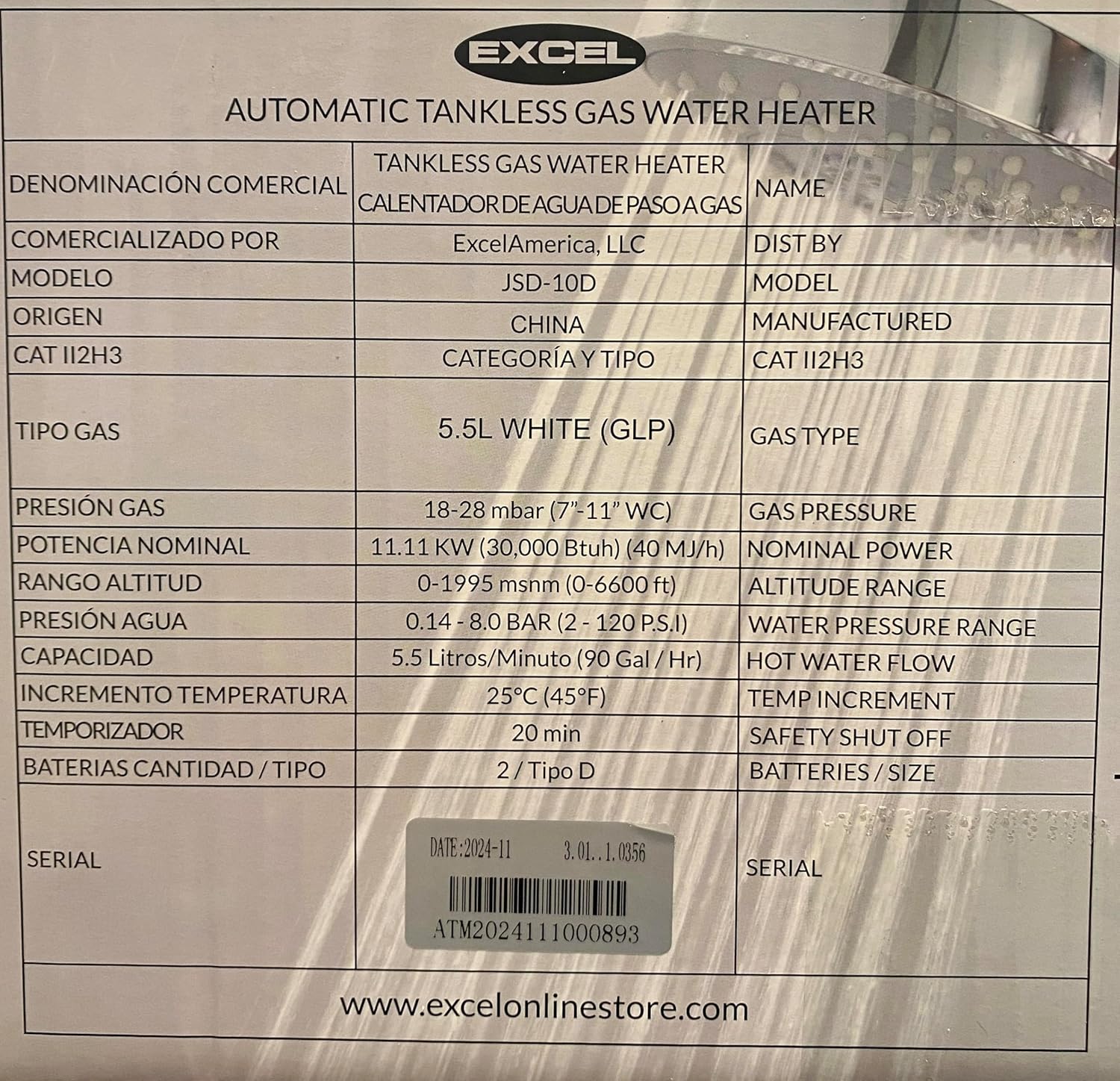
Figure 7.1 : Étiquette du produit avec spécifications détaillées.
| Spécification | Valeur |
|---|---|
| Marque | EXCELLER |
| Numéro de modèle | 850020757060 |
| Dimensions du produit (L x P x H) | 12.8 po x 8 po x 18.75 po (environ) |
| Poids de l'article | 8.6 livres |
| Type de carburant | Propane (GPL) |
| Voltage | 3 Volts (for ignition) |
| Piles requises | 2 piles de type D |
| Débit maximal | 1.6 gallons par minute (GPM) |
| Puissance calorifique | 40,000 unités thermiques britanniques (BTU) |
| Augmentation de la température | Adds approximately 45°F to cold water |
| Minimum Water Pressure Startup | 2 PSI |
| Pression de service maximale | 120 PSI |
| Caractéristiques de sécurité | Oxygen Depletion Safety (ODS) shutoff, 20-minute safety shutoff |
| Type de montage | Support mural |
| Composants inclus | 2 Size D Batteries, Exhaust diffuser Plate, LPG Brass Fitting for ⅜" Flare connection |
8. Garantie et assistance
For warranty information and technical support, please refer to the documentation included with your purchase or contact the seller directly. The seller for this product is typically Energy-Store.
For additional resources and product information, you may visit the official EXCEL website: www.excelonlinestore.com


